The chatbot to human hand-off plays an important role in customer support. It is useful when your chatbot is unable to understand the visitor query and fails to answer them.
Let say you visit a specific website that is empowered by chatbots. Assume that you ask a specific question to a chatbot but it fails to answer your question and keep on repeating the same response.
How does it feel? Don’t you get frustrated and leave the website immediately?
The same will applies to your website visitor also.
If your chatbot is unable to quickly handoff the unknown conversation to live agent and repeatedly saying the same thing then the visitor will get frustrated and may lead to less customer satisfaction and its bad reputation for your company which might affect your revenue as well.
So your chatbot should be brilliant enough to identify when it should hand off the conversation to a human agent and ensure that the end-user experiences a smooth transition.
When does human handoff should occur?
1. Tricky and tough situations
Usually, the chatbots are trained to help the users with answering their basic queries. If the end-users issue is complex and the chatbot is not able to provide any solution then it should involve a human agent to help the end-user with the complex issue.
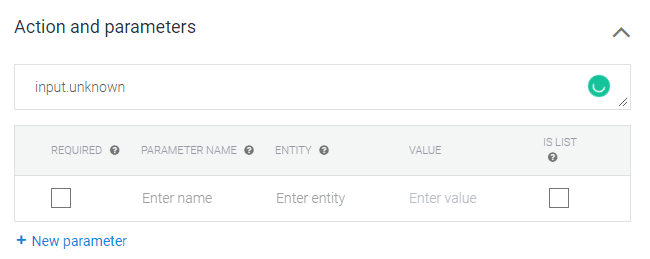
In dialogflow, the action “input.unknown” used to handoff the conversation to a support agent. Whenever action “input.unknown” is detected in the response, Kommunicate automatically assigns a conversation to a support agent based on the configured conversation routing rules from the dashboard.
You can add an action “input.unknown” to any intent to handoff the conversation to a human agent.
The “input.unknown” action is built into Dialogflow and used with the default fallback intent. When none of the intents are matched, the default fallback intent is triggered and action associated with it is added in the response.
2. Depending upon the User requirements
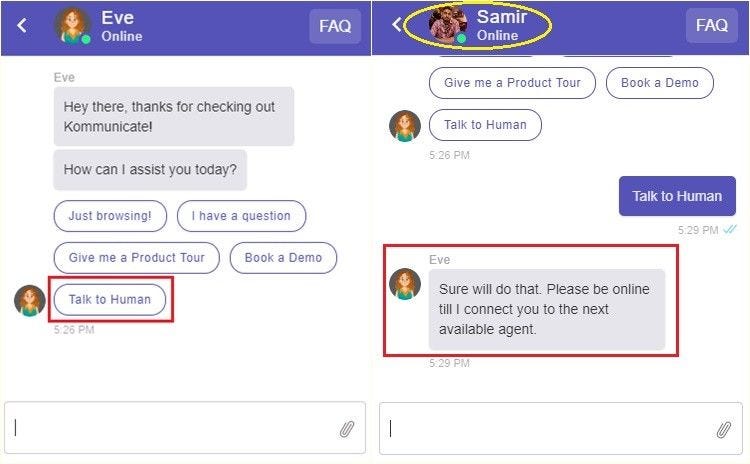
There are some scenarios the end-user doesn’t want to wait for the bot to help with his issue or query and will be looking for a human agent. In that time the user should be given an option to directly talk to a human agent. This can be done with the help of menu options or rich messages.
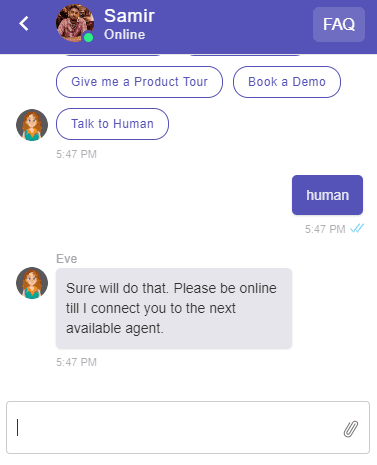
Here is the example, when the user clicked on the button “Talk to Human” the bot handoff the conversation to the agent.
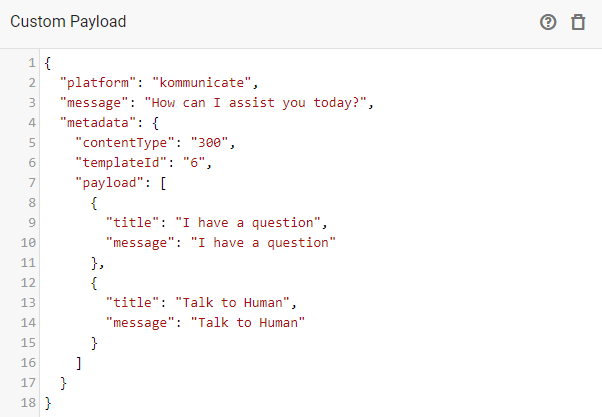
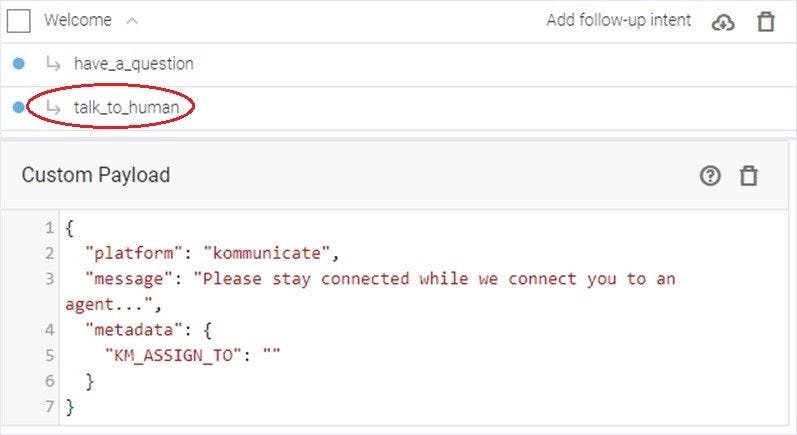
Below is the example for Dialogflow custom payload to add above shown menu option for transferring conversation to a human agent.
Here, talk_to_human is mentioned as a follow-up, and the payload is passed to it.
3. Human handoff based on keyword trigger
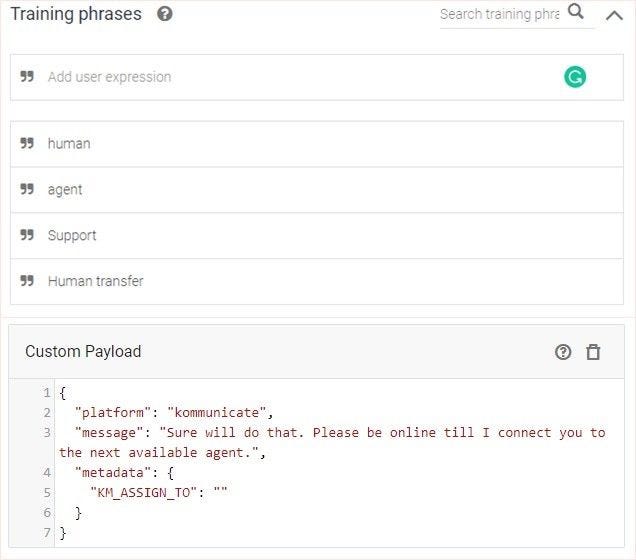
There are some cases where the bot should be able to handoff conversation to a human agent based on the keywords trigger. For example, when the user types words like a human, support, agent, etc.
Here’s an example where the user typed “human” and the bot handover conversation to a human agent.
The corresponding Dialogflow intent and the custom payload are as follows.
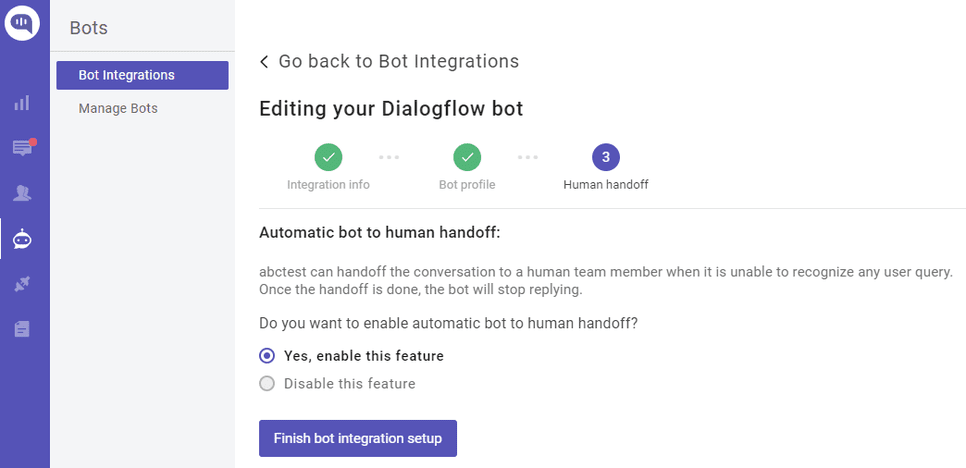
If you’re using Kommunicate then there is a simple option to do the bot to human handoff. While integrating your bot in Kommunicate, you will be asked to enable the bot to human handoff in the last step.
These are the possible scenarios where a chatbot should be able to handoff conversation to the human agent from Dialogflow after integrating with the Kommunicate.
Taking the internet by storm overnight. After DALL-E 2, ChatGPT is another model that made enthusiasts fall in love with AI again. So, I’ve written this article after interacting with ChatGPT and making it write some beautiful lines.
I’ve come across quite a few posts about ChatGPT on Youtube, Instagram and Medium. I considered it as my sign from the universe to write my first article about it. After reading and playing with it for a while. Here are my understandings about it.
Before we start let me tell you this, I have two things for you by the end of this article.
A secret. (I couldn’t think of another way to make it more engaging)
An article generated by ChatGPT.
Let’s start by addressing the elephant in the room.
What is ChatGPT?
AI in Space generated by Roshan Shaik (Me) with DALL.E AI. Loved the Buddhist vibe 🥰
I wondered what it would reply if I asked a question about itself. Guess what it said?
I’m sorry, but I don’t have any information on ChatGPT. As a language model trained by OpenAI, I do not have access to the internet and cannot browse the web to research and provide information on specific topics. I can only provide general information and respond to questions based on my training. Is there something else I can help you with? – ChatGPT (2022)
Now that it is reluctant to generate real-time information after training on a huge amount of text due to lack of internet. So, here is an answer I’ve found after researching on Google like any other sane person.
The model ChatGPT has been trained to interact in a conversational way. The dialogue format allows ChatGPT to answer follow-up questions, admit its mistakes, challenge incorrect premises, and reject inappropriate requests
Examples of inappropriate requests: asking questions about hate speech or asking for help in planning to take over a country are a sample of inappropriate requests. Don’t ask me how I know it.
ChatGPT is based on GPT-3.5, a language model that uses deep learning to generate human-like text. Unlike the older GPT-3 model, which only took text prompts and tried to continue on with its own generated text, ChatGPT is more engaging and capable of generating more detailed text. It can even generate poems. Another unique characteristic of ChatGPT is its memory, which allows it to recall earlier comments in a conversation and share them with the user.
A sample poem generated by ChatGPT (The Secret)
Two lovers lost in different dimensions,
Their love as strong as any other’s mention.
Though separated by the vast expanse of space,
Their hearts beat as one, with a timeless grace.
In one dimension, he is young and free,
In the other, she is wild and carefree.
But in both, their love is pure and true,
Despite the obstacles that they must construe.
They long to be together, to feel each other’s touch,
But their love transcends even time and space, it’s too much.
They are star-crossed lovers, lost in different planes,
But their love will endure, through time and through pains.
They will wait for each other, through all of eternity,
For their love is strong, and it will never be free.
How is ChatGPT trained?
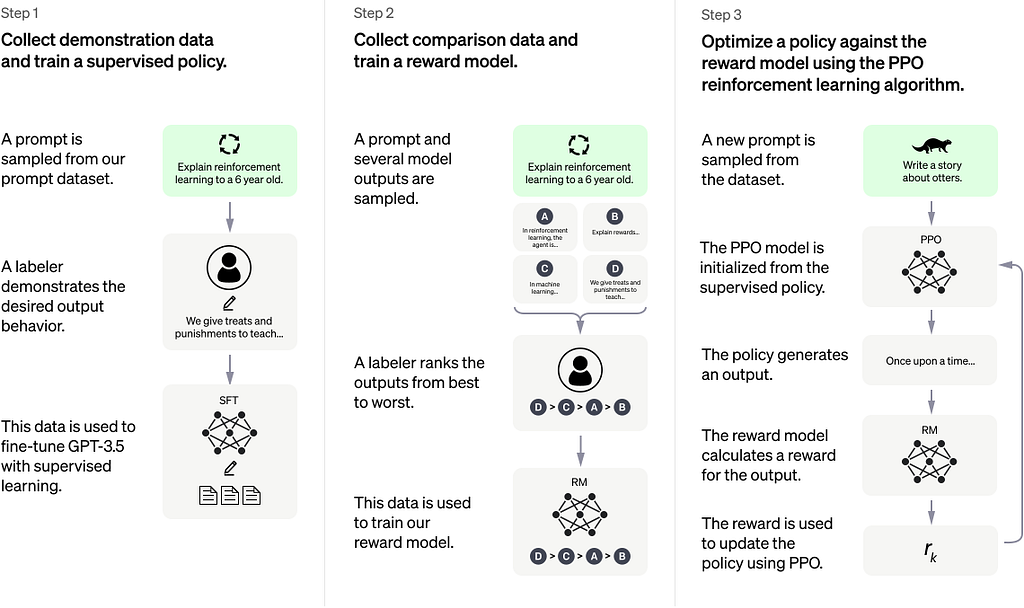
ChatGPT is trained using Reinforcement Learning from Human Feedback (RLHF), which is similar to the methods used by InstructGPT. To train the initial model, human AI trainers provide conversations where they play both the user and AI assistant roles. The trainers are given access to model-written suggestions to help them compose their responses.
To create a reward model for reinforcement learning, comparison data is collected, consisting of two or more model responses ranked by quality. This data is collected by taking conversations between the AI trainers and the chatbot, randomly selecting a model-written message, sampling alternative completions, and having the trainers rank them. Using these reward models, the model is fine-tuned using Proximal Policy Optimization, and several iterations of this process are performed.
Finally, The article generated by ChatGPT about Artificial Intelligence Ethics.
Artificial Intelligence Ethics
As artificial intelligence (AI) technology continues to advance, it is becoming increasingly important to consider the ethical implications of AI. While AI has the potential to revolutionize many aspects of our lives, it also raises a number of ethical concerns.
One of the key ethical concerns surrounding AI is the potential for it to be used for malicious purposes. For example, AI algorithms could be used to manipulate public opinion, spread false information, or even commit crimes. These concerns are particularly acute given the rapid pace of AI development and the potential for AI systems to operate autonomally.
Another ethical concern related to AI is the potential for it to be used to discriminate against certain groups of people. AI algorithms are only as good as the data they are trained on, and if the data is biased, the algorithms may produce biased results. This could lead to unfair treatment of certain individuals or groups, such as people of colour, women, or members of the LGBTQ community.
Additionally, the use of AI raises questions about accountability. If an AI system makes a decision that has negative consequences, who is responsible? Is it the developers of the AI, the users of the AI, or the AI itself? These questions are difficult to answer and require careful consideration.
To address these ethical concerns, it is important for society to develop a framework for ethical AI. This could include guidelines for the development and use of AI, as well as mechanisms for holding AI systems accountable for their actions. Such a framework would need to be developed and implemented in a transparent and inclusive manner, involving input from a wide range of stakeholders.
In conclusion, the development of AI technology raises a number of ethical concerns. It is important for society to consider these issues carefully and to develop a framework for ethical AI in order to ensure that this technology is used for the benefit of all.
What is ChatGPT by OpenAI ? was originally published in Chatbots Life on Medium, where people are continuing the conversation by highlighting and responding to this story.
In today’s fast-paced, digital-first world, customer needs and expectations continue to rise, raising the demand for customer contact centers all over the globe.
In Europe, particularly, the change in customer demographics and the growing popularity of e-commerce has led to increasing pressure on contact centers for customer support. Here, companies, small, medium, and large, believe in focusing on their core operations; hence, Europe is one of the biggest markets that is outsourcing contact center operations.
The call center outsourcing market share in Europe is expected to increase by USD 3.73 billion from 2021 to 2026, and the market’s growth momentum will accelerate at a CAGR of 3.53%. The retail, IT, and telecom sectors will be the most significant drivers of contact center outsourcing in Europe from 2022–2024.
High agent volume and the need for diversity, scalability, and multilingual capabilities are the most significant reasons why most European enterprises are turning to automation and AI to scale their contact center operations.
That’s where intelligent virtual assistants, including chat and voice bots, come into the picture. Virtual assistants, also known as virtual agents, use intelligent conversational interfaces powered by AI, machine learning, and natural language processing technologies to understand and respond to customer inquiries in a human-like manner.
Let’s know the five ways virtual assistants are well-placed to support European contact centers.
Five Ways Customer Support Chatbots Augment Contact Centers In Europe
1. Deliver Exceptional Customer Support Across Geographies And Time Zones.
European companies prefer to focus on their core revenue-generating activities and prefer to outsource their contact center operations. However, they mostly outsource to nearby regions and time zones to account for language and cultural similarities.
This strategy suffers from a major drawback. Rapidly changing customer demographics have necessitated quick, 24X7 customer support. Thus, organizations may want to set up contact centers in distant countries to cover customer support beyond their usual business hours, demanding additional resources in terms of staffing and equipment.
AI-powered customer support chatbots transcend locational boundaries, especially in a continent like Europe that has multiple time zones, and provide instant answers to all customer queries at all times.
2. Make Omnichannel Chatbots The New Gold Standard In Customer Support In Europe.
Customers in different parts of Europe prefer different ways and channels of contacting contact center support. For example, the Netherlands has the highest number of non-telephone channel users, with email and web chat being the most popular.
On the flip side, people in Norway, Denmark, and Sweden prefer social media and web chat over email. The bottom line is that people prefer to communicate with brands on the channel of their choice and may even want to switch channels in the middle of an ongoing support case.
That’s where omnichannel chatbots play a crucial role. Virtual assistants can offer omnichannel experiences so customers can experience consistent and personalized brand engagement on their preferred channels. Moreover, customers can seamlessly transition from one channel to another without losing the context of the original conversation.
3. Address Inquiries And Grievances In Customers’ Native Tongue In The Land Of Many Languages.
In a continent like Europe, where people speak multiple languages, it is challenging to personalize customer support for the entire customer base. After all, customers prefer being engaged in their native language. Moreover, it makes them feel comfortable, valued and heard.
Hiring contact center agents who speak multiple languages or training existing ones to speak in different tongues is costly in terms of time and money. That’s where virtual assistants play a crucial role.
AI virtual assistants support contact centers by detecting the user’s language and switching the conversation flow to the native tongue. What’s more, the customer support chatbot can remember the customer’s language preferences and then reach out to them in the same language in case of a proactive outbound engagement.
4. Providing Scalable Self-Service Options And Data-Enriched Proactive Engagement.
In recent times, Europe has seen steady growth in using self-service solutions like websites, social networking channels (Facebook Messenger, Instagram, Telegram, WhatsApp etc.), and IVR. These are easily accessible and take a considerable load off contact centers. To work productively and provide seamless, more meaningful customer engagement, organizations in Europe are embedding customer support bots on these channels.
70% of contact center agents say there are fewer calls when chatbots are available. Customer support bots and virtual assistants can shorten waiting times and collect relevant customer data before the call is passed on to the human agent. In cases where the requests are simple and repetitive, virtual assistants can solve them faster than the contact center agent.
Voice bot platforms have paved the way for conversational IVR in contact centers. Voice bots embedded within traditional IVR systems leverage natural language processing and speech recognition technologies to respond to users’ verbal commands using voice or text, enabling faster, more accessible, and more interactive user support.
Moreover, predictive data analytics maps out the entire customer journey to personalize interactions, reduce mean time to resolve (MTTR), and increase overall customer satisfaction (CSAT).
5. Cost Is Always A Significant Factor!
Using virtual assistants — chat and voice bots, leads to major cost reductions for all enterprises.
For starters, outsourced customer service agents cost as much as €22,200 per agent annually in countries like Denmark, Sweden, and Norway. Even for employees hired in Central and Eastern Europe, where contact center jobs are amongst the better-paid ones, the cost of hiring a contact center agent can come out to be around €6,436 per year.
In short, hiring more contact center agents will always prove heavier on the organization’s pockets. On the other hand, intelligent virtual assistants can solve thousands of problems at a few pennies per transaction, making them highly viable, almost a mandate for countries in Europe where labor costs are very high.
How Can Acuvate Help?
Acuvate helps clients build and deploy virtual assistants — customer support & engagement chatbots and voice bots with its enterprise bot-building platform, BotCore.
As a Microsoft Gold Partner, we have the opportunity of leveraging the best of Microsoft’s AI, machine learning, and natural language processing (NLP) frameworks, including the Microsoft Bot Framework, Azure Cognitive Services, and LUIS.
Besides supporting languages like German, French, English, Latin, and many more (multilingual functionality), our bots work on popular enterprise channels (Teams, Slack, ProofHub, etc.) and social channels (Facebook Messenger, Instagram, Telegram, WhatsApp etc.), thus helping organizations engage a geographically-dispersed workforce and customer base.
If, like me, you work with just a couple other folks or maybe as an indie software developer, you know the challenge of marketing. There’s so much to write, so many people to tell. Sometimes, you’re not sure how exactly to say what’s great about your app. Or, maybe you do have a pretty good idea of what to say, maybe even a content marketing or drip email strategy rolling around in your head but just haven’t found the time to write it all down yet. ChatGPT can help.
Like seemingly everyone else in the geekosphere, Jacob Gorban and I have been playing around with how OpenAI’s ChatGPT might help us with our app marketing and other writing. Here’s some of what we’ve learned, along with some tips from others (credited and linked).
There’s plenty of useful content you can get right now from ChatGPT that will help you get your app to market faster, better communicate with users and maybe even help you think through what to tackle next from your backlog.
Read on to learn how you can:
Get valuable responses from the chatbot for content creation, marketing and other product writing scenarios.
Teach the bot about your app. The more context you share, the more relevant and useful responses you’ll get back.
Edit what comes back so the writing sounds you and so you catch any creative embellishments the bot has not-so-helpfully snuck in.
Writing app marketing materials with ChatGPT
Here’s some of what we’ve tried and what others have reported, loosely ordered by what seemed to work the best. Example prompts and comments follow.
Writing email pitches
Writing blog posts
Brainstorming further content marketing
Writing an email pitch with ChatGPT
A fundamental ongoing challenge in marketing is getting the word out. How do you let potential users know that you have an app that could make their life easier? One great way is if someone else writes about it for you and lots of people read what they wrote (or listen to what they podcast, or watch what they share on YouTube). Tech journalists, we love you, and that’s why we keep cold emailing you our pitches on why you should cover our apps.
Here’s how ChatGPT can help.
Can you suggest a DALL-E prompt for cute illustrations to go with this article? “Generate cute illustrations of a dog using a smartphone to train its separation anxiety.”
Start by telling the chatbot about your product.
A simple way to do this is by typing learn and then pasting in whatever writing you already have. At Apparent Software, we’re working on a dog training app, for which we already have a video available. I spent some time on the video description and am pretty happy with it, so I used that as the starter text, copying and pasting the whole description from YouTube Studio into ChatGPT.
2. Then ask for the output format you want:
please write an email pitch for a tech journalist so they will cover Calm My Dog
Here’s what came back:
Dear [Tech Journalist],

I am reaching out to you on behalf of Apparent Software, a developer of innovative and user-friendly apps for Apple devices. We are excited to announce the beta launch of our latest app, Calm My Dog, which is designed to help owners of dogs with separation anxiety train their pets using a proven method used by dog trainers.

Calm My Dog is an iPhone app that allows users to track their progress as they gradually desensitize their dogs to their absences, using a customizable schedule and alerts to remind them when it is time to depart and return. The app also offers tips and advice from professional dog trainers on how to effectively and safely train their dogs, as well as a community forum where users can share their experiences and support each other.

We believe that Calm My Dog is a unique and valuable tool for dog owners, and we would be honored if you would consider covering it in one of your upcoming articles. We would be happy to provide you with additional information, screenshots, or a demo of the app, and we are available for interviews to discuss its features and benefits in more detail.

Thank you for considering this request. We look forward to hearing from you and hope that you will be able to share the news about Calm My Dog with your readers.

Sincerely,

[Your Name]
Apparent Software
3. Copy the response to wherever you keep your marketing materials.
4. Carefully review and edit the AI-generated text before sending it. In this case, we do not have tips from professional trainers in the app, nor is a community forum yet part of the MVP, although those are good ideas that were not mentioned in the video description.
Writing an App Store description with ChatGPT
Thus far, Jacob and I have hand-crafted (meaning written with just our own brains), the Apparent Software App Store descriptions. That said, I would definitely consider an AI-assisted approach to get started. Similarly to writing the email pitch, here are the recommended steps:
Provide the bot with some context including your target market and how you think your app will help these users. You don’t need to fit this all into one prompt — you can just keep chatting. I tried just highlighting and copying all the text on Cashculator.app, then pasting it in to the bot:
learn <paste in the whole web page>
It will summarize what you’ve pasted.
2. Ask the chat bot for your desired deliverable:
can you help me write an app store description for Cashculator?
3. Save the response, then tap Try again to see more choices.
4. Edit before using to make sure the description is accurate and reads in the voice you want for this product.
Some indie developers reporting good luck with this approach thus far include Noam Efergan, author of the upcoming Baby Wize app and Johan Forsell, author of BarTab:
Johan Forsell on Twitter: “Example:I told it about BarTab and asked it to write an enticing description for the App Store.Then I asked it to optimize for popular search terms.Then to highlight the benefits of building a trusting relationship with customers.Amazing work flow for new copy! / Twitter”
Example:I told it about BarTab and asked it to write an enticing description for the App Store.Then I asked it to optimize for popular search terms.Then to highlight the benefits of building a trusting relationship with customers.Amazing work flow for new copy!
Writing content marketing with ChatGPT
One great way to draw potential users to your app’s website and hopefully actual provide some value at the same time is to write meaningfully about topics of interest in and around your app. Apparent Software has a fairly deep bench of such content for our ImageFramer digital framing product, but we know we need to build this still for our Cashculator personal finance app.
“Generate a cute illustration in the same style showing a Mac computer with a financial spreadsheet”
We had already looked into AI writing tools to help with this before the launch of ChatGPT’s research preview, but the results here are better than anything we’d tried. (We had only spent a couple hours trying and only with free tools, so your mileage may vary.)
Because we had already brainstormed what we’d like to cover, it was fairly straightforward to come up with prompts. Both of these produced decent results, definitely usable as starting points and possibly as publishable posts:
Write a blog post explaining how to plan and forecast family finances
Write a blog post about how to use hashtags on Instagram to promote one's art
Because the chatbot iterates within a session, you can ask it to hone what it’s provided thus far, like:
Add headings before informational paragraphs
Suggest an SEO keyphrase for that blog post
Rewrite the blog post to include the SEO keyphrase
If you have content briefs at the ready, try feeding them into the chatbot and seeing what you get back. And if you don’t have topics to hand, ask the bot for suggestions!
Sample ChatGPT Content Marketing Prompts
Here’s some of what we tried:
suggest blog post topics of interest to Cashculator users
suggest Instagram posts for Cashculator
suggest Twitter posts for Cashculator with call to action to try Cashculator on the Mac App Store
suggest a DALL-E prompt to generate an image to include in your first Twitter post suggestion above
Simplifying ChatGPT’s writing
A great trick to get the bot to simplify what it’s written is asking how would you explain that to a child? In the same session where the chatbot helped me write an email pitch, I also asked it for our dog training app’s value proposition. It replied with:
“The value proposition of Calm My Dog is that it is an iPhone app that helps owners of dogs with separation anxiety train their pets using a proven method used by dog trainers. The app offers a customizable schedule and alerts to remind users when it is time to depart and return, as well as tips and advice from professional dog trainers on how to effectively and safely train their dogs. By using Calm My Dog, dog owners can help their pets overcome their separation anxiety and improve their overall health and well-being.” That’s decent, but dry for customer-facing use.
This struck me as much improved:
“To explain Calm My Dog to a child, you could say something like:
“Calm My Dog is a special app that helps dogs who get scared or upset when their owner is not around. It gives their owner a schedule to follow, so they can leave the house for a little bit and then come back, and do this more and more each day. This helps the dog get used to being alone, and not be so scared anymore. The app also has advice from experts who know a lot about dogs, so the owner can make sure they are doing the right thing to help their dog feel better.” Better! There’s language in there we could use to label screenshots or make future videos or blog posts.
Communicating with customers
One known use of chatbots that ChatGPT will tell you itself if you ask is to help you communicate with customers. We don’t use AI for this — it’s real Jacob you’re interacting with when you write in — but we did try it. We started by pasting in the email to support, then trying the following prompts:
What is the sentiment of the following customer support request?
How to politely reply to the customer, asking about how the crash occurred?
ChatGPT’s response was pretty close to how Jacob already answered, but for now, we’re sticking with the human touch.
Copyright concerns
Wondering about the legalities of using AI-generated text? Here’s what the chatbot replied when I asked:
“As a language model trained by OpenAI, I do not have the ability to create or hold copyright. The text I provide is generated based on the input I receive, and it is not subject to copyright restrictions. You are free to use the text I provide in any way you see fit, without needing to obtain permission or give credit to me or OpenAI. However, it is always a good idea to double-check any information you receive from a source like me, and to verify that it is accurate and up-to-date before using it in any important or official context.”
Even if you end up choosing to use the generated text verbatim, always take the time to read it aloud and think through whether it’s accurate and sounds like what you want for your audience. Copyright guidance may well evolve, as with everything in this area.
ChatGPT3 as late night product team buddy
Once you’ve taught ChatGPT about your app, you can start asking questions like:
What new features can Cashculator benefit from?
Which online publications are likely to publish articles about Cashculator?
What more information about the app would help you to be more precise in your answers?
Iterating in these discussions and combining them with a traditional search engine might lead you to some interesting new ideas for your next release!
Further reading
Here are some places I’m exploring to learn more:
OpenAI’s ChatGPT3 site: Learn more about the project and sign up for access here. During the research preview, access is free, although there appear to be periods of wait time as they presumably add more capacity.
Follow the #ChatGPT hashtag on Twitter, which will lead you to project founders like Sam Altman and others puzzling through this space.
Prepared for OpenAI’s other recently famous project, the DALL-E image generator, rather than for ChatGPT, dallery.gallery’s DALL-E prompt book is an outstanding reference. It would be great to create something similar for the chatbot.
Respond here or come join me on Twitter @SuzGupta and let’s talk more about this. For sure there are concerns about how we can and should use AI tools going forward. As we struggle together to understand, let’s also enjoy the time saving and brainstorming help this and future tools can bring now. There’s so much to do as small-shop and indie developers — I’m grateful for any help!
Get your Personality NFT & Find your Community Everywhere you Go
Almost all vehicle accidents are caused by human error which can be avoided with Advanced Driver Assistance Systems also known as ADAS.
The role of ADAS is to prevent deaths and injuries by reducing the number of car accidents and the serious impact of those cannot be avoided. The ADAS Systems are passive and active safety systems designed to remove human error when operating vehicles of many types.
The ADAS Systems use advanced technologies to assist the driver during driving and thereby improved the driver’s performance.
It uses sensors in the vehicles such as radar and cameras to perceive the world around it and then either provide information to the driver or take automatic action based on what it perceives.
The modernization of ADAS applications is the first step towards realizing autonomous vehicles.
How does the ADAS system work?
Self-driving cars use a variety of technologies to gain 360-degree vision both near and far.
The ADAS System consists of sensor various chips called systems on a chip interface and a powerful computer processor that integrates all of the data and makes decisions in real time.
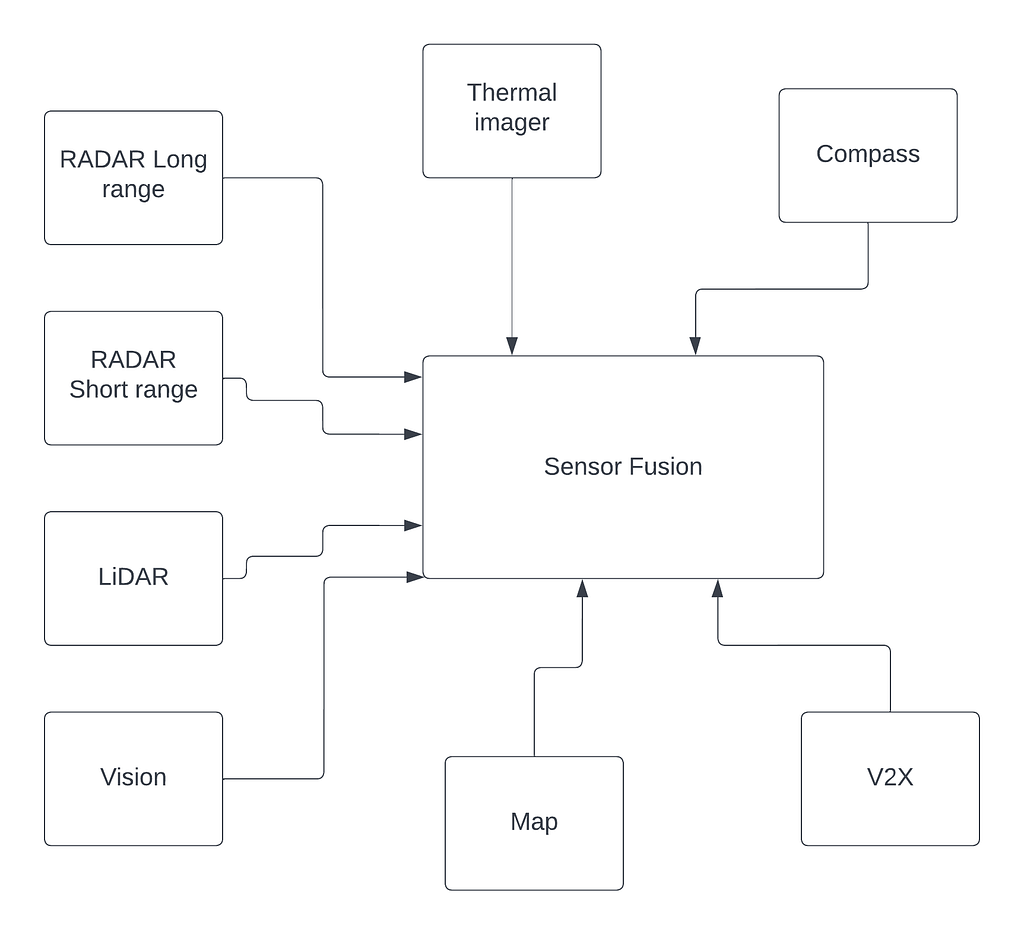
The implementation of cameras in the vehicle involves a new AI function that uses Sensor Fusion to identify and process objects.
Sensor Fusion is similar to how the human brain process information. It combines large amounts of data with the help of image recognition software Ultrasound Sensors, LiDAR, and RADAR.
This technology can physically respond faster than a human driver ever could.
What does ADAS do that humans can’t?
The ADAS -equipped vehicles have an array of advanced sensors that augment the eyes, ears, and decision-making of the human driver.
Can a human see in the dark?
Not very well but radar can.
Can a human echolocate like a bat or a dolphin to determine if there is a child behind the car before the car is put in reverse?
No, but SONAR Sensors can.
Can you see in all directions at once?
No, but cameras and LiDAR Sensors can.
Do you know your exact latitude and longitude at all times?
No, but several constellations of global positioning satellites in space can send that information to the car.
ADAS Levels
Advanced Driver Assistance System levels are technical features that are intended to improve vehicle safety they are categorized into different levels based on the amount of Automation and the scale provided by the Society of Automotive engineers.
The ADAS System can be divided into Six levels
In level 0 the driver is entirely responsible for managing the vehicle including steering braking, accelerating, and slowing down.
In level 1 the vehicle has at least one driver support system that assists.
In level 2 the vehicle can perform steering and acceleration. The driver still monitors all tasks and can take control at any time.
In level 3 ready autonomous vehicle is capable of driving itself in particular conditions during which it will take control of all safety critical systems nonetheless when the system asks it the driver is supposed to take control.
In level 4 you can take an app while riding in the vehicle. Level 4 driving automation technology is for use in driverless taxis in travel between point A to point B and is restricted to specific Geographic boundaries by Geo-fencing technology.
In level 5 the vehicle performs all driving tests under all conditions. At this level zero human attention or interaction is required.
Get your Personality NFT & Find your Community Everywhere you Go
What is ADAS Systems was originally published in Chatbots Life on Medium, where people are continuing the conversation by highlighting and responding to this story.
In the modern era, individuals use chat applications to connect with team members, close ones, family, and friends via their mobile phones. Messaging apps have become a crucial medium of communication these days. There are about six billion smartphone users globally. Hence, the mobile app market is progressively competitive. And this is where many founders and developers put their efforts lately.
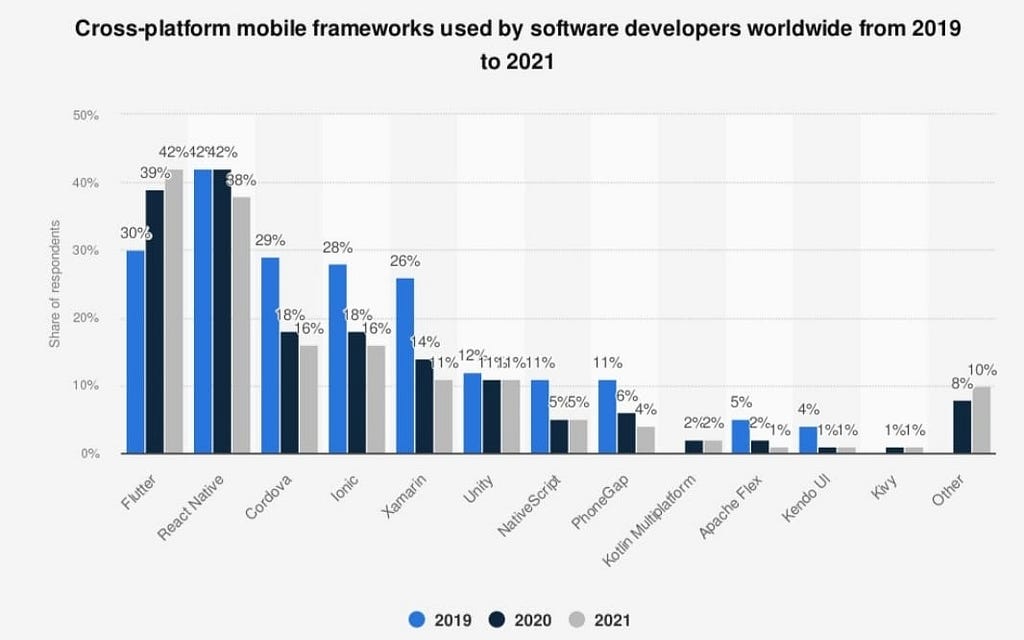
It is obvious that application developers are always looking for simpler, quicker, and cheapest methods to build their chat applications. Effective development tools are essential in the application-building process. From programming languages to software development kits (SDK), the tools a coder utilizes define how rapidly they can launch a product in the marketplace. Flutter is a booming framework for developing cross-platform applications and gaining popularity worldwide. The following image explains the acceptance of the Flutter application development framework:
If you are thinking to develop your next mobile application using Flutter and want to learn more about this mobile app development framework, continue reading to find out everything you should know.
Introduction to Flutter
Flutter is a chat application SDK and UI cross-platform framework announced by Google in 2017. This framework allows flutter developer to create Android and iOS applications with a single codebase. The flutter comprises graphics and animation libraries that make creating UI stress-free. Flutter uses Dart i.e. a reactive programming language that assists in developing high-performance, scalable applications with an eye-catching user interface. According to a survey, Flutter has exceeded Reactive native and become the preferable mobile application development framework. Let’s understand this with an image:
Some top Features that Flutter Offers
Dart programming language — Flutter make use of Dart which is an easy-to-learn programming language and permits flutter developers to build top-quality applications.
Expressive and Interactive UI — This platform’s elements are created using the same ethics as Google’s material design procedures, giving users a flexible way to develop attractive applications.
Native performance — Flutter applications are compiled into innate code, giving you the best predictable performance on both Android and iOS devices.
Hot reload — This feature let the coder quickly and easily makes updates to the application without restarting it.
How does Flutter work?
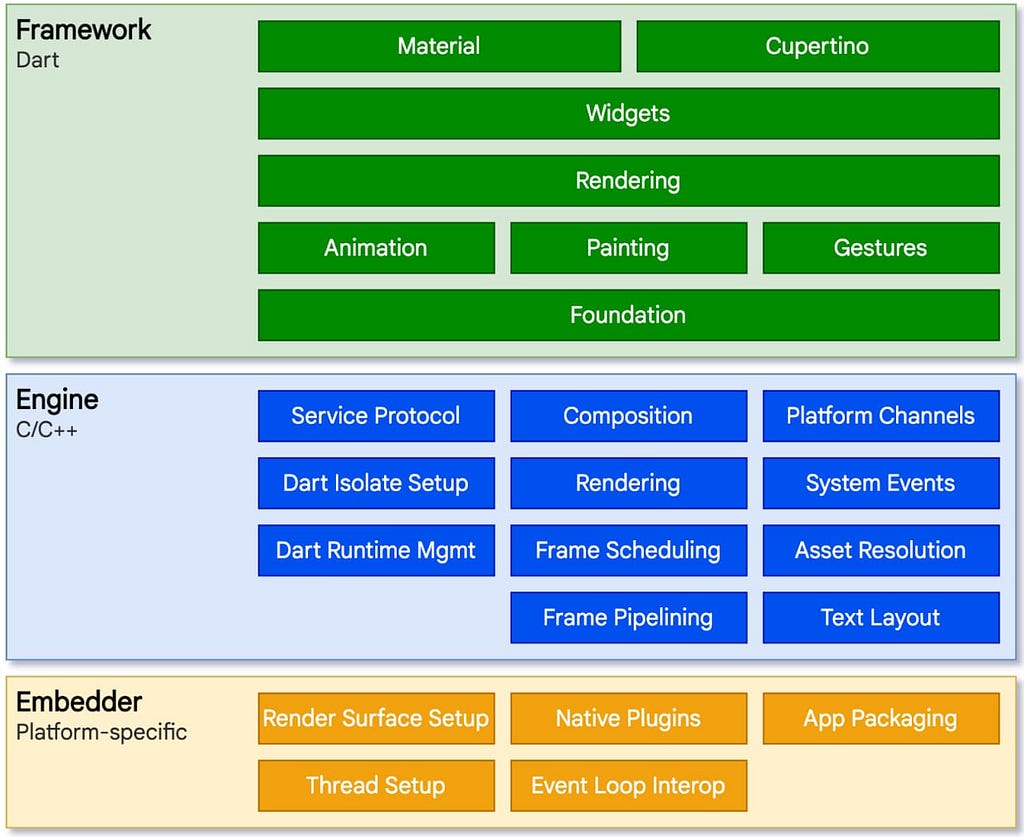
Flutter is a coated structure including the framework, the engine, and platform-precise embedders. This SDK utilizes Google’s Dart programming language to create chat applications. The Flutter engine is inscribed in C/C++ and Skia library is the spine of this framework’s graphics competencies.
Flutter Layer Structure
Dart is the basis for many of Flutter’s performance benefits. It supports ahead-of-time (AOT) as well as just-in-time (JIT) compilation. AOT compiles code into lower-level innate code, which creates applications that run faster and have good performance. JIT enables the hot reload feature of this framework which diminishes development time. Dart also complies straight with native ARM or Intel x64 code, minimizing performance differences amid Flutter apps, and innate applications that depend on in-between code elucidations at runtime.
Advantages of Flutter
It is fast — The framework utilizes Dart compiled into innate code. This means JavaScript Bridge is not needed. Resultantly, using Flutter developers can create applications that are fast and responsive.
Rich set of widgets — Widgets are the building blocks of this mobile application development framework. This feature makes it easy to make striking and custom user interfaces.
Easy debugging — Flutter uses Dart programming language that has great tools for debugging such as Dart Analyzer and DevTools Suite. These tools make it easy to discover and fix errors in the Flutter application.
Automated testing — This framework has its set of tools for app testing and also Dart supports automated testing. It is easy to create unit, integration, and widget tests for mobile apps, so the coder can continually optimize and enhance the app quality.
It creates cross-platform apps — The similar code can be utilized to create chat apps for both Android and iOS devices from a particular codebase instead of swapping between diverse platforms. This can save a lot of time as well as effort when building mobile applications.
Diverse screen adaptability — The mobile apps developed using Flutter can run on numerous screen sizes and aspect ratios. This makes it easy to develop an application that works well on phones and tablets.
Disadvantages of Flutter
• Lack of third-party libraries.
• Tools available in Flutter are not as good as other platforms.
• Dart is not an extensively used programming language.
• It creates large applications which are not suitable for platforms with limited storage space.
Why Do Businesses Choose Flutter?
Here are some reasons why Tech founders pick Flutter for mobile application development:
Endow better UI experience — The framework provides a better user interface. Being a businessperson, you want to launch your application quickly to get the marketing benefits. The faster the app is launched, the sooner it will make into the marketplace. Furthermore, your early customers help you comprehend their experiences, from which you can get to know their prospects. The latest release of Flutter has extended the reusable modules to a great extent.
Reusability of code — Flutter lets coders utilize the same code base for diverse platforms in application development. This feature makes it easier to resolve bugs and helps in fast development. Developers can reuse 90% of the code and this enhances an application’s scalability and diminishes the Flutter app preservation cost.
Free and open source — Flutter is a free and open-source platform that permits developers to use incalculable third-party libraries and packages for diverse features such as videos, chat, ads, etc.
Low application building cost: The resource and time allocation for creating an application using Flutter is lesser. Therefore, the development cost would be low spontaneously.
Community support: As Flutter is an open-source framework, so, it has several active community users about 20.8k. Hence, if you go with this framework for app development, you can get help and guidance from the active users of Flutter.
These are a few reasons why you should elect Flutter for cross-platform and what makes flutter an optimal choice for building MVP.
Different Applications built using Flutter Framework
Let’s take a look at the most exciting developments that have used the Flutter framework:
• Google Ads
• Reflectly
• Groupon
• Pairing
• Alibaba Xianyu App
• Realtor.com
• KlasterMe
• Take Your Seat
• Birch Finance etc.
Final Words
Flutter is gaining popularity with time. Many businesses realize it as a way to reduce costs and save time while developing more user-friendly applications. Hope this blog post has cleared your doubt about the Flutter framework. You can hire a flutter app Development Company if you want to make your next chat application more user-friendly and responsive.
Get your Personality NFT & Find your Community Everywhere you Go
It is well known that data science teams dedicate significant time and resources to developing and managing training data for AI and machine learning models — and the principal requisite for it is high-quality computer vision datasets. It is common for problems to stem from poor in-house tooling, labeling rework, difficulty locating data, and difficulties in collaborating & iterating on distributed teams’ data.
An organization’s development can be hindered by frequent workflow alterations, large datasets, and an ineffective data training workflow. Growing too rapidly, which is common for startups, regardless of their industry, aggravates these issues.
An example is the highly-competitive autonomous vehicle industry, where scalable training-data strategies are vital. The computer vision market for self-driving vehicles is high in complexity and competition. If your team cannot adapt (including the ability to annotate data), your business can suffer from customer dissatisfaction. Because of the complexity of training data, definitions and scope are constantly changing; if you cannot adapt, you can lose a lot of money.
Identifying the Right Data Annotation Strategy
Several reasons can explain why your training data strategy must adapt quickly. It could be because new product features generate an important volume of raw data that needs to be labeled, or you have decided to develop a solution that requires a significant volume of real-time data to perform well.
Moreover, ML model performance can often disappoint, especially in proofs-of-concept or early versions. Finding the optimal data annotation strategy can come late in the development process when a lot of money and time has already been spent.
Furthermore, some AI projects based on a large volume of data often require a feedback loop. It is often the case when neural networks are used to improve with each new case and tackle edge
cases continuously. ML requires iterative data annotation processes. Data annotation feedback loops and agile methodologies are critical for success.
Regardless of your situation, you can either react by hiring an internal team of annotators, which can be expensive, work with freelance annotators, or rely on a data annotation platform. Let’s see the pros and cons of each approach.
Building In-house Teams
Some companies choose to create an in-house data annotation team. A good reason to build an in-house data annotation could be related to security. Perhaps your projects’ nature requires labeled data that cannot be transmitted online.
Building an internal data annotation certainly brings benefits of process control and QA but also carries additional costs and risks:
HR resources
Management of a new team
Software development to support data annotation and workflows,
Risk of constant staff turnover
This method is not scalable. Like all companies involved with AI, your data needs may heavily evolve based on your current and future projects as you invest in hiring, managing, and training employees. Concretely, if you decide to build an in-house data annotation team, you will also require annotation tools. Unfortunately, teams that try to build in-house tech solutions often lose strategic development time rather than outsourcing the data annotation process.
While this method may seem more cost-effective at the start of your project, it’s often not a scalable solution due to operational infrastructure challenges, lack of training data know-how, and skills gaps for internal annotators.
Unless you work for a large tech company, chances are your internal tool will probably never be as advanced as an end-to-end data labeling tool built by many specialized developers and iterated over several years. Third-party data annotation tools are usually more sophisticated and come with experienced annotators and skilled project managers.
2. Choosing an Outsourced Data Processing Company
In this context, outsourcing refers to getting an industry expert on board to perform data processing tasks for AI and machine learning initiatives. The remuneration is often low and based on the volume of work. A prime example of this solution is Amazon Mechanical Turk.
This approach is considered an easy way to collaborate with an on-demand workforce. However, it forces you to define the assignment accurately and identify specific requirements & payment conditions. Conveying your idea clearly to the outsourced data annotation & labeling company behind your ML model is of the utmost significance — the blurry sense of your AI project to the outsourced company may lead to nothing but disaster. So picking the right data processing partner is important. Companies such as Cogito, Anolytics, and a few more offer high-quality custom data to train AI models by the in-house workforce and efficient workflow.
Some companies have built a crowd-as-a-service data platform and license data platforms. These platforms manage the workflow and sourcing of workers. Leveraging such data platforms will enable you to scale quickly with competitive pricing. However, because this approach is often used for small-size and temporary projects, there is no feedback loop and opportunity to train labelers over time.
Another aspect worth mentioning is that outsourced labelers tend to suffer from a lack of expertise, leading to poor training data quality. Give experience and expertise priority when picking your annotation & labeling partner to process your data for your AI model.
Data security is also challenging, as outsourced labelers often work independently on unsecured computers. Depending on your project’s importance, complexity and scope, outsourcing platforms can be an easy and cheap solution to label your data. But the low price comes at the cost of reduced data set quality, consistency, and confidentiality
3. Data Platform + Workforce
Another solution available on the market is related to companies that have built and sold their own data platform. These self-service platforms enable companies to efficiently self-manage their annotation projects with advanced capabilities, robust UI, advanced annotation tools, and, in some cases, ML-assisted annotation features.
ML teams can more easily manage labeling workflows by leveraging these platforms to produce quality computer vision training data while reducing labeling time compared with outsourcing platforms. They can also rely on some on-demand project managers to help structure their projects. Non-advanced transparent quality processes are also part of the offering from these platforms.
These SaaS-based platforms are known for their ability to scale quickly and provide competitive pricing. However, most of them are highly dependent on partners to secure the necessary non-contracted workforce.
This dependency often leads to a lack of expertise from their labelers, uptime issues, and ultimately poor quality labeled datasets (often the case for complex projects).
Another worth mentioning element is that these platforms are often mainly specialized in a specific industry (e.g., data labeling for the autonomous vehicles industry) or AI subfield (e.g., computer vision or NLP).
4. Platform + Fully Managed Workforce
Annotation solutions for data are offered by companies that have developed and sold their own data platforms and have fully managed workforces. The major difference between these platforms and other solutions is that such platforms depend on experienced labelers and subject matter experts for identifying edge cases and suggesting best practices for annotation.
These platforms rely heavily on both human expertise and automated data annotation tools to adapt to new guidelines or computer vision datasets requirements quickly, allowing them to be implemented same-day or next-day. By leveraging human expertise, edge cases will be identified proactively, guidelines will be recommended, and models will be developed faster.
Annotation time can be reduced by leveraging advanced tools used by industry experts. However, fully-managed services cost more than other data annotation solutions in terms of pricing because they cover the entire training data cycle.
5. ML-Assisted Annotation
A growing company tends to have an increasing amount of data to label. When this data is large, manual labeling becomes challenging. ML-assisted annotation can help solve this problem.
The goal of machine learning-assisted annotation is to reduce the time annotators spend annotating by making it possible for them to spend more time correcting complex cases so the machine learning models can be developed further by performing close-to-perfect annotations (covering all important annotation types).
Annotation tools that use machine learning are defined and automated according to different standards. Some allow users to create new neural networks from scratch, while others use pre-trained ones.
Because of this, the model is able to predict classes from an unlabeled image set. This results in annotation tasks turning into evaluation tasks after human annotators have reviewed and corrected them. Additionally, manual annotations are most useful in challenging edge cases, and machine learning-assisted annotation tools have proven to be effective in large datasets as well.
As a result, the annotator can see the suggested labels and only have to review them, while other solutions show only those images with the highest or lowest confidence for label confirmation; data annotation flexibility means you can find errors in your dataset in minutes rather than days.
Annotation tools that use machine learning can integrate a feedback loop, so that after reviewing the images, the user can add the images to a computer vision training data in order to train a more accurate neural network. Reinforcement learning, for instance, can mimic the decision-making process of annotators. the reinforcement agent identifies alarm data based on the annotations made by humans.
An image annotation tool that identifies polygons based on class is available in some data annotation tools. A polygon prediction is provided by the network after the annotator marks the selected object. The user can also use a pre-trained segmentation model to create a rough mask of unlabeled images automatically. A number of other features are available, including the ability to switch between labels & methods and the ability to reach output faster.
6. Promising Quality & Deadlines
The best way to optimize workflows as your company grows is to create in-house teams to analyze data, outsource it, or utilize a machine learning-based data platform. An ideal tool would be one that reprioritizes tasks automatically, provides feedback, and tracks production models.
Developing a fast model requires a deep understanding of the classes represented and the edge cases in a computer vision dataset. Data training strategies need to be scalable as well as reportable. In order to stay in control of your projects and measure the productivity and quality of your annotators, you need a dashboard with real-time analytics and error reports.
Additionally, a good dashboard will let you set labeling rules and integrate raw data easily, perhaps via a Rest API, so you can scale up and down tasks dynamically based on your training data.
Conclusion
This article presents several solutions that will help your company create a scalable data annotation strategy in a jiffy. Companies that need to scale benefit from data annotation platforms that provide complete and cost-effective solutions. You can choose to partner with an outsourced data processing company to develop training data for your machine learning and AI models in order to guarantee success. Originally published at Cogito.
Get your Personality NFT & Find your Community Everywhere you Go
Artificial Intelligence in the Cloud — Comparing Google Vertex AI vs. Amazon SageMaker
Cloud solutions make it easier for businesses to manage, track, and move their apps, files, and other resources to the cloud without having to deal with many obstacles.
Several benefits exist for moving to the cloud, including increases in scalability, security, and flexibility, as well as decreases in cost and environmental effects.
Artificial Intelligence in the cloud enables businesses to train, test, and deploy deep learning models using cloud infrastructure and services. The leading cloud providers are Amazon AWS, Google GCP, and Microsoft Azure. All three providers provide quality, highly scalable and secure cloud solutions and a huge set of cloud services.
This article focuses on cloud artificial intelligence services, specifically Google Vertex AI, and Amazon Sagemaker. Microsoft Azure also provides AI services through Azure AI, which I would also recommend, but for this article we will focus on Google Vertex AI, and Amazon Sagemaker.
Google Cloud Platform (GCP)
The Google Cloud allows you to host virtual machines (VMs) on a wide variety of hardware and operating systems through their Compute Engine. VMs can be used to host your website, web applications, or other services, and provide you terminal OS access to most Linux based operating systems. You can also enable ssh to allow remote access to your VM from your own computer.
Google Cloud makes it easy to create, start, and stop a VM, and billing is charged by the minute, which makes it easy to run experiments or tests on high end hardware with keeping costs low.
Google provides disk, image, and snapshot resources within its Compute Engine. Files can also be stored in Google Cloud Storage to allow network access and sharing of files.
Google Vertex AI
Google Vertex AI provides a cloud service to make it easier to train, test, and deploy deep learning models in the cloud.
Vertex AI provides AutoML as an easy way for non developers to start training a model. AutoML supports a UI for training models for image, tabular, text, and video. This provides an easy way to get started, but for most projects you will want a lower level of configuration through code.
Python is the overwhelmingly dominant language for deep learning. Most deep learning models are based on Python frameworks such as TensorFlow, PyTorch, or Apache MXNet. Python can be either through a terminal and your favorite code editor, or through Jupyter Notebooks. Jupyter notebooks provide a web based UI for editing and running Python scripts.
Vertex AI provides a Jupyter notebook based environment through Vertex AI Workbench. Vertex AI Workbench makes it easy to create and share Jupyter notebooks with your team.
Vertex AI is mainly geared to training models using TensorFlow Enterprise, but do also support creating VMs configured for PyTorch.
Once you have trained your model, you can deploy it using Vertex AI endpoints. Vertex AI endpoints provide a way to enable access to your model as a cloud service.
Vertex AI allows you to train models using very high end GPU and TPU servers. This is the main advantage of cloud AI, as most development organizations do not have their own high end GPU hardware, and training high models on traditional hardware is not feasible.
Amazon Web Service (AWS)
AWS allows you to host virtual machines (VMs) on a wide variety of hardware and operating systems through their EC2 service. VMs can be used to host your website, web applications, or other services, and provide you terminal OS access to most Linux based operating systems. You can also enable ssh to allow remote access to your VM from your own computer.
AWS makes it easy to create, start, and stop a VM, and billing is charged by the minute, which makes it easy to run experiments or tests on high end hardware with keeping cost low.
AWS provides disk, image, and snapshot resources within its EC2. Files can also be stored in AWS S3 to allow network access and sharing of files.
Amazon SageMaker
Amazon SageMaker provides a cloud service to make it easier to train, test, and deploy deep learning models in the cloud.
Sagemaker provides Jumpstart as an easy way for non developers to start training a model. Jumpstart supports a UI for training a wide variety of different models including image, tabular, text, and video. This provides an easy way to get started, but for most projects you will want a lower level of configuration through code.
Sagemaker provides a Jupyter notebook based environment through Sagemaker Studio. Sagemaker Studio makes it easy to create and share Jupyter notebooks with your team.
Sagemaker is more framework agnostic than Google, and provides Jumpstart models and VM configuration for Apache MXNet, PyTorch, and TensorFlow. Most of their Jumpstart models tend to be based on Apache MXNet.
Once you have trained your model, you can deploy it using Sagemaker Edge Manager. Edge Manager endpoints provide a way to enable access to your model as a cloud service. Sagemaker also provides a service Sagemaker NEO for deploying your model to various hardware and devices.
Sagemaker allows you to train models using very high end GPU servers. This is the main advantage of cloud AI, as most development organizations do not have their own high end GPU hardware, and training high models on traditional hardware is not feasible
Bot Libre and the Cloud
Although cloud providers do their best to make it easy to start a cloud AI project, cloud platforms and services are still very complex environments with a huge amount of different services to understand, and AI in general is a complex subject. Bot Libre and Paphus Solutions have many years of experience in cloud services, cloud AI, and AI and deep learning. If you are considering a cloud AI project, we can help you get started and develop your service through our development services.
The Bot Libre Enterprise Platform provides a cloud agnostic solutions for chatbots, AI, and deep learning services. Bot Libre can be deployed to Google GCP, Amazon AWS, Microsoft Azure, and many other lower cost cloud providers. Bot Libre and Paphus Solutions also provide cloud AI development services either using the Bot Libre platform, Vertex AI, SageMaker, as well as custom Python projects.
For all your development and cloud AI needs, contact Bot Libre at sales@botlibre.com
Learned something? Please give us a
to say thanks and to help others find this article
Telegram has been growing in popularity ever since it was launched close to a decade ago. The app has nearly 540 million users, which is a staggering number. The app offers a powerful alternative to WhatsApp and Facebook Messenger and claims to be more secure than both of these platforms. Speed and security are Telegram’s USPs.
Without further ado, here are the steps to integrate Telegram with Kommunicate.
The integration presented in this blog post will teach you how to:
Create a New Bot for Telegram
Connect a Bot to Kommunicate
How to connect a chatbot to Kommunicate
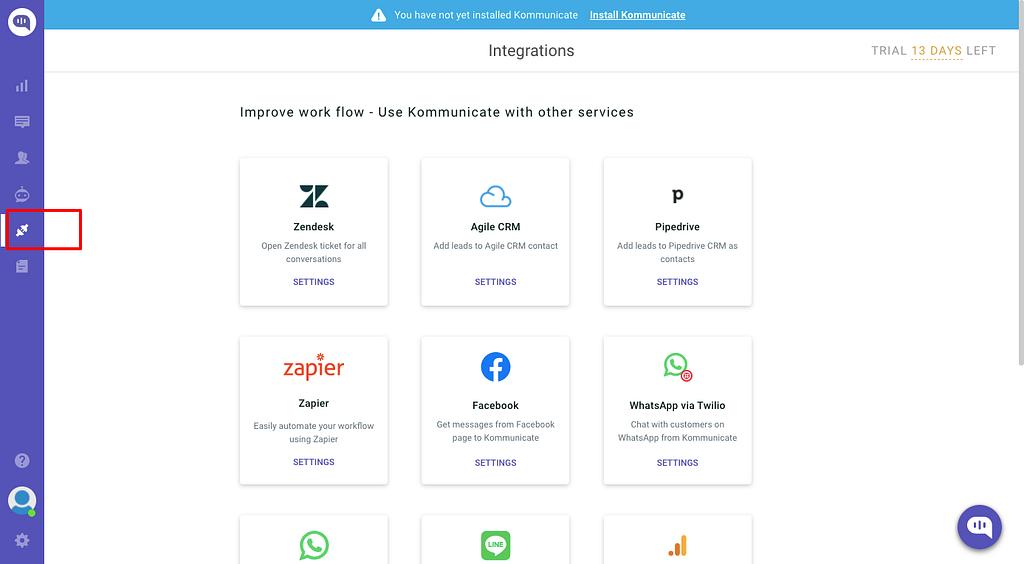
Open Your Kommunicate Dashboard
Step 1: Click Integrations
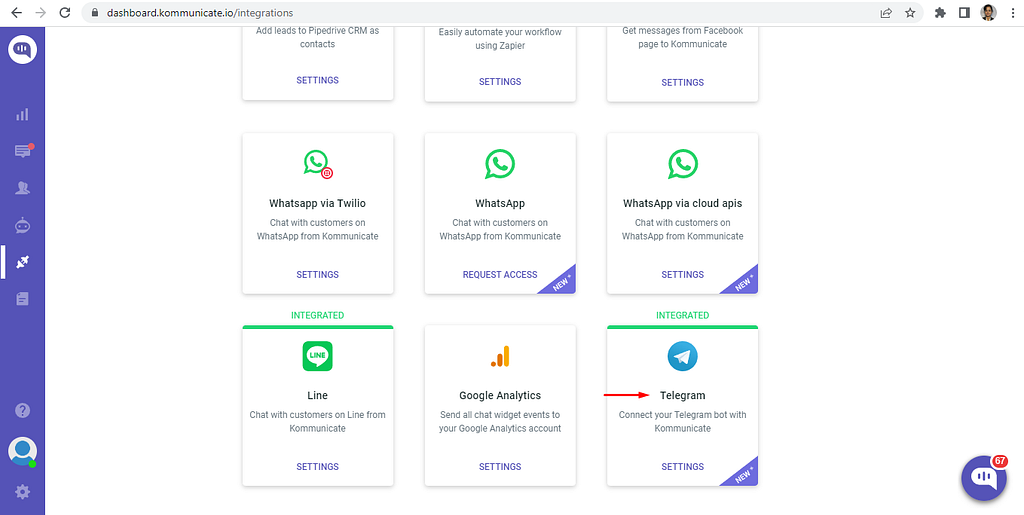
Step 2: Click the Telegram card setting link
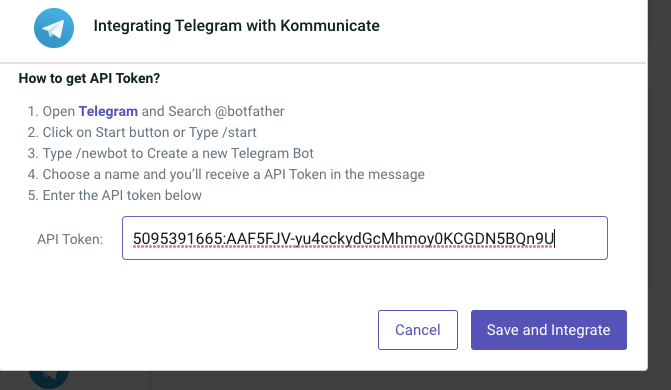
Step 3: Paste the API key into the Telegram integration card from the Kommunicate Dashboard and click the “Save and Integrate” button.
Note: official Telegram bots have a blue checkmark beside their name
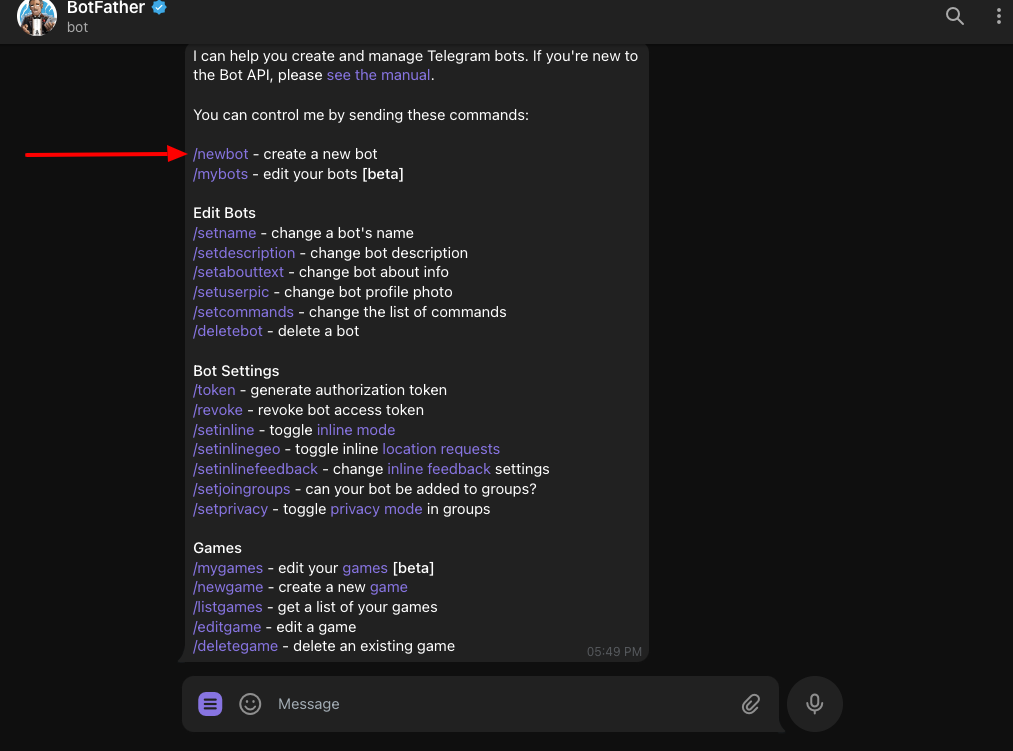
Step 2: Select the BotFather channel and click /start.
Click on the “Send” button.
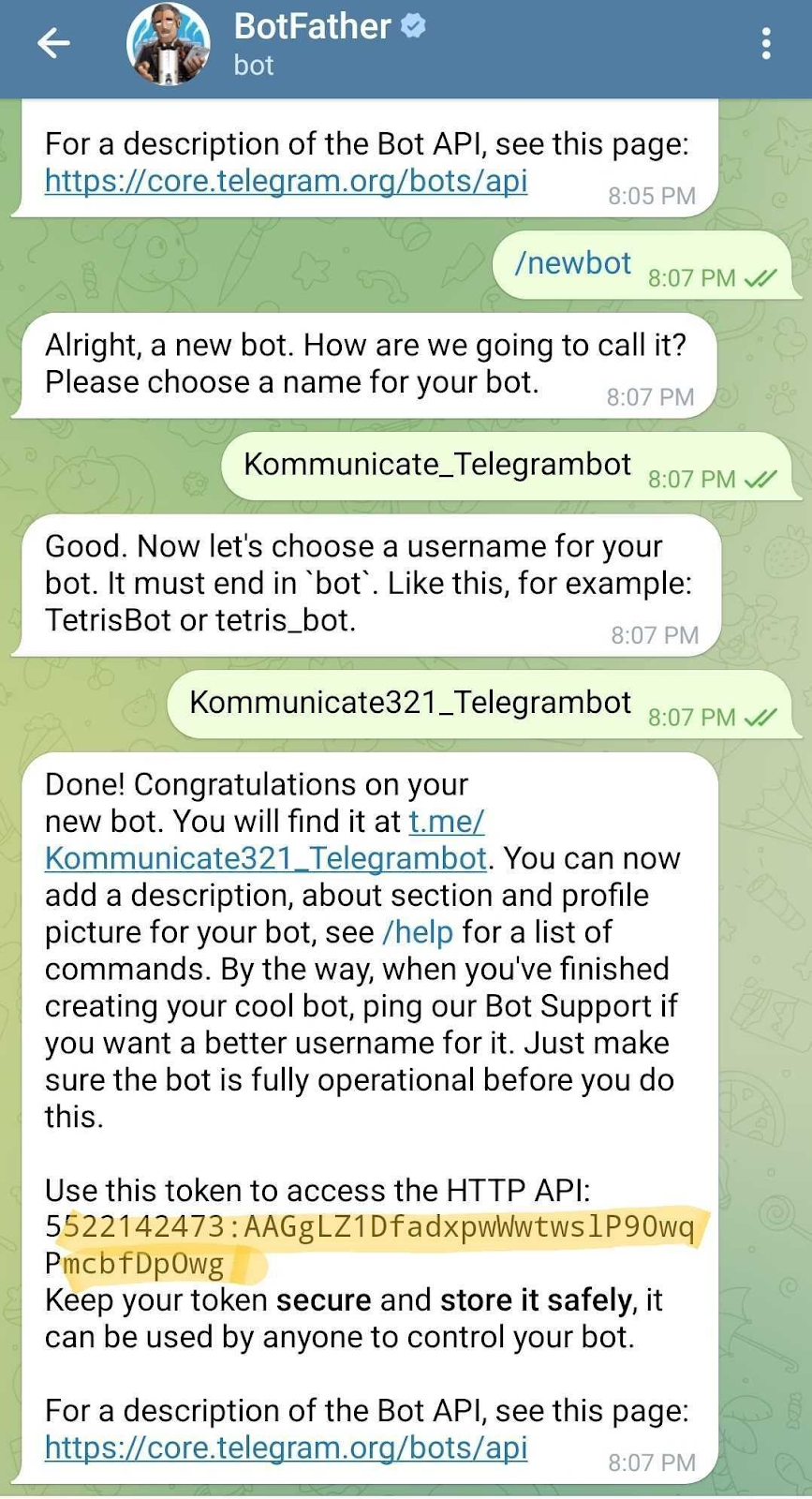
Step 3: Select /newbot — create a new bot.
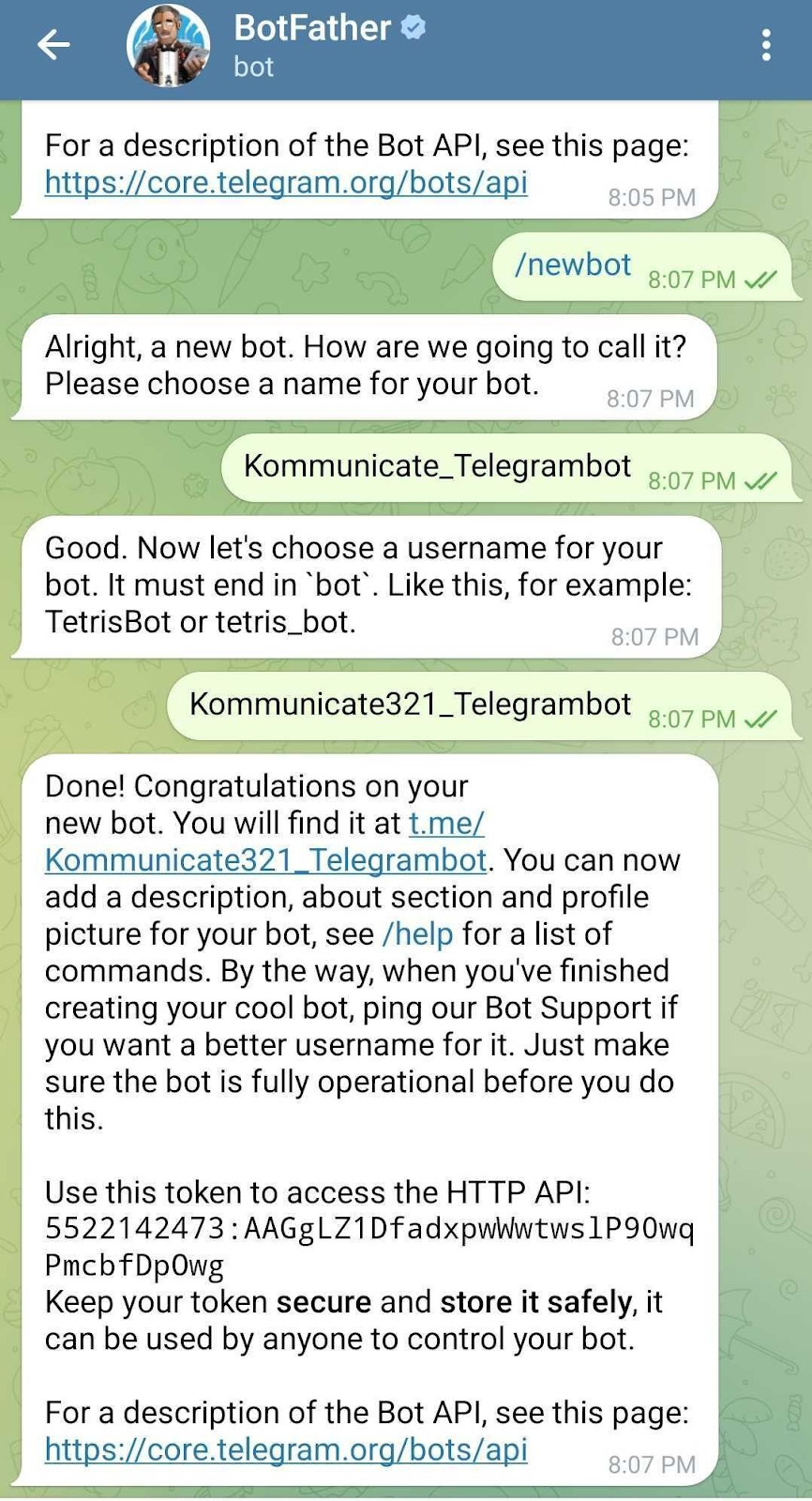
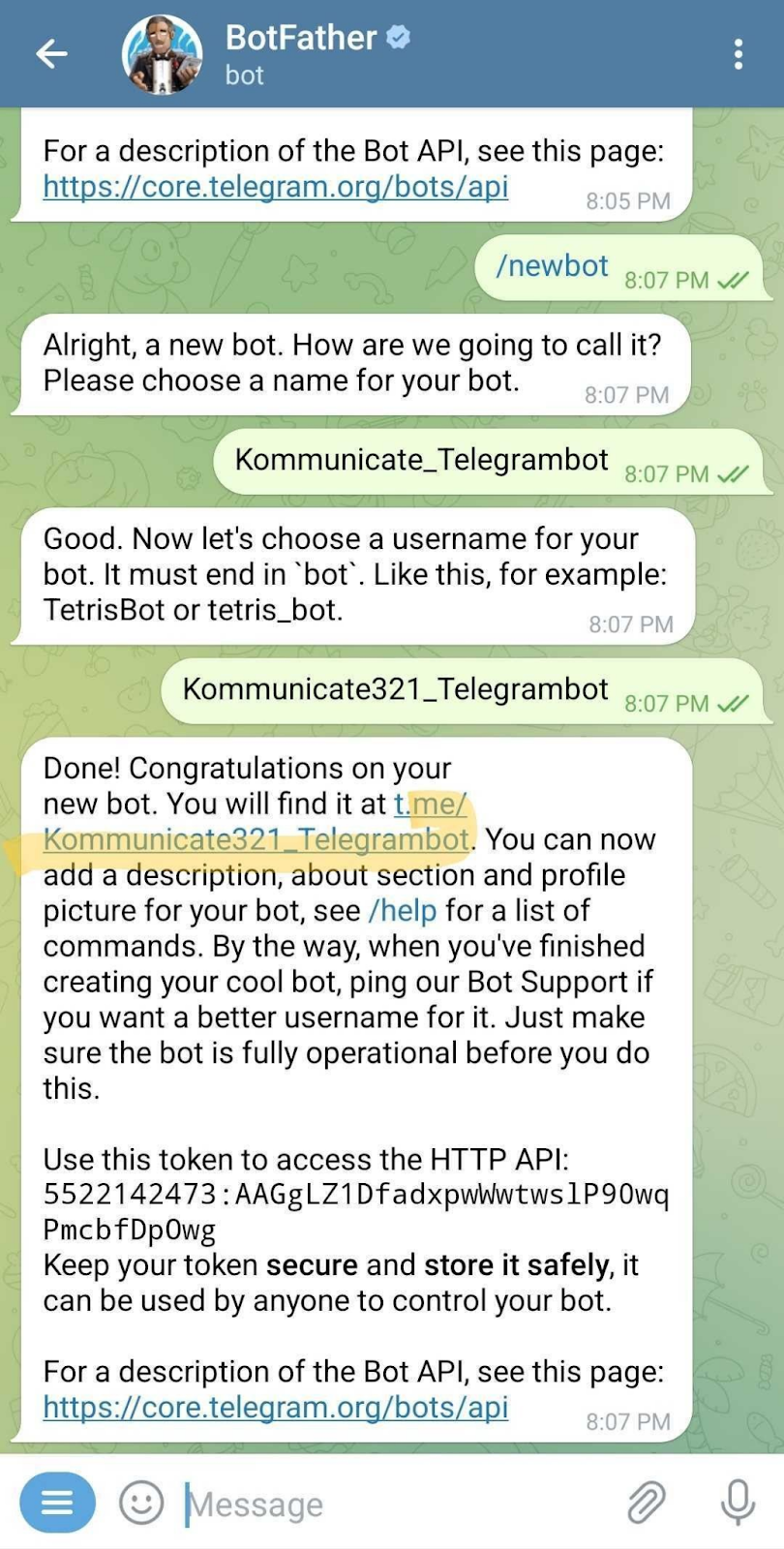
Step 4: Add a bot name to call (Kommunicate_Telegrambot) and enter the bot name to display (Kommunicate321_Telegrambot)
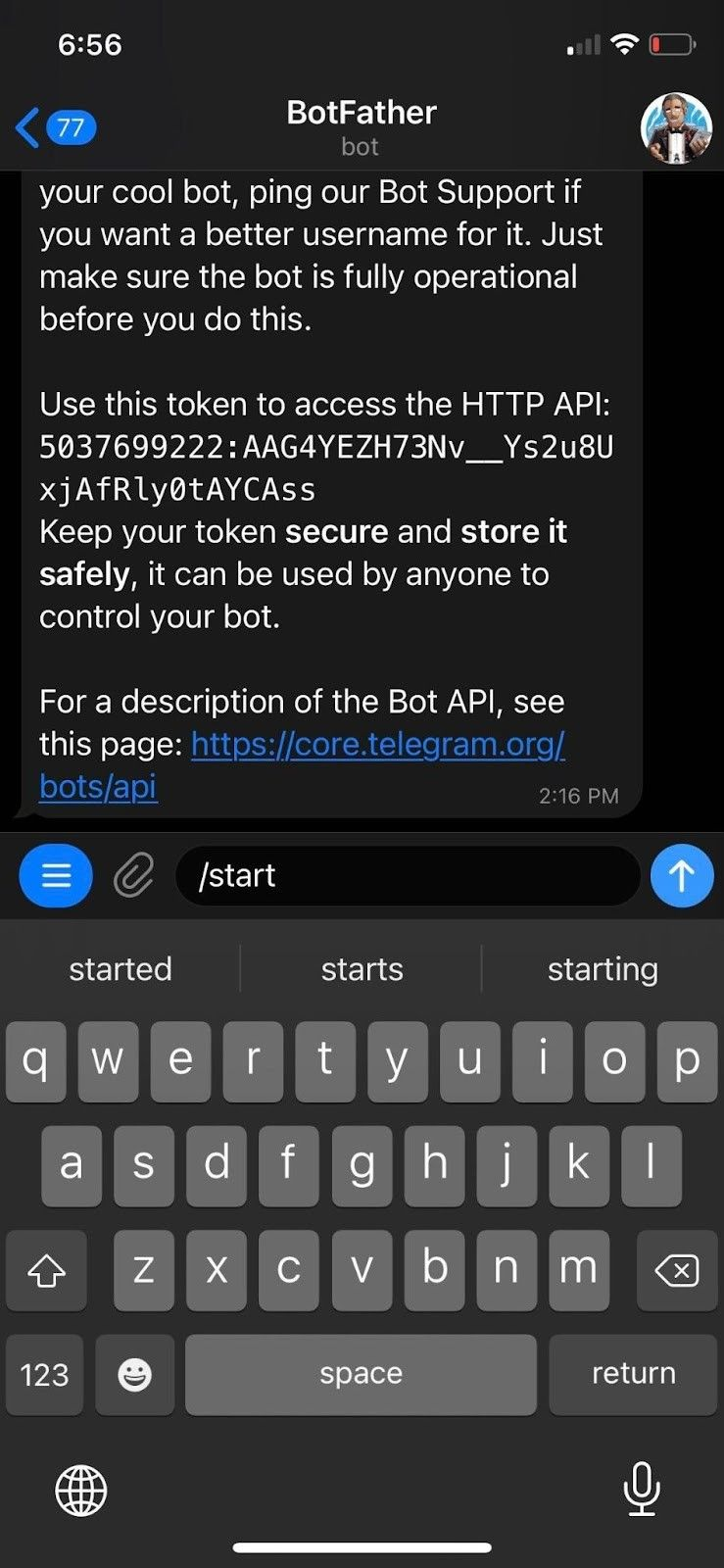
Step 5: Copy the API key that is generated under “Use this token to access the HTTP API”
After creating the Telegram bot, follow the steps to trigger the Dialogflow chatbot.
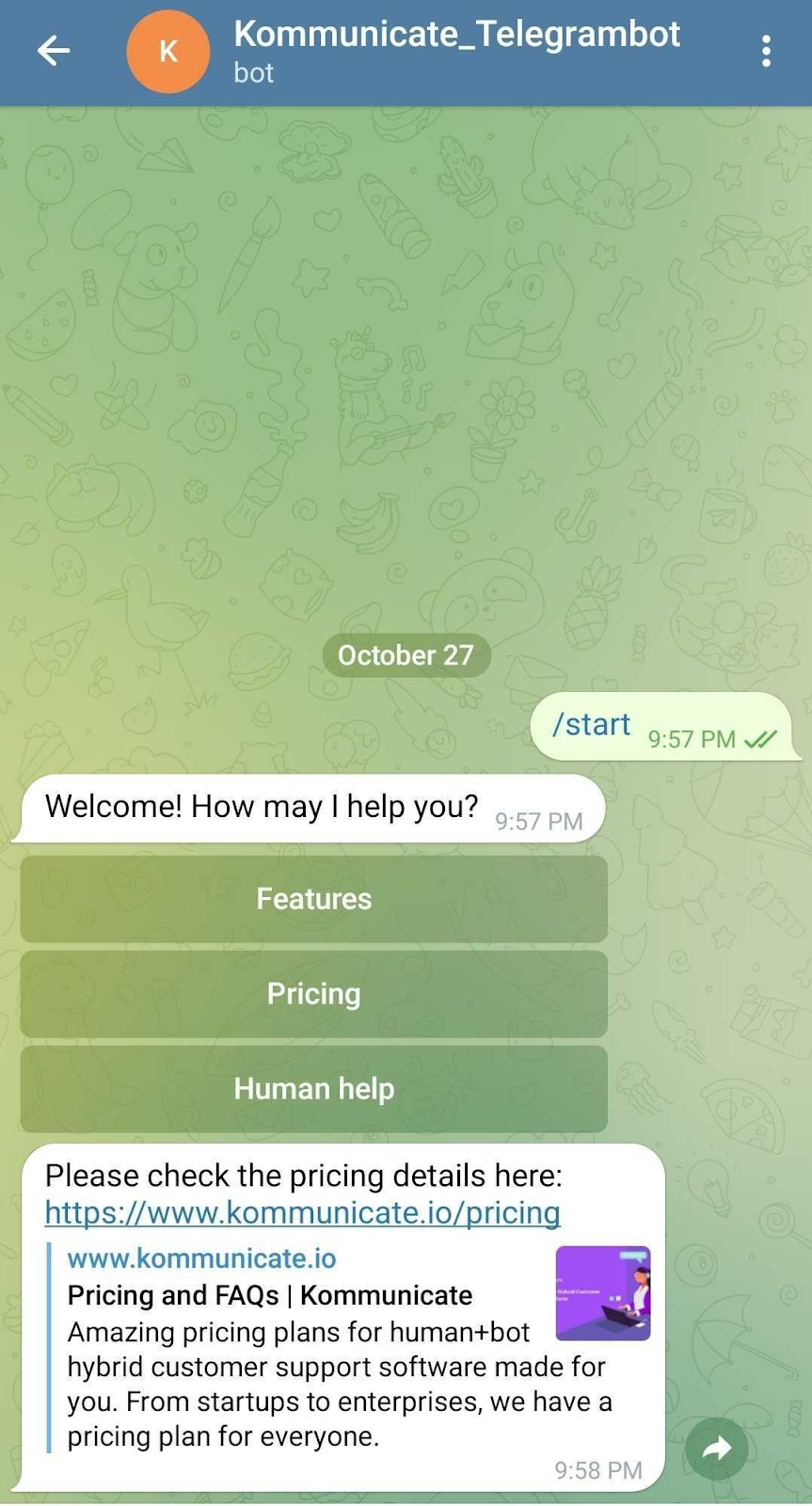
Step 1: Click on the link to open the chatbot you created on Telegram
Step 2: Click on START to initiate a chat, once you click on START, you will send a message to Kommunicate. Next, the Dialogflow chatbot will start answering with the Welcome message you trained on the Dialogflow side.
Make sure you have selected the Dialogflow chatbot on the RULES section of the Kommunicate dashboard. Check here to build and integrate the Dialogflow chatbot if you still need to create one.
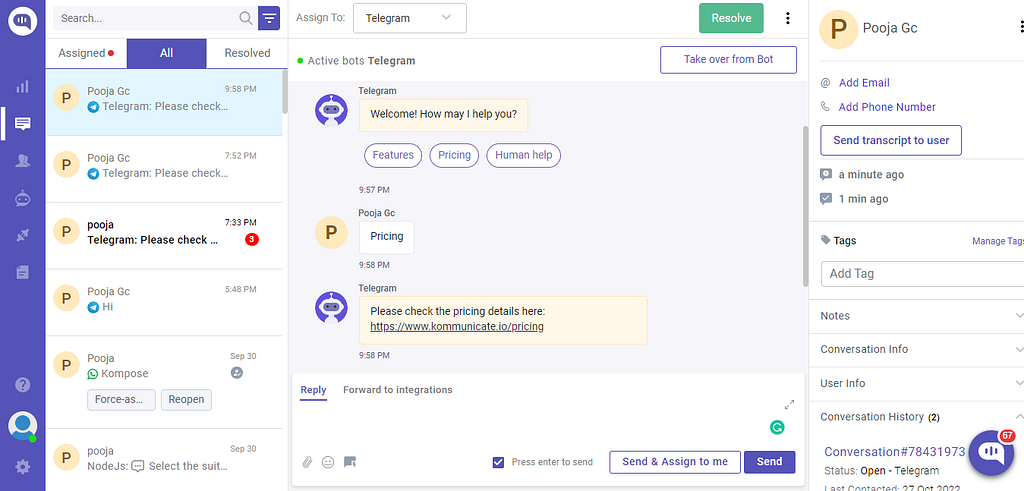
This is how your Kommunicate dashboard will look after the integration is complete: