Your brand needs a virtual assistant, and you have the opportunity to build it — that’s great. But one of the burning questions on your mind right now might be — where do you even start?
The first step that you absolutely need to get right is use-case selection. Picking the right use-cases before you start investing in building a chatbot is critical to the success of your bot. Building a bot is a time-consuming and extensive exercise and spending all that effort building the wrong use-cases could be detrimental to the success of your Conversational AI Journey.
“If you don’t have the time to do it right, when will you have time to do it over?” — John Wooden
But figuring this out isn’t as easy as it sounds. It usually takes weeks and months of intensive planning, research, and ideation. You would have to talk to multiple teams, manually go through heaps of past conversations, tickets, calls, etc. to arrive at your key use-cases & customer queries.
Until today.
Get it right the first time with Intent Discovery
You already know what your customers want and ask for. Your brand has been interacting with customers through tickets, existing chat data since the start. So why not use existing sources of information to build your bot and get it right the first time itself?
Export a CSV file of support tickets or past chatbot conversations from the last 2 months.
Upload it in the form below
Within 24 hours, we will send you an email report from our AI-driven clustering analysis containing all the top potential use-cases that your customers might ask your bot. Not just that, to simplify your life further, we also provide the sample queries which act as top-class training data for the chatbot.
Let’s understand how Intent Discovery works
Past Support tickets — Your support tickets are the biggest pool of all your customer queries asked in the past. What could be a better way to feed your bot with all the top use-cases basis exactly what your customers want. All it takes is to upload your tickets in a CSV file and then we tell you exactly which use-cases or intents your bot should be trained on.
Past Chat Records — If you already have a current chatbot but want to build a new one — we’ve got you covered. Instead of starting from scratch, you can use all the chat records from your current chatbot to train your new bot. Even better? You can also use your live agent chat records to provide additional training.
To Sum Up
We understand that building a great Intelligent Virtual Assistant can be time-consuming and tedious for you and one of the biggest challenges might be not knowing where to start.
Well, not anymore. With our Intent Discovery feature, you can leverage AI to arrive at the right use-cases by simply uploading existing customer tickets & conversations. To learn more schedule a demo with our product experts.
“A chatbot is a type of software that can help customers by automating conversations and interact with them through messaging platforms.”
A chatbot is a software program that can hold a conversation with a human user. They essentially automate one-to-one conversations. But don’t be fooled into thinking that all they do is talk. They can do everything from turning your lights on to advising you on what investments you should be making.
Also known as Artificial Conversational Entities (ACEs) or conversational agents, chatbots are quickly changing the way business is being conducted. The automation of basic, mechanical processes through conversational agents allows businesses to concentrate their valuable resources on tasks that actually matter.
With chatbots evolving and growing more powerful in their capabilities, they’re gradually becoming an integral part of our daily lives. And no, we’re not just talking about our virtual assistants like Siri and Alexa. We now have bots of various types, being utilized in almost every way imaginable. Here’s a quick tour of the marvelous world of chatbots.
How do Engati integrations and deployment help?
Engati chatbot deployment channels
Customers are omnipresent. They interact, engage, and communicate with brands and seek instant answers to their queries. It is over the odds to lose out on customers across digital platforms who can bring potential value to a company. Engati provides easy deployment of chatbots across multiple digital platforms to stay connected with all your customers.
All you have to do is select your channels from the channel deployment menu, and you’re set!
And if you’ve already deployed your chatbot and would like to deploy it on additional channels, simply select Channels from the Configure menu and select your channel of choice.
The same Engati chatbot could serve as a social media chatbot, a website chatbot, and much more — create your bot once and deploy it across all your channels.
How can businesses benefit from chatbots? And, What are the applications of Chatbots?
Healthcare
We need to integrate healthcare chatbots with e-health records to start with the basic patient data. With time, they can use the data to provide patient information. Determining basic symptoms and matching them with known ailments is also something that the bots will become good at, with time.
Availability round-the-clock — Healthcare Chatbots are available 24/7 and are dedicated to assisting patients through their recovery. This chatbot can help you in tasks such as reminding you about your medicines, providing medical information, giving you tips, and monitoring your overall well-being.
Builds a rapport with the patients and provides assistance — Imagine one of your patients has fallen ill but can’t describe what they’re feeling. What would they do? They’d start by looking up their symptoms online, and you know how that turns out. They would most likely land on a page that scares them further and stresses them out even more.
Schedule appointments — Chatbots can help patients book appointments directly from your website chatbot. Not just that, they can also assign a relevant doctor to your patient, send the doctor an email with patient information and create a slot in both the patient as well as the doctor’s calendar.
eCommerce
Customers expect lightning-fast responses and want the purchase process to be quick and seamless. Moreover, the surge in mobile eCommerce has raised the bar as organizations need to accommodate higher volumes of traffic. eCommerce Chatbots like Shopify chatbots allow businesses to attract clients one-on-one too in a personalized manner.
Provides personalized suggestions — AI chatbots remember the past interactions of the users and use them further to customize future conversations. Moreover, bots can keep the focus on customers while promoting the products or services.
Records real-time interactions — AI chatbots enable e-commerce businesses to get hands-on real-time user interaction. They can analyze information to improve the services as per the user input. The instant access to critical data reduces the operation cost and maximizes a business’s efficiency and functioning.
Eases customer executives — As chatbots can handle 80% of the repeated queries of the customer, they can help customer care executives keep the locus of support to solve complex queries. By addressing complex queries with priority, you can win more customers while reducing the operation cost. Allows customers to browse and compare products with ease
Insurance
Insurance companies have been able to uplift their services, communication, efficiency, and customer support by incorporating insurance chatbots into their workflows.
Process claims faster — As part of efforts to make claims smoother for policyholders, chatbots can help out in processing claims. The chatbot will then pass on that information to an agent for further processing.
Help in finding the right insurance policy — Chatbots assist clients in choosing the right insurance policy by collecting large amounts of data.
Manage claims and renewals — Healthcare or employee-initiated policyholders are always eager with their claims. With the help of chatbots, they can check their coverages, file for a claim, track status, and assist in the renewal process also.
Once you’ve registered, you have to follow these simple steps-
Step 1: Select the Create a Bot button on the portal’s homepage.
Step 2: Give your chatbot a name, a description, and assign a category.
Step 3: Then you’ll be presented with a library of our templates. You can either browse through and select the one that suits your use case or click Skip and build the chatbot from scratch.
Step 4: Next is channel setup. Here, you can customize your chat window for web chat and select which channels you’d like to deploy the chatbot. Then click Next for the live chat menu.
Step 5: If you’d like to support your chatbot with live chat, enable it in this menu.
Step 6: The conversational intelligence step will allow for quick FAQ set up and customizing the welcome path for your bot.Step 7: Finally, review all changes, and your bot is ready to be deployed!
You can also watch this complete step-by-steptutorial on getting started with Engati!
How do Engati integrations and deployment help?
Engati chatbot deployment channels
Customers are omnipresent. They interact, engage, and communicate with brands and seek instant answers to their queries. It is over the odds to lose out on customers across digital platforms who can bring potential value to a company. Engati provides easy deployment of chatbots across multiple digital platforms to stay connected with all your customers.
We also support deployment for channels such as:
WhatsApp
Facebook
Telegram
WeChat
Website and native mobile applications
And more
All you have to do is select your channels from the channel deployment menu, and you’re set!
And if you’ve already deployed your chatbot and would like to deploy it on additional channels, simply select Channels from the Configure menu and select your channel of choice.
The same Engati chatbot could serve as a social media chatbot, a website chatbot, and much more — create your bot once and deploy it across all your channels.
With a robust, flexible integration platform, you can easily integrate data flowing from multiple sources, whether it’s on-premise or on the cloud. Engati provides easy integration with the following platforms.
SalesforceZendeskGoogle Calendar IntegrationGoogle Sheets IntegrationSMS IntegrationJSON API Zapier IntegrationSocial Media Integration
Why Chatbots are the future?
Despite always being connected to the internet, GenZ is considered the loneliest generation yet. Keeping this in mind, it is highly likely that we will soon be seeing chatbots that have Emotional Intelligence. These bots could judge the user’s emotion and respond in a way that is sensitive to the user’s state of mind, performing sentiment analysis in the process.
AI is the future. We’re going to be seeing bots that sound more human as time passes. Someday, we may even get bots that are indistinguishable from humans, even though that’s a long time from now, but that’s where we’re headed!
Here’s a quick infographic that could help you understand why chatbots are the future:
FAQs
How much time does it take to build a chatbot?
The average time required to build a chatbot system could range from a few mins to maximum few hours. You can get started with pre-designed templates and customize them as per your requirements!
Are chatbots successful?
The success of chatbots is the impact it’s creating on customer experience. Chatbots help the business to provide overwhelming customer service which pushes more and more companies to try them.
How effective are Chatbots?
As per IBM’s research, chatbots can successfully answer up to 80% of routine questions without human intervention. In addition, the capacity to manage multiple customers at once makes the chatbot a better choice when compared to a human. Chatbots can increase operational efficiency in your sales, marketing, and customer support teams.
Do Chatbots increase sales?
When used smartly, chatbots will improve your revenue significantly. They not only help in lead generation & sales but also play an important role in customer support and nurturing. They provide omnichannel support to your customers throughout the entire journey.
What are the must-have features for Chatbot?
Following are the 7 must-have features that can change the mechanism of business functions and help increase customer success.
1. Customized customer interactions
Chatbots can collect user data and function as per customer needs and behavioral patterns with the help of AI, making the entire customer journey more personalized and customized.
2. Chatbots with emotional intelligence
With the help of sentiment analysis, chatbots can pick up the underlying emotions and intent of customers and respond to them most appropriately.
3. Trainable intelligence to reduce resolution time
This is among the most exciting chatbot capabilities, wherein you can train the chatbot to perform complex reasoning on its own, without human interference, with the support of DocuSense.
4. Easy omnichannel deployment and messaging support
Engati made it easier through the OneView inbox, empowering conversations across 14+ channels and stitching them into a single inbox, providing an easy gateway for your customers to engage with your business.
5. Extensible integrations with 3rd-party applications
Integrating with 3rd-party applications allows businesses to extract or workaround necessary data, analysis, and reports that are important to monitor trends and form business decisions.
6. Rich contextual history
This feature allows brands to keep the conversation more relevant and contextual every time the customer interacts with the chatbot.
7. Multilingual conversations for a global audience
Engati chatbots can converse in more than 37 international languages providing a wide array of languages to select from.
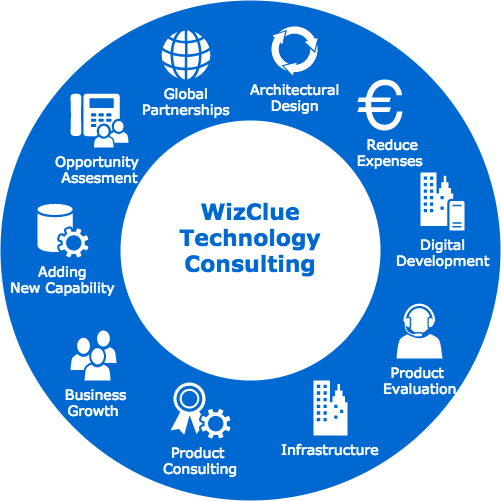
Technology is a massive part of any business. If you’re not using the latest and greatest technology, you’re falling behind your competition. That’s where business technology consulting comes in.
A good business technology consultant can help you grow your business by implementing the right tech solutions for your company. In this blog post, we will discuss some of the benefits of business technology consulting and how to find the right consultant for your needs.
What is Business Technology Consulting?
Business technology consulting is the process of assessing a company’s current technology needs and providing solutions to help them grow. This can include anything from implementing new software to upgrading hardware.
A good business technology consultant will have a deep understanding of how technology can be used to improve businesses. They will also be up-to-date on the latest trends and developments in the tech world. This allows them to provide their clients with the best possible solutions for their needs.
Benefits of Business Technology Consulting for Organisations
There is a number of reasons why you might want to use business technology consulting. Perhaps you’re looking to improve your customer service or streamline your operations. Maybe you want to reduce your costs or increase your sales.
Whatever your goals, a business technology consultant can help you achieve them.
There are several advantages that enterprises can enjoy by working with a business technology consultant. Here are just a few:
Improve Efficiency And Productivity
The objective of any enterprise is to make money. Availing Business Technology Consulting service can help you find ways to increase your output while reducing your costs.
This will give you more resources for other parts of your business, including marketing, customer service, and new product development. Moreover, it will also help you free up time for your employees, so they can focus on more important tasks.
2. Boost Customer Satisfaction
If you want to keep your customers happy, you need to give them what they want. Business technology consulting can help you find ways to use technology to improve your customer service.
This might include implementing a new customer relationship management (CRM) system or using data analytics to better understand your customer base. By making your customers happy, you’ll also improve your chances of retaining them in the long run.
3. Grow Revenue And Market Share
The foremost goal of any business is to make money. Business technology consulting can help you find ways to increase your revenue and market share.
This might include developing a new e-commerce platform or expanding your social media presence. By finding new ways to reach and sell to your customers, you’ll be able to grow your business sustainably.
4. Keep You Up With Industry Trends
You may have a great business idea, but if you don’t stay on top of your industry changes, you could fall behind. A good business technology consultant can help you stay on top of changes in your field and find new ways to bring in more customers.
They can even provide valuable insight into how tech will impact your business in the coming years so that you’re prepared for what’s next.
5. Ensure Compliance With Regulations
Most corporations are required by law to keep certain records. A business technology consultant can ensure that your company is compliant with federal, state, and local laws regarding record keeping and data privacy.
This is especially crucial for healthcare providers, which are subject to strict HIPAA regulations regarding patient information.
6. Expand Operations Without Adding Employees
Working with the best tech consulting firms doesn’t mean hiring more staff members; it means bringing in an expert who has already built relationships within your industry or area of expertise.
For example, if you run an accounting corporation and want to expand into offering payroll services as well, it would be much easier to do so by partnering with an existing payroll service provider than trying to build those relationships yourself from scratch.
How To Choose The Right Technology Consulting Firm?
The business technology consulting market is a tough one to navigate. As your organization starts looking for a business technology consultant, you’ll quickly find that there is an abundance of providers in various forms.
These providers offer varying levels of experience and expertise, but how do you make sure that you’re working with someone who can really add value? And how do you know that they won’t simply empty your pockets?
Here are a few crucial things that you should keep on a note while choosing the right business technology consulting firm for your business:
Assess The Firm’s Technical Expertise
You should first assess whether or not a business technology consulting firm has relevant technical expertise for your project. This can be accomplished by checking out their previous work, portfolio, and client list.
It will help if you ask about their experience with similar projects in terms of scale, size, and complexity. If you don’t get adequate answers to these questions, you might want to consider working with another provider.
Concentrate On Clients Who Are Similar To Your Organisation
When choosing the right technology consulting Firm, you must concentrate on clients similar to your organization in terms of size and industry vertical.
The reason behind it is that they have already worked with clients like yours before and they will be able to understand your requirements better than others. It also helps them determine a practical solution for your problem.
If They’re Too Cheap, They Might Not Be Good Enough
You should also make sure that they aren’t too cheap as there might be some hidden costs or risks involved in their proposal. If their price seems too good to be true, there might be something wrong with it. So you need to make sure that you get a firm quote from them before you sign any agreement.
Ask For References And Testimonials
Another important thing you should do is ask for references and testimonials from previous clients similar to your organization. This will help you get an idea about how well they work with other organizations like yours and whether or not they can deliver on their promises.
Check Out Their Professionalism
Another thing that you require to keep in mind while choosing a business technology consulting firm is their professionalism. Do they respond quickly? Are they organized? Do they seem like a trustworthy company?
These are all things that can give you an idea about how professional consulting companies in India are. If you don’t get satisfactory answers to these questions, it might be time for you to look for another provider.
Do They Have Experience Working With Your Industry Vertical
It is also crucial that you check out whether or not a business technology consulting firm has experience working with your industry vertical before finalizing them as your service provider.
If they have worked with similar customers before, it will help them understand your requirements better and deliver on their promises more effectively. So make sure that they have relevant experience before signing any agreement with them.
Conclusion
Business technology consulting is a great way to help companies grow and succeed. The greatest part about business technology consulting is that you’re not restricted to one industry or type of company.
From large corporations to small businesses, it doesn’t matter what your niche is — you can find success in any area. In fact, it’s fair to say that one of these companies may eventually hire you as their own permanent consultant or employee after they see how much you can help improve their operations and bottom line!
Moreover, to get the best business technology to consult at your desk, get connected with one of the best consulting companies in India. This will help you get the best resources and services related to business technology at an affordable price.
According to Statista, 3 billion people rely on phone-based messaging apps to connect and communicate with one another. Surveys also confirm that WhatsApp Leads The Global Smartphone Messenger Wars With 44 Percent Market Share ( 1mtb).
Put these two statistics together and it is evident that WhatsApp as a business communication channel is going to reap dividends for businesses. Until recently, email, phone, website, live chat, and social media messengers have been the primary means of communicating with customers. The introduction of WhatsApp bots into the mix provides a simple, direct, and real-time means of communication.
What is a WhatsApp Bot?
A WhatsApp chatbot is an automated system that can converse with customers through WhatsApp. The WhatsApp number would be your business number. The chatbot can provide quick replies, take customer queries, offer canned responses or customer account information. The chatbot functions based on the user’s input provided through phrases or keypad presses programmed in its backend.
How to create a WhatsApp Bot for your business in 2022?
Companies can create WhatsApp bots for customer service and notification delivery using the WhatsApp Business API. So in this article, I will show you exactly how to create a WhatsApp bot and tell you everything you need to deploy it on WhatsApp using Kommunicate and Twilio.
Before you can introduce an official WhatsApp chatbot to your audience, you must need a Twilio account to set up your WhatsApp business API and a Kommunicate account to deploy the chatbot to your WhatsApp and manage customer conversations. Both of these platforms have free trials.
Step 1: Building a chatbot
Kommunicate provides a bot builder tool called Kompose, where you don’t need to write a single line of code. You can create AI-powered chatbots, deploy them to your website and apps, and even add automated human takeovers if they fail. Please refer to this article for detailed instructions on how to build a chatbot.
Kommunicate also lets you integrate with other third-party bot builder platforms such as Dialogflow, Amazon lex, IBM Watson, and custom bots.
First, you need to login into your Kommunicate dashboard. If you do not have a Kommunicate account, you can sign up for free.
🚀 Bonus: If you want a pre-built chatbot? Here’s where to find a bunch of them!
Step 2: Configuring Whatsapp
Here, we use Twilio for WhatsApp integration, and You must complete the Twilio sign-up process before starting the integration with Kommunicate. Please sign up to Twilio here if not already registered.
Request access to enable your Twilio numbers for WhatsApp
To do the integration on Kommunicate, one needs to have the WhatsApp number that Twilio provides. To get a WhatsApp number, fill out Twilio’s Request Access form with accurate and up-to-date information, including the Facebook Business Manager ID. Please refer to Twilio’s documentation for more information
Submit a WhatsApp Sender request in the Twilio console
Once you fill the Request Access form and submit it, you will receive the Twilio pre-approval email. Check out this referral link for the same information.
Then, in the Facebook Business Manager console, allow Twilio to send a message on your behalf. Also, submit your Facebook Business Manager account for Business Verification.
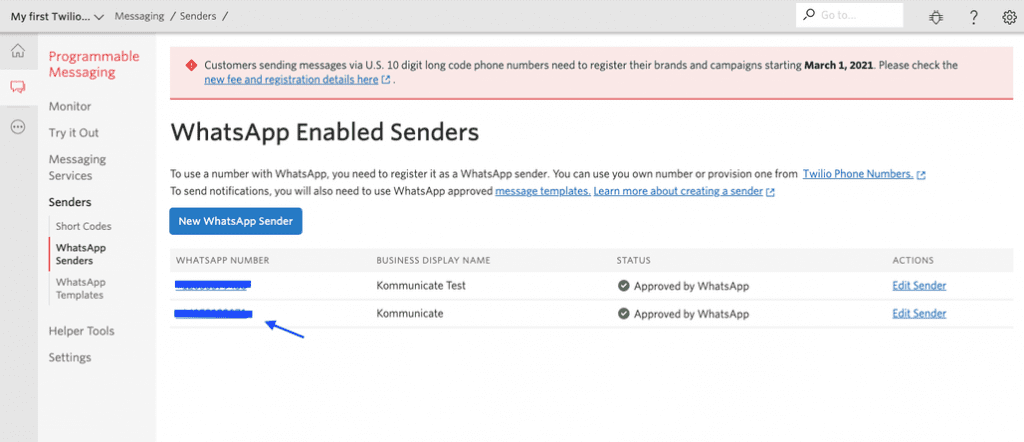
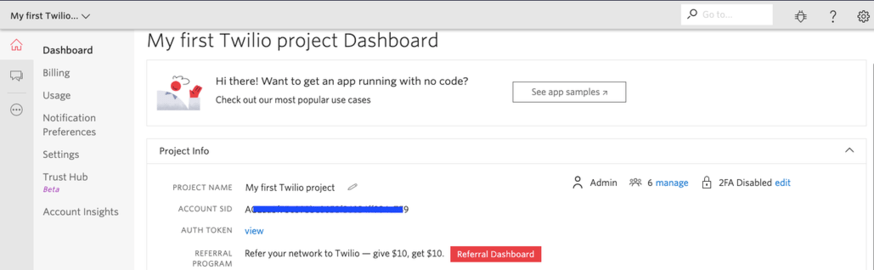
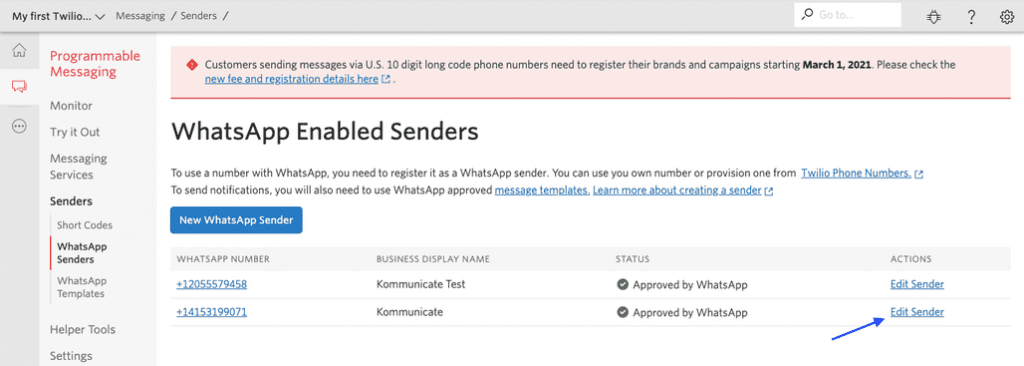
Note: Once you complete all the above steps, you will get the Whatsapp number to add it in the Kommunicate integration section. You can find the Whatsapp-enabled number in Whatsapp enabled senders section of the Twilio console. Refer to the following screenshot for more details.
Step 3: Integrating WhatsApp with Kommunicate
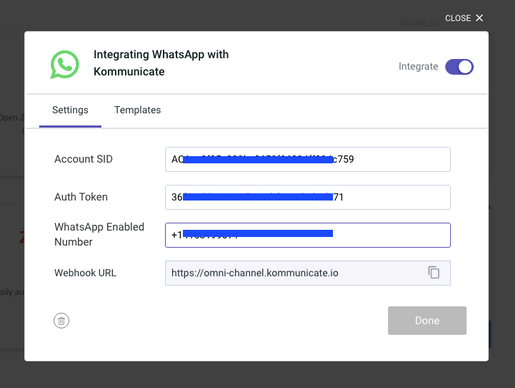
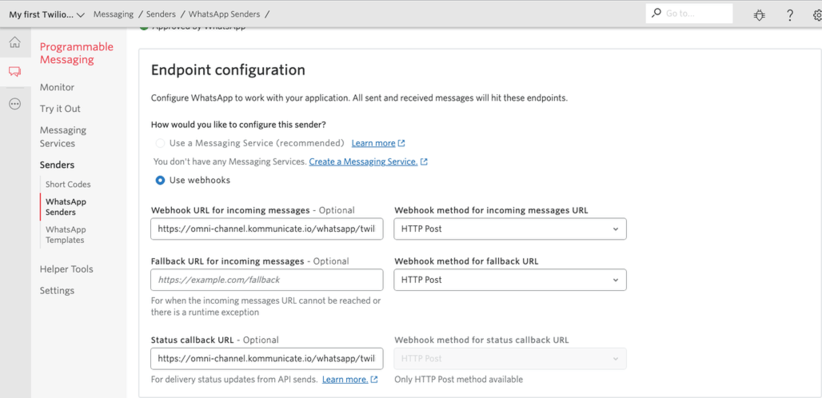
The following instructions will help you connect Kommunicate with Twilio and thus with WhatsApp.
Final Step: Test your WhatsApp Bot
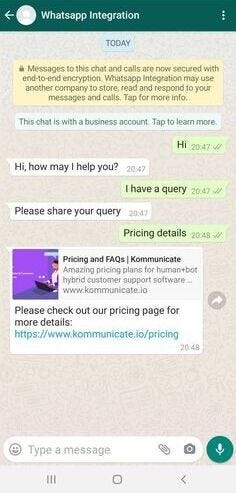
Now Kommunicate is successfully integrated with the WhatsApp account, try sending messages to the number linked to the account. These messages will be sent to Kommunicate chat as well. If the chatbot is already integrated, the bot will start replying to your WhatsApp chat queries.
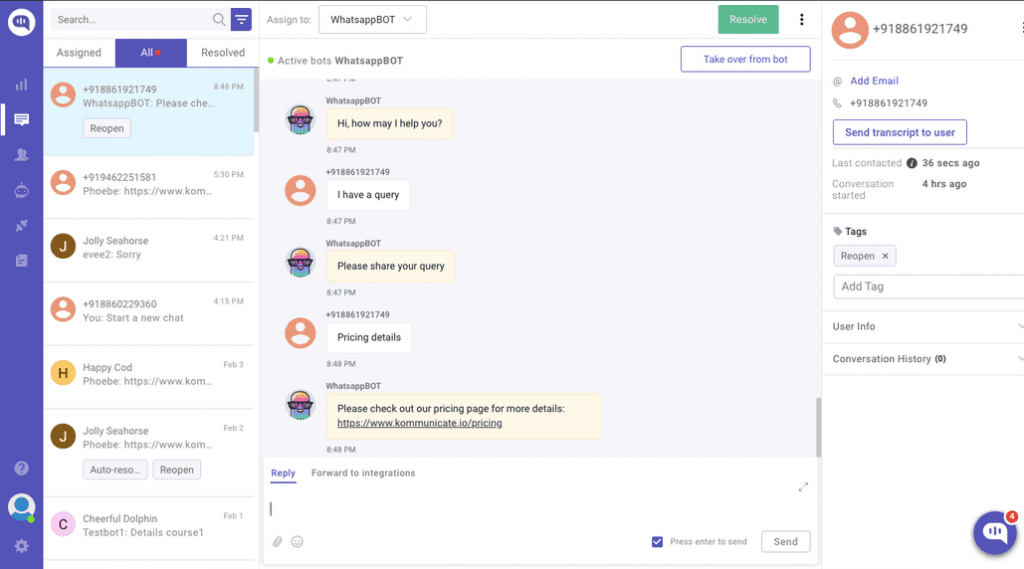
This is how the conversations will look like in the Kommunicate dashboard.
Limitations
You can only send and receive specific media files. See more info here.
If more than 24 hours have passed since the last user message, only template messages will be allowed.
WhatsApp does not support rich message responses from the bot, so they will not be received by the end-user.
Why WhatsApp chatbots have become popular amidst businesses.
A human agent cannot handle your business communication 24/7/365. But, a WhatsApp bot can. It can provide canned responses — template-based responses to questions that are repetitive in nature or are frequently asked by customers.
For prospects who want quick information about the business and its offerings, WhatsApp bots offer product and service catalogues. Catalogues are a handy way of presenting information using images, video links, long-form text descriptions along with price details. This helps the prospect make a quick choice and proceed to make a buying decision
WhatsApp is an app that users rely on for their personal communication on a daily basis. Businesses can join this app bandwagon to communicate with customers without requiring them to install another app. This creates a win-win situation for both sides.
Versatility. This is the prime reason why WhatsApp is considered to be superior to most chat apps and video conferencing apps. Customers can send texts, get on a voice call for detailed discussion, or even initiate a video call to discuss the product working in detail.
Differences between WhatsApp messenger, WhatsApp for Business and WhatsApp API
WhatsApp Messenger is meant for private use. It is best suited for individual conversations, group messaging, and real-time communication. However, WhatsApp for business and WhatsApp API go beyond these features and enable businesses to develop state-of-the-art communication features that are built on the WhatsApp platform. It is akin to using the simplicity of WhatsApp to build a more robust and powerful real-time communication tool.
Among the three, WhatsApp messenger offers the least enterprise-grade features. As we go up the scale, WhatsApp for business and WhatsApp API provide more features that will empower businesses to drive customer communication at scale. In the process, they also open up countless use cases for marketing, sales, and customer service.
The table below lists down how WhatsApp Messenger is used by users, WhatsApp for Businesses used by businesses, and WhatsApp API for building WhatsApp Chatbots differ from each other.
5 Reasons why you would choose Kommunicate to build a WhatsApp bot
Kommunicate’s no-code Chatbot builder: Using Kommunicate’s Kompose chatbot builder, anyone can build a chatbot in a matter of a few clicks and then train the bot to give answers to simple queries.
Create a WhatsApp bot in a matter of minutes: Kommunicate lets you build a WhatsApp bot in 3 simple steps and then integrate it to WhatsApp business in just 5 minutes, all using methods that can be easily followed.
Easy interactions: Kommunicate lets you interact with your customers who are reaching out to you via WhatsApp easily via the Kommunicate dashboard. This dashboard is interactive and gives you all the vital details at your fingertips.
All your conversations in one place: The Kommunicate Dashboard also lets you access all your current and previous conversations with a particular customer in an easy to digest format, meaning you are well informed all the time.
Transparent pricing: No hidden costs, no charging for add ons that you didn’t order. With Kommunicate, the pricing is always clear and we make sure you get what you pay for.
Imagine owning a business website and having to respond to all your visitors’ queries all day, every day. Sounds cumbersome, doesn’t it?
Well, rather than hiring a team of responders, why not take the technologically-advanced way and opt for a chatbot? You must have certainly seen one while browsing online, so you are well aware of the benefits that come with its integration.
In simple terminology, a chatbot is an AI software that can help build a conversation in a natural flow of language with your website’s users through chatting or voice commands.
But there’s much more to it. We shall dive into the basic functionalities of chatbots and understand why you should prefer them for your WordPress website.
History and Evolution of ChatBots
Thechatbot marketis estimated to reach $77.6 billion in 2022, a big jump from $24 billion in 2018.
But where did it all start?
The world’s first chatterbot (now known as a chatbot) is considered to be ELIZA. Joseph Weizenbaum developed it at the Massachusetts Institute of Technology (MIT). ELIZA would operate by recognizing the keywords and responding appropriately from its pre-programmed set of options.
Technology has come a long way since the introduction of the first chatbot.
Apart from Artificial Intelligence, several other technologies have helped with chatbot evolution, like Natural Language Processing (NLP), Voice-Activation Technology, Interoperability, etc.
NLP allows the chatbots to respond accurately by picking up the data provided by the users. It helps develop emotional intelligence that gives a human touch to the responses.
Voice-activation technology interacts with your users with pre-recorded voice responses. This hands-free option comes off as convenient as well as more engaging.
Interoperability is nothing less than a complete tech-savvy engagement. It allows the users to engage two different chatbots to get their work done. For example, browsing products on a chatbot on Facebook and then asking Alexa to order the same for you.
Tasks of a Chatbot
The following are the two crucial tasks of a chatbot:
1. Analysis of the User’s Request
The chatbot analyzes the information given by the user in the form of a question or query and extracts the relevant data. Unless and until the chat understands the user’s intent, it shall not be able to provide an appropriate response.
2. Responding As Per the Request
Once the user’s intent is identified, the chatbot provides the response in the form of a text or options of answers.
In case the chatbot has been unable to understand your query, it will provide a follow-up question.
Have a look at the following benefits of adding a chatbot to your WordPress website and decide for yourself:
1. Seamless Live Communication
In a world where you can Google any query and get your answer within 0.10 seconds, would your user wait around all day for a response? Definitely not.
This makes speed and seamless live conversation one of the fortes of chatbots.
According to a survey by Userlike, 68% of the participants were pleased that the chatbots responded quickly. This replicates a human-like conversation and fastens the process of providing the relevant information to the user before they run out of patience and leave your website.
Integrating a chatbot into your WordPress website can help engage with your users, analyze their queries, and respond with proper answers, thereby guaranteeing maximum customer satisfaction. In this way, you can cater to the customers living in different time zones without losing out on any potential customers.
2. Faster Qualifying and Prioritizing New Leads
Let your sales team focus on other priority tasks and leave the task of qualifying leads to chatbots.
Chatbots can present a few pre-prepared sets of questions to the users of your WordPress website. On the basis of the responses, the chatbots can segregate the leads into potential customers.
This will make it easier for your sales team to only focus on the qualitative leads rather than just fleeting users.
The prioritized leads could be prompted to schedule a meeting with your team by your chatbot. At the same time, the other leads could be redirected to a form or another page of your WordPress website.
It is not advisable to add all the relevant information to your website’s home page since it will make everything look cramped up. At the same time, it is necessary to help your users in reaching the varying pages of your website to access your videos, blogs, tutorials, etc. A chatbot can fulfill this tedious job.
You can program a chatbot to direct the users of your WordPress website to the relevant resources as per their queries.
For example, if a user asks a question about the quality of a particular product, it can redirect them to the blog of the said product.
Or, you can redirect the users to the website’s contact page if they ask for your address or email.
4. Personalized Customer Journey
Store assistants make it easier for you to decide because they first understand your style and then present the relevant options.
The same personalized journeycan be experienced by adding chatbots to your WordPress website.
Out of all the types of websites, such a personalized customer journey is a prerequisite in eCommerce websites. If we go by the numbers, chatbots are said to increase the revenue by 7–25%by understanding the customers’ needs and previously abandoned carts.
A chatbot can start the conversation by greeting the visitor and carrying forward the conversation by asking relevant questions. By collecting the information in the directory, the chatbot can recognize the user and present the pertinent products or services to the users as per their past purchases or cart details.
5. Build Trust with Customers
The chatbots integrated into your WordPress websites are not a salesperson, and they shouldn’t be programmed in that way.
Instead, a chatbot can help build trust by greeting the users, providing personalized and human-like responses, and solving the users’ queries.
Quick responses, providing the necessary updates, friendly tone, quick scheduling of meetings, etc., can build trust in your company, something that will help you retain customers in the long run.
6. Saves Time and Money
According to research, Chatbots are said to save approximately 2.5 billion hours by 2023. That’s a significant amount of time that can be spent elsewhere, in other productive ways.
Since chatbots work 24/7 to gain the necessary information and data from your visitors and help them with their queries, you can direct your human resources to do other tasks. Moreover, you need not worry about chatbots going on unlimited breaks, thereby saving the company time and money.
Since a chatbot can undertake several tasks like qualifying the leads and scheduling meetings, you need not hire personnel for the same. Therefore, investing in a chatbot for your WordPress website turns out to be a cost and time-effective investment.
Conclusion
Adding chatbots to your WordPress website is beneficial, but is it easy? Yes, you can add a free chatbot to your website through the plugin options. But before that, you will need a strong WordPress website, something that will replicate the persona of your company and brand.
You can do so by hiring the best WordPress developersfrom Creole Studios. Our skilled WordPress developers are specifically chosen to provide qualitative and optimized solutions.
Don’t wait any longer to start your dream WordPress website. Contact ustoday, and let your WordPress website stand out in a lot of hundreds!
Eventually, every IT project has the same or rather similar goals:
Simplify workflows
Save time
Reduce costs
Increase revenue
Chatbot testing is not any different. In this article, we highlight the main business reasons that make automated chatbot testing with Botium an essential and unmissable part of every chatbot project.
Leverage Chatbots for positive user experience
No matter what area the chatbot operates in, its main job is to connect and to communicate with people. In most cases these people are customers. The equation of success is actually the same for chatbots as for conventional customer lines: fast and efficient service. Although the technological advancements behind conversational AI are promising, the user experience is still lacking!
Chatbots fail, and even the kindest, or funniest fall-back intent (when the agent doesn’t recognize the end-user expression) can’t save you if the user receives the “sorry, i didn’t understand” message for the third time.
Since ensuring the joy of owning and using a chatbot means covering all requests, businesses account for factors like pleasure, elegance, personality and even fun while designing chatbots. Of course these soft-touches can really place the cherry on top, but in most cases the functionality of the chatbot is deficient.
It won’t be much of a help, if your chatbot “speaks” posh British if the server is down and can not be reached, or it can not handle user requests anymore due to the high load. Start with the basics and then level them up and figure out how they can assist the user through the whole process.
Build positive reputation with a chatbot
While chatbots can help manage your business, they can also be a key tool to maintain and nurture your reputation.
As you might know, customers do not “judge” your company solely based on how you perform in your core activity. Trust is transferable. It is a common assumption to think that the quality of your work in one area will be reflected in others.
Who would want to travel with an airline that needs to maintain hundreds of airbuses a year, but can’t develop a well-functioning chatbot?
As long as consumers feel their expectations have been met, they are likely to return as a customer.
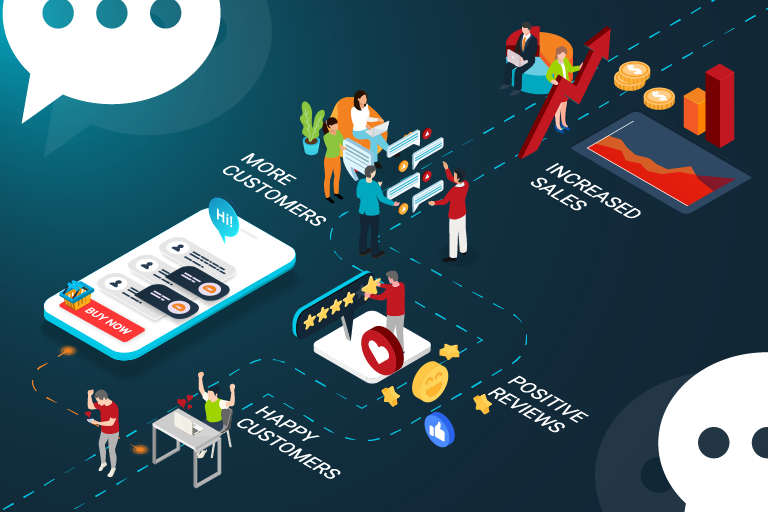
Clear conclusion: happy customers leave positive reviews, which in turn, leads to more customers and ultimately increased sales.
It’s clear that a strong online reputation is crucial to obtain, but it can take years to build and only a few minutes to break.
Increase your competitive advantage with a chatbot
Having a website in 1994, when they started to become available for the general public, was considered something extremely cool and rare to have. Today (regardless of the activity), even the smallest companies can not survive without a transparent website.
Chatbots will go through the same evolution, but with a faster pace. While a couple of years ago, placing a virtual assistant on your landing page or social media was a big step, today they are must-haves. The increasing number of chatbots on the market has moved the competition from the product to the quality level. The question is no longer whether you have a chatbot, but what kind of a chatbot you have.
Maximize ROI in your chatbot project
Chatbots fail. It’s a known issue, but there are not enough actions to avoid it. If we take a look at the global market, only 3% of the big companies that own a chatbot (and could easily afford QA) have automated testing in place for their conversational AI. The other 97% are wasting enormous manpower on manual testing, or don’t even pay attention to quality assurance. However, with this attitude, the primary purpose of chatbot development becomes meaningless. The chatbot can not complete the task in hand and returns the request to the human agent as it would have been without the chatbot anyway. The only difference between the two scenarios is the millions of dollars spent on chatbot development.
Management usually gives priority to IT projects that have revenue growth potential over those that focus mainly on cost savings. Chatbot testing actually falls into both categories, yet it still hasn’t fought its well deserved position in the development cycle of most businesses.
Exactly how much money can we save with automated chatbot testing?
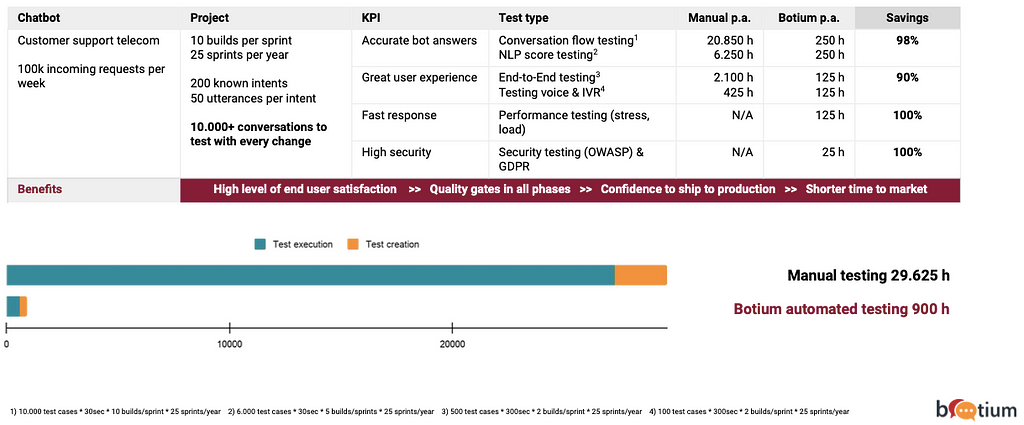
The following figure shows how the working hours are distributed for manual and Botium automated testing when developing and monitoring an average Telecom customer chatbot.
The outcome in terms of time saved is not less than 28.725 hours a year!
Of course, this is an estimation, since the processes and workflows are different in every business, but the proportions are speaking for themselves. With this information, it is easy to calculate the money that could be saved if you are aware of the average hourly wage of engineers.
According to a recent World Economic Forum report, robots, automation, and artificial intelligence could replace 85 million jobs globally by 2025. However, it will also create 97 million new jobs in the future.
Undoubtedly, new phenomena always provoke great enthusiasm, but the general experience is that they do not become exclusive, but are integrated into existing systems and gain space there.
With the advent of Conversational AI, customer service employers can become valuable members of the chatbot development team as business analysts, conversation designers, or test set writers. Breaking out of monotony can greatly increase productivity and the feeling of motivation.
Conclusion
The common perception that customer-service bots are generally less helpful than human representatives can result from the lack of quality assurance. It’s time to put the question on the table: is the money actually saved, that we did not spend on quality assurance, or just had to invest it in something else, such as reputation management after a failed bot. When will our sloppiness backfire and how much will it cost?
Quality is the red ribbon that differentiates us from the competition, leads to customer loyalty and revenue growth. Investing in chatbot testing is letting your customers know that you care about them, their priorities and safety. In addition when quality is a priority for a company, it also sets the tone for the employees. A work culture focused on meeting certain standards is good for everyone!
Chatbots are software tools created to interact with humans through chat. The first chatbots were able to create simple conversations based on a complex system of rules. Using Python and Dialogflow frameworks, you would be able to build intelligent chatbots.
In this post, we will learn how to add a Dialogflow chatbot to Python frameworks such as Flask or Django.
Pre-requisites:
You will need a Dialogflow account, and a Kommunicate account for deploying the chatbot. Also, you will need Python and Flask frameworks installed on your system. To need more info about the Flask framework, please refer to this link.
We will be using Flask in this tutorial. If you are looking to add Dialogflow chatbot to the Django framework, you can see this tutorial.
Steps to Add Dialogflow Chatbot to Python Frameworks
Create an agent
Login to the Dialogflow console. An agent is just a chatbot. You can train the agent with training phrases and corresponding responses to handle expected conversation scenarios with your end-users.
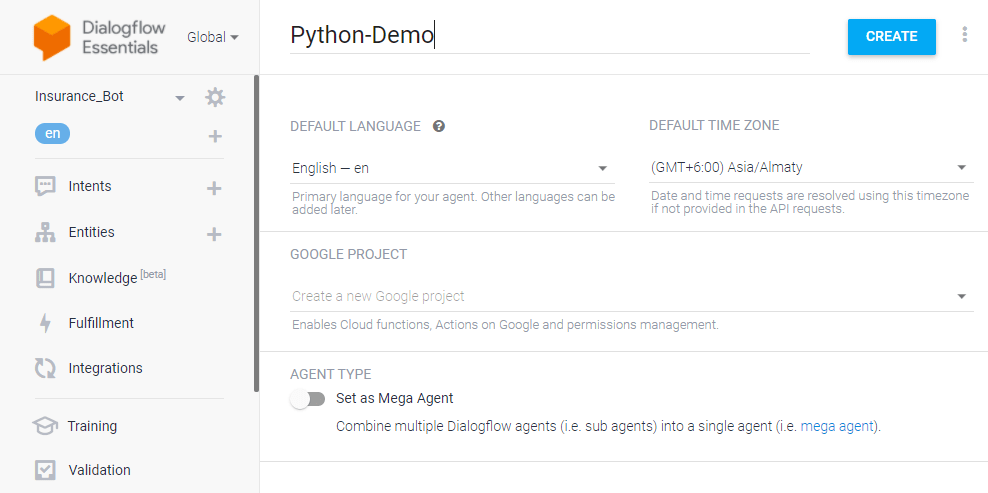
Click the dropdown near the Agent settings, then click Create new agent, provide an agent name (For example — Python-Demo), then click CREATE.
Create an intent
An intent categorizes end-users intention for one conversation turn. For each agent, you can define many intents. When an end-user writes or says something, referred to as an end-user expression, Dialogflow matches the end-user expression to the best intent in your agent.
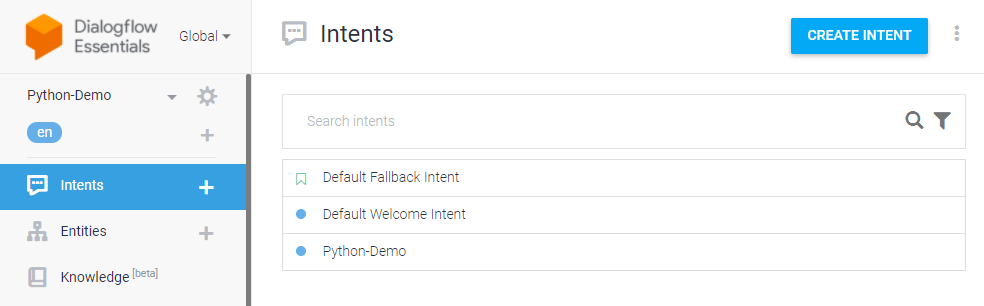
Click the CREATE INTENT button and provide an intent name (for example, python-demo) and save.
Add training phrases
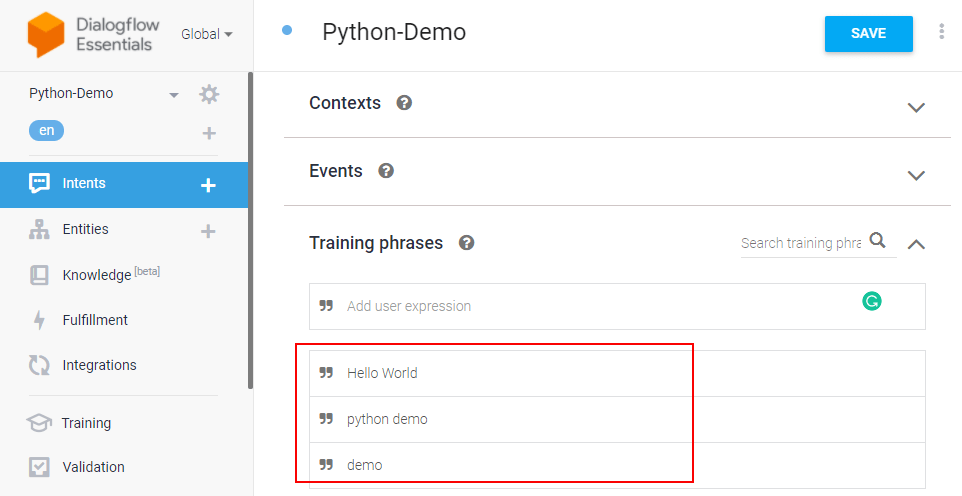
These are example phrases for what end-users might say. When an end-user expression resembles one of these phrases, Dialogflow matches the intent.
Click the intent created (python-demo) and add the user phrases in the Training phrases section.
🚀 Here’s a video for you on creating a Dialogflow chatbot and learning more about agents, intents, and entities:
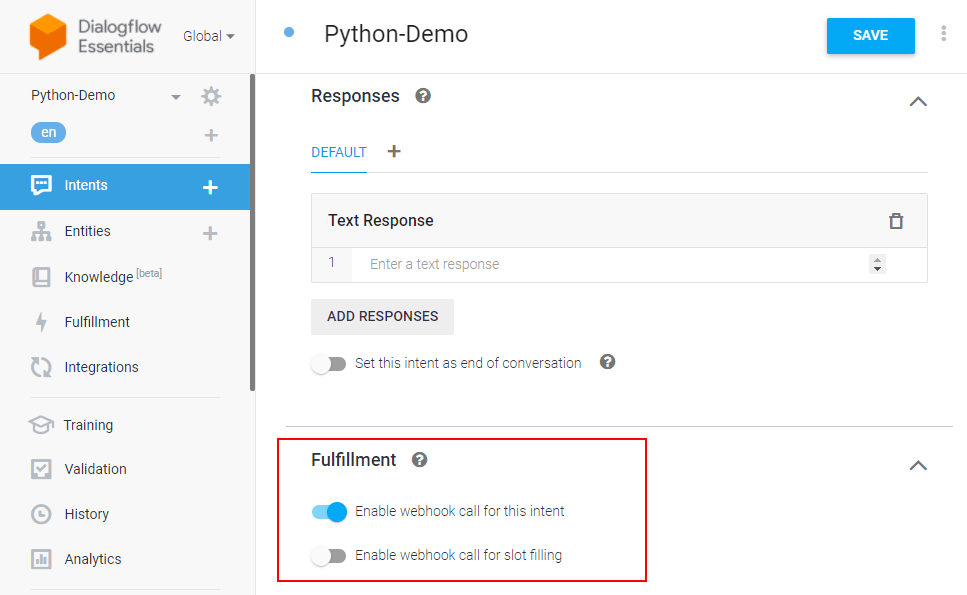
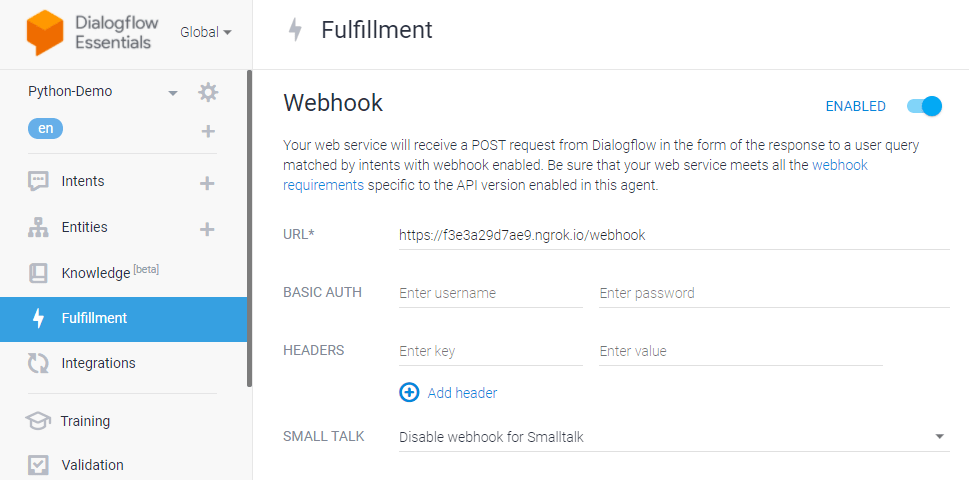
After adding an intent, you don’t need to add agent responses in the Responses section. Since we are using Flask for the same, you need to enable webhook for this intent. The webhook will help us transfer data and responses between Dialogflow and Flask. Dialogflow provides webhook services via Dialogflow Fulfillment.
Fulfillment is a code deployed through a web service to provide data to a user. You can enable webhook calls for all those intent that required some backend processing, database query, or third-party API integration.
Under the Fulfillment section, click Enable webhook for this intent and save the intent.
Dialogflow fulfillment has two options — Webhook and Inline Editor. The inline editor is also a webhook but hosted by Google cloud functions. We are going to use the webhook.
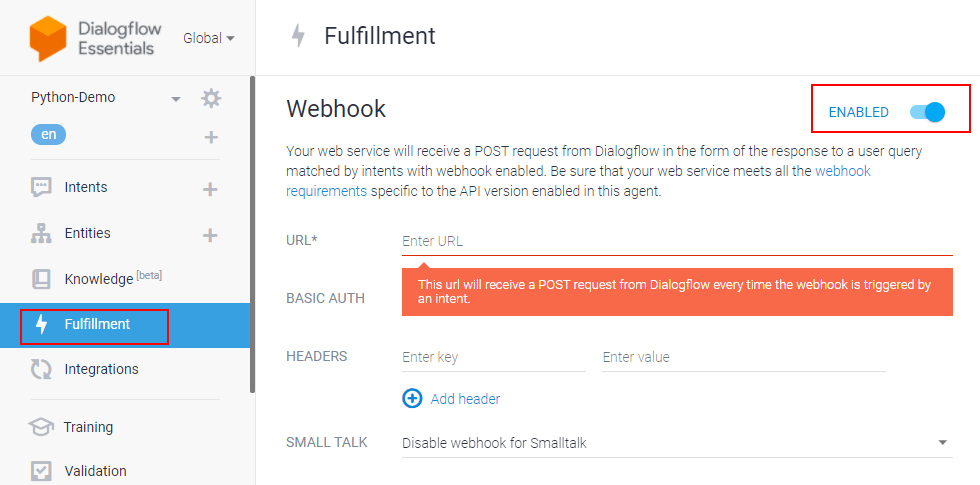
Go to the “Fulfillment” section & enable Webhook.
Using Python with Flask & enable the webhook server
The webhook requires a URL, and it should be an HTTPS protocol. The webhook URL will receive a POST request from Dialogflow every time an intent triggers the webhook.
We are using Python programming language and Flask framework to create the webhook.
Create a file (for example — app.py). Import all the necessary libraries (ex: os, JSON, send_from_directory, request) needed for Python. Please check if you have Flask on your system. If not, install it using pip, and here’s the documentation for the same.
import flask
import json
import os
from flask import send_from_directory, request
To handle all the agent webhook requests, we need to define and add a route/webhook method with a POST request. A POST request will be sent to this URL /webhook. It executes all the methods inside the method.
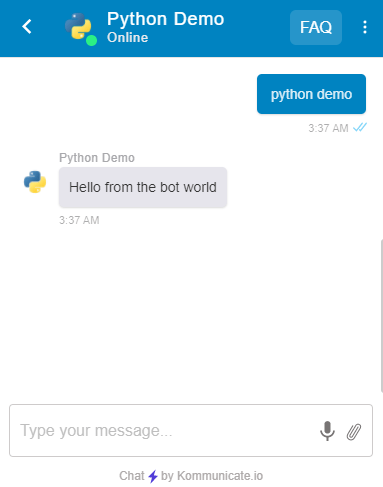
Also, a fulfillment text is added to return that when it triggers the training phrase from Dialogflow.
If you need to add more conditions & responses, you can define them inside the webhook method.
# Flask app should start in global layout app = flask.Flask(__name__) @app.route('/favicon.ico') def favicon(): return send_from_directory(os.path.join(app.root_path, 'static'), 'favicon.ico', mimetype='image/favicon.png') @app.route('/') @app.route('/home') def home(): return "Hello World" @app.route('/webhook', methods=['POST']) def webhook(): req = request.get_json(force=True) print(req) return { 'fulfillmentText': 'Hello from the bot world' } if __name__ == "__main__": app.secret_key = 'ItIsASecret' app.debug = True app.run()
After setting up the Python process, let’s use Ngrok to create a public URL for the webhook and listen to port 3000 (in this example). For Dialogflow fulfilment, you will need an HTTPS secured server since the local server (localhost) will not work. You can also use a server and point a domain with HTTPS to that server.
How easy was that? In a few simple steps, you can add a Dialogflow chatbot to your Python frameworks. Do try this out and let us know in the comments. We would love to try your chatbot out.
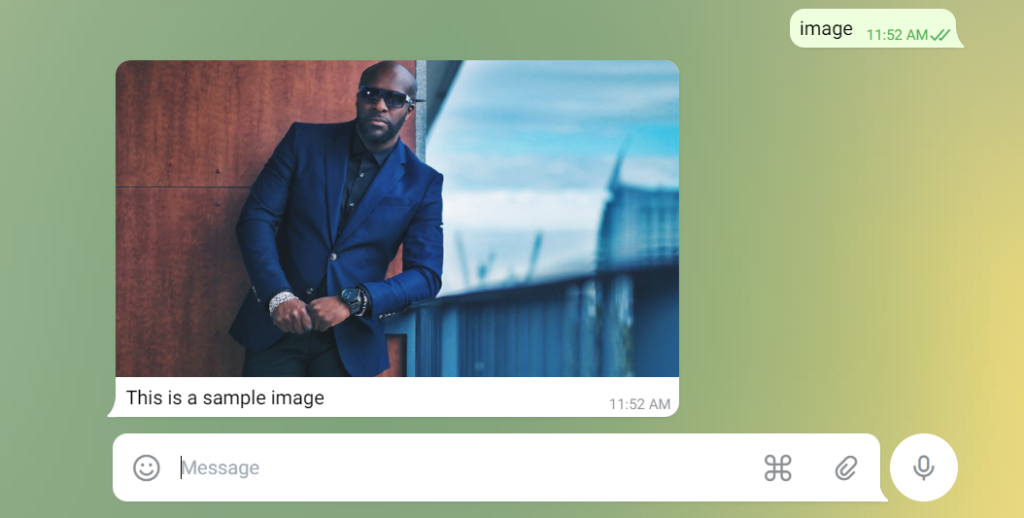
For engaging conversations, the automated chatbot is really beneficial. On platforms such as Facebook, Google, and others, we can develop chatbots. In this tutorial, we will learn about how we can create a Telegram chatbot and use it to prepare text messages with rich responses.
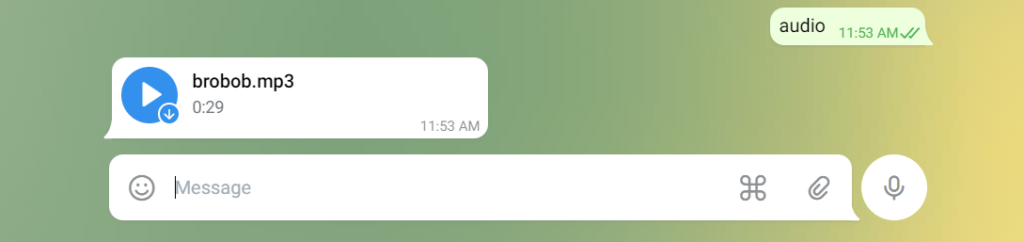
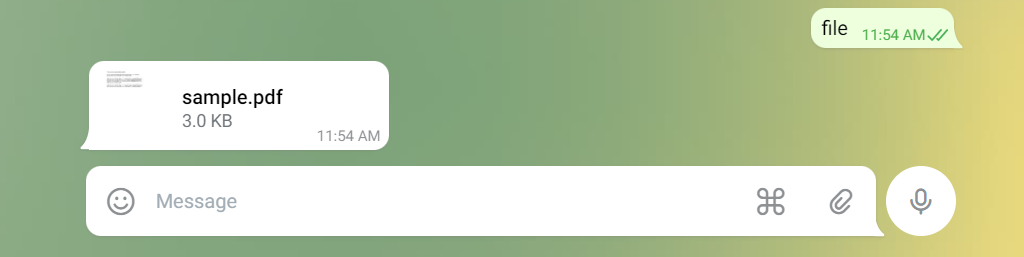
Here we learn how we can get different types of responses from the bot such as:
Text
Image
Video
Document
Audio
Poll
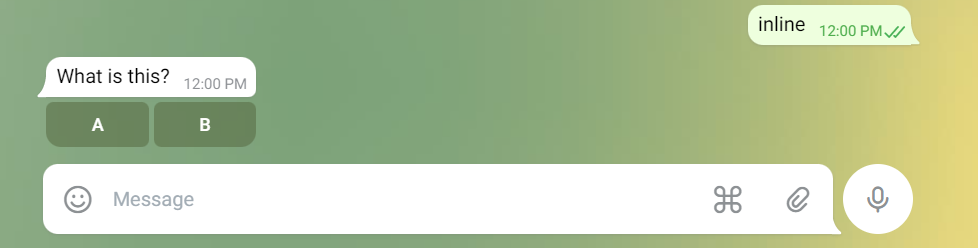
Quick reply Buttons
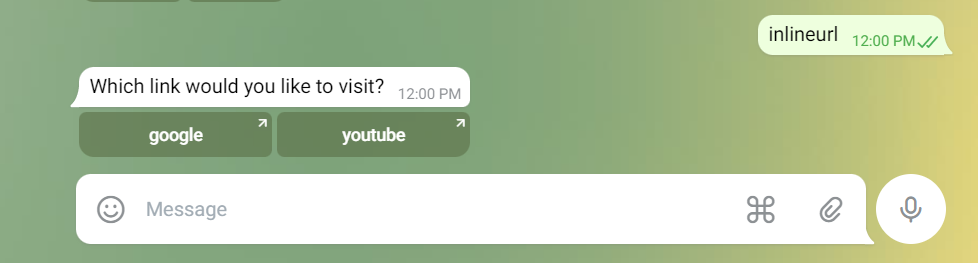
Buttons with the links
Steps to create a Telegram Bot
Follow the below instructions to make a Telegram chatbot.
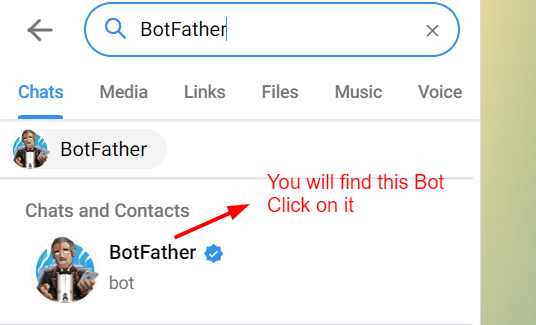
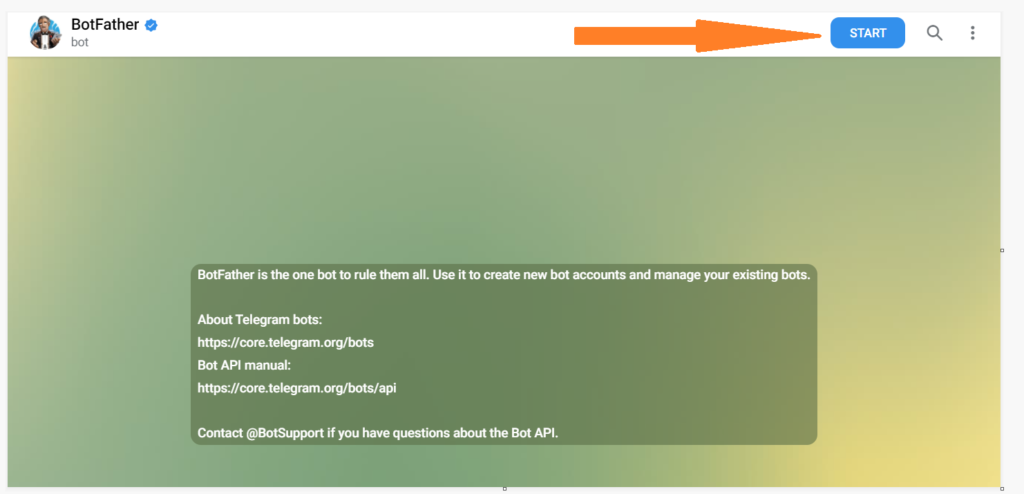
Step 1: Open your telegram account and in the search bar type “BotFather”.
Step 2: Click on the “BotFather” and Click on the “Start” button.
Step 3: Type “/newbot”.
Step 4: Type your unique bot name.
Step 5: Now type a unique username for your bot.
Remember: username must end in ‘bot’. E.g. ‘Tetris_bot’ or ‘Tetrisbot’.
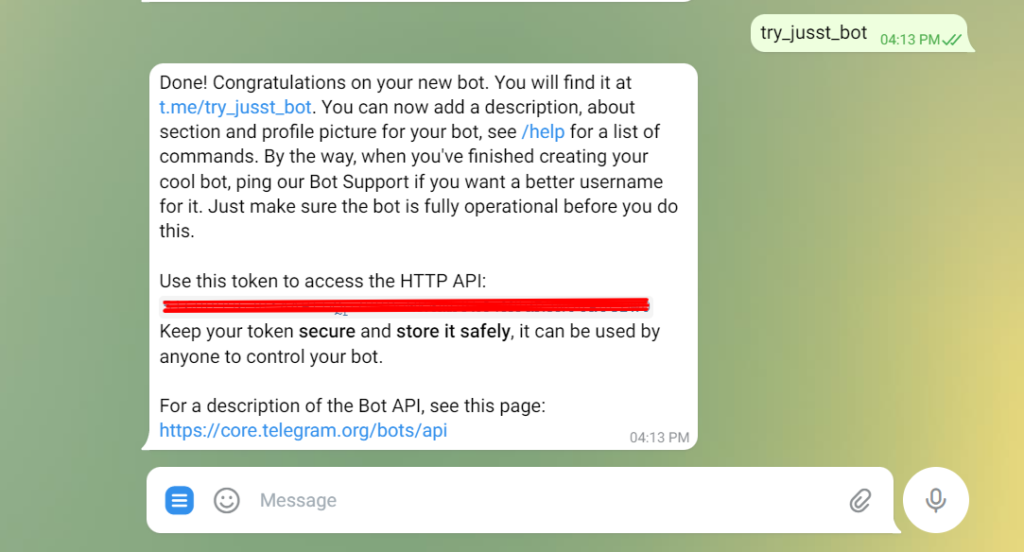
Step 6: After giving a unique username you will get a message like the below. it contains a token to access the HTTP API. Keep your token secure and store it safely.
Step 7: Creating a flask app for the webhook response.
First of all, you will need to install python and flask on your computer.
Run this code to check whether the flask app is running correctly or not. When you run the code you will get the link for the server like “ http://127.0.0.1:5000/ “ click on that link you will be redirected to the webpage where you will see the response “Welcome!”
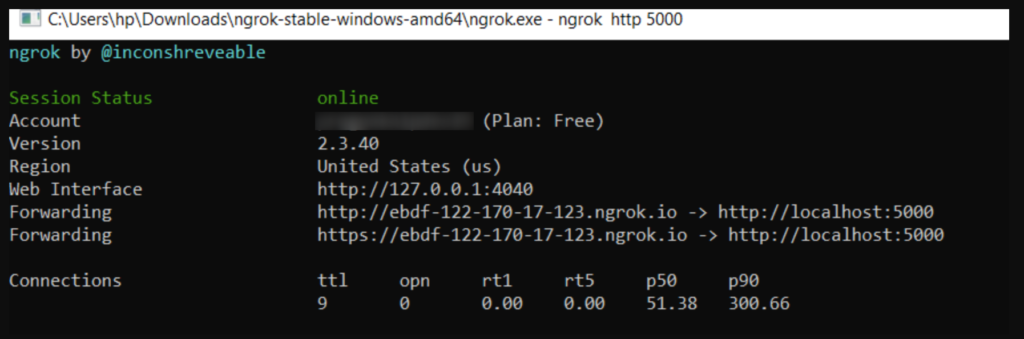
Go to the Ngrok and type the command “ngrok http 5000” after running this command you will get the links.
From that Ngrok links copy the HTTPS link and paste it to your browser. You will see the response “Welcome!” same as the previous step.
Step 9: Setup webhook.
Now you will need to set the webhook for the telegram bot.
You can do it by running the link in your browser.
https://api.telegram.org/bot<Your Bot Token>/setWebhook?url=<URL that you got from Ngrok>
After running the link in your web browser you will get the response shown in the bellow image.
Step 10: Get JSON response.
Now we will need to get the JSON response from the telegram bot for any text that we write to the bot.
Now open VS Code and add the following code and run it on the same Ngrok link on which you had run the previous code.
from flask import Flask
from flask import request
from flask import Response
import requests
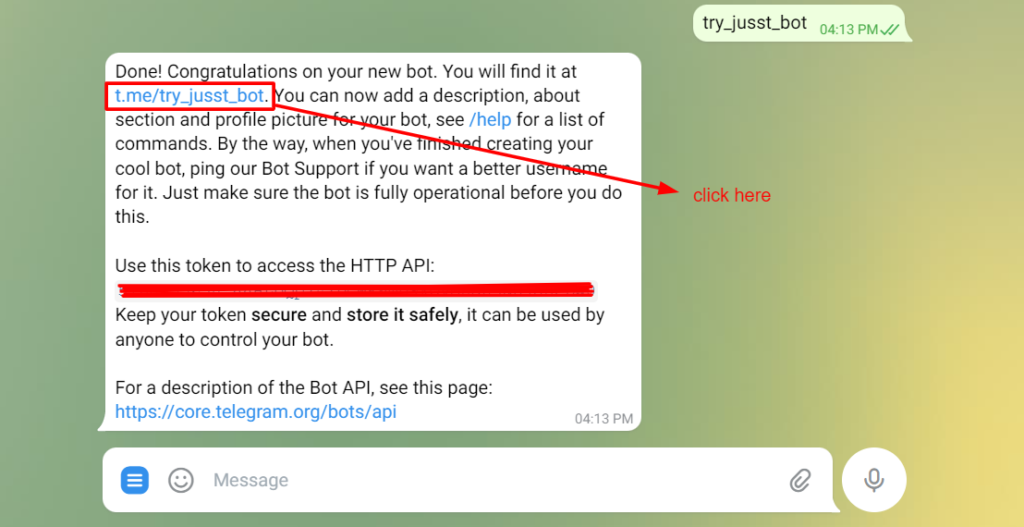
In BotFather where you get the token for your Telegram chatbot, you can also file the URL to redirect to your Telegram bot.
After that click on the Start Bot to start the chat with the bot. Then type any message that you want such as “test bot” or anything you want.
After writing “test bot” to your bot now go to the Vscode you will file the following JSON in your terminal.
Here we can see that the message that we have written to the telegram bot we can get at the backend in text.
Step 11: send the text message from the bot.
We will write the code to get the response for the “hi” message from the user and if anything other than “hi” is imputed then response with “from webhook”. You can also add an extra parameter in send message for that you can follow the Documentation.
from flask import Flask from flask import request from flask import Response import requests
You will get the following response in your telegram like this.
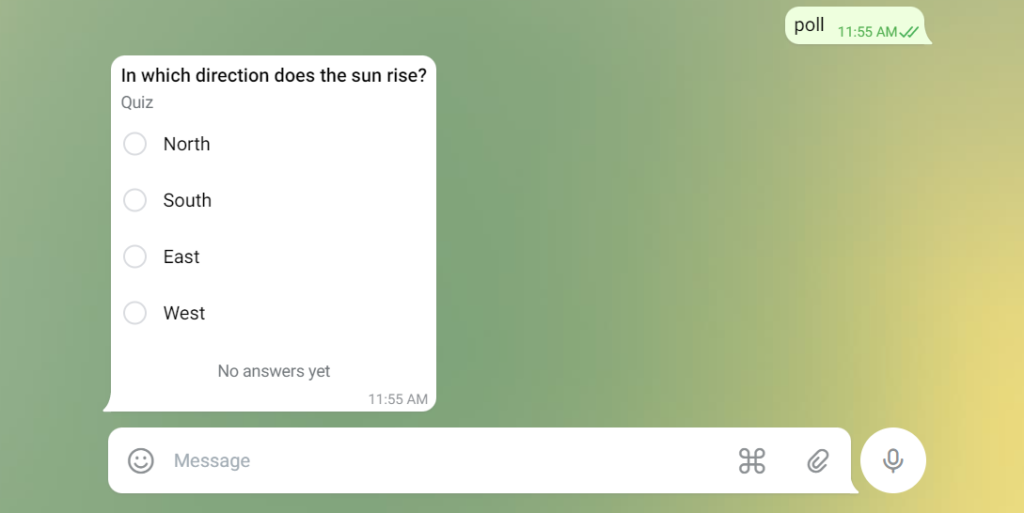
Step 16: Get a Poll.
Add the code to get the Poll to the telegram. To add more parameters you can follow the Documentation.
def tel_send_poll(chat_id):
    url = f'https://api.telegram.org/bot{TOKEN}/sendPoll'
    payload = {
        'chat_id': chat_id,
        "question": "In which direction does the sun rise?",
        "options": json.dumps(["North", "South", "East", "West"]),
        "is_anonymous": False,
        "type": "quiz",
        "correct_option_id": 2
    }

    r = requests.post(url, json=payload)

    return r
Add this code to your index function.
elif txt == "poll":
     tel_send_poll(chat_id)
You will get the following response in your telegram like this.
Step 17: Get Button.
Add the code to get the Button to the telegram bot.
Here in the function first we are trying to get our file path for the image that we had shared from a JSON.
After getting the file path we are trying to get the file from the telegram server by redirecting the file path to the “url_1”.
From “url_1” we are trying to save the file to our computer.
On the server-side, you will see the print and JSON like this.
Here is the directory where we are writing our code. We need to create a folder named “ photos “ so that we can get the image that we send to the bot directly in our system.
Step 21: Now we will try to add a video to the telegram bot.
When we send the video to the bot then we are receiving different types of JSON. So we need to extract the file id from it.
It can be done with the help of the following code.
return g_file_id except: print("NO file found found-->>")
Step 23: As we have tried to store the image, video, audio, and file at our server-side and also done the code to get the different types of responses through the telegram bot.
You can also refer to the full code on our Github repository and test it to get the various responses through the telegram bot and send files to the server-side.
We have learned how we can get the text response from the bot and also the different types of files. After that, we have also seen how we can get the files that we send to the bot on our server-side.
Now you can have your bot work the way you want-go ahead and create the next big thing!
Hope you had fun building your first Telegram bot. If you face any difficulty then do let us know in the comment.
Here’s a list of things that will dominate the conversational commerce industry in 2022.
Image Credit: Polina Pirogova
A recent report states that in 2021, consumers spent $871.03 billion online with U.S. merchants, which makes it a 14.2% rise YoY from $762.68 billion in 2020. The past two years of the COVID pandemic have fostered retail digitization and AI-powered conversational agents like chatbots and virtual assistants are among the main drivers. Juniper Research expects that chatbots will save retailers $439 million annually by 2023, while retail sales via conversational channels demonstrate a 98% annual growth rate and are projected to reach $142 billion by 2024. All in all, global spending on conversational commerce is predicted to grow nearly sevenfold to about $290 billion, by 2025. We’ve put together a list of trends and drivers that will dominate the conversational commerce industry in 2022.
Stay-at-home-economy on the rise
Since the 2020 lockdown, much of our lives moved online, and new consumer patterns have been established: according to McKinsey, more than 75% of consumers who turned to online shopping will not return to pre-lockdown patterns after all restrictions are over.
In 2021, Walmart U.S. had eCommerce sales amounting to 43 billion U.S. dollars, an increase of over 70% in comparison to 2020’s figure. So, what started as a necessity forced by coronavirus persisted even after the restrictions softened. People discovered a new way to shop and now are sticking to it.
Offline and online blend together
In some ways, the pandemic has blurred the line between online and offline. During the lockdown, many consumers opted for the “buy online, pick up in-store” aka “click and collect” model, and half of those surveyed by McKinsey enjoyed it. Statistics say, “сlick and collect” sales more than doubled in 2020, and are expected to make 10% of all sales by 2025. Although right now retailers view online and offline as two independent directions, customers expect seamless integration between the two, so businesses will have to deliver.
Conversational AI automation continues
Further automation in retail will affect the areas of customer service that consume the most time and effort. When it comes to inbound customer interaction, chatbots and voice bots will handle Frequently Asked Questions on delivery, returns, order changes, as well as loyalty and reward programs. While outbound voice bots will conduct NPS surveys and notify customers about promotions and special offers.
Omnichannel customer experience
Services and support that customers used to get in stores migrated online and now exist as chatbots and virtual on-demand assistance. So, online platforms available to retailers such as websites, mobile apps, voice assistants, messengers, and social networks are becoming increasingly important.
“Chatbots are platform-independent and available across several channels,” says Kevin Cook, CPO at TrackRight, — “Many of these chatbots are presented to the service as another end user, which simplifies their deployment and integration into the platform. This maximizes reach by deploying bots on numerous platforms such as Facebook, SMS, and Twitter, where customers already have an established presence, and stimulates multi-channel engagement, which results in greater brand perception and outreach.”
Omnichannel presence makes it possible to merge all these platforms into a single system, evaluate the customer journey, and offer a seamless brand experience.
Proactive personalization
AI and machine learning technologies allow retailers to create comprehensive customer profiles and offer products and services that are based on customer preferences and anticipate their needs. Thus, customer experience changes from responsive to proactive. According to Microsoft, 63% of online shoppers are willing to share personal information if it results in more personalized offerings from brands and retailers.
“Personalization is crucial in retail. It produces the “how did they know?” effect, which increases customer loyalty,” says Alex Lartey, CBDO at Tovie AI, a London-based Conversational AI solutions and technologies provider, — “Naturally, customers will opt for companies that can take personalization to the next level.”
Integration with messengers and social networks networks
Over 40% of Statista’s respondents stated that they had spent more time on social media during the lockdown. This resulted in a dramatic increase in purchases made through this channel. According to ResearchAndMarkets, this market is expected to grow by more than 30% YoY and reach $604.5 billion by 2027. Chatbot integration with social media and messengers will foster this trend.
Voice-powered interactions
Increasing use of voice search shifts brand-to-consumer interaction to the most natural interface — the human voice. Customers will use voice search on smart speakers, smart displays, TV set-top boxes, as well as voice-powered wearables and mobile apps, meaning businesses will also need to adapt if they want their products and services to be found.
Voice shopping and video shopping
According to eMarketer, 21.6 million Americans used a smart speaker to make a purchase in 2020. The increasing adoption rate of voice-powered smart devices, along with growing ecosystems for developers and skills stores are opening up new opportunities for voice-powered e-commerce experiences and video shopping. Smart displays hold a lot of promise for online retailers, as they pair voice controls and visual channels.
AI-powered speech analytics
Recording customer interactions and analyzing them with AI technologies allow businesses to find the best communication and sales scenarios, as well as monitor the general level of employee training and motivation.