Expand your NLP portfolio using BERT and Haystack to answer all your questions!
If you’re trying to learn Natural Language Processing (NLP), make a Discord Bot, or are just interested to play around with Transformers for a bit, this is the project for you!
In this example, we will create a Chatbot that knows everything about Dragon Ball, but you can do about anything you want! It can be a chatbot that answers questions about another series, a university course, the laws of a country, etc. Firstly, let’s see how that is possible with BERT.
How a BERT works as a Chatbot
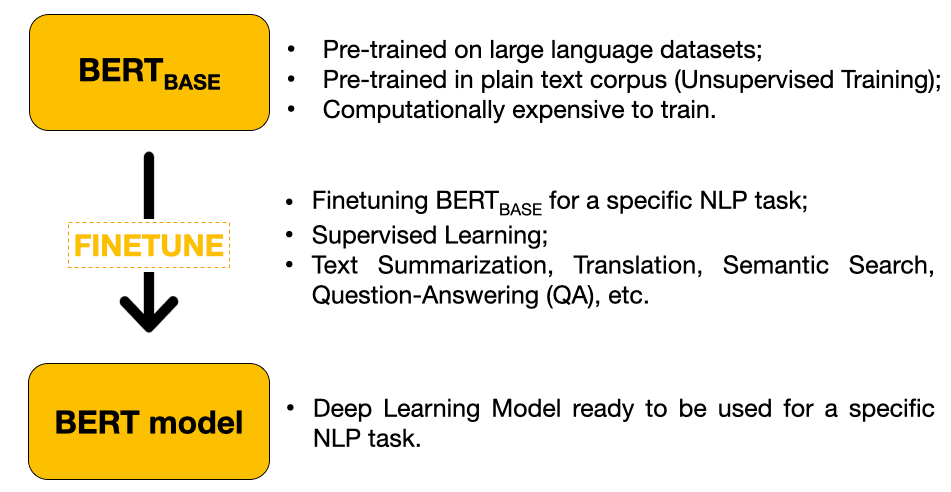
BERT is a Machine Learning technique for NLP created and published by Google in 2018. In the first phase, the model is pre-trained on a large language dataset in a semi-supervised way.
In this phase, the model cannot answer questions yet, but it learned contextual embeddings for words.
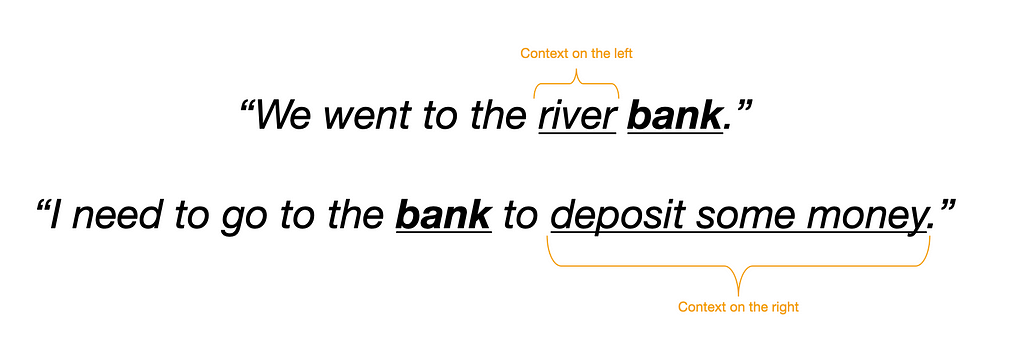
BERT creates contextual embeddings for words so that it can take into account the context for each occurrence of a given word. Source: Author
In the second phase, BERT is then finetuned for a specific task. Because we are trying to build a Chatbot, we need a model that is finetuned on a Question Answering task.
BERT uses Transfer Learning: the model is pre-trained in big quantities of data and those learnings can then be transferred for the model to be finetuned on a relatively small quantity of data for a specific task.
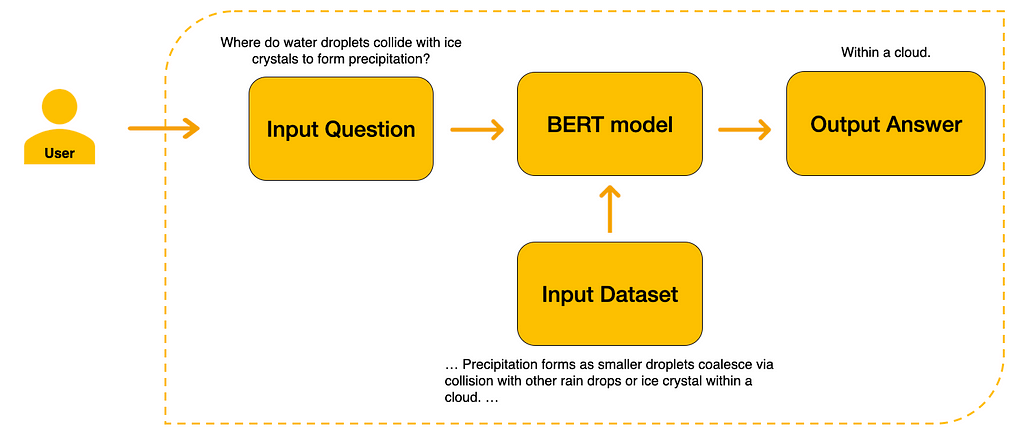
After the model is finetuned for Question Answering, we have to provide the Input Dataset for the model to know where to extract its answers from. Finally, the user can then input a question. The model will extract the answer from the input dataset.
After giving the model a dataset with the context to answer the question, the user can then use our Finetuned BERT model. Source: Author
As such, first of all, we need to get an Input Dataset from where the model will extract its answer from.
Fetching the Data
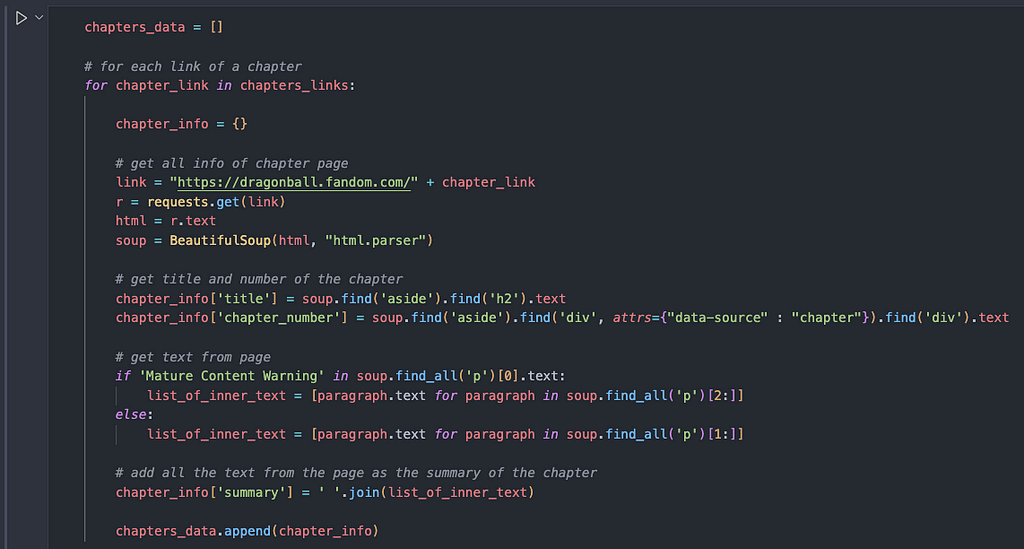
In this example, our chatbot will be a Dragon Ball Master, so we will fetch the data from the Dragon Ball Wiki with BeautifulSoup. Scraping isn’t the focus of this post, so we are just going to brute force it a little bit to get all the data we need.
The scraping could be more robust, but this is a simple run-and-gun way of doing it. Source: imgur
We fetch the data of the chapters and also of the different series (Dragon Ball Z, Dragon Ball GT, etc). The most important information that we will take is what actually happens in each chapter and, through the pages of the different series, we also have other types of information (creator, production company, dates of airing, etc).
Example of the scraping done to get all the information that will be then fed into the model. Source: author
After getting all the summaries of each episode, Haystack needs the data to be formatted as a list of dictionaries, which have two major keys. One of the keys is called “content”, where the model will extract all the information needed to answer all questions. The other key is called “meta” and has a nested dictionary with all the metadata you need. In this example, I passed a dictionary with the title and number from the episode which the summary was extracted from.
The dictionary has two keys: content (from where the data is extracted) and meta (where the metadata is stored). Source: Author
Now that we have all the information about what happens in the series, we need to initialize our model!
Initiating BERT
For this part, I will use Google Collab because of two reasons:
it is much easier to setup Haystack: Haystack is a library for NLP which has a lot of dependencies and sometimes making it work on your personal computer is not very smooth, especially for beginners who are not used to set up environments;
we will use a BERT model, which is a big model that works much faster with a GPU — which Google Colab provides for free!
A real depiction of the Colab GPU making our Chatbot work lightning fast. Source: Pinterest
We need to choose a Retriever and a Reader to use. The Retriever is a lightweight filter that goes through our whole database of documents and chooses an X number of documents that might answer the question the user is posing. In this case, we will ask the Retriever to return 10 documents.
The Retriever goes through our database very quickly, retrieves the documents that are related to the question, and then passes them to the Reader, which analyzes them in more detail and extracts an answer from them.
The Retriever passes these 10 documents to the Reader. In this case, we will use a BERT as our Reader. More specifically, we will use an English BERT model that is already finetuned for Extractive Question Answering. In essence, that means that the model was pre-trained in the English language and then was trained for Extractive QA in the last layer of training. Because the Dragon Ball data is already in English, the model is already prepared out of the box for answering our questions!
PS: If you have data in another language, you can search for a model that is trained in that language in HuggingFace.
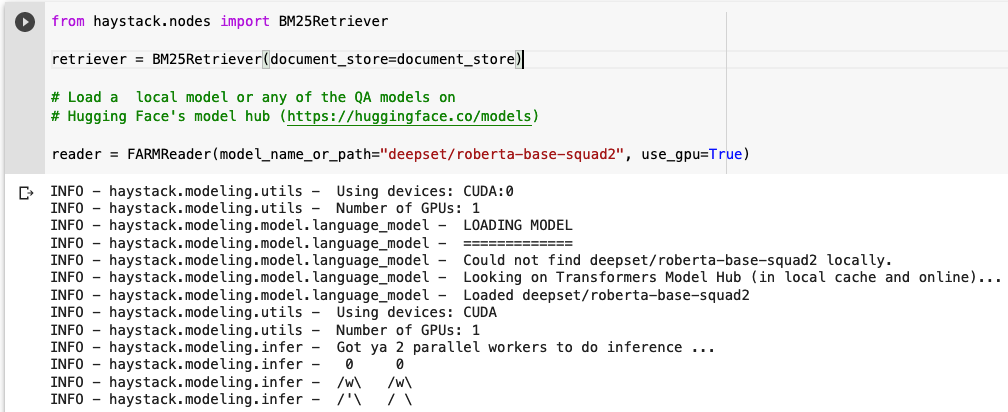
Here we import the roberta-base-squad2 model, but you can any model you want from HuggingFace! Source: Author
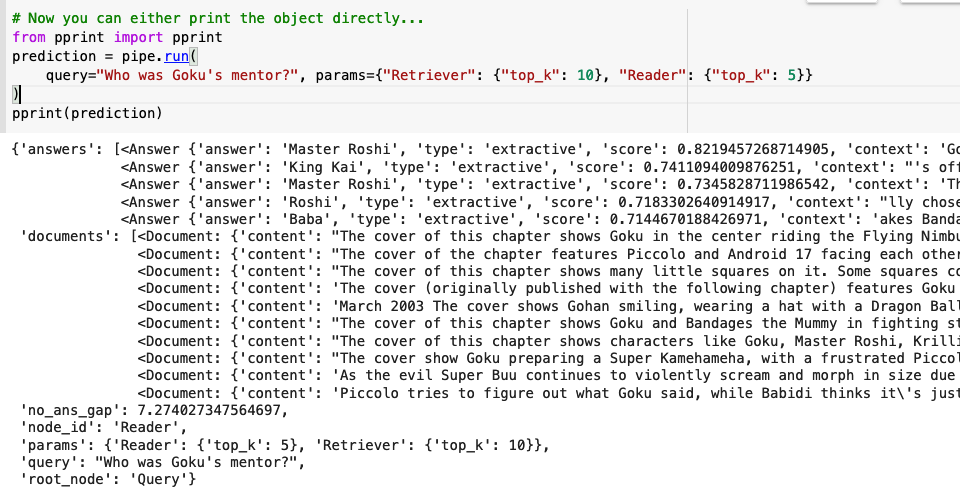
We will ask the model to return the 5 most probable right answers from the 10 documents most probably to have the answer! Remember: the Retriever finds the right documents and the Reader finds the exact answer (in this case, our reader is roberta-base-squad2)! This is the output of the model after inputting a simple question about Dragon Ball:
The model got the answer right! The mentors of Goku were Master Roshi and King Kai!
Goku’s first mentor was in fact Master Roshi like the model said it was! Source: Pinterest
Again, this is right out of the box, we didn’t have to train any model on our data!
Testing our Chatbot
After creating a function that lets our output be prettier, let’s see the results!
Let’s ask it who Vegeta is married to:
Source: Author
It got it right! Its first answer was Bulma! Let’s try other questions and see the results:
The model is answering quite well to a lot of the questions!
The power level of BERT is quite impressive indeed. Source: Pinterest
But if we add some variation in the way we ask some questions, it starts being not quite right…
Just because we changed the word “grandpa” to “grandfather”, the model gives a wrong answer!I’m pretty sure Dragon Ball Z had more episodes than this
These are just some examples of how the model is still not perfect.
No worries, because we can train it further on our data if we want! Haystack has a simple tutorial on how to do this also. However, that could be its entire new post. If you would find it useful, you can send me a message or a comment and I will try to create a post explaining it step by step.
WhatsApp is a messaging service, but you already knew that. But have you met the side to WhatsApp that can be used for more than just sending funny cat GIFs to your cousins? We are talking about WhatsApp for Business, which allows you to stay connected to your customers via the famous messaging service.
According to a Zendesk report, 48% of the people in the world have a smartphone, and with a user base of more than 2.5 billion people, WhatsApp as a marketing channel has a lot of potentials.
In this blog post, we will teach you how to use WhatsApp as a powerful business tool, and get WhatsApp API access so that you can provide support to a large customer base.
We will also teach you how to integrate WhatsApp through our partner 360 Dialog,
Before proceeding with that let’s first know about what is WhatsApp API and why we need WhatsApp API
WhatsApp API is an application programming interface, which means it has no front end interface or app. It is designed for mid-size to large companies that want to use WhatsApp with a large number of users at the same time. Large businesses are more complex, with hundreds of messages coming in at the same time that need to be handled by business software. WhatsApp Business API helps connect your business software, such as a chatbot, to your WhatsApp account.
But there are a few things about WhatsApp Business API that you need to know. For starters, WhatsApp Business API is not free. You need to apply for an API account through one of WhatsApp’s designated business partners, and then go through an approval process.
Every time a customer sends a message to your WhatsApp inbox, WhatsApp API has a messaging window that gets activated. This is a 24-hour window, within which the business can respond freely to the customer. After 24 hours, customers can only send WhatsApp Template Messages, which are pre-approved messages that have Placeholders, along with Quick Reply and CTA buttons.
Now you have understood what Whatsapp API is and why we need WhatsApp API let’s understand the difference between Whatsapp Business and WhatsApp Business API to get more clarity.
Difference between WhatsApp Business App and WhatsApp Business API
Whatsapp Business App
People often confuse WhatsApp Business App with WhatsApp Business API, thinking they are one and the same thing, but the answer is far from the truth. WhatsApp Business App is a separate application that can be downloaded from the Play Store or the App Store. It is designed for small businesses that need to handle only a finite number of customer queries. Only one user on one device can use the WhatsApp Business app, and it is the best solution for small mom and pop establishments that don’t get hundreds of customer queries in a day.
Whatsapp Business API:
WhatsApp Business has an Application Programming Interface (API) that is designed to help businesses cope with the plethora of customer support requests they get in a day. Support teams can use WhatsApp alongside other channels so that all the customer interactions are in one place and there is no loss of data. You will need a WhatsApp API to connect WhatsApp Business App to your company’s software, which can be obtained from a WhatsApp partner.
WhatsApp Business allows you to send unlimited messages to your customers, in any content format you wish. WhatsApp Business API account, however, bifurcates your messages into two types — Session messages and Template messages. Respond to a message within 24 hours, and that is a session message. Take longer than that to send a message, and you will have to send out a template message, which has to be pre-approved by WhatsApp.
The WhatsApp Business App has built-in features that help you in automating some of the common greeting messages and away messages. If you need advanced automation options, you will have to use a WhatsApp business API account and connect it to your business logic. Another key difference between WhatsApp Business App and WhatsApp Business API is that you can only broadcast a message to 256 contacts at a time on the WhatsApp Business app, but with the API, you can reach unlimited users, as long as the message content is not promotional.
Why get your WhatsApp Business API from a business partner
You cannot get a WhatsApp API directly, and usually have to rely on one of the several business partners that WhatsApp has teamed up with. Why has WhatsApp done this?
To avoid spammers: When last counted, WhatsApp had close to 2 billion users on its platform, and with a user base this large, WhatsApp knew that it had to fight an uphill battle against spammers. To have greater control over the companies that have access to its API, WhatsApp decided to provide access only through select partners.
Less resource-intensive: Outsourcing the API application process to partners means WhatsApp doesn’t have to hire additional resources to oversee this process, which also helps reduce costs.
Leveraging partner’s strength: Partners have the resources that will help them vet which companies are allowed on the WhatsApp platform. Many of these partners are also SMS providers, which means they have the access to high-volume clients.
Here is a link to all the partners that WhatsApp has teamed up with to provide its API access.
One such partner is 360Dialog, with whom Kommunicate has teamed up to provide you with WhatsApp API access. 360Dialog provides a developer-friendly API, and the company does not carry out any modification around WhatsApp Rich messages. 360Dialog also does not charge the user per message, which works out quite economically for the business owner.
360 Dialog: How to get a WhatsApp API account on 360 Dialog
There are 4 steps in getting a WhatsApp API Account.
Step 1: Port or Buy a phone number
You need a phone number to set up your WhatsApp Business API account. Partners such as Dialog 360 allow you to port an existing phone number, as long as you can receive calls or SMS. You have to make sure that the number is not connected to another WhatsApp Business account or WhatsApp API account, to avoid any conflict.
Step 2: Verify the Business name and meet WhatsApp Commerce Policy
WhatsApp has a Commerce policy, which you will need to adhere to before you apply for a WhatsApp API. WhatsApp will review your application, as well as your Display Name, which should ideally match the legal name under which your business is registered.
Step 3: Verify Facebook Business and Number
This step is different from the Facebook Page Verification. Here, you need to provide a few documents and complete your Business verification in the Facebook Business Manager. This process usually takes a few working days.
Step 4: Generating an API key
Once you have a WhatsApp API account, you need to obtain a WhatsApp API key and connect it to a business software of your choice. You can use different API providers to get your API Account setup. 360Dialog is one such API provider.
How to connect Kommunicate and Dialog360 for WhatsApp integration
There are 2 ways you can connect Kommunicate and 360Dialog
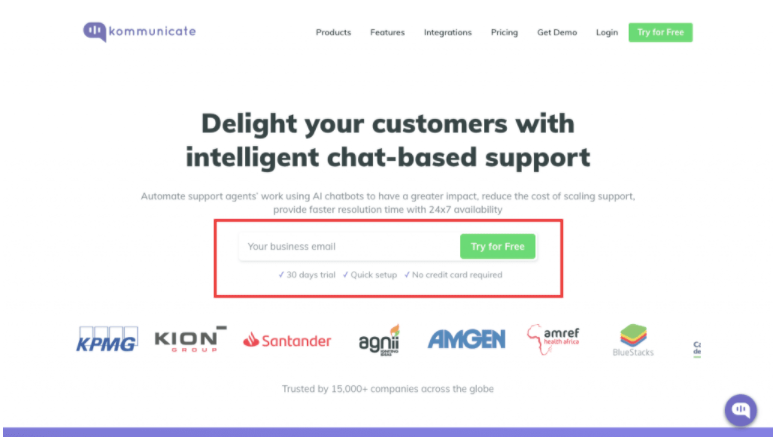
First, you need to login into your Kommunicate dashboard. If you do not have a Kommunicate account, you can sign up for free.
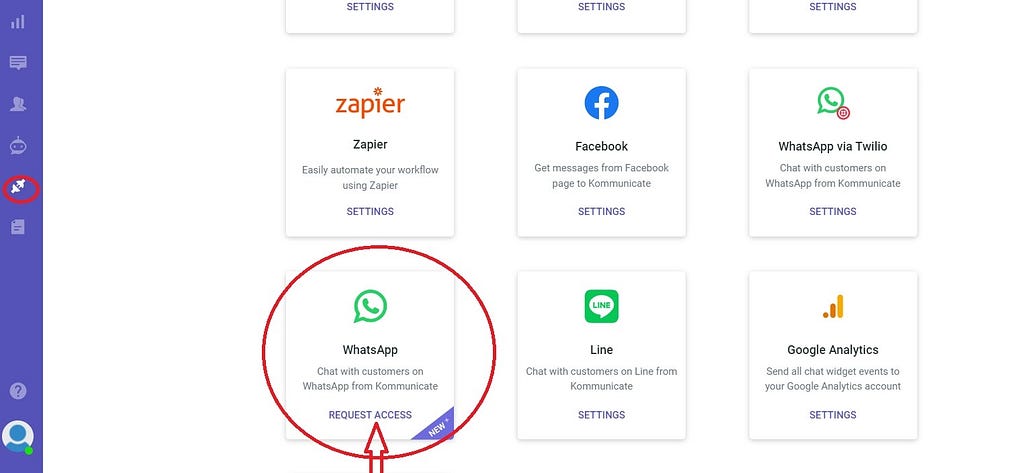
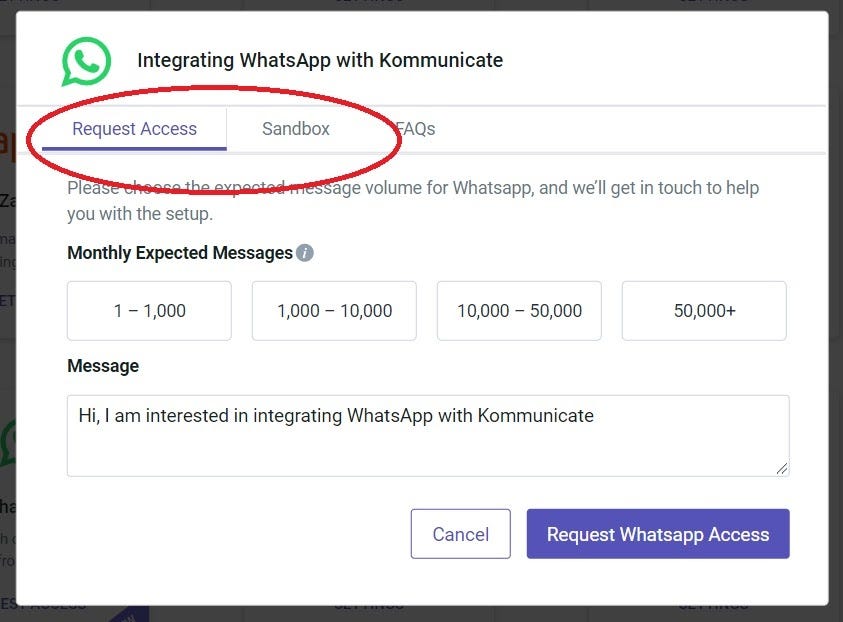
And then Go to integrations > WhatsApp and then Request Access on your Kommunicate Dashboard.
Here, you will see 2 methods of getting your WhatsApp Integration:
Request Access and Sandbox.
In Request Access, you have to specify the expected number of monthly messages that your business will get through WhatsApp, and then click “Request Whatsapp Access”.
You then have to follow the following steps:
If you want help generating your App_ID, click here.
Once the Kommunicate support team receives the requisite information, we will assist in connecting your WhatsApp number to your Kommunicate account.
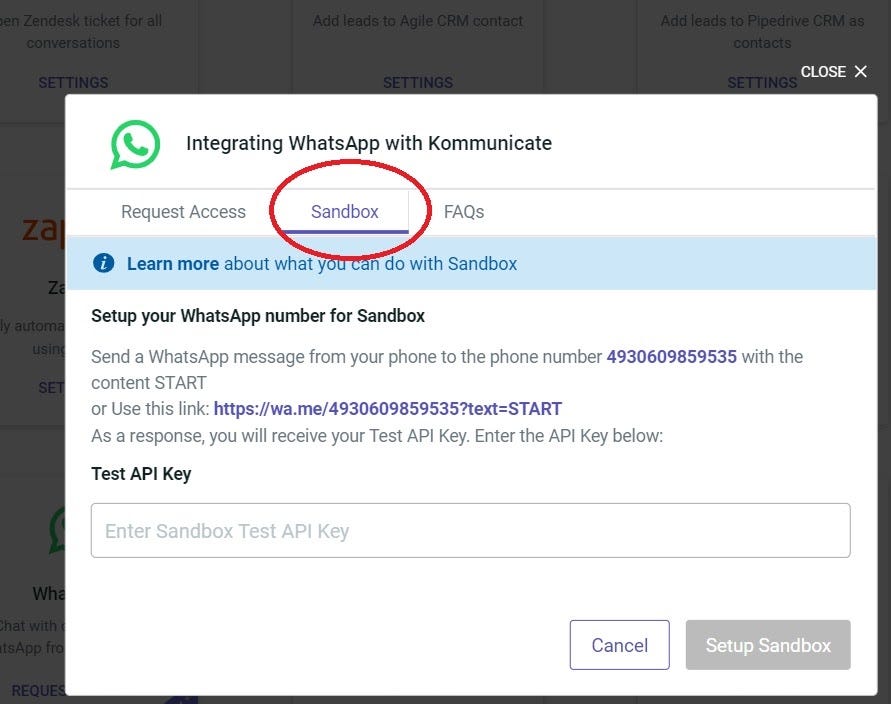
If you want to test your WhatsApp API, you can also use the Sandbox option.
Click on the Sandbox tab after you click on the Request Access button.
Follow the instructions on the screen, which involves sending a WhatsApp message from your phone to a predestined number.
You can also use a link provided in the tab to get your Test API key. Once you receive the API key, you can set up your Sandbox and test the WhatsApp API.
And there you go!! You have successfully integrated WhatsApp into your Kommunicate dashboard. Now, any message you send to the 360 Dialog WhatsApp number will be available in the Kommunicate dashboard.
As you can see, setting up WhatsApp API for your business need not be a hard ordeal. With tools like Kommunicate doing the heavy lifting, you can sit back, relax and do what you do best — provide a superior customer experience.
Key takeaway:
Why would you consider using all the features of 360Dialog WhatsApp API through Kommunicate? Well, there is the cost advantage, for starters. Any user does not have to pay 99 Euros to 360 Dialog since the pricing is already covered in the Kommunicate subscription.
If you want to integrate Kommunicate to Dialog 360, you can use the Grow plan. You can integrate 360 dialog at no additional cost since the price is already included in the Grow plan is $100.
And that’s just not all that you get with Kommunicate’s Grow plan. You also get:
Integration with WhatsApp, Facebook, Telegram, Line along with AgileCRM and Pipedrive.
Quick replies and Ready to use bot templates.
Advanced Widget customization.
1-year chat history
For a detailed list of all the features in our various pricing plans, check out our pricing page here.
That’s WhatsApp API Access under 100 dollars. If that is not a killer deal, we don’t know what is. So, what are you waiting for? Partner with Kommunicate and get access to your WhatsApp Business API today!!
Businesses have been quick to jump on the WhatsApp Business API bandwagon since the company’s Business API launch. And rightly so, who would want to miss an opportunity to connect with 2 billion active users and engage with them?
That’s why today, WhatsApp Business API has become a powerful communication tool for businesses. It helps them create a superior Customer Experience and drive better Commerce & Customer Care opportunities. WhatsApp Message Templates are an important aspect while designing your WhatsApp chatbot journey.
Initiating communication through WhatsApp may look challenging to many with the stringent messaging guidelines that brands need to adhere to. One of the guidelines’ critical aspects is the creation of the WhatsApp Message Templates. And that’s what we are going to talk about in this blog. Let’s dive right in!
So what are WhatsApp Message Templates?
WhatsApp Business API offers two types of messages for companies to communicate. If a business wants to initiate a chat with its customers, it needs to do it via Message Templates. WhatsApp Message Templates are specific message formats that companies can use to send standardized notifications. These are also called Highly Structured Messages(HSM), which can be sent to customers if they have opted to receive them.
Earlier, businesses were only allowed to send transactional notifications like order updates, appointment reminders, and account information. But recently, WhatsApp has allowed brands to send marketing notifications, in other words, non-transactional messages. These include product recommendations, helpful informational alerts, relevant offers, and newsletters. This move has been a game-changer and is helping brands to boost their customer engagement.
The other type of message is session messages, where if the customer starts a conversation, the brands can respond within a 24hr window. Brands don’t have to get any approval from WhatsApp if they reply within the time duration. But if the brand wants to re-engage with customers post the 24hr bracket, they need to do it through business templates.
Creating a WhatsApp Message template is a straightforward process, but let us see some critical pointers and best practices that everyone should be aware of before structuring their messages to avoid rejection from WhatsApp.
Template Name: While naming the templates, only alphanumeric lowercases and underscores are allowed; special characters and spaces are not acceptable. You can delete a template but cannot edit a template once submitted.
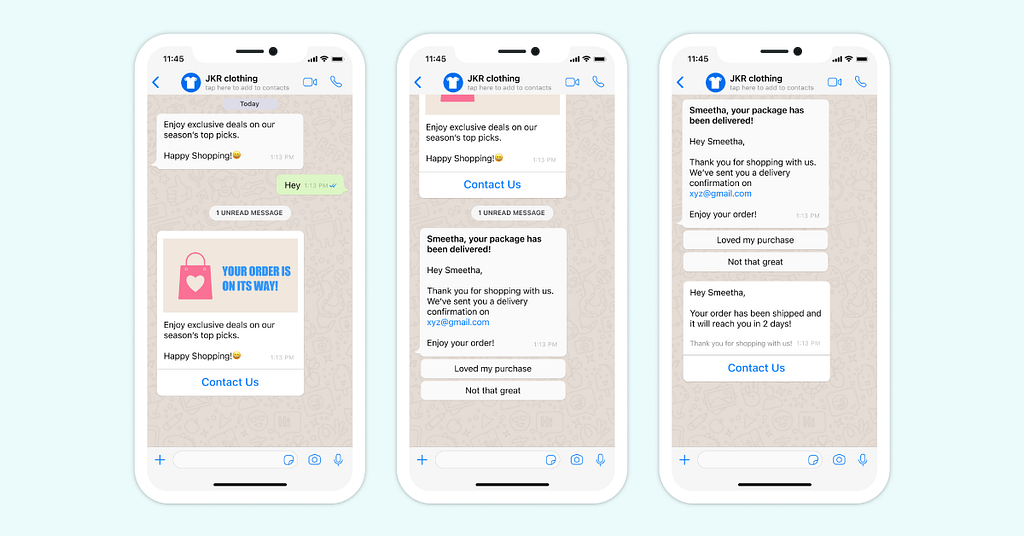
Template Content: WhatsApp template message can be text-based, media-based, or interactive. The text content cannot contain newlines, tabs, or more than four consecutive spaces. While sending media content like audio, images, videos, or stickers, you have to specify the media type and upload the media to the WhatsApp server or share an HTTPS link. Businesses can also employ interactive elements like a call-to-action or a quick reply button to get prompt responses from customers.
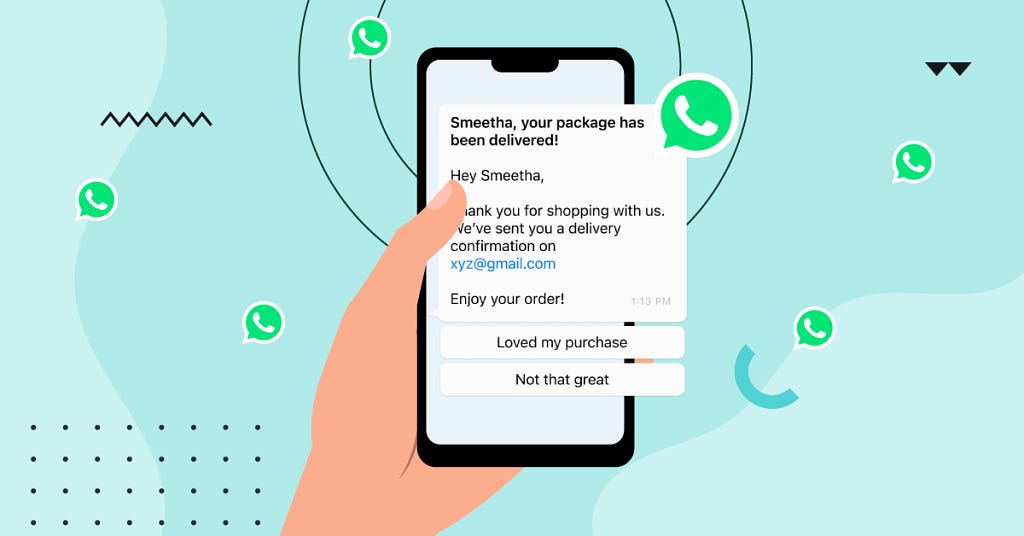
The template content can also have placeholder values that are called variables. Variables give brands the flexibility to personalize their message content and are shown as { {…} } in the WhatsApp templates. It is essential to use the proper formatting while using the variables. Here in the below WhatsApp message template example: { {Customer First Name} }, your package has been delivered!; the customer name is the placeholder value, which is Smeetha.
Language: WhatsApp Business API doesn’t support auto translation; brands have to provide translations for each template element. Message templates for a particular language are stored together and called language packs. And a collection of the language packs is referred to as a message template namespace.
Now that we have understood what a WhatsApp Message Template is and what it consists of, we will move to one of the most crucial parts, the categories under which these templates get created. So, let’s dive in and look at the various types with some sample WhatsApp templates that everyone must use.
Brands can engage with their customers by creating WhatsApp Templates under the following categories:
Account update
Issue resolution
Payment update
Appointment update
Ticket update
Shipping update
Transportation update
Reservation update
Personal finance update
Alert update
1. Account update
E.g #1: Dear { {1} } the password for your { {company name} } account has been reset recently. If you did not initiate this action, please get in touch with us on { {2} }.
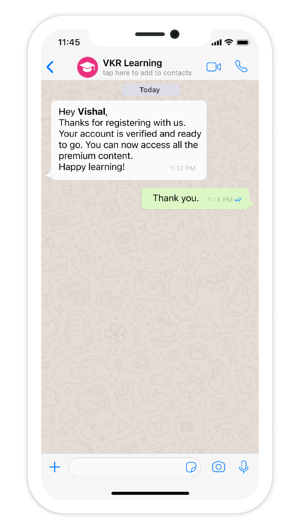
E.g #2: Hey { {1} }, Thanks for registering with us. Your account is verified and ready to go. You can now access all the premium content. Happy learning!
2. Issue resolution:
Companies are always striving hard to give their customers the best service, but malfunctions are bound to happen. That’s where businesses need to proactively inform their customers about any problems and impacts to avoid getting them alarmed.
E.g #1: Hey { {2} }, the { {name of the issue} } issue has been resolved. You can access your account. If you still face the problem. Please get in touch with us on the below number.
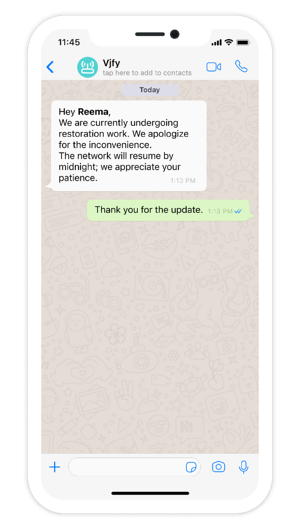
E.g #2: Hey { {1} }, we are currently undergoing restoration work. We apologize for the inconvenience. The network will resume by midnight; we appreciate your patience.
3. Payment update:
This category of WhatsApp templates notify customers about their payments for the purchases made, provides reminders for their upcoming pending bills, and sends updates on the refund status.
E.g #1: Hey { {1} }, refund for your order { {order number} } has been initiated. It should reflect in your account by the next 7 days.
E.g #2: Hey { {1} }, your bill for the month of { {2} } is generated. Please pay the bill before { {date} } to avoid any late fees.
E.g #3: Hey { {1} }, the payment for your order { {order number} } has failed. If any amount got debited from your account. It will get refunded in the next 48 hours.
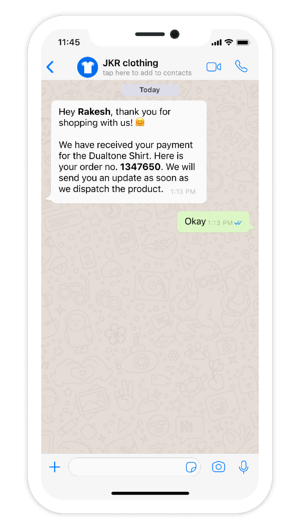
E.g #4: Hey { {1} }, thank you for shopping with us! 🤗 We have received your payment for { {product name} }. Here is your order no. { {order number} }. We will send you an update as soon as we dispatch the product.
4. Appointment update:
Customers are sent confirmation, reminders, and other information regarding their appointments by using this category.
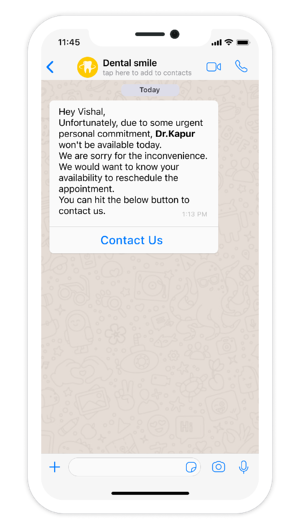
E.g: Hey { {1} }, unfortunately, due to some urgent personal commitment, Dr.{ {name of the doctor} } won’t be available today. We are sorry for the inconvenience. We would want to know your availability to reschedule the appointment. You can hit the below button to contact us. Insert <button> Contact us.
5. Ticket update:
Whenever a complaint is registered, a corresponding ticket gets raised. Brands can keep their customers informed about the status of their tickets with the help of the ticketing message template. Customers need to get regular updates on the steps taken to resolve their complaints to give them a sense of security.
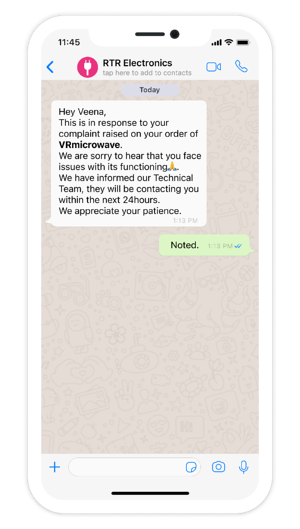
E.g: Hey { {2} }, this is in response to your complaint raised on your order of { {prodcut name} }. We are sorry to hear that you face issues with its functioning.🙏We have informed our Technical Team, they will be contacting you within the next 24 hours. We appreciate your patience.
6. Shipping update:
As the name suggests, businesses notify customers when they can expect to receive their orders with the following WhatsApp template.
E.g #1: Hey { {1} }, we are excited to tell you that we have shipped your order { {order number} }. It will reach you in the following { {number of days} } days. You can track your order here { {tracking link} }. We hope you love using our products! 💓
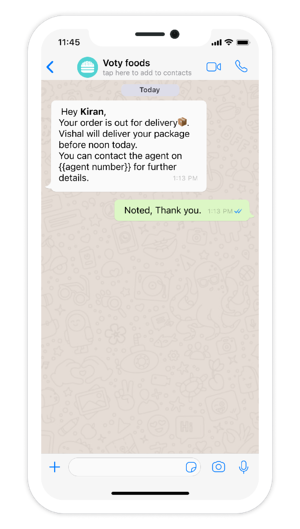
E.g #2: Hey { {1} }, your order is out for delivery.📦 { {agent name} } will deliver your package before { {time} } today. You can contact the agent on { {agent number} } for further details.
7. Transportation update:
Travel-based companies can majorly use these templates to share all the information related to a customer’s transit. Like changes in travel schedule, luggage restrictions. Etc.
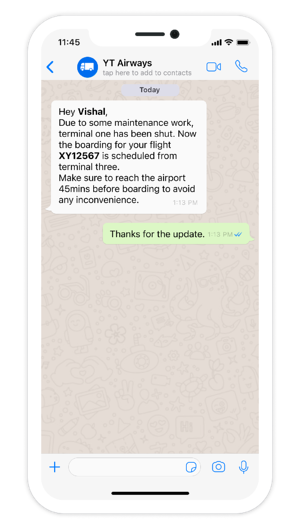
E.g: Hey { {1} }, Due to some maintenance work, terminal one has been shut. Now the boarding for your flight { {flight no} } is scheduled from terminal three. Make sure to reach the airport 45 mins before boarding to avoid any inconvenience. See you soon!
8. Reservation update:
These templates are beneficial for brands working in the Hospitality sector to keep their customers up to date on their reservations.
E.g #1: Hey { {1} },your stay with us has been booked for the { {date} }. We are looking forward to hosting you. To know about the check-in and check-out timings and other policies. Please visit the below link. In case of any queries, please reach us at 90xxxxxx. Insert button with website link <Know More>
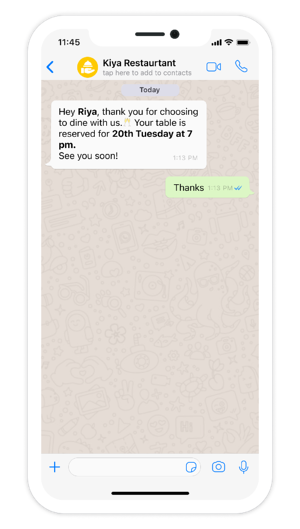
E.g #2: Hey { {1} }, thank you for choosing to dine with us.🥂 Your table is reserved for { {date} } at { {time} }.
9. Personal finance update:
Financial brands can utilize these messages to notify their customers about their transactions, like account balance, claim status, etc.
E.g #1: Congratulations { {1} }, your loan application has been approved.
E.g #2: Hey { {1} }, your account { {2} }, has been debited with { {3} }. Your current balance is { {4} }.
E.g #3: Hey { {1} }, your claim id { {the number} } is under process and will be settled within the next seven days.
10. Alert update:
Companies can use this template to share general information, like product updates, delivery updates, etc., with their customers.
E.g #1: Hey { {1} }, thank you for registering for our webinar on { {name of the webinar} }. Please check your email for your login details. We hope you find the session resourceful.
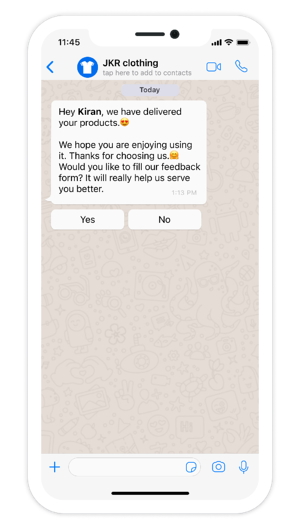
E.g #2: Hey { {2} }, we have delivered your products.😍 We hope you are enjoying using it. Thanks for choosing us.🤗 Would you like to fill out our feedback form? It will really help us serve you better.
Promotional Marketing Notifications
As mentioned earlier, WhatsApp has now allowed brands to send promotional marketing notifications. And it’s a no-brainer for brands to jump on this opportunity. Businesses can leverage the benefits of this rollout by simply creating message templates under the alert category.
Discount Offers
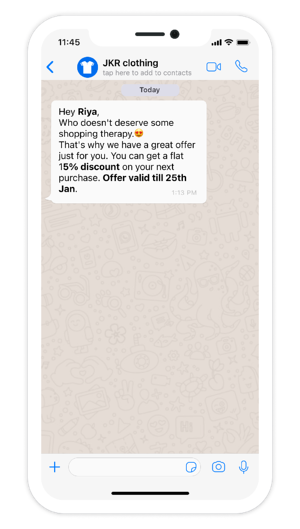
Hey { {1} }, Who doesn’t deserve some shopping therapy.😍 That’s why we have a great offer just for you. You can get a flat { {% discount} } on your next purchase. Offer valid till { {date} }.
2. Abandoned cart message
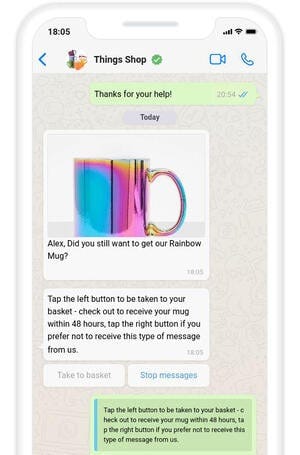
{ {1} }, Insert <image of the product> Did you still want to get our { {product name} }? Tap the left button to be taken to your basket- check out to receive your mug within 48 hours, tap the right button if you prefer not to receive this type of message from us. Insert <quick reply button> Take to basket Insert <quick reply button> Stop messages
3. Immediate follow-up message
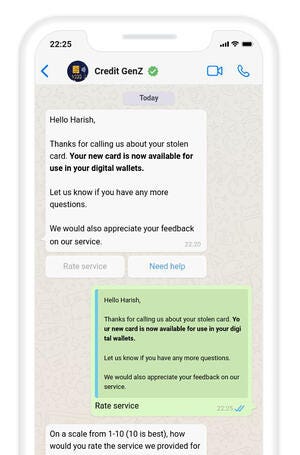
Hello { {1} }, Thanks for calling us about your stolen card. Your new card is now available for use in your digital wallets. Let us know if you have any more questions. We would also appreciate your feedback on our service.Insert <quick reply button> Rate your service
Insert <quick reply button> Need help
4. Dormant customer message
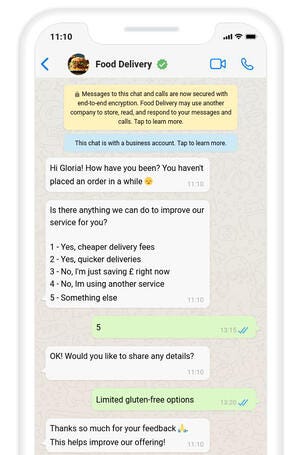
Hi { {1} }! How have you been? You haven’t placed an order in a while.😒Is there anything we can do to improve our service for you? (Give options)
5. Feedback message
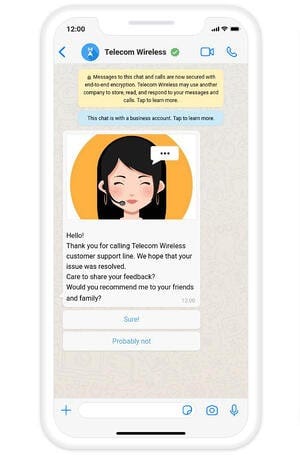
Hello! Insert <Image> Thank you for calling Telecom Wireless customer support line. We hope that your issue is resolved. Care to share your feedback? Would you recommend me to your friends and family? Insert <quick reply> Sure! Insert <quick reply> Probably not
Notifications play an important role to nudge the customers ahead in the buying journey. WhatsApp is committed to providing a top-notch user experience to its customers, hence these guidelines are to be strictly adhered to. With its pre-defined categories and rich media capabilities, the WhatsApp Business API is helping businesses drive deeper engagement with help of Message Templates.
Haptik, with its WhatsApp chatbot solution, is assisting brands to automate their communication and get the most out of the WhatsApp platform. With 350+ live solutions and 1B+ interactions, Haptik is leading the WhatsApp chatbot revolution. India’s prominent brands such as Jio, TATA, HDFC, Dream11, OLA, Kotak Mahindra, etc.
Nowadays, chatbots are everywhere. They are our digital assistants who are ready to help. Businesses love to use chatbots for customer support. They’re never sick and always on the job, 24/7.
It’s a very efficient way for a business to help customers, but only when done correctly. You’ve probably experienced annoying chatbots yourself when you’re looking for customer support. The ones that keep repeating and are not answering your question. Why is this? And why are some chatbots really capable of having a human-like conversation while others are just annoying? More importantly, as a small business owner, how to make sure you select the right type of chatbot that fits your business and the needs of your customers?
Scripted vs non-scripted chatbots, what is the difference?
Generally, you can make a difference between scripted vs non-scripted chatbots. A scripted chatbot is a chatbot that uses a predefined conversation flow. When you start a conversation with such a chatbot, it gives you a set of options to choose from. Based on the option you select, it guides you to the right answer. It’s similar to how IVR or Interactive Voice Response works with a phone. You know, the voice recordings saying “Press 1 if you have a question about your invoice”, “Press 2 to…”
These types of chatbots are easy to set up for a business. Often they work with a drag and drop builder so you can create a flow within minutes. However, as you probably already felt with the IVR example, these chatbots can be very annoying. Especially when you’re having a question that falls outside of the regular flow, it can be a nightmare to get some decent support.
Alternatively, you have non-scripted chatbots. These types of chatbots use technologies like AI and NLP to have more human-like, flexible conversations. NLP stands for Natural Language Processing and it is a technology to recognize text.With NLP, basically a chatbot understands human language so you can chat with it and ask a question like you would do with a real human being.
The way it works is that the chatbot analyses every incoming sentence. Based on training it received, it tries to recognize the intent of a sentence and replies. For example, if you say “Hi, I received my order but it got damaged”, the chatbot understands “Hi” as a greeting or welcome and says “Hi” back. The next part of the sentence is about “my order” and “damage” so the chatbot guesses that the customer is asking about how to return a product and get refunded. It will reply with something like “So sorry to hear that, here you can ask for a refund”, with the link to the refund page.
Setting up scripted chatbots requires time and effort
Non-scripted chatbots sound like a dream come true in chatbot land. They can be actually very good due to the underlying technology of AI and NLP and the rapid improvement of that technology. However, setting up a properly working, non-scripted chatbot is a massive job. These types of chatbots require hours and hours of training and it needs correction to improve itself. As you can imagine, this can be very time consuming and requires particular knowledge and skills about non-scripted chatbots.
There is hope though. At Table Duck for example, we’ve done the hard work for you with our pre-trained intents on a non-scripted chatbot. You can easily turn on the questions you want to get answered and fill in the answer specific to your business.
It works especially well for smaller types of businesses that want to use chatbot technology, but don’t have the time or money to invest in custom made, fully trained chatbots.
Since the upsurge of the Covid-19 pandemic in 2020, the necessity of chatbots has increased. This is because people had to work from home. This meant that any business using human dialogue systems took a hit.
A chatbot is a software application deployed to a website or an application. A chatbot can engage in a conversation with a human and understand the person’s needs. After understanding a person’s needs, the chatbot guides the person to achieve the desired outcome.
Benefits of Chatbots to Businesses
The use of chatbots in businesses has several advantages such as:
Immediate response to customer concerns.
Chatbots act as the foundation for a business’ conversational marketing tactics.
They offer automation methods for routine business processes.
It help the business to gain customer insights.
Chatbots improve a business’ sales.
AI Chatbots are designed per the Turing test rules. Their integral purpose is to mimic the way a person would behave as a conversational partner. Chatbots need vigorous tuning and testing to ensure that they mimic a human conversation well.
The integration of chatbots in Shopify and other similar e-commerce sites has proven to improve revenue by 15% to 35%. With this in mind, one has to ensure that their chatbot is efficient. The efficiency and reliability of chatbots are dependent on the framework used.
The chatbot development framework is the underlying structure of a chatbot. This is where the definition of a chatbot’s behaviour happens.
Chatbot Framework
Google Dialogflow Framework
This framework allows developers to create intelligent chatbots that understand various language dynamics because it is supported by Google’s Cloud Natural Language.
Their chatbots can be integrated with Google Assistant, Cortana, Telegram, Facebook Messenger, etc. The framework offers two packages. These are the standard edition and a paid version.
Pricing of Google Dialogflow.
The standard edition is free but you can always swap to a paid version if you have a regular query workload. The charges are $0.002 per text request, but the prices vary and can rise to $0.075 per minute for all processed phone calls.
Pros of Google Dialogflow
The framework supports more than 20 languages worldwide.
The framework also offers Software Development Kits (SDKs) for more than 14 platforms.
Cons of Google Dialogflow
Facebook Wit.AI
Wit.ai is an open-source chatbot framework with advanced natural language processing or NLP capabilities. Wit.ai is owned by Facebook and is a popular choice for NLP-based Facebook Messenger bots.
Pricing of Facebook Wit.ai
Pros of Facebook Wit.ai
Wit.ai makes it easy for developers to create applications and devices that can talk or text with
Since wit.ai is an open-source framework (and open application), they also benefit from a large developer community. . Developers can see what other people have done, learn from it, and use it for their own robots.
Wit.ai features include a well-designed developer user interface and a dialog flow tree that is easy to edit visually.
Cons of Facebook Wit.ai
IBM Watson Assistant Framework
IBM Watson’s framework uses modern technologies like machine learning and artificial intelligence. The framework uses Watson AI, Machine Learning, and Natural Language Understanding to learn from previous client conversations.
The framework allows businesses to keep data that flows through it. This is a unique feature since other proprietary vendors of chatbot frameworks collect the information gathered by their chatbots. IBM’s privacy offer isolates the information gathered by their assistants in a private cloud. This is done to secure proprietary insights acquired from the user interaction.
Pros of IBM Watson Assistant
IBM’s stringent security policies promote data privacy. Data privacy has become a huge concern in this era of technological advances, and IBM is spearheading the change.
It allows seamless phone integration. When the chatbot gets a request that it cannot solve, it connects the client to a telephony platform to get further help.
Cons of IBM Watson Assistant
The framework is complex. It encompasses many features and capabilities. This means that for a user to understand how to develop their chatbot based on it, they need to have developer expertise to unlock its full potential.
It does not allow the end-user to access chat history.
Pricing of IBM Watson Assistant
The framework offers three product plans, that is Lite, Plus, and Enterprise. The Lite plan is free but lacks a Voice Add-On channel and supports 1000 monthly active users only.
The Plus plan supports all channels and allows more than 1000 monthly active users. The extra number of users is charged at $14 per 100 users. The plan starts at $140 per month.
The Enterprise plan offers enterprise-scale performance for data governance and support. It allows more than 50,000 monthly active users. The pricing of the plan depends on the features that the client will choose. The prices, therefore, vary based on the needs of the client.
Amazon Lex Framework
Amazon Lex Framework is a chatbot-building framework offered by Amazon Web Services(AWS). The framework uses the artificial intelligence suite offered by Amazon (Amazon AI).
The framework incorporates numerous technologies offered by Amazon to aid in its functionality. It uses Amazon Cognito for the user authentication process. It then uses Automatic Speech Recognition to convert audio into text.
For converting text to human speech, the framework uses Amazon Polly services. The interconnection of these various technologies improves the functionality of chatbots developed using this framework.
Pros of Amazon Lex Framework
It has automatic scaling capabilities thereby alleviating the need for the developer to manage the infrastructure and hardware to scale the bot.
It supports various platforms and deployment to them is through a one-click process.
Cons of Amazon Lex Framework
It is not multilingual. The framework supports English only.
The process of data preparation using the framework is complicated.
Pricing of Amazon Lex Framework
Amazon Web Services charges this framework based on the number of requests, unlike other frameworks which have a stipulated monthly rate.
The framework has a free package that supports 10,000 message requests and 5,000 speech requests per month for a year.
The second package offered for Amazon Lex Framework is the Request and response package. This package charges $0.004 per speech request and $0.00075 per text request.
The framework also supports streaming conversation packages whereby all the user inputs across various turns as one API call. In this package, the bot continuously listens for any user input then the time usage is calculated into 15-second speech intervals. The framework charges $0.0065 per speech interval and $0.0020 per text request.
RASA Framework
Rasa is used to develop industrial-grade contextual assistants and chatbots. The developer defines the set of policies that will govern the bot’s functioning. The policies are then saved in a .yml file.
The framework has two integral components, that is Dialogue Management and Natural Language Understanding (NLU). NLU handles the process of classification and entity extraction. It also handles the retrieving of responses.
The Dialogue Management unit decides the next cause of action based on the series of previous messages with the user.
Pros of RASA Framework.
The framework develops highly customizable chatbots. The developer can employ numerous pipelines to process dialogues with the users.
The chatbots can be run as simple HTTPS servers.
Cons of RASA Framework.
Chatbots developed by the framework are resource-intensive on the server-side.
It does not provide direct integrations with messaging platforms directly out of the box.
Pricing of RASA Framework.
The RASA framework offers custom pricing to its users based on the features that they opt to have. This improves budget efficiency since the clients only pay for what they need.
Although the pricing also takes the size of a company’s specific use case, the pricing of the framework is not tied to the number of messages.
Azure Bot Framework
The Azure Bot Framework is best for businesses that already use other Microsoft Services like Cortana, Skype, Microsoft Teams, etc. This framework seamlessly integrates with existing Microsoft services.
The framework uses Microsoft’s LUIS to comprehend speech. LUIS is a cloud-based artificial intelligence service that uses Natural language processing technologies and machine learning. This is used to understand conversations with humans and extract necessary information.
Pros of Microsoft Bot Framework
It supports seamless integration with other existing Microsoft services.
Azure Bot Framework provides several SDKs for various computer languages.
Cons of Microsoft Bot Framework
It requires a developer to choose between two development platforms is Node.js or C#. The two platforms offer different functionalities, therefore a choice between the two should be based on the needs of the client and how conversant the developer is with either of them.
The framework is complex. A developer also has to write too much code to implement a basic function with the framework.
Pricing of Azure Bot Framework.
In terms of pricing, the framework offers a free and a paid version. The free version offers up to 1000 messages per month. The paid version operates based on pay as you use. It charges $0.50 per 1,000 messages that are exchanged via the Chatbot. Microsoft also offers additional features on the paid plan that a user can add.
Botpress Framework
Botpress is an open-source framework used to develop AI applications such as chatbots. Languages required to develop using the Bottpress framework are React, NodeJS, JavaScript, and Typescript.
The framework is mostly used by governments, insurance companies, and companies that offer financial services. This is because the framework offers on-site chatbots that improve security unlike when using cloud-based chatbots.
Pros of Botpress Framework.
It is easily customizable.
Documentation offered with the framework is easy to understand and use.
Cons of Botpress Framework.
The framework has limited features as compared to other frameworks.
The framework uses a high learning curve.
Pricing of Botpress Framework.
Botpress offers two packages, that is the Open-Source package and the Enterprise package. The open-source package is free though it has limited features as compared to the Enterprise package.
The Enterprise package offers the user various features to choose then the pricing is calculated based on the chosen features. This package is designed and developed for use by large organizations.
The features offered by the framework are listed here.
Chatbot Platforms
Kommunicate
Kommunicate is a human+bot hybrid platform for real-time, proactive, and personalized support for growing businesses. The way customer conversations and support are happening is broken, redundant, and time and cost-inefficient. Kommunicate aims to correct it.
Chatbots developed by this platform can be integrated easily with apps such as Whatsapp, WordPress, Squarespace, Facebook, etc.
1. It is easy to use since it is codeless. 2. It provides easy chatbot integration methods. 3. Clear and intuitive dashboard 4. The only player to provide all Mobile SDKs Android, iOS, Ionic, ReactNative, Flutter
1. Since it is a relatively new framework, some of its core functions are not polished up hence they do not work well.
Chatfuel is a bot-building system that offers individuals and enterprises a single and centralized platform from which to create AI conversational chatbots.
It is a managed chatbot platform that provides unified chat automation for your business. With omnichannel live-chat service connected with multiple platforms to set auto-responses
1. Pre-built templates for building a chatbot quickly. 2. Easily integrates with websites and other services.
Tidio is a communicator for businesses that keeps live chat, chatbots, Messenger and e-mail in one place.
1. Tidio offers a very simple, clean, robust and customizable interface 2. Automation of new chat widget design is super simple chatbot administration.
ProProfs Chatbot is an AI-powered tool that is designed to boost website engagement and customer support. It has wide use cases in various industries like finance, education, and e-commerce.
The tool offers numerous integrations with the most popular CRMs- Microsoft Dynamics, Salesforce, Zoho CRM, etc. Its customization features allow you to create decision trees consisting of multiple choice and open response questions.
Robust reporting capabilities allow you to measure and improve the chatbot’s performance. User-friendly interface Supports over 90 languages to help you cater to a diverse audience.
It has limited integrations with social media platforms. There is no option to generate social media tickets from the chatbot. It doesn’t integrate with Zapier.
What to Choose chatbot framework or chatbot platform to build your first bot
Once you decide the best way to boost your website or application is through the use of a chatbot, the first thing to decide on should be the framework to use the platform?
Choosing tools for developing a chatbot, you need to consider your business goals and requirements. After that, you can decide what type of chatbot is required rule-based or AI chatbot.
You should choose the chatbot development framework or platform based on the features you need for your chatbot and the pricing. If you lack the knowledge or expertise required to make an informed decision, you should consult a developer. The framework used for your chatbot can be the determining factor that will either make or break your business. You should, therefore, put much thought into it.
In-wheel motor system is a type of EV (electric vehicle) drive system. Electric Motors are directly connected in the wheel where Conventional EVs feature a design and the gasoline engine is substituted with an electric motor.
What is In-wheel motor?
The basic principle behind a vehicle equipped with In-wheel electric motor is simple. The internal combustion engine normally found under the hood is simply not necessary it is replaced with at least two motors located in the hub of the wheels of the vehicle these wheels contain not only the breaking components but also all of the functionality that was formerly performed by the engine, transmission, clutch, suspension and other related parts.
Although the concept is relatively simple in theory and will motors pose a number of questions about performance function and efficiency.
In recent years we have seen some vehicles developers moving towards powertrain configuration where the motor is mounted inside the wheel that is an In-wheel motor system. We must admit there is an impressive amount of new space available when the electric motors are integrated into the wheels and sure these so-called hub motors or In-wheel motors come with certain benefits but they also create some challenges.
In-wheel motor are not new, at the beginning of the 20th century ferdinand porsche’s first hybrid vehicle used hub-mounted electric motors in each wheel. These motors power the wheel directly to the wheel there’s no need for a gearbox or drive shaft. When using a reduction gearbox the speed is reduced and the torque is multiplied. But with an In-wheel motor there is no reduction. In this system wheel speed is equal to motor speed so the required torque and power need to be delivered in a direct drive mode.
In-wheel motors are directly exposed to dust, salt water and other fluids of road and also to vibrations and shocks which shortens their life expectancy. That is one of the main reasons ford eventually decided to ditch the In-wheel motor concepts that they were working on for the new electric f-150 in 2008.
The four In-wheel motors also known as Quad-Motor Drive. These four motors deliver instant power and independently adjust torque at each wheel for precise control in all the conditions and controlling power at the individual level of motors will enables torque vectoring.
What is Torque Vectoring?
Basically torque vectoring is a technology that distributes an engine’s power across the left side and right side of the vehicle. With torque vectoring one side of the wheel on the axle can go faster or slower than other.
Torque vectoring aims to improve steering response and handling through the distribution of the torque between the wheels in vehicle.
How In-Wheel Motor EV is different than other cars?
For traditional IC engine vehicle the drivetrain system consists of conventional mechanical system such as engine, transmission, exhaust, drive shaft, differential.
In a conventional EV the engine is replaced by an electric motor with inverter and a set of batteries installed at the back or at the base of the vehicle.
In the case of EVs that use In-wheel motors all the mechanical subsystems of the powertrain are eliminated and replaced with direct drive and will motors that do not need any driveshaft as they are connected directly to wheels.
About Design
Producing a vehicle that uses In-wheel electric motors is a process that is a lot more complex than just tearing out the engine and then cramming electric motors into the unused space inside the wheel. This type of electric motor is designed to work on hybrid vehicles to improve the efficiency of the full battery operated vehicles and even fuel cell powered electric vehicles.
The amount of power generated by these In-wheel motors can vary depending on the manufacturer and the size of the motor to use. The electric motor is installed inside the wheel and provides power to the wheels directly without the need of any transmission.
The idea of installing the motor inside the wheel rim in an EV is a right choice in this way it can be ensured that the full output of power of the motor is available at the wheel without any mechanical transmission losses.
Do these In-wheel electric motors provide enough torque for every application?
Torque plays an important role in any automobile’s response time and its performance. In a vehicle equipped with In-wheel electric motors there is plenty of torque available almost instantly as a matter of fact.
Electric Motors produce a high amount of torque and since that force is transmitted directly to the wheel each wheel can be equipped with the sensors to determine how much torque is required at any given time.
Efficiency of In-wheel motor
In-wheel motor will always suffer move from no load losses and part load losses. because the motors can’t be de-coupled from the wheels. Some companies claim that the efficiency with In-wheel motors is higher because there is no gearbox, although a gearbox does always introduce a bit of inefficiency the one or two speed gearboxes that are typically used for EVs are much more efficient than the complex multi-stage transmissions seen in combustion engine powertrain.
This loss in the efficiency of vehicle is overcompensated by the fact that due to the gearbox. The electric motor can run on its most efficient operating area resulting in an increase in vehicle range when compared to a direct drive system depending on the use case and driving cycle.
Regenerative Breaking Power
Some of the In-wheel motor design offers regenerative breaking as well, that means the system captures some of its own kinetic energy while breaking and sends it back to charge the battery.
Some hybrids such as the toyota prius and tesla roadster already incorporate this regenerative breaking technology which provide the automobiles with a longer driving range. One of the greatest advantages of the In-wheel motors is the fact that the power goes straight from the motor directly to the wheel reducing the distance the power travels increases the efficiency of the motor. For Example- In city driving conditions an internal combustion engine may only run at 20% efficiency meaning that most of its energy is lost or wasted via the mechanical methods employed to get the power to the wheels, but in In-wheel motor in the same environment is said to operate at about 90% efficiency.
Is this the future of Electric Vehicles?
Porsche engineering has developed a torque control system for a four motor electric vehicle drivetrain that lets electric SUVs handle with the ability of a sports car in even the most difficult conditions. Because of the much faster responsiveness of an electric motor as compared to an IC engine EV traction control system can respond much more quickly.
In an electric vehicle the torque is purely electronically controlled which works considerable faster than mechanical clutches. Every millisecond intelligent software distributes the forces in such a way that the vehicle always behaves neutrally but porsche’s solution is not just all-wheel drive it utilizes for separate motors one controlling each wheel in the vehicle.
There are advantages and disadvantages to multiple motors, more motors increase cost and complexity but eliminates the need for a drive-shaft and gives more control. Motors can also increase unsprung weight which can have some negative effects on handling and ride quality.
For Example- It becomes possible to rotate the wheels 90 degrees and drive to the left or the right or even rotate in place instead of just driving forward or backward. This adds another dimension to how the car can move around and makes it easy to navigate tight spaces.
The new rivian r1t features one engine for each wheel this quad motor drivetrain enables the rivian truck to handle like a sports sedan on-road and 4 by 4 off-road with ease this reportedly makes the r1t the fastest truck in the world.
Advantages of In-wheel motor
In-wheel motors are easy to install and replace they add flexibility as they can be used to power rear or front-wheel drive as well as all-wheel drive vehicles without much change in drive-chain they are compact in size as the entire motor is inside the wheel In-wheel motors provides high efficiency due to the lack of mechanical losses from transmission differential and drive shafts and makes the car to run quieter with electronic motor control. This means features such ABS, traction control and even cruise control could be handled more efficiently.
Disadvantages of In-wheel motors
The major challenge in In-wheel motors face is the issue of unsprung weight, unsprung weight is the mass of all components including the frame, motor, passengers and body that are not supported by a vehicle’s suspension. Unsprung weight includes wheels, breaks and it travels up and down over any bumps and potholes and it tries to follow the contours of the road and with hub motors being part of the vehicle’s unsprung weight they will the impact of every pothole bump and high speed turn.
Also they will be exposed to road dirt, mud, dust water and road salt that can be reduce the life of the motors. In-wheel motors are expensive than a single motor mount on rear axle.
In-Wheel Motor System was originally published in Chatbots Life on Medium, where people are continuing the conversation by highlighting and responding to this story.
As learning is no longer defined by the four walls of a classroom, virtual educational tools have increased in popularity. For example, data from statista.com shows that in the first quarter of 2020 Google Play saw 466 million downloads of educational apps. That number continues to grow especially amid various social changes.
To help bridge the gap between eager learners and accessible education, Bot Libre has launched its latest mobile app — Virtual English Tutor. The app has features that have been proven by experts to increase memory and learning outcomes and are currently being developed to meet individual user needs.
Features:
Conversational English Lessons
Different learning categories — greetings, job interviews, and dating.
Chat segment for conversational practice
Virtual English Tutor is meant to offer English lessons to persons interested in learning English as a second language or to sharpen their current English skills. The app is also designed as a virtual tool for English tutors to engage with students in the environments they spend most of their time, on the phone, and online. Since English is recognized as one of the universal languages, the need for educational tools like Virtual English Tutor is of utmost importance.
“The app is a good demonstration of how the Bot Libre platform can be used in education. We will continue to create more lessons and with the active engagement of English teachers, the app can facilitate curriculum-based content.”, said CEO and expert software architect of Bot Libre, James Sutherland.
Benefits of Learning A New Language
Heightens creativity
Develops good communication skills
Improves memory and other cognitive functions
Benefits of the Virtual English Tutor App
Offers 24.7 learning availability
Provides new and exciting learning techniques
Creates a marketplace for English teachers
Self-paced
To access these benefits and more, users can download the app for free on Google Play, where they will be provided with free lessons and a chance to be first in line when new and exciting features are added.
Bot Libre is an open-source platform for chatbot development and artificial intelligence solutions fit for the metaverse.
Artificial Intelligence doesn’t need to be a grim topic to discuss. Replete with possibilities to become the most transformative tool in the years to come, AI is fast shaping into an assistive resource instead of staying on course as an overwhelming tech. Clubbed with Machine Learning algorithms and principles of Data Mining, AI is rapidly moving towards a summit way too steep for human contemplation.
But then, AI and Machine Learning discussions need not be as complex as the tech itself. AI, in its entirety, is expected to be an industry and business commonplace in the next few months to come, and therefore, it is important to check out some era-altering current trends in AI that might gain a lot of traction moving into 2022.
What is The Basis for Enlisting Recent Trends in AI in 2022?
Tech trends are perceptive stepping stones that give us a sneak peek into the future. For enlisting AI and ML trends in 2022, it is therefore important to understand that global firms are already contemplating AI-driven projects over the course of the next year, and riding on these positive speculations, the AI and ML market seems to be riding rapidly towards the $9 billion market valuation.
And for a tech space as big as this, it is only appropriate to know some of the raging trends in advance to pre-empt innovation faster than most.
6 Future AI Trends that Require Detailing
The concept of machines evolving beyond contemplation and being able to think independently is already huge. But then, trends are better descriptions of how machine learning and thinking abilities can actually make their presence felt in the real world.
Have you ever come across a thought that what would happen if machines become intelligent enough to replace humans, especially when the focus is on amplifying workforce productivity? Well, that might be a thing to worry about in the future. For now, at least in 2022, we might see the evolution of augmented workforces, a space where humans and intelligent machines will coexist.
Unsure about how an augmented workforce would pan out! Here are the key pointers relevant to the same:
Cohesive cognitive functionality, with machines helping humans grasp the concepts better
Quicker and more accurate lead generation
Pre-emptive maintenance schedule for industrial components
Faster information procurement
Generation of smarter tools for eliminating errors
Better business forecasting
NLP-powered fraud detection systems
Better aggregated financials
Trend 2: Improved Healthcare
Also, the following benefits of an augmented workforce might vary depending on the industry you plan on influencing with AI and ML insights. On digging deeper, we would see that augmented workforce and augmented intelligence also have roles to play in Healthcare AI, with doctors benefiting significantly from faster threat detection and intelligent imaging resources.
One such use case has to be the insanely accurate CT scanning space, where AI can be an instrumental resource to improve speed and lower overall costs. However, efficient data annotation services are important to consider for this trend to hold.
Also, with virtual healthcare getting a more persistent nod in the post-covid era, virtual monitoring and crowd detection technologies are expected to work hand-in-hand with the realigned healthcare domain.
Trend 3: Conversational AI and Hyper Automation
As 2021 draws to an eventful end, 2022 might just see companies focusing way more on data quality. While the approach to training AI and ML models still primarily hinges on data quantity, with credible data collection and annotation firms coming into the picture, quality will also be a factor.
And if a company plans on launching conversational AI models like Siri and Bixby, it would be important to strike the perfect balance between volume and quality to make the models successful.
And is Hyper Automation even a word? Well, it would be, in 2022, courtesy of the AI and Data Science confluence. And if you aren’t privy to the more technical terms, Hyper Automation is more about seamless task automation with advanced technologies put to use, more so with Conversational AI models to assist.
Coming to the tech stack forcing the Hyper Automation revolution, it all boils down to RPA (Robotic Process Automation), ML, Cognitive learning, and obviously, AI. Also, if you are into specifics, this intelligent form of automation is expected to be an asset in:
Facilitating conversation and intent analysis to understand customer sentiments better
Trend 4: AR, VR, and the Metaverse
The concept of Metaverse and its connection to Web 3.0 is making companies reinvent the wheel. And with 2022 already knocking at the doors, the focus will initially be on developing the best Augmented and Virtual Reality offerings to be more Metaverse-relevant.
And what’s heartening to see is that even today, almost 90% of the top brands are stoked enough to incorporate AR & VR tech for pushing marketing campaigns. With experienced service providers offering better AR & VR data collection and annotation services, Augmented and Virtual Realities will soon rival the reality we are currently inhabiting.
Trend 5: Improved Focus on Data Annotation
Did we just say data annotation? Yes, we certainly did, as data labelling will hold the key to better AI and ML models in the months to come. But that’s not it. Data annotation, despite being very much there, is still a sluggish and time-consuming process. In 2022, riding on the innovations adopted by leading data annotation firms, the process of labelling will shift towards a more automated format.
The focus, therefore, will be on speed labelling, smart validation of data sets, and pre-labelling to make the sequencing and clustering faster than ever.
Wait, aren’t autonomous vehicles already around? Yes, they are, but 2022 will see a massive rise in their global adoption, courtesy of AI-powered tech and the inclusion of improved self-driving capabilities. With Computer Vision is slowly moving up the ranks to improve the perceptive abilities of machines, experienced data annotation firms are progressively trying to make self-driven cars more intelligent. And moving into 2022, the primary focal points would include:
Improved on-road categorization
Better object detection and localization
Semantic segmentation for better object understanding, and more
And that’s not it. We are expecting the first-ever Autonomous Ship to surface in 2022. Now that’s as big as it can get.
Wrap-Up
But wait! Are these the only future AI trends that we need to watch out for going into 2022. Not exactly as you should even keep your eyes open for the likes of Creative AI, improved Conversational AI, and Explainable AI in the future. However, these tech trends might take some time to settle down, and if you are only interested in the immediate future, i.e., the next few months, these six trends might see increased global adoption, riding on the able shoulders of Artificial Intelligence and Machine Learning.
And if you are an organization looking to strengthen offerings with new AI-drive resources whilst making good use of any of the relevant trends, it is important to connect with credible and experienced data collection, data annotation, and data cleansing firms to get the data sets prepared, well in advance. As in the end, it all boils down to the quality of data fed into these intelligent AI and ML setups.
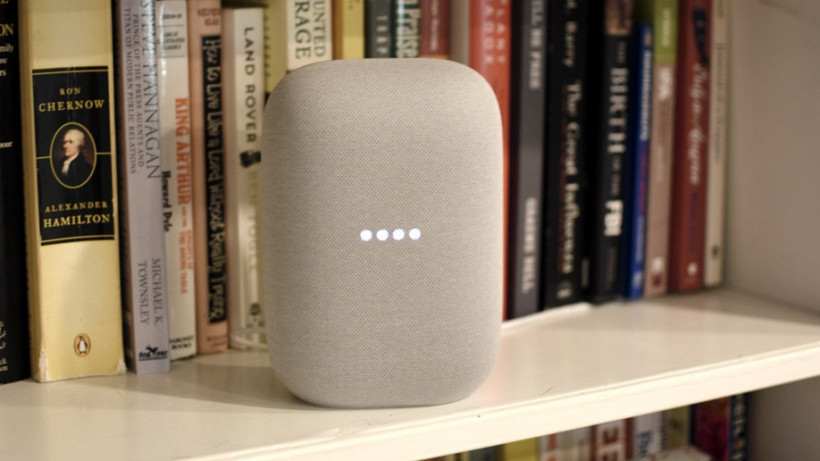
As a Google assistant owner you must have wanted a feature like incognito mode or something like that to search for a surprise gift on your partner’s birthday. So Google now made your wish true. With this new ‘Guest Mode’ on Google Home and Google Nest smart speakers any of your conversations with Google assistants won’t get saved.
However, Google doesn’t state the fact they save your ‘ok Google’ recordings by default and you can view or delete data anytime but still we wanted something more prominent and for that ‘Guest Mode’ is here to do that job. It will automatically delete all the recordings and conversations you had with Google assistant and nothing will be stored on your history.
So now let’s get straight to how you can enable Guest mode on your Google Home speaker
The best part of this feature is you don’t have play tricky to get this feature on. Just command “hey! Google, Enable/turn on Guest Mode” and boom you are ready to use it.
And when you are done with your private conversation with Google just command “hey Google, turn the guest mode off”.
And in case, if you forget whether it’s on or off just ask “hey Google, is the ‘Guest mode’ on ?”.
However, there are some limitations such as while having ‘Guest Mode’ on you can’t update of your events from Google Calendar or access any personal contact. But otherwise you can do plenty of things.
Well, this ‘Guest mode’ feature is now only available in English speaking regions.
Well, the very first question that might end up troubling you would be ‘WHAT IS ROUTINES HERE?’. We know well, but don’t worry pal it’s one of those things again which offers you comfort.
Routines have to do with how gadgets respond to your commands rather than simply turning them on and off, which has long been a characteristic of Groups within the Alexa app. That could mean dimming some lights, changing the color of others, or turning up the heat to a specific setting.
Alexa Routines allows you to regulate your smart home with a unified command, allowing you to get the functionalities you desire from your smart house. Amazon has further incorporated music, podcasts, and radio into the mix. It has also recently made it easier to connect Routines with friends and family by providing URLs found in the Alexa app.
Who wouldn’t want restful nights of sleep? If you count yourself in then I bet you wouldn’t want to miss out on any of the following steps:
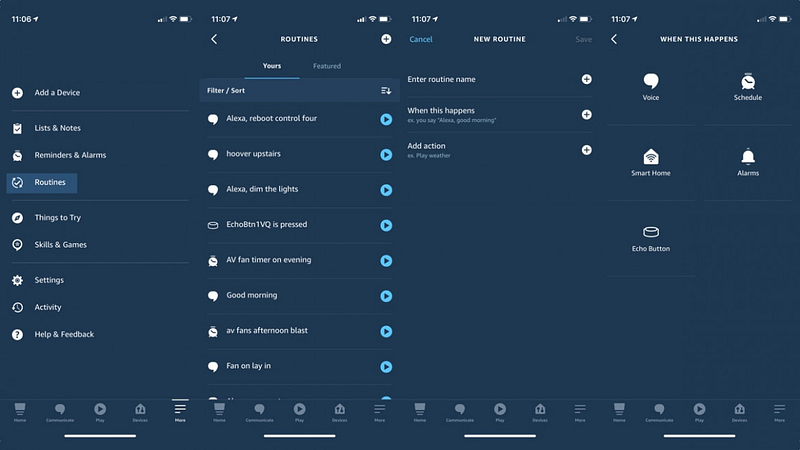
To begin an Alexa Routine, simply open the Alexa app, select More, and then Routines.
A list of your prevailing Routines will be displayed, and Amazon will suggest a few to get you started under Featured. To start a new one, either click one of these or strike the + in the top-right corner.
The screen is straightforward, with only two options:
This is primarily the brief command you’ll give Alexa when this occurs. To insert one, click the + button and select from a variety of options.
If you select Voice, then the Alexa voice command will be used to start the Routine. All you have to do now is individually type it in. Maintain a natural and clear tone with whatever you say.
ALEXA CLEVER HOME ACTIONS
Smart Home Technology Smart sensors and device status are used in routines to initiate an action. After you’ve chosen the conditions for your routine, you’ll need to append all of the actions. Simply click the + icon beside Add action to do so.
The components and smart home devices that will be operated when you speak your selected command are the actions you incorporate into your Routine.
We’ll run through some of the options briefly below, but it’s important to note that you might not have to start from the ground. You can use the shortest route to operate specific Groups or Scenes that you’ve set up in the Alexa app.
Lights-You can append savvy lights to your Routine for more than just on/off control. Compatible wise bulbs can have their illumination, tonality, and color adjusted.
Thermostats and smart heating-You can regulate thermal spots in your home with an on/off setting that refers to the standard temperature in the Smart Home listing, or by choosing customized temperatures for the Routine if your smart heating brand endorses it.
Smart plugs — You can switch on/off smart plugs from your Routine, which is good for tasks like lamps (without smart bulbs), gaming systems, kettles, and more.
Music/speakers — You can now include tunes, podcasts, and radio in your Routine. That’s an important part of creating better wake-up and nap time recipes.
Robot vacuum cleaners — With a good late-night routine, your robot vacuum cleaner may be able to do its job while you stay in bed.
Another excellent suggestion is to use a smart humidity sensor to activate the system for air-conditioning.
Alexa Routines can include features such as the ones listed below, in addition to activating smart home devices.
News — Alexa can interpret your flash to debrief, which is comprised of media abilities. It’s like getting a customized news broadcast tailored to your preferences.
Weather — Have Alexa read you the weather report, ideally as part of a morning routine. Keep in mind that these can be set to go off at the same time as your alarm.
Calendar — Whether it’s today or the future, Alexa would go over your calendar. You can also have it notify you of the upcoming occasion on your calendar.
Want to share your routine with your close ones?
To have the easily accessible URL, open the Alexa app, go to Routines, click the preferred Routine, and choose whether to share by message, mailing, or social networks.
When your loved ones receive the URL, they will be guided through some on-screen guidelines in the Alexa app and should see some fields in the yellow text where they must select which device a step of the Routine should be performed on.