 |
submitted by /u/Vinay_Kumar20 [link] [comments] |
Blog
-
Chatbot Conference Online 2021
Starting May 25–27th 2021

If you could ask Google, Salesforce, GoDaddy, T-Mobile, IBM Watson, Rasa, Twilio, anything about AI, Bots & Voice what would you ask?
Discover how Enterprises are using chatbots, AI and Voice to decrease costs and increase revenues. We will explore latest trends, use cases, and get a behind the scene look at what is working best and how you can apply it in at your company.
We features speakers from many of the leaders in the space such as Google, Facebook, Amazon, Rasa, IBM, Salesforce, Intuit, Walmart, and many more.

3 Reasons you need to Attend:
- Save Time: Discover how Enterprises are using Chatbots, AI and Voice from Top Industry Experts. Attending our events puts you in touch with Top Experts in AI, Bots , Voice and saves you a lot of time and trial and error.
- Certified Workshops: Learn how to Design and Develop Chatbots and Voice Apps in our full day workshops. Workshops like this typically cost between $2,000 — $5,000. Workshop details below.
- Networking & Virtual Happy Hour: We have digitized the networking experience! In our upcoming event, you will be able to virtually network with speakers, attendees, vendors and exchange contact information with the click of a button.
Promo Expires April 1 How the Chatbot Conference is Organized
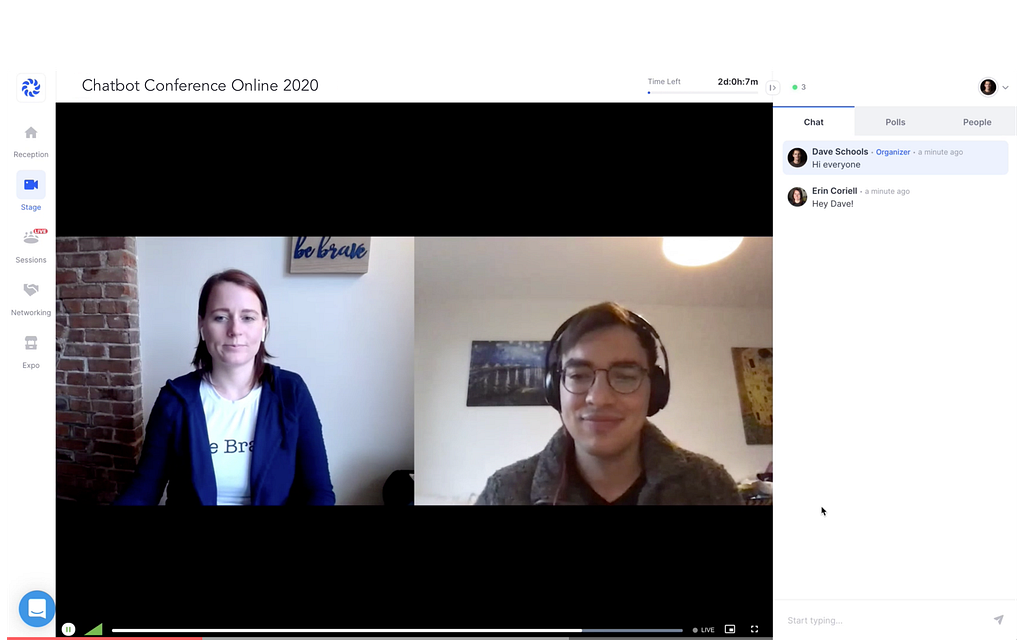
Day 1: DISCOVER |May 25th
Chatbot Conference & Live Q&A
On Day 1, of the Chatbot Conference, our Goal is to give you an overall understanding of the Conversational AI Ecosystem, to discover the best business application that are producing an ROI, and to do deep dives in the most essential areas.
Deep Dive into Use Cases:
- AI Customer Service: Exploring how Enterprises are using bots in Customer Service to increase customer satisfaction and decrease costs.
- Sales & Marketing: Latest on how Enterprises are generating leads and sales using Bots.
- B2E, Backend & RPA’s: This is the biggest use cases no one is talking about! Backend bots are bots that automated tasks between employees and enterprises such as HR, password reset, employee on-boarding, document management, proof reading, and much more.
- Voice & Virtual Assistants: Latest on Voice from Google Home, Alexa, & Siri.
Deep Dive into Execution:
- Artificial Intelligence & NLP: Latest on NLP & AI for Bots
- Conversational UX: Latest design conventions and a look at what’s working.
We aim to give an overview of the Conversational AI space and help you identify the most important areas. We then jump in and do deep dives in each of these focus areas and try to answer the most pressing questions such as ‘what use cases have the biggest ROI’, ‘what is possible given the current state of AI & NLP ’, ‘what is the best way for Enterprises to get started’ and many more. The Live Q&A is the perfect time to ask them questions and go in depth on their topic of expertise.
Promo Expires April 1 Virtual Happy Hour, Networking & Virtual Round Tables
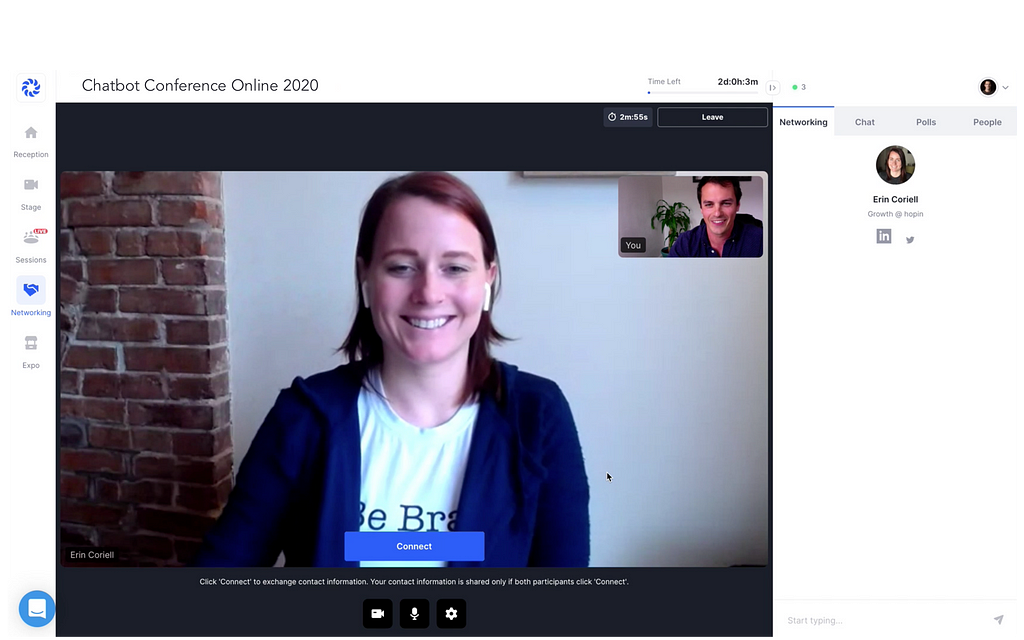
We have digitized the networking experience! In our last event, attendees had 1700 conversations! Our events are the perfect place to connect with industry experts and network in the Conversational AI industry.
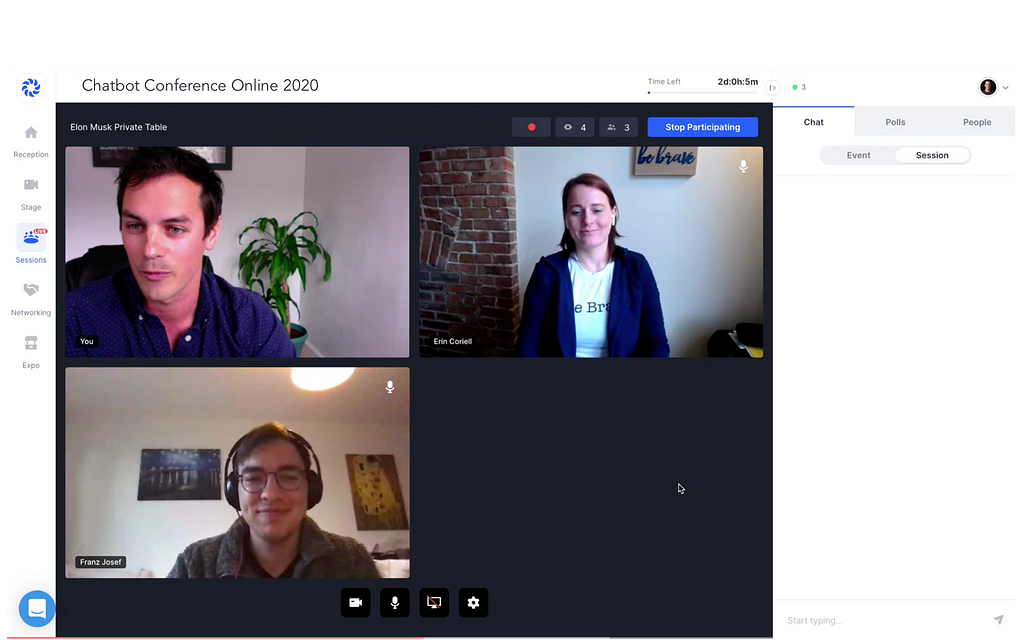
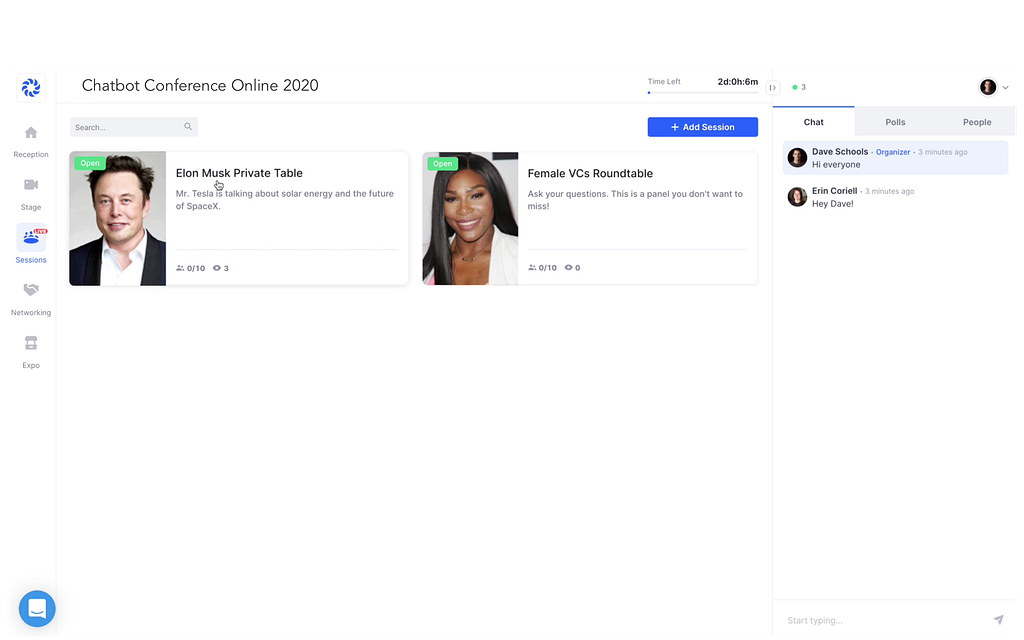
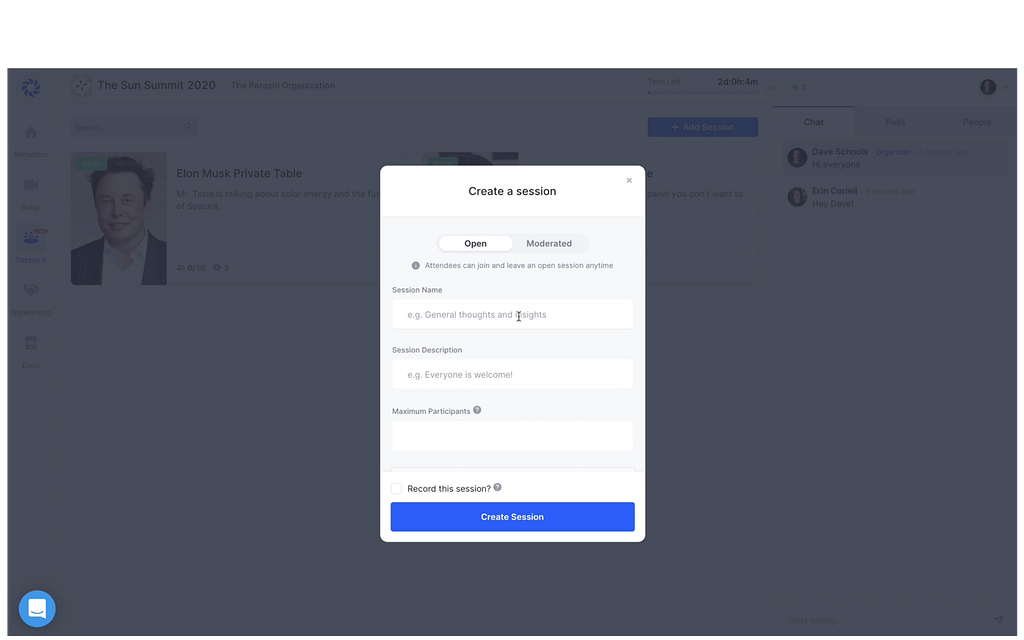
Here is how it works
In our Virtual Networking Area, you will automatically be matched to someone who has similar interests and have the opportunity to talk for a few minutes. After that time, you can exchange contact information with the click of a button or move to the next person.
Day 2: DESIGN | May 26th
Certified Conversational UX Workshop
In this year’s event, we are featured two Certified workshops that build on each other. First, you will design a bot in our Conversational UX workshop and then develop it in our an AI Development Workshop. By the end of our workshops, you will have a Conversational Agent that you can implement at your company or take it back to your supervisor.
The Project
Your bot will be able to answer 10 FAQ questions, have a great on-boarding experience and a number of fall backs. You will learn how to design and develop a bot using NLP/NLU Platforms and deploy your bot to a website, sms, messaging channel or voice.
Conversational Design Certification: In this workshop, you will learn how to design a great chatbot. You learn about copy writing, user research, UX design and how to use data and analytics to improve your chatbot or virtual assistant.
Day 3: DEVELOP | May 27th
After you Conversational Agent has been designed, we will take that preliminary design and develop it into a fictional MVP. In the workshop, the NLP section will be implemented and your bot will be able to answer 10 FAQ questions.
Certified NLP Workshop| May 26th
AI Developer Certification: In this workshop, you will learn how to build a bot using Natural Language Processing. You will learn about intent classification, entity extraction, dialogue management, and you’ll learn how to make your bot conversational using NLP!
After completing the workshops, you will be able to build a high quality chatbot or virtual assistant using an NLP.
Lastly, students who take the workshop, will earn a Certification upon completion!
Promo Expires April 1 See what our Attendees are saying
Promo Expires April 1
Chatbot Conference Online 2021 was originally published in Chatbots Life on Medium, where people are continuing the conversation by highlighting and responding to this story.
-
4 DO’s and 3 DON’Ts for Chatbot Testing Strategies
A quick summary of 7 important DO’s and DON’Ts when designing a chatbot testing strategy. We are continuously seeing teams ignoring those actually rather simple rules.

DO’s and DON’Ts
✅DO plan for iterations
In german we say rome was not built in a day — same applies for your chatbot training data. A robust chatbot is built by multiple iterations, training and testing cycles and by ongoing monitoring and performance tuning: CODE, TEST, DEPLOY, REPEAT
❌ DON’T underestimate the need for constant performance measurement
Without measuring performance with real user conversations, you will never know if your chatbot is really working for your users.
✅DO apply the 80/20 rule for testing utterances
Most teams are tempted to use 100% of the available data for training. Do not do this. You won’t know if your training data works if you use parts of the training data additionally for testing. Rule of thumb is to use 80% of data for training and 20% for testing.
If and only if the amount of available data is very small you may try K-Fold validation to get some insights about the quality of your data.
❌ DON’T rely on smoke tests or happy path tests
Again the 80/20 rule — 20% is the work spent for the comfort zone, 80% of the work is testing and bugfixing. 20% of your users will follow the happy path, 80% will break out. Prepare for this.
✅DO: spend a reasonable amount of time with explorative testing
Automated regression testing is superior for finding defects that you know can happen. It won’t help to find defects you don’t know about. Spend some time with explorative (=manual) testing: try to bring your chatbot to its limits and beyond.
Trending Bot Articles:
1. How Chatbots and Email Marketing Integration Can Help Your Business
❌ DON’T: ignore the need to re-test after training
You can never know what effect adding some training data on one end of your fine-tuned NLU model will have on the other end, until you try out. Do a full regression test of your NLU model every single time you make changes.
✅DO: test processing of out of order messages
One of the most human-like bevaviour is to scroll up the conversation history in the chatbot window and resume from a previous step. Most chatbots out there will fail this challenge if not prepared accordingly.
Action Plan
Here are suggestions to address the DO’s and DON’Ts.
Establish Continuous Testing Mindset
Testing is a crucial part of the development process. There is no such thing as a single testing phase when bringing a chatbot to life. Testing has to be part of the team’s daily business, just like coding, design and monitoring.

Awesome picture showing continuous testing Holistic Testing
For chatbots as for software products in general, there is more than unit tests coded by the programmers.
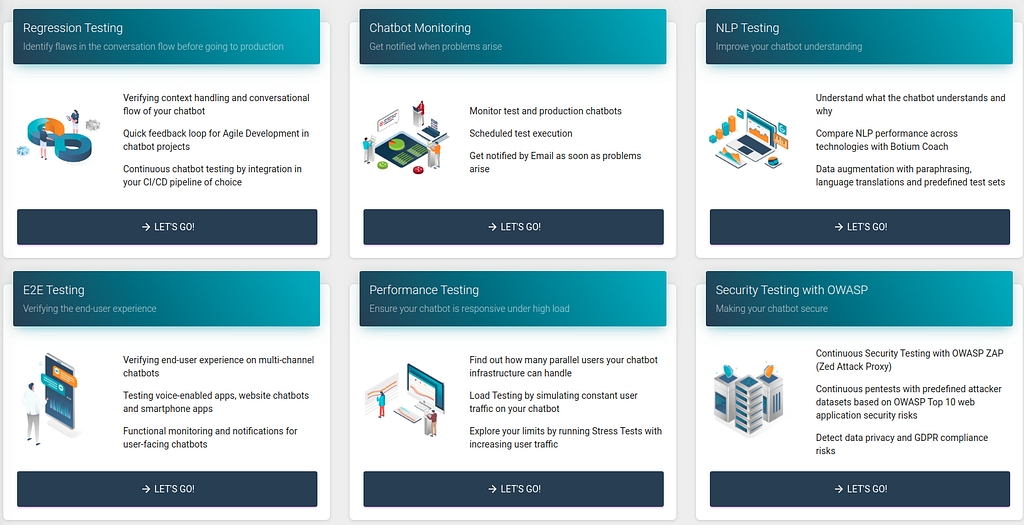
Botium Test Project Types - Regression Testing — Identify flaws in the conversation flow before going to production
- NLP Testing — Improve your chatbot understanding
- E2E Testing — Verifying the end-user experience
- Voice Testing — Understand your users on voice channels
- Performance Testing — Ensure your chatbot is responsive under high load
- Security Testing — Making your chatbot secure
- Monitoring — Get notified when problems arise
Get the Right Tools In Place
Without the right tools you will be lost. With Botium Box you are prepared for the challenges of getting them in place and integrate them into your chatbot development lifecycle.
Don’t forget to give us your 👏 !

4 DO’s and 3 DON’Ts for Chatbot Testing Strategies was originally published in Chatbots Life on Medium, where people are continuing the conversation by highlighting and responding to this story.
-
No-Code Platforms — Future of chatbot development
No-Code Platforms — Future of chatbot development
Increasing focus on digital transformation has been driving the popularity of conversational AI and text & voice-based chatbots. Many enterprises are leveraging these solutions for automating as well as humanizing conversations and enriching customer interactions.
As chatbots are becoming the quintessential tool to deliver premium customer support as well as automating operational routines, organizations are looking for solutions that augment existing capabilities in these areas. AI-powered bots that can understand, learn, and even recommend based on customer behavior are gaining top-mindshare among executives. There is a huge demand in the market for solutions that can deploy AI-powered bots within minutes to enhance lead generation and support branding activities. The value proposition of these solutions is the convenience to convert contact centres into business generation centres within no time.
In a competitively fierce market, businesses have started turning toward enterprise-grade applications with capabilities to offer ultra-personalized customer experiences to improve brand value and differentiation. The market is witnessing a heightened sense of urgency, especially with customer interactions, as these are increasingly correlated with several business metrics and are pressurizing software development teams to deliver applications faster than ever before. In addition, there are significant gaps between developers and business requirements, which are impeding the rising demand for customer-facing applications among enterprises. Quite often, chatbot developers don’t indulge in understanding the nuances of the deployment environment, domain knowledge, and the perceived value of the bots leading to unsatisfactory results.
Can anyone develop chatbots?
Yes, using KLoBot’s chatbot builder platform, anyone can develop and deploy chatbots with minimal programming expertise. Knowledge managers in law firms are always on the lookout for advanced automation technologies to enhance lawyer’s productivity as well as minimize their spend on repetitive routine activities.
Knowledge management professionals and teams are moving beyond traditional management practices to uncover efficient solutions to connect people, process, and technology. In addition, these solutions typically do not require expert programming knowledge and lessen dependency on expensive IT expertise. Platforms with the ability to shift from current transactional work to transformational value are witnessing increased traction.
No-Code platforms for rapid delivery of intelligent chatbots!
No-Code development platforms have risen as the path towards innovation that reduces enterprise dependency on developers and third-party software developers. These platforms are reinventing the way chatbots are built by using prebuilt modules, reducing the development time, and transforming the business process.
Targeting at organizations requiring tools for faster and easy to build bots, No-Code chatbot builder platforms allow rapid development and deployment of chatbots, becoming the preferred choice for startups, enterprises, and non-technical developers.
Trending Bot Articles:
1. How Chatbots and Email Marketing Integration Can Help Your Business
KLoBot — A No-Code chatbot builder platform
KLoBot Inc., a disruptive startup, is accelerating enterprise digital transformation initiatives by simplifying human–machine interactions with their chatbot solution, “KLoBot”. The No-Code DIY chatbot builder platform makes it easier to develop web, mobile, and business applications especially for businesses with minimal IT support.
KLoBot’s elegance lies in the ability to build customer-facing applications using a simple drag and drop interface. The No-Code development platform offers agility, reduced development costs, and enhanced productivity by designing and deploying chatbots within a few hours.
KLoBot’s chatbot building process
Creating or Selecting Skills:
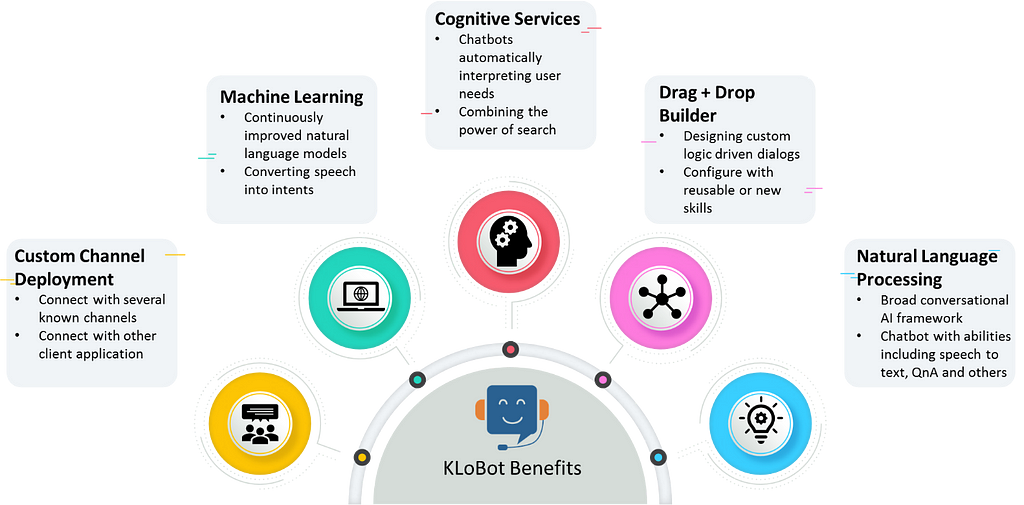
Clients using the drag and drop interface, can either create their own skills or select available skills from KLoBot’s reusable skills categories, which consist of reminders, information, tasks, QnA, and Flow.
KLoBot enables users to build AI-enabled chatbots for simple as well as complex tasks, including transaction completion process, knowledge repository search, and virtual personal assistants among others. The bot also provides seamless integration with NetDocuments, allowing users to access NetDocuments content by using voice or text.
Configure and Train Chatbots:
KLoBot’s custom channel deployment allows enterprises to configure chatbots on a wide range of communication channels, including Facebook, Skype, Cortana, Slack, Telegram, Microsoft Teams, Twilio, web chat, email, etc. Other than these standard channels offered by KLoBot, enterprises can even configure chatbots with their specific client applications using direct line as a channel.
KLoBot leverages ML to train chatbots to continuously enhance Chatbot & Human interactions using natural language. In addition to learning, these bots are capable of comprehensive reporting and generating insights based on user interaction. These functionalities help businesses to better understand and target the key metrics resulting in improved service capabilities and ROI.
Robust Security Features:
Some adjustments are needed after configuring skills to chatbots. KLoBot’s bot builder user interface assists clients in managing all their chatbots from a centralized location, with minimal customized settings.
End-to-End Testing:
The final step of KLoBot’s chatbot building process involves testing, which ensures that the organizational AI chatbot requirements are met. It includes testing of configured skills across chatbots on different communication channels. This final step ends the KLoBot’s turnkey chatbot development process.
Don’t forget to give us your 👏 !
No-Code Platforms — Future of chatbot development was originally published in Chatbots Life on Medium, where people are continuing the conversation by highlighting and responding to this story.
-
Enhance your Crisis Communication Chatbot with the Covid-19 API & News Sources
Recently on the 22nd of February Worood Dabbas, Tosin Amuda and I (Fawaz Siddiqi) conducted a webinar on creating a chatbot based on crisis communication. The main idea of the use case was to keep the public and users informed about the latest COVID-19 development and cases, and this was achieved by linking Watson Assistant with Watson Discovery & the COVID-19 API with the help of IBM Cloud Functions which is a serverless platform.
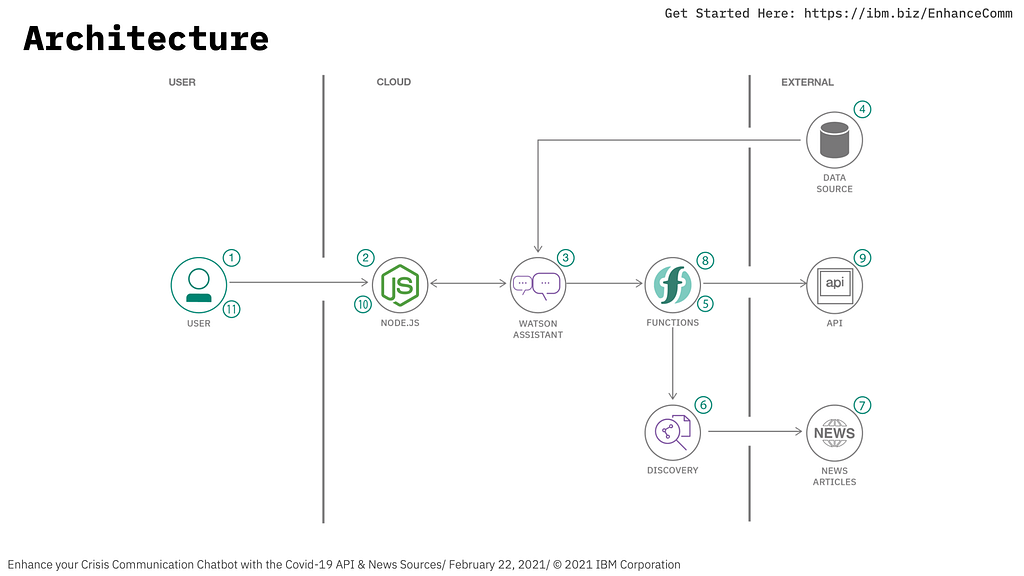
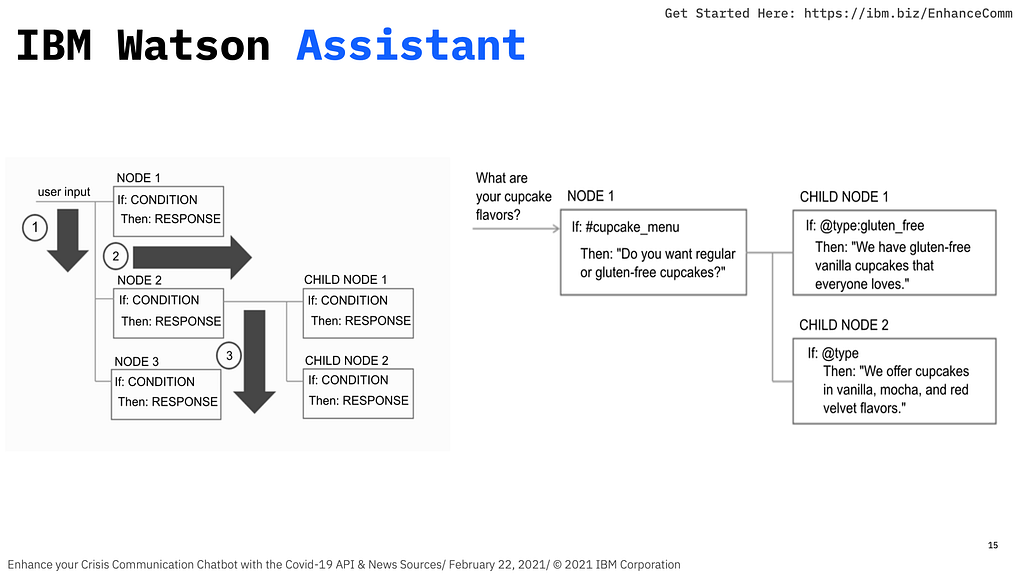
Worood kicked off the session by explaining the use case and how it can help the community with the latest up to date information, she explained the types of chatbots which are used in the industry as well as the chatbot road map on how to make an efficient chatbot which serves the purpose of it being built in the first place, for in our case was to create a crisis communication chatbot. She also explained the flows within Watson Assistant and how they work when a user is using the chatbot.
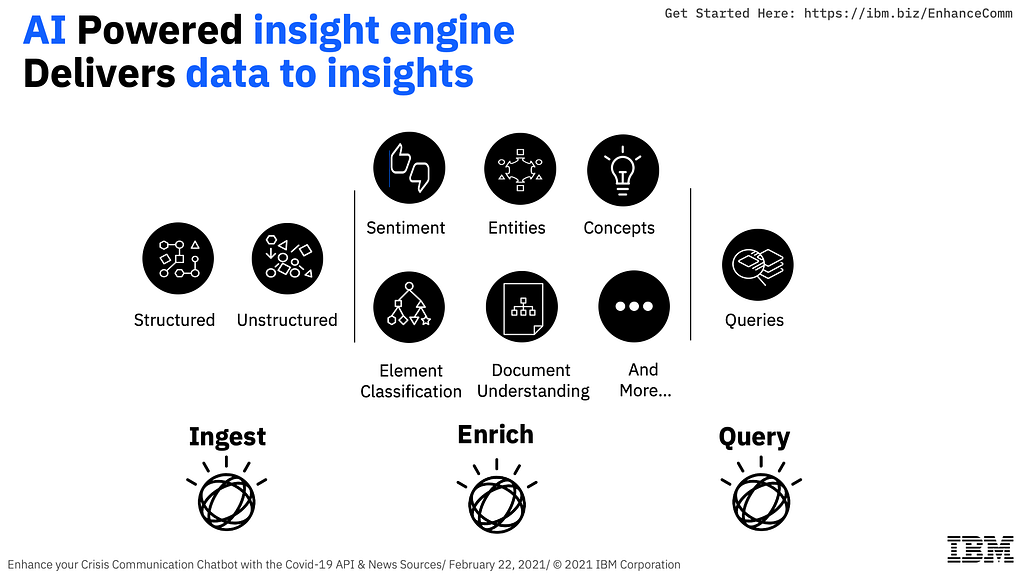
Up next was Tosin, he discussed on how Watson Discovery can be integrated within our solution and how it is used, he introduced the Watson Discovery News collection which comes out of the box with Watson Discovery, which is basically a collection with news articles and it being updated frequently with the latest news allowing us to query the collection and get the news. Moreover, he discussed how the ingestion pipeline works within Watson Discovery and how it serves as an AI powered insight engine, and also introduced the idea of serverless.
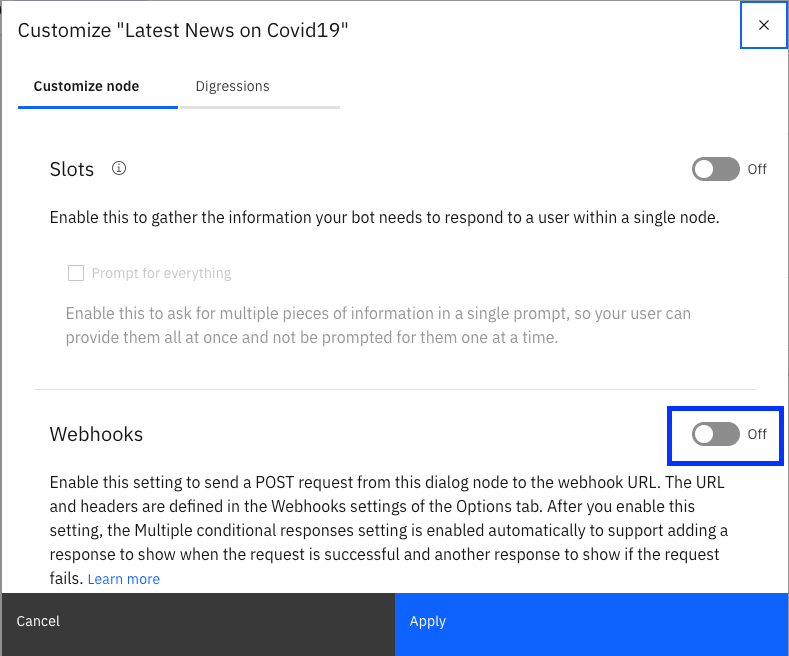
After which I took over to conduct the hands-on session where we built the chatbot, I guided the audience on how easy it is to create the chatbot service on IBM Cloud and create the relevant skills for the chatbot, after which I discussed about Watson Discovery on how can the create the service and query the Watson Discovery News Collection with the help of the Discovery API. Finally, I moved on to the initiating the IBM Cloud Functions service to connect Watson Discovery and Watson Assistant together, the serverless function was also pulling data from the COVID-19 API in JSON format, finally I showed them how they can enable webhooks in the assistant and enable the dialog nodes to receive the responses from the webhook which is an HTTP web service of our serverless fucntion.
Trending Bot Articles:
1. How Chatbots and Email Marketing Integration Can Help Your Business
And after all of the instructions, this is how our final output would look like
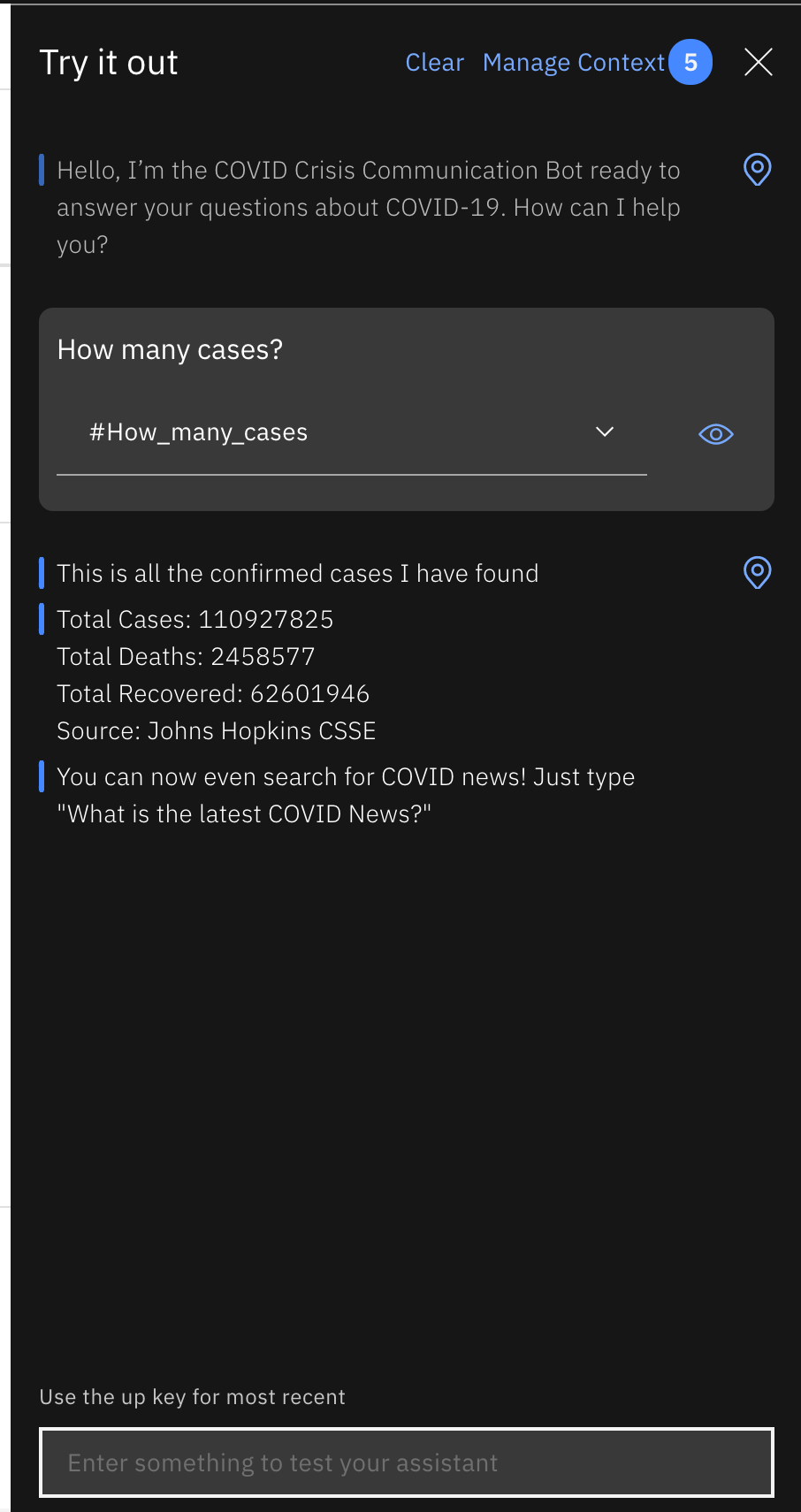
It was one of the workshops which I really enjoyed, because there was a lot of engagement form the audience and they were very curious to learn a lot more about these services.
In case you missed out on the webinar, don’t worry I have all the resources for you right here which you can refer to at any time
Recording of the session: https://www.crowdcast.io/e/covid-19-news-chatbot
Link to tutorial: https://ibm.biz/EnhanceComm-Tutorial
Link to slides: https://ibm.biz/EnhanceComm-Slides
Sign up/Log in to your IBM Cloud Account: https://ibm.biz/EnhanceComm
Don’t forget to give us your 👏 !
Enhance your Crisis Communication Chatbot with the Covid-19 API & News Sources was originally published in Chatbots Life on Medium, where people are continuing the conversation by highlighting and responding to this story.
-
What would you like to do?
General Discussion- wondering what people prefer?
submitted by /u/Botmywork
[link] [comments] -
Chatbot from scratch.
What does an ‘about to be’ big company (still in the website building phase) mean by ‘we want to implement chatbot from scratch’? How does one go looking for resources for building this?.. What are different platforms one can start experimenting with? PS: collaborative, educational services.. something something.. type website. (Wants to use Python for this.)
submitted by /u/paw__
[link] [comments] -
Trends in Insurance Software Development
What trends will be relevant for insurance apps in 2021?
- Artificial Intelligence and chatbots guide users through common issues, speed up the initial processes like registration and identity verification, make client-app communication more personalized, provide faster claim settlement, help with fraud prevention, etc.
It isn’t necessary to use these trending technologies in insurance app development. Still, it’s good to be aware of your possibilities if you decide to extend the app’s functionality.
submitted by /u/AnnaBodina_VNNV
[link] [comments] -
Looking for a Chatbot for interactive theatre piece
I’m creating a piece of interactive online theatre this summer, and one of the elements will be where the audience gets to interact with a chatbot as a part of the narrative. They’ll think they’re talking to a character in the show, when in reality, it’s the chatbot.
Do you know of any easy-to-set-up bots that could be used? Ideally, I’d love to find something that passes the Turing Test, that can have customized writing, and is cheap/free.
submitted by /u/sushipoutine
[link] [comments]

