Have you made any recent flight bookings from any leading travel site? If yes, after booking, you might have received a confirmation and ticket to your WhatsApp from the area along with the number and details which a chat application bot is doing!
Interesting, isn’t it? This is how businesses simplify their workflows using chatbots without human intervention at every step of the process.
Does your business rely mainly on communication and collaboration?
How about using the messaging platforms or chatbots to accelerate the workflows?
The messaging and collaboration platforms have become one of the key accelerators for productivity within the teams. If most of the activities in your business are collaborative, you need simple apps built with a top messaging framework. Here are the top 5 best chatbots that boost workflow management and process automation to the next level.
1. Conversational chatbots
The conversational AI bots can mimic human conversations almost accurately and engage with people without pre-scripted responses. By using Artificial intelligence, processing, and technology, these Chatbots can make personalized and contextual conversations.
Example
With Quickwork Conversations, you can build multi-channel communication in mind and connect with any messaging platform like a pro. It manages the discussions for the businesses and helps in making a better customer journey.
By using the Chatbots in the customer service department of your business, the bots can help you with a wide array of tasks. From self-service to answering a set of questions, they can answer it right without the need for human intervention.
Some examples of customer service chatbots
Welcome Bots: Not all customers are comfortable initiating the conversation so that a proactive bot can set you apart.
Resolution Bots: this kind of bot can resolve over 80% of the customer queries quick and fast
3. E-commerce bots
Online Ecommerce is like an ocean where you can find a sea of pages, crosslinks, and more. The Ecommerce Chatbots streamlines the procs for customers and provides a great shopping experience. Here are some types of Chatbots that can employ Ecommerce service bots.
Examples
Sales bots — The bots that automate the sales and the conversations related to the sales processes like providing price lists and executing the sales. It helps to boost your revenue and improve the sales strategy and approach.
Billing bots –The billing process is tedious, and several monotonous tasks are involved in the billing process, which is exhausting to the sales teams. A billing bot can replace your team in this process.
4. Lead generation bots
The lead generation tools are not new, as they have been employed for years by the marketing people. Now, even the Chatbots are capturing and nurturing the leads. They can be more proactive, trigger based on the conversations.
Examples
Conversation bots — The Chatbots establish the conversations in the most precise manner and helps in capturing and communicating with the leads.
5. Survey bots
Customers are not interested in filling the surveys and answering all the questions online. Deploying Chatbots to capture your customer data and surveys from the people is the intelligent approach today, and it nestles the questions without a conversation.
Feedback bots — If a customer purchases some goods from your website, a feedback survey can help you improve the customer service and experience. These bots can make a survey process less tedious compared to manual ones. The bots interact with the customers in real-time and help businesses seamlessly capture the feedback.
Summing it up
The above top five chatbots are the best type of bots that can improve your operational efficiency, workflow management and helps in automating your complex tasks.
If you want to build chatbot journeys and integrate multiple applications using the best workflow automation platform, Quickwork is the best choice. Start building your first automation journey with Quickwork today!
In our previous article, we talked about what universal design for learning (UDL) is and explained its key principles.
In this article, we’ll tell you why lecturers should start using universal design for learning ASAP. If you’re already interested in incorporating UDL into your classroom, we also explain how you can do that.
Hello, I have been trying to implement a chatbot in Microsoft Azure. My first step is the NLU module where there will be intent classification. I wanted to know if it’s possible to do this using BERT? Thank you.
Hello, I was wondering if anyone could help me with this. I need to create a free prototype of a chatbot that reads posts from a facebook page and sends it to whatsapp contacts. How do I proceed ahead with this? Can someone help with a resource? Thanks so much in advance
I’m developing a chatbot. Where can I find help for testing it? I would like to share it to some communities, people who like to play with chatbots etc.
I don’t want to make it open to everyone because it’s I don’t have infrastructure to serve high traffic. Just to limited number of ppl.
Not sure if this is the right place, but here goes. We’d like to create a cross-platform automatically-updating wiki and bot. We got a pretty big budget for this.
Think following scenarios:
If someone shares a presentation in Microsoft Teams public channel, related to a topic. Throw it in the wiki (Collab. Platform)
Someone’s account manager for a client? Throw it in the wiki (CRM Platform)
Someone’s available to work in 2 weeks? Throw it in the wiki (ERP Platform)
Problem right now is I have no idea at all where to begin. Anyone got any inputs? Could be platforms, AI, machine learning, anything really. The more specific the better. All I got is ‘start with the data people will actually need/should be easily available.
Mercury — a chatbot for Ordering Food using ALBERT & CRF
Unless you have been out of touch with the Deep Learning world, chances are that you have heard about BERT, ALBERT and CRF (Conditional Random Field).
Mercury, named after the Greek God Hermes who was the messenger of the Gods, is a chatbot service which can be integrated with various Food-Delivery brands such as Swiggy or Zomato where a User can simply type in his order and send it as a text.
Mercury can then extract the essential information from the order and place the order for the User accordingly.
Here is a list of technologies involved in Mercury :
Since this paper is about “Mercury”, I will only be providing a brief summary and some useful links for a more in-detail understanding of each concept.
What is BERT?
Let’s take a look at these sentences where the same word has different meanings :
|- I was late to work because I left my phone at home and had to go back.
|- Go straight for a mile and then take a left turn.
|- Some left-winged parties are shifting towards centralist ideas.
How do you differentiate between each meaning of the word left?
These differences are almost certainly obvious to you, but what about a machine? Can it spot the differences? What understanding of language do you have that a machine does not?
Or rather, What understanding of language do you have that machines did not have earlier?
The Answer : Context.
Your brain automatically filters out the incorrect meaning of words depending on the other words in the sentence, i.e. depending on the context.
But how does a machine do it?
This is where BERT, a language model which is bidirectionally trained (this is also its key technical innovation), comes into the picture.
This means that machines can now have a deeper sense of language by deriving contextual meaning of each word.
ALBERT was proposed in 2019, with the goal of improving the training and results of BERT Architecture by various techniques :
Parameter Sharing (Drop in Number of Parameters by over 80%)| Inter-Sentence Coherence Loss | Factorization of Embedding Matrix
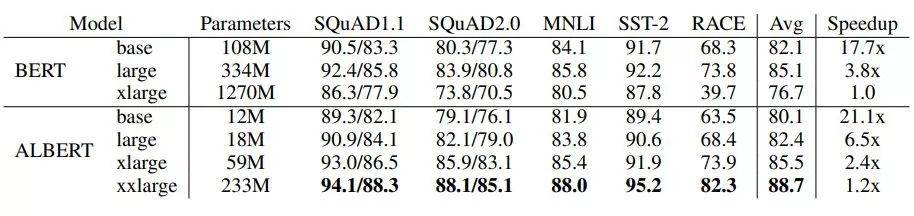
Results of ALBERT on NLP benchmarks :
ALBERT VS BERT (ALBERT Achieves SOTA Results with 20% Parameters)
What are Conditional Random Fields?
CRF classifies inputs to a feature from a ‘list of potential’ features.
I will be going into a little more detail shortly but for now, just understand that CRFs are used for predicting sequences depending upon previous labels in sentences.
They are often used in NLP in various tasks such as Part-Of-Speech Tagging and Named-Entity Recognition since CRFs excel in modelling sequential data such as words in a sentence.
What is gRPC?
It is an open-sourced high performance Remote Procedure Call framework.
It’s main advantage is that the client and server can exchange multiple messages over a single TCP connection via the gRPC Bidirectional Steaming API.
Mercury uses gRPC bidirectional streaming API for implementing Speech-To-Text functionality by using the Google Speech-To-Text API.
Mercury — What’s under the Hood?
What does Mercury do before placing the order for the User?
How does Mercury know that the text it has received is indeed a request for placing an order?
Let’s take a look at this sentence:
“I would like to have 1 non veg Taco, 3 veg Pizzas and 3 cold drinks from Domino’s.”
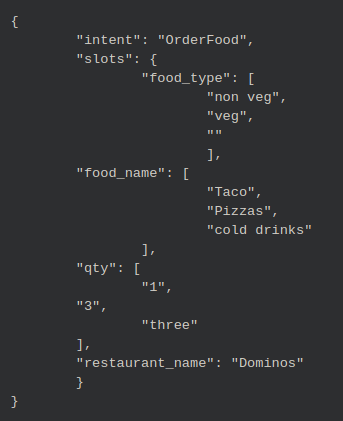
How does Mercury go from this to something like this?
This is where Joint-ALBERT (Slot-Filling & Intent-Classification) comes into the picture.
Sneak-Peak under the hood of Mercury’s Model
Training :
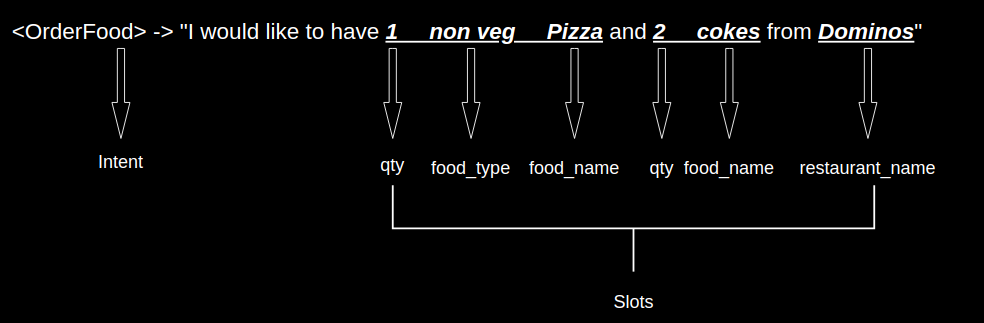
We come up with some desired labels for our model.
Intent Label : <OrderFood>
Slot Labels : <restaurant_name> , <food_name>, <food_type>, <qty>, <O> (<O> means that specific word does not carry much value in the sentence and can be masked or ignored).
We create hundreds of sample sentences with labels associated to each word.
ALBERT + Conditional Random Field (Joint-ALBERT):
We have already learnt that CRFs excel in modelling sequential data. So how does it help Mercury?
CRFs essentially help in mapping each word to it’s appropriate label.
For example:
It can map the number “1” to <qty> denoting quantity.
It can map the word “Domino’s” to <restaurant_name>.
Great! So if CRFs can do this, why do we even need ALBERT?
In our original sentence :
“I would like to have 1 non veg Taco, 3 veg Pizzas and 3 cold drinks from Domino’s.”
How does CRF know that the word “non” is a <B-food_type> and the word “veg” is <I-food_type> (B means beginning & I means continuation of B)?
How does CRF know that the word “non” is not the dictionary meaning “anti”?
As you probably already guessed, ALBERT provides CRF the contextual meaning of each word which helps CRF in classifying each word into the correct slot labels.
CRF does Slot-Identification for each word by mapping each word’s possible label with each other and figuring out which mapping has the highest probability.
Bold Line represents the Most Probable Mapping
Finally, how is Intent of the sentence predicted?
CRF does this part too by figuring out that “A specific sequence of slot-labels leads to a specific Intent”.
For example :
If the slots <food_type>, <food_name> and <restaurant_name> are found in a sentence, then the sentence is probably having the intent of <OrderFood>.
Intent Prediction based on Slot Labels
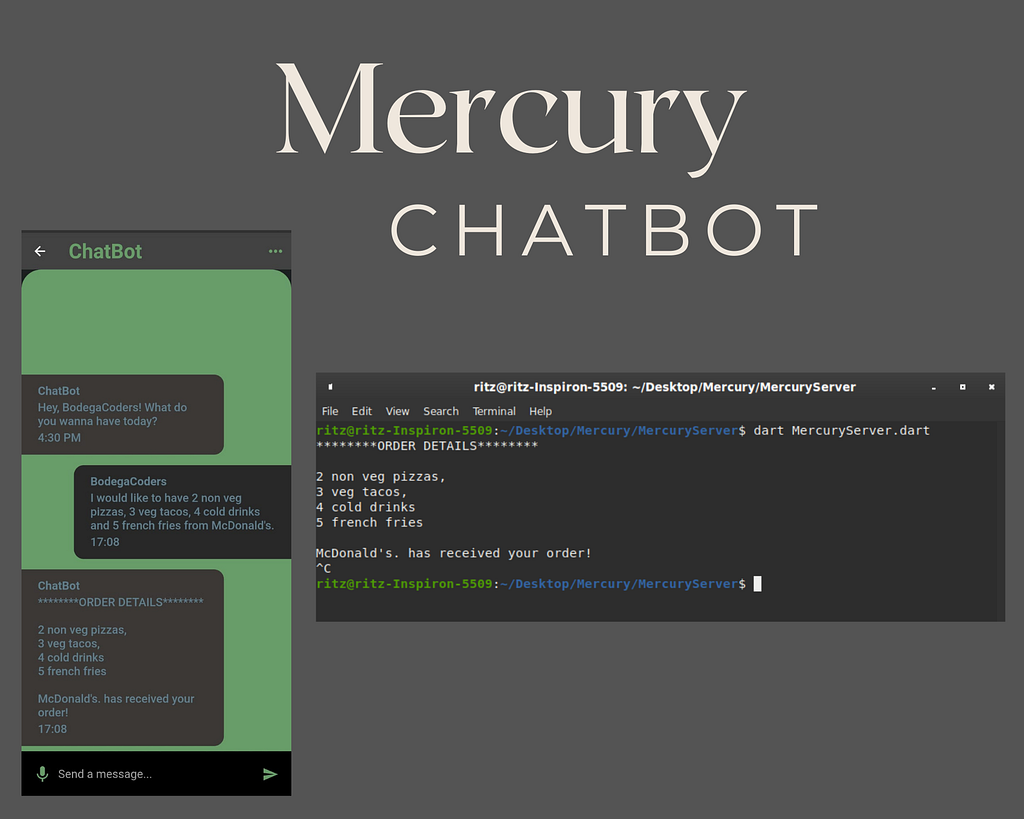
Flutter Front-End
Mercury has a simple and elegant front-end for the User.
Humans have long been fascinated by the concept of machine thinking and working like a human, at least intellectually. Though there might be potentially devastating consequences of a machine becoming as intelligent as humans, we simply cannot deny that they could be of great help and improve our daily lives.
Cognitive AI has been powering virtual assistant services throughout their existence. The capabilities of virtual assistants are increasing year by year and With various virtual personal assistants showing very advanced and high intelligence capabilities, it is common for anyone to get curious as to what is a virtual assistant ai? and to what extent this “cognition” they exhibit would go.
In this article, let us try to understand exactly that. However, before that, we must understand what cognition means and what to think of when software exhibits cognition.
What is Cognition?
Basically, cognition is a state of awareness of an entity of its surroundings and an ability to evaluate it and give an intelligent response to the stimuli. To define more formally, it is a mental action or a process of a being in which it acquires understanding through thinking, experience, and senses which it uses to communicate with the world.
Other than being able to “sense” the world, the cognitive being must have the intelligence to understand and react to it and also have a working memory.
Humans have intuitive cognition which is developed through a lot of means. However, a machine exhibiting cognition means that it is also “aware” of its surroundings and gives intelligent responses if we interact with them.
How can we test the Cognition of a Software?
In humans, cognitive capabilities are tested by making them do various activities that require a certain level of cognition. So, a similar form can be used to test and assess the level of cognition of software.
This actually can be seen as the core idea behind the Turing test, which is a thought experiment that goes like this: a computer is hidden behind the doors of a room and a man would be communicating with that computer by sending them written notes. If the computer manages to answer all queries satisfactorily without a man getting doubt, the computer wins!
Artificial Intelligence is actually divided in general into weak AI and strong AI. The former one being Artificial intelligence that works only for a subset of problems and requires a lot of training material to solve a new set of problems and the latter is a general AI that can solve almost all problems that are given to it. Strong AI has not been developed fully yet, so much of the development is still ongoing.
So, this is the first limitation we see with today’s AI. Which is that they can exhibit only finite cognition in limited fields onto which they are trained on. There is another general problem associated with the present state of AI — — black-box nature.
That is, much of all machine learning models used in practice are black boxes and we do not easily know how exactly a particular decision is made and so, we cannot look at “process” and come to a conclusion whether the machine is “thinking” and going through “right steps” of intelligence in giving an answer.
So, what can we do? One easy way is to look at various examples in which virtual assistants give intelligent responses and analyze how intelligently they handled the situation.
Cognitive Capabilities of a Cognitive Virtual Assistant
Here, let us see various examples of how an intelligent virtual assistant would respond to a query and analyze it from various viewpoints of cognition.
Memory Retention
When using memory, we can understand that a virtual assistant would have an exceptional memory where it is able to access an appropriate memory when there is particular use.
Consider you are talking to a virtual assistant regarding going to a place for a vacation. Think that you told it a very while ago that you like to go to a particular place in the winter season. Now, when you ask a virtual assistant to suggest a place to visit, the virtual assistant would check that the current season is winter and from an understanding of your interests, it may suggest to you places that really suit you.
Not only this long-form memory retention, virtual assistants can also retain current context across various previous messages and thus can give intelligent answers based on previous conversations.
Understanding Spell Mistakes and Paraphrases
The ability to understand spelling mistakes and paraphrases signifies that a virtual assistant is cognizant enough not to take for granted that what you type to be correct and includes complete intent. Even though you give an incorrect input or do not specifically specify intent, the virtual assistant would extract the correct intent and proceed with the next actions.
For example, let us think you have given an input when my event is scheduled? Then, it might understand that you have asked when your event is scheduled. Also, you did not specify what event you have asked for. The virtual assistant tries to guess the most appropriate event that you might ask about and would provide a response based on that.
Understanding long-form Sentences
Understanding long-form sentences signify that a virtual assistant is able to break sentences down and can still understand the overall intent and meaning of a sentence.
For example, if you provide Hi I am John Doe. Currently, I have a mid-tier plan. I Am not satisfied with it. Either solve my problem or get me a higher plan. Then, the virtual assistant would understand that you are somewhat angry and tailor its response. Also, it first asks about the problem and if the problem is not solvable easily, then provides information regarding higher plans. If you are still not satisfied, then your request, with all appropriate information, would be forwarded to a support representative.
Conclusion
From the above analysis, we can come to a conclusion that virtual assistants, with help of cognitive AI technologies, exhibit exceptionally good cognitive capabilities. The capabilities would exhibit intelligence in discerning the intent of the user and also remember and understand the context.
So the limit of a virtual assistant to exhibit cognitive capabilities cannot be specified as such, except for the fact that it’s limit is just to our imaginations. The existing attributes and level of intelligence is certainly growing with a drastic pace.