Blog

  • 12 Chatbot Metrics That You Will Be Naive To Ignore

    Chatbots are not just the helpdesk assistants of the future, they are the helpdesks of the future.

    There, we said it.

    As a company that makes chatbots and has access to a tonne of data that repeatedly shows how chatbots are more effective than your typical customer service agent, we at Kommunicate believe that there will be only one channel of communication between you and your customers in the future — chatbots.

    1.4 billion people on the planet currently use chatbots on a regular basis, according to this report by Acquire. That’s close to twice the population of Europe.

    As more and more millennials become paying customers who prefer to talk to a computer rather than a real human being, adding a chatbot to your website is not just common sense, it is a matter of survival.

    But what if you already have a chatbot involved, which is taking care of all those customer conversations, doing a bit of lead generation for you, handling customer support, and even helping out the sales team. You must have got it all figured out and would now just have to sit back, sip iced tea (or coffee, if you prefer) and watch your business grow, right?

    Wrong.

    Chatbot analytics is as important as adding a chatbot to your website. Having a feedback loop helps you find areas of improvement for your chatbot, which can only lead to greater business.

    In this blog post, we are going to examine:

    1. Why it’s important to measure chatbot performance
    2. Top metrics you should monitor
    3. Additional resources to learn more about chatbot metrics

    Create A Chatbot Now

    Why it’s important to measure chatbot performance

    1. Focus on the right metrics: Implementing chatbots to your website is just step 1 of ensuring that none of your customers falls through the cracks. Many times, businesses do not get the desired results from chatbots because they have been optimized for the wrong metrics. Measuring chatbot analytics helps us to track the most important KPIs and make decisions that are data-driven.
    2. Gauging how effective is your chatbot: If you have the right performance indicators in place, you can measure how effective it is to have a chatbot on your website. Answering a few basic questions like, “How helpful are chatbots in solving my customer queries?” or “ Are the chatbots directing my customers to drive profitable actions?” will go a long way in gauging the effectiveness of your chatbot.
    3. Understanding customer journey: To be data-driven, you need to visualise certain aspects of your customer journey on your website, such as user paths, exit points etc. A good chatbot solution comes bundled with a chatbot analytics dashboard that helps you map all these details, helping you understand the customer journey that much better.
    4. Measure ROI on business: Chatbots have a real impact on business, and chatbot analytics provides information such as the total number of leads generated, total tickets resolved, average time spent per conversation etc. With these metrics in hand, you can take calculated business decisions such as how much additional investment is required on your website and in which areas.

    Top Metrics to Measure Chatbot performance

    We have classified the metrics that you need to track into 4 broad categories, and are listing them out here in the order of least important to most. Here are the top 12 metrics, in our view, which you need to keep track of to measure how effective your chatbot is.

    1. Goal Completion Rate
    2. Conversation Starter Messages
    3. CSAT Scores
    4. Bot intent analytics
    5. Bot Messages
    6. New Users
    7. Total Users
    8. Active Users
    9. Engaged Users
    10. Bounce Rate
    11. Fallback Rate
    12. Conversation Duration
    13. Goal Completion Rate: GCR is on the top of our list because it successfully measures how effective your chatbot actually is, by capturing the percentage of user interactions that have been successful over the chatbot. Your bot essentially exists to answer a customer query, and this metric tells you how effectively your bot processes input and gives a response that answers that customer query satisfactorily. GCR is dependent on how good your Natural Language Processing and Artificial Intelligence Capabilities are.
    14. Conversation Starter Messages: Interactions between the bot and the customer is a two-way street, and the number of times the bot initiates the conversation forms the basis for this next metric. Companies need to initiate conversations with customers so that they stay on the website longer, so in a way, conversation starter messages help measure the organic reach of your platform. Be careful to not sound too pushy in your conversation starter messages though, they may scare away your potential customers. Sound natural, and be warm.
    15. CSAT scores: Customer satisfaction scores are an important metric to measure since all businesses want happy customers who will keep coming back. To measure customer satisfaction with your chatbot, all you have to do is ask the customer to leave a “like” or a “thumbs down”, or leave a score out of 10, as we do here at Kommunicate.

    As you can see, Kommunicate’s chatbot “Eve” is right there at the top with the human agents when it comes to CSAT scores, meaning the bot is effective and people actually like interacting with it. But since the agents still beat Eve to the top position, there is a lot of scope for improvement. Another way of measuring the effectiveness of your chatbot is by measuring the CSAT scores before and after the bot was introduced onto your website. If the CSAT scores show a dip, it means that probably the chatbot was not as effective as you wanted it to be and you might want to reconsider having one on your website.

    1. Bot Intent Analytics: Bot Intent Analytics helps your developers assess how their messages are mapped to specific intent categories. It is a measure of how “smart” your bot currently is and how it can be improved.

    As you can see, the Welcome intent was triggered the maximum number of times, which means most of the visitors to your chatbot started their question with a “Hi” or “Hello” and the bot responded accordingly.

    1. Bot Messages: The total number of messages sent by the bot during the course of a conversation forms the basis of this next metric. This metric measures the length of the conversation between the customer and the bot, and we generally want this number to be high. An important caveat to note, we don’t want this metric to be high for the wrong reasons, like, for instance, if the bot gives the same answer over and over again to a query it doesn’t understand.
    2. New Users: This is an important metric to measure, especially if you have just deployed a chatbot onto your website. The number of new users that your chatbot has helps you gauge how popular your chatbot really is, which will then drive your business decisions on making the chatbot handle more things. As with any new fancy technological advancement, customers’ interest is bound to decrease over time in your chatbot, and if you are able to attract a good pool of new users to your chatbot, you can keep the momentum going.
    3. Total Users: As the name suggests, this metric tells you the total number of users who are interacting with your chatbot. This is an important metric to track since it allows you to measure the impact of your chatbot and its overall success. The total users also give an indication of the amount of data that the chatbot is exposed to, and you can use this information to calculate the market size.
    4. Active Users: Active users are those who have read the messages from your chatbot in a given time frame. This is an important metric to track because, given the number of your active users, you can easily get an idea of how many potential customers you have for your product or service. This in turn lets you measure the effectiveness of your marketing efforts, and you can now invest resources where they are actually required. Note that with Active users, Engagement is not guaranteed, and the metric only shows how many people have seen the content on your chatbot.
    5. Engaged Users: Unlike Active USers, Engaged users measures how many people actually send back messages to the chatbot, once your bot has initiated the conversation. This is an important metric to track, since it can give you access to conversation statistics, telling you exactly how effective your chatbot is. If you have set up a chatbot to answer FAQs or simple billing questions, you want this number to be higher.
    6. Bounce Rate: This is an important metric to track, not just to measure the effectiveness of your chatbot, but to measure how well your website is performing as a whole. The bounce rate represents how many people are visiting your website, and leaving without interacting with your chatbot. We want to keep this number as low as possible since there is no point in making your bot smart and able to answer all those complicated queries if no one is interacting with it. There are a wide variety of reasons why bounce rates are high, including poor UX, website design, longer loading times etc.
    7. Fallback rate: A FallBack response is one in which the bot does not understand the query from a user and gives a canned response that has been set by the bot designer. The rate of occurrence of this Fallback response is called the Fallback Rate and to effectively design a chatbot, you should know the user messages that trigger these fallbacks. If the chatbot is placed wrongly, then the FBR is bound to go up, or it could also be a fault in the NLP engine if the bot is not able to understand what the user is looking for.
    8. Conversation Duration: The last factor on our list is a bit tricky to quantify since there are 2 sides to this coin. The conversation duration between your chatbot and the user needs to be just right, neither too long nor too short. If the conversation duration is too long, it means the user is having a tough time finding what they are looking for, and will most likely navigate away from the website. If the conversation duration is too short, it means the bot has effectively failed to engage the user, and they have moved out of the website without staying too long. Either way, it is very important that you keep a close eye on the conversation duration since it will help you make subtle changes to your chatbot design and keep your customers engaged on your website.

    Parting words:

    Having close to half a decade’s worth of experience building chatbots, we at Kommunicate have access to chatbot data that is sure to make the analyst in your team go “Ooohhh.”.

    In this blog post, we have told you about the top 10 metrics you must absolutely look at if you are investing in a chatbot for your website, but we want to leave you with more.

    • If you want to learn how to build a chatbot from scratch, you can read our blog post here.
    • If you prefer to watch a video instead, we have created one on how you can build your own chatbot without a single line of code, which you view here.
    • WhatsApp is one of the most popular messaging platforms out there, and if you want to learn everything about WhatsApp chatbots, you can read why e-Commerce businesses need WhatsApp chatbots here.

    Originally Published at https://www.kommunicate.io/ on 3rd April 2022


    12 Chatbot Metrics That You Will Be Naive To Ignore was originally published in Chatbots Life on Medium, where people are continuing the conversation by highlighting and responding to this story.


  • Conversational AI Chatbot Use Cases in Banking and Financial Services

    Insurance, and Financial companies like Wells Fargo, Citigroup, Bank of America, JPMorgan Chase & Co., American Express, and Fidelity Investments own the largest call centers in the US and witht over 3.3 million call center workers nationwide. However, we’ve seen a shift in how enterprises are investing in technology to reduce customer support costs and automate the bulk of customer requests. According to Juniper Research these operational cost savings will reach $7.3 billion globally with the help of Conversational AI in banking by 2023.

    In this article, we’ve looked at the Top Conversational AI Chatbot Use Cases in Banking and Financial Services industries as well as the benefits of these implementations.

    Conversational AI Chatbot Use Cases in Banking and Financial Services

    Top Conversational AI Chatbot Use Cases in Banking and Financial Services

    Chatbot Use Cases in Banking #1. Checking account/card balances

    A great benefit that chatbots’ offer is their ability to solve a myriad of issues and answer questions all in one place, 24/7. With the help of a banking chatbot, banks can cover more personalized requests, AI-powered chatbots request user verification, and only after this, all account information becomes available. Checking account or card balances is a top user request, as 36% of Americans check their balance daily.

    Chatbot Use Cases in Banking #2. Payment due date questions

    Banking chatbots can easily answer questions around payment due dates, whether it be for bills, loans, or credit cards. According to the FRS, Delinquency Rates under Consumer loans rose to 1,73% in the first quarter of 2022. This number could be even less with the automatization of regular payment and more availability through different channels. AI banking chatbots are able to proactively remind customers of their upcoming due dates to prompt users to make a payment.

    With the everyday hectic schedules of Americans, there’s a lot to balance and ensuring all bills are paid on time can be a challenge. Conversational AI solutions address this pain point by offering bill reminders, answer payment due date questions and can even perform payment activities from customer requests. Chatbots can now guide users through paying their bills as they understand their balance and can use saved payment methods on their accounts to make payments once advised to. They also can set up automated payments for customers, leaving them to have one less thing to worry about.

    Chatbot Use Cases in Banking #3. Making a payment (e.g: loan or credit card)

    Conversational AI integrations of a bank’s backend systems can guide users through the process of making a payment or managing their payment methods. These conversational experiences can actually be faster than a user paying over the phone, website or even an app, due to the agility and speed of a chatbot and its ability to perform a multitude of tasks and actions.

    Conversational AI Use Cases — Download Guide for Financial Institutions with Examples.

    Chatbot Use Cases in Banking #4. Transfer funds between accounts

    Transferring funds between accounts can also be performed also with the help of AI banking chatbot, but even more, it could prevent fraud and cyber attacks. The number of victims of credit or debit card fraud rose to 127 million people in the United States by 2021. Fraud prevention in banks and overall finance is critical, and Conversational AI chatbot has a strong potential for its detection.

    A finance chatbot can ask a user questions from the context to prove that the user is not a robot and immediately track the geographical location to check the transaction history. If some of these factors are new, an chatbot can immediately ask the user some of the questions from the previous context to identify that it’s the correct person engaging. If there are some concerns, then a more detailed authentication activity can be involved to verify the user is who they say they are, which may include escalation to a live agent in some cases.

    Chatbot Use Cases in Banking #5. Report lost or stolen card

    In case a customer loses their credit card, action should be taken immediately to freeze or lock the card. To proceed with this, the client needs to find a relevant phone number and call the credit card issuer. But waiting on a long list for an available live agent — is not the best option for the user, and here is where an AI banking chatbot can support. The user may report their lost/stolen card, check out if the money is still available under the account, and then try to physically find a card.

    Also read: Call Center Automation using AI-Powered Chatbot.

    Chatbot Use Cases in Banking #6. Ask for the most recent charges on an account or card

    Another benefit of these banking virtual assistants is that they can track recent transactions and charges, ready to answer these questions from customers about their latest spending activities. According to CNBC, 42% of Americans have forgotten that they’re still paying for a subscription they no longer use and these chatbots can answer questions about subscription charges or list the high spending categories of a user.

    Chatbot Use Cases in Banking #7. Exchange rate or stock price questions

    Chatbots can easily answer questions related to currencies, exchange rates and stock prices. No longer do customers have to search through different pages on websites or apps. They can simply ask the banking chatbot a question about the markets in real time and get an accurate answer instantly.

    Chatbot Use Cases in Banking #8. Current interest rates for loans and mortgages

    AI-based banking chatbots offer a viable alternative to human personnel in providing a whole spectrum of information for company services and latest propositions. They can answer queries related to interest rates for loans and mortgages all in real time, giving the most up to date information to customers instantly.

    Also read: How Conversational AI Is Changing The Way Businesses Communicate.

    Benefits of Conversational AI chatbot in Banking and Financial Services

    Financial Service institutions have been one of the leading adopters of Conversational AI as part of a push to modernize financial services, primarily banking, making them easier to use and more accessible. Let’s take a look at these company-wide benefits of Conversational AI in banking and finance.

    Benefits of banking with Conversational AI
    • Reduce customer support costs. 6 in 10 financial services and organizations ranked customer experience as their top priority as most consumers say they are more likely to switch service providers for poor customer support. Conversational AI for Finance helps enhance customer experience through 24/7 support. With Master of Code, companies can deploy the most advanced virtual agents for a wide variety of issues.
    • Faster payment services are directly tied to higher revenues across the industry. Conversational AI enables businesses to significantly cut down time-to-payment with purpose-built sales bots. Businesses can deploy AI finance chatbots on popular platforms with built-in payments services for instant checkout, expanding the company’s Point of Sale (PoS) systems in the process.

    How to Choose Conversational AI Platform. Get the checklist!

    • Reduce resources for customer acquisition. The average cost per customer acquisition in the banking industry is USD 300. Financial service organizations can reduce this cost (and time) with the right finance chatbot. AI chatbot implementation for banks leads to a more effective conversation start with potential customers. Chatbots reach a wider audience but have a low cost and minimal effort implementation, thereby reducing the customer acquisition cost.

    Check out this Case Study showcasing how a chatbot provides 3x higher conversion rate than a website alone.

    • Personalized Customer Experience. 72% of customers rate personalization as “highly important” in financial services organizations. Despite its importance, most modern FSI organizations are unable to customize the customer experience beyond the very basics. FSI companies use AI in finance chatbots to leverage customer data and tailor a customer experience based on their preferences, previous queries, personal details, and all this within a secure infrastructure.

    The financial services industry (FSI) is at the forefront of testing and deploying the latest consumer-facing technologies. As a pioneer in Conversational AI, Master of Code is a proud partner for numerous innovating and forward-thinking financial services providers.

    1,4 M hours saved with implementing the automated customer service tool Erica at Bank of America. Ready to transform?

    Contact US!


    Conversational AI Chatbot Use Cases in Banking and Financial Services was originally published in Chatbots Life on Medium, where people are continuing the conversation by highlighting and responding to this story.

  • Information Extraction with DONUT

    We live in world of big data. The plethora of data gets generated from person’s day-to-day activity i.e. banking, social media, insurance, etc. Most of the time this data gets stored in an unstructured way. To perform data analysis on such data is quite a challenging task. We are going to discuss a state-of-the-art technique to solve such challenging problems.

    Extracting data from unstructured documents is always a challenge. Previously we used to have rule-based approaches to tackle such problems. However, due to the nature of the rule-based mechanism, external knowledge source, and manpower is required. To solve such issues, NLP is always a go-to solution for everyone.

    Deep learning has revolutionized the NLP field and to add to it hugging face has always delivered state-of-the-art solutions for multiple problems in NLP. We’re going to discuss one of the SOTA called DONUT.

    The DONUT model is proposed in the OCR-free Document Understanding Transformer(DONUT) category by Geewook Kim, Teakgyu Hong, Moonbin Yim, Jeongyeon Nam, Jinyoung Park, Jinyeong Yim, Wonseok Hwang, Sangdoo Yun, Dongyoon Han, Seunghyun Park. Donut includes an image Transformer encoder and an autoregressive text Transformer decoder to understand the document. It is widely used for Image classification, form understanding, and visual question answering.

    Photo by Dave Hoefler on Unsplash

    DONUT proposes to solve the following problems.

    • CORD (form understanding)
    • DocVQA (visual question answering on documents)
    • RVL-DIP (document image classification)

    In this blog, we will talk about visual question answering on documents.

    DONUT consists of a Transformer based visual encoder and textual decoder modules. In which visual encode extracts relevant features from document and textual decoder convert the derived features into a sequence of sub word to generate a desired output. DONUT doesn’t relay on any of the OCR-module.

    DONUT pipeline

    Let us consider one example to understand it better.

    Sample payslip

    This is the sample payslip document(Source Internet). The task is to extract the information like

    • “Employee Name”
    • “Total working Day”
    • “Final Net pay”
    • “Total Deduction”

    A possible solution would be to create a template and store the bounding box information for each entity. Such approaches work well when no different variations exist. Another possible approach would be using Layoutlm with finetuning on specific task.

    DONUT comes to rescue here with an already pre-trained model, which requires very little or no finetuning.

    Let us take a walkthrough of the code. We have used the “Google colab” for ease of exploration.

    1. To speed up the processing GPU require. Please select processing unit as GPU.

    2. Install the packages.

    3 . Load the image of payslip. Any Specific image can also be used.

    4. Load the Process and model

    5. Encode image using the Processor

    Prepare the image for the model using DonutProcessor.

    6. Prediction on the questions

    7. Output

    Question-Answer pair

    Observations

    If we analyze the results, it looks pretty cool. Please keep in mind following points.

    • Document image quality should be high otherwise OCR (Optical Character Recognition) might be wrong for lower-resolution images.
    • Please be specific while drafting the question. Your question should contain a keywords/phrase around your answer. It will yield good results.
    • It can also extract the value from paragraphs as well. If required field/data exist in paragraph, then asking specific question around context yield the results.
      Consider the sentence, “. The next meeting of the ACP is scheduled during November 28–30, 2022.”
      To extract the answer, “When is ACP meeting scheduled?” question can be asked.

    Conclusion

    I specifically tested with different images are results are quite breathtaking. Please make sure to use high-resolution images. It will produce much better results.

    Please check out the full code here. In subsequent blogs I will share the detail about finetuning on custom set of data.

    Follow me on Linkedin.

    Special thanks to Anupam Madhwal for guiding the exploration and Shaksham Kapoor for review and help.

    References

    1. HuggingFace DONUT
    2. OCR-free Document Understanding Transformer
    3. Niels Rogge
    4. payslip
    5. Resources


    Information Extraction with DONUT was originally published in Chatbots Life on Medium, where people are continuing the conversation by highlighting and responding to this story.

  • WhatsApp Business — 10 Features You Cannot Ignore in 2022

    WhatsApp Business — 10 Features You Cannot Ignore in 2022

    WhatsApp is a messaging constant for over two billion people today. It’s quick, convenient, and well-multifaceted since it’s no longer limited to personal use. WhatsApp Business has only made things better and amazingly beneficial for about 50 million businesses globally. Launched in 2018, the platform has evolved and introduced several excellent features that make customer interaction a breeze for companies.

    Let’s spot our top 10 WhatsApp Business features that will amp up your customer interaction on a larger and more powerful scale.

    What is WhatsApp Business?

    WhatsApp offers WhatsApp Business as a platform for business communications. It offers various features of the standard WhatsApp app and has an array of functions catering to business purposes.

    The WhatsApp Business app is available on the App Store or Google Play. Besides, it is free to download. Businesses can conveniently enjoy the features and services offered by WhatsApp Business for free. You’ll have to pay for ads if you opt for marketing messages.

    From personalizing your conversations to displaying your products, there’s a lot you can do with WhatsApp Business. And when the WhatsApp chatbot enters the equation, WhatsApp Business becomes the most robust tool to fulfill your tasks. Just like that, we’re going to discuss the top 10 WhatsApp Business features that make business life easier than ever.

    Advantages of WhatsApp Business

    WhatsApp Business has emerged as one of the most popular platforms for business interactions. With a slew of incredible features and options, it has made communicating with customers remarkably easy. Here are a few good reasons why using a WhatsApp Business account is beneficial for you:

    • 24/7 support: The automated messaging function on WhatsApp Business ensures you’re in touch with your customers even when you are away.
    • Saves Time: The app encourages efficiency in client interaction by offering features like quick replies.
    • Integrations that count: It allows you to use Facebook and Instagram for social media marketing (thanks, Meta).
    • A Chatbot on Duty: With Whatsapp Business chatbot, ensure your customers don’t miss out on anything while you’re inactive. On top of that, a WhatsApp chatbot can help you attract more leads and manage them effectively on one platform.
    • Convenience: What’s better than using WhatsApp to interact with your customers? It’s the most feasible channel for you and millions of your customers (and potential customers).

    10 WhatsApp Business Features That Can Make Your Business Speak for Itself

    1. Quick Replies

    Quick replies have to be one of the prominent features of WhatsApp Business. As the name suggests, this feature enables fast messages to respond to general queries. The quick reply option allows you to save and use messages you frequently need in order to interact with your customers.

    This feature makes it pretty smooth to answer the most common questions without taking a minute. All you need to do is hit “/” on your keyboard, choose a suitable reply, and send it.

    2. Setting Away Messages

    WhatsApp Business allows you to set away messages to send to your contacts. These are custom messages you send to people who are trying to contact your company after official working hours. You can simply compose a message indicating that you’re away. Alternatively, you can simply send a message sharing the working hours.

    Here is how to set up an away message:

    Navigate to your WhatsApp Business app. Launch Settings. Go to Business settings. Tap on the “Away message” option. Activate an away message.

    You can set up a time slot for when you’d like people to receive your away message. You can also choose from the options like “Custom schedule,” “Always send,” or “After work hours.” Moreover, you can edit your away message from the settings.

    3. Label Contacts

    Contact labeling is yet another feature of WhatsApp Business that makes things orderly for businesses. It allows companies to organize their contacts and label them to put them in different categories. It makes accessing the required details easy and quick.

    Here is how to add a label to a new contact:

    • Click on the menu button on your customer’s chat page. Choose a label. Save the changes you make.

    If you’d like to add a new label, here’s what you need to do:

    • Click on the menu button on your client’s chat page. Hit the “New label” option. Click “Save.”

    4. Interactive Business Messages

    These messages give you the freedom to have a quick interaction with your clients. You can add certain buttons to your messages that solve a specific purpose.

    In WhatsApp Business, you will find two types of interactive messages: Quick Reply and CTA. While quick replies are predefined messages that respond to general queries, a CTA button redirects users to a call or a particular webpage.

    The interactive button is an amazing feature that boosts the user experience. Don’t forget, this option is the paid one. If you want to use these buttons, you must pay for every message.

    5. Business Profile

    A business profile establishes your brand’s identity and makes it more presentable before your customers. You can set up a business profile by furnishing useful information that tells your customers something about your business. Your profile may include information like a business description, office address, email address, and website.

    Here is how to create a WhatsApp business profile:

    • Expand Settings.
    • Tap on “Business Settings.”
    • Open Profile.
    • Enter your details in the given fields.

    This incredible feature is a big YES for composing an approachable and reliable platform for communication with customers. Moreover, you need this feature, especially when you want to have a verified badge shining next to your brand name. WhatsApp requires the profile data to validate a business account.

    6. List Messages and Reply Buttons

    List messages and reply buttons serve the purpose of interactive messages. You can add up to 10 options using the new list message. It will allow people to click on the option they like easily, and they won’t have to do it manually.

    The Reply buttons allow customers to simply choose from a set of three options by tapping on the desired option. These messages provide a convenient way for users to choose their reply when interacting with your business.

    7. Catalogs

    “Catalogs” is another beneficial feature for your business. This one allows you to display your products for customers to skim and find which one they would like to buy.

    Using the catalog option, you can seamlessly group your collection on your WhatsApp business page. It eliminates the need to share each item’s price separately, a time-saving benefit.

    You can add details like a description, price, etc., for each item in your catalog. This option only increases your customers’ ease of navigation through your offerings. They won’t have to message you asking about each item one by one.

    Last year, WhatsApp introduced a new option named Collections under the Catalogs feature. Collections refer to the folders that represent grouped items on your business account.

    This incredible option enables users to land on the category they are looking for without traveling from product to product. You can add more to the collection when your company launches a new product or remove the ones you don’t sell anymore.

    These simple steps will help you create a catalog or collection on your WhatsApp Business account:

    • Go to your WhatsApp Business app.
    • Click on the more options icon at the top right corner.
    • Now, move to Settings.
    • Expand business tools.
    • Tap Catalog.
    • Click the “Add new item” option to create a new catalog.
    • Then click on the plus icon to add relevant images.
    • Click on “Gallery” and choose photos. (You can click on the camera to take and upload photos).
    • Add a name to the photos.
    • You can also fill in details, including price, description, and product code.
    • Click the “Save” button.

    Now users can go through your products and place an order on WhatsApp for the product they would like to buy. Moreover, they can check out payment options and even track the order.

    8. Message Statistics

    The message statistics feature in WhatsApp Business allows entrepreneurs to look into crucial metrics regarding customer interaction. It covers parameters like the number of messages sent or read. For instance, if you want to gain knowledge on the number of messages that were read, you can use this feature to check out the answer. This feature simply allows you to check up on the performance of your messages.

    Here’s how to check message stats on WhatsApp Business:

    • Click the Menu button.
    • Go to Settings.
    • Expand Business Settings.
    • Head to Statistics.

    This feature can play a significant role in helping you make more informed decisions on the basis of the insights offered by these statistics.

    9. WhatsApp Business API

    The WhatsApp Business API is designed to help businesses reach out to their customers globally. It is a secure and fast way to communicate with customers worldwide. It allows sales teams to exchange messages with the customers and manage interactions within WhatsApp.

    WhatsApp Business API is not just a feature like the other titles mentioned above. It is a whole different concept that is defined beyond a function. Devised on the same infrastructure as a standard messenger, this platform is an excellent channel to use when you have to manage large volumes of messages.

    10. WhatsApp Payments

    This has to be the greatest feature offered by WhatsApp Business. Why? Perhaps because the messaging giant has had a tough road integrating payment solutions owing to the standards of government legislation.

    WhatsApp Pay is processed by Cielo and is powered by Facebook Pay. It is accessible on regular WhatsApp standard and business apps. Not to mention, it is only available to users in India and Brazil.

    Conclusion

    So this was pretty much it about WhatsApp Business features and why they are advantageous for your business. This popular tool can surely help you establish a consistent interaction with your customers, no matter where you are. At the end of the day, you need ingeniously fueled customer service and user experience, and these features have your back on that.

    Originally Published at https://www.kommunicate.io/ on 4th August 2022


    WhatsApp Business — 10 Features You Cannot Ignore in 2022 was originally published in Chatbots Life on Medium, where people are continuing the conversation by highlighting and responding to this story.

  • Ecommerce App For Gulf Country: UI/UX Case Study

    Creating a Simple Fashion e-Commerce App

    This has risen to become one of the most popular online shopping sites in the UAE. Noon.com Fashion and Electronics is the leading fashion retailer in the middle east and gulf region. While the sales of these brands inside malls and offline stores have been growing year or year, the sales from online channels (Eg noon.com) have been on the decline. It is principal because customers do not get to try the products before purchase (to check the fabric, the fit, and the overall look) and hence are reluctant to buy stuff online.

    The Problem

    Photo by Nathana Rebouças on Unsplash

    NOON has decided to build a new and independent fashion e-commerce app. This app shows a limited customer set of products (approx. 500), but the key differentiator is that customers can get these products on the same day for trial (less than 2 hours). The customer has to just pay a nominal fee of 8 AED per product as a trial fee (Which has to be paid upfront. Cash on Delivery is not allowed for trial fee payment). Once delivered, the customer can try all the clothes ordered, and decide to buy or reject each product. The customer will have 30 minutes to try all the products while the delivery guy waits. In case the customer chooses to buy a product (let’s assume the selling price is 100 AED), the trial fee is waived off and adjusted to the cost of the product. The customer can then pay the changed amount (AED 93) online on the app or via cash to the delivery guy. The rejected items will return to the delivery guy.

    by Shailesh K Gupta

    To begin with, I needed to build my case. One does not simply start making a product. It’s critical to get all these insights before embarking on the design itself to ensure that the team is solving the right problems and aligned with the project goals.

    imgflip.com

    The flowchart below outlines the core stages of my redesign process. I chose to take an iterative approach, testing, and improving the design throughout.

    by Shailesh K Gupta

    A bit more details…

    Discover — How do users shop online and in-store?

    To thoroughly investigate the problem space of online shopping, I conducted observations in stores and online for fashion brands and other competitors. And then I conducted interviews based on topic maps. Next, I coded users’ responses by looking for commonalities in the challenges users faced and their contexts.

    By Shailesh K Gupta

    What people love in store

    • First-hand experience with the product (touch and see)
    • Staff accessible when needed
    • The environment made room for people to explore and be inspired

    What people love online

    • Can look at lots of items quickly
    • Save items to list
    • Able to check product details and availability online

    Understanding User

    My principle is “Start With Why” to clearly understand why users would need this app. Why should they care? It establishes the context and can help identify the problem users are facing.

    We ask why to find purpose. It guides the narrative and defines the value proposition.

    When designing for international markets, having a more international sample often reveals problems that could well exist for domestic users, too. We found that there were no distinct differences between cultures when it comes to main usability issues such as navigation. It resonates with this finding by Jacob Nielsen:

    “People are the same the world over, and all the usability guidelines remain the same. After all, usability guidelines are derived from the principles of human computer interaction (HCI), which are founded on the characteristics of computers and the human brain and the many ways the two differ.”

    By: Shailesh K Gupta
    By: Shailesh K Gupta

    User Persona

    By: Shailesh K Gupta

    Job Stories

    I used the Jobs To Be Done framework to explore a context in which a user would use it and understand their motivation and desired outcome.

    It culminated in artifacts called Job Stories:

    By: Shailesh K Gupta

    Usability Tests + User Interview

    I opted to further validate my assumptions by usability testing and interviewing a comparative demographic: millennials, online shoppers who are users of Amazon, Zara, Myntra, H&M, etc.

    Assumption #1

    A significant portion of users who reach the home screen has the intention of buying specific items

    Findings:

    Answers collected to support the assumption that there is a significant portion of users who shop online only when they have purchase intent for a specific item(s):

    By: Shailesh K Gupta

    Assumption #2

    Users with specific items in mind look forward to having the option to try the fit and fabric as well

    Findings:

    By: Shailesh K Gupta

    Assumption #3

    Time is taken to try apparel by a user (as discussed by a group of 10 females)

    Findings:

    User’s time requirement to try an outfit varies with the item, and if they are trying to create a match

    By: Shailesh K Gupta

    Assumption #4

    A significant portion of users are willing to pay for the products they order to try and later buy it

    Findings:

    I asked users if they are willing to pay for this service per product, to which most of them agreed — however, the behavior was a bit confusing.

    By: Shailesh K Gupta

    Defining Pain Points

    People want to be able to quickly decide on an outfit without compromising their creativity and sense of self. Statement pieces reflect personality. Individuals who have statement pieces, tie their identity with their outfits.

    Pain Point 1

    Making a collection of products based on availability for a home test fit. Assuming not all the products will be eligible. For a brand selling all kinds of lifestyle products, the possibility of having products that are not eligible for test fit is quite high.

    Pain Point 2

    Making a single Order Id for both: products for test fit & products purchased instantly; e.g. the user has already purchased socks but wants to try out shoes

    By: Shailesh K Gupta

    Pain Point 3

    Identifying the time required to try the products ordered for fit — if it is feasible and find a solution. Based on Assumption 3, the time will vary as per the order type — 3 t-shirts will take as much time as a Dress.

    Pain Point 4

    Tracking the entire order, time calculation, and successful purchase/return of products. Clarity in logistic-ops is a must

    To help prioritize the issues, I used a 2×2 map to help rank the category of issues by how important they are to the business (x-axis) and the users (y-axis).

    Usability Tests + User Interview

    I opted to further validate my assumptions by usability testing and interviewing a comparative demographic: millennials, online shoppers who are users of Amazon, Zara, Myntra, H&M, etc.

    By: Shailesh K Gupta

    I had to keep in mind the multiple use cases where the user will just buy/test-fit or both, and also the time & fee adjustment accordingly.

    Suggestive product flow

    What I felt is to play with toggle buttons for the Test Fit feature, and not to disrupt the Law of Similarity

    UI — Making the product scalable for Arabic

    Knowing that the product is targeted both for Arabic and non-Arabic, I had to make it scalable for two design versions: an English and an Arabic one. Of course, I first designed the English version, which can adapt to the Arabic UI by mirroring the design right-to-left (RTL). But when you’re designing specifically for Arab users, it’s not enough to just mirror the design. There are some local-specific usability considerations to apply.

    While the man to the right is running from right to left, I’m pretty sure the story was intended to be read from left to right…

    Copy and type:

    Using screen real estate smartly: Arabic is a “wordier” language; therefore, it might take up more space. I had to keep this in mind when designing the layout and UI element pixel size

    Paying attention to legibility: Arabic characters are very complex; they have overhanging and looping features. The type needs to be at least four points larger than the corresponding English type to achieve the same degree of legibility. Also had to avoid bold and italics for the same reason.

    Reading pattern:

    Mirrored F-shape: Arabic-speaking users mirror the F-shaped reading behavior, so had to put the most relevant information on top, as many left-to-right (LTR) sites do.

    Mirroring icons: Even in RTL websites, certain icons and logos should retain their LTR alignment, such as:

    Icons that indicate direction: e.g. play or rewind buttons on media players, progress indicators, and a clock’s hands should always rotate clockwise too;

    Icons that represent objects usually held with the right hand (e.g. phone icon);

    Any words are written in other languages and Hindu-Arabic numerals (1,2,3, etc.);

    Icons with user expectations: consider whether there is a user expectation for the icon to look a certain way. Also, changing the icon’s alignment would change its meaning.

    Images: had to make sure that the images are culturally appropriate for target users

    The alignment is right. Notice that only the location of the icons is reversed, the alignment remains the same, adapting to user expectations.

    Since it was just a task — I just did the English version keeping in mind the product need to be scalable for an Arabic version when required.

    A solution to keep both — the normal and Test fit products in a single card as discussed in the pain points, hence the toggle button will help me identify the product and its further lifecycle.

    In case there is no product for a test fit, the user will simply proceed with the regular checkout

    Selecting the timing is very critical since the task mentioned the delivery to be in hours — I am not using the date selection here, assuming it is for the same day.

    Terms & Conditions are very critical here:

    Based on Assumptions, the following things are to keep in mind

    The user can try X number of products in Y time. This has been researched. Based on product selected, if the time calculations exceed Y time, a further selection of products to be denied

    In case we want to exceed time Y to Y1, the price of the product selected should increase; this is to ward off any constraint on demand & supply line. The price can go from AED3.00 to AED 4.00 if the time 30 minutes exceeds to 45 minutes

    A limitation on products for test fit is must — based on previous research, no more than 3 dresses, or 6 t shirts etc can be selected for test fit. This data will come from more research

    Safekeeping of product packaging — all tags and packaging must be kept as is it in case of a return, otherwise, a penalty is to be charged.

    The user can edit its information before confirming the order

    The user can easily track the order on the map; in case there is no in-app navigation — a button to navigate it to maps is there. Once the order is received, in other countries — I might have gone with a confirmation OTP, however not for the markets of the Middle East.

    Upon a successful trial, the user can simply use the toggle to accept or reject the product.

    The final price payable will be calculated accordingly — and based on that the user will proceed to the payment page or give cash on delivery.

    Further…

    While working on this, there are multiple scenarios that came to my mind, but, since they were not part of the task — I had to ignore them.

    Why not a 3d Try on for fashion accessories?

    The time of test fit will vary with age and gender as well — how will we quantify this information?

    Doing a case study brings so many thoughts to me, always. It is why I’d love to share my new findings with you guys. However, the solution in the actual project will vary a lot in terms of the data we get from each version of the iteration and testing.

    shaileshkgupta.com


    Ecommerce App For Gulf Country: UI/UX Case Study was originally published in Chatbots Life on Medium, where people are continuing the conversation by highlighting and responding to this story.

  • A CFO’s Guide to Financial Automation — Benefits, Use-Cases & Impacts

    A CFO’s Guide to Financial Automation — Benefits, Use-Cases & Impacts

    This post originally appeared in Signity Solutions

    Timely and precise closing of books is at the top of every CFOs list, and in most cases, it takes weeks for the finance and account department to accomplish that arduous task. Besides, it’s imperative for CFOs to match pace with transforming regulatory regimes and accounting practices worldwide.

    All these consume a lot of time and effort, leaving not much bandwidth for what CFO’s actually be doing, like:

    • Collaborating with the business lines
    • Analysis
    • Offering crucial cross-functional insights

    All in all, being a Chief Financial Officer means knowing much more than just advanced knowledge of Finance and Accounting concepts. Indeed, it means understanding how an entire company and the industry work and how you can make that company more profitable and competitive.

    Thus, it’s right to say, “CFO’s wear multiple hats.”

    Furthermore, overseeing the financial activities of an entire company, the CFO acts as a catalyst instilling a financial mindset throughout the company.

    In a nutshell, financial automation not just makes the closing book easier, also it accelerates the process far more frequently, which in return offers a real-time view of the company scenario. To add, RPA allows CFO’s and financial advisors to evolve according to the market flux, becoming the forerunners that constantly assist along a growth-oriented path.

    Let’s have a look at the handful of benefits RPA offers CFO and related departments and evaluate where it would fit into your enterprise.

    Unlocking The Benefits of Finance Automation for CFOs

    Undoubtedly, the rush to automation is warranted. Financial automation especially allows teams to reach efficiencies that are a little difficult to comprehend today.

    And, being a CFO or a financial advisor, you should encourage and maximize these changes — not only for investors or the company’s long-term success but also for better-utilizing resources.

    After all, Bill Cline (KPMG Advisory Principal) once said –

    So, let’s unlock the benefits!

    Enhanced Productivity and Minimized Operational Costs

    RPA’s core objective is to automate voluminous, repetitive, and manual low-value work.

    So, integrating RPA streamlines business operations and returns hours to the business and enables employees to focus on more prioritized projects. Freeing up resources also lets them focus on high-priority tasks that are often tabled because employees are only occupied with keeping up with the volume of manual work.

    Moreover, one of the main arguments that favour automation in finance is reduced operational costs that directly relate to an organization’s pricing. This means more available cash flow for innovation and high-value activities.

    According to a Deloitte survey, RPA leads to:

    • 92% improvement in compliance
    • 90% improved quality
    • 86% maximized productivity
    • 59% cost reduction

    when integrated correctly, RPA can result in 25–80% of savings on current operating costs. For example, KPMG stated that RPA could save up to 75% for financial service companies.

    Nearly Zero Operational Risks

    “Push Your Team To excel, Not Excel!”

    • Do you still certify an Excel workbook as a system of record?
    • Does your F&A team specialize in complicated formulas and macros?
    • Or are you at the brink of a key-man dependency because someone on the team built a complex formula-powered, cross-referencing data of an Excel spreadsheet?

    RPA is a one-stop solution to eliminate End User Tools and the red flags of corrupted Excel files. Also, RPA ensures that the same steps are completed the same way, which eliminates the risk of not refreshing or retrieving up-to-date results.

    Simply put, RPA processed data will be consistent, standard, auditable, and documented.

    Addressing Workflow Inefficiencies & Bottlenecks

    Many aspects of accounting and finance are repetitive but crucial for accessing and analyzing an organization’s financial health. For example, auditing, transaction matching and reconciliation are some processes that require employees to prepare and approve, making the complete financial process susceptible to inefficiencies and bottlenecks.

    And as a CFO, the core focus is on the timely delivery of precise financials to stakeholders. Still, bottlenecks can result in missed deadlines, further extending the completion of the financial closure period.

    Efficiently identifying bottlenecks and delegating tasks through Robotic Process Automation allows CFOs to accelerate the financial process and meet delivery deadlines.

    Maximized Control Over Risk and Economic Volatility

    Undoubtedly, it has never been more crucial for CFOs and financial advisors to have the predictive technology and tools in the right place to deliver a strategic and informed approach to risk management.

    In Particular, order-to-cash automation solutions can help achieve this. By allowing clarity over customers’ behaviors and historical data and by providing predictive algorithms that identify opportunity and risk, they secure it against an array of scenarios, for instance, downturn and upturn in market conditions, changes in customers’ business, etc.

    As a result, CFOs can predict how to optimize potential revenue amidst minimizing bad debt risk.

    Source

    Generate More Actionable Insights

    Minimizing errors and creating actionable insights from collected data are other unskippable benefit of finance automation.

    According to Accounting Today, 41% of errors in finance and accounting originate from humans. In addition, 28% of companies can’t identify the mistake but report the wrong numbers, whereas big organizations spend, on average, ten days per month finding and fixing errors.

    But, in the era of finance automation, these are bygones.

    RPA, especially amalgamated with Artificial Intelligence, has surpassed human precision, reaching up to 99% accuracy. That path leads to fewer errors, equaling to less time spent resolving errors and avoiding duplicate payments.

    Source

    Optimizing KPI’s Indicator

    Often, companies do not have any metric to support where employees spend their time, volume, and effort. But, with RPA, organizations can delve into the details of how teams are using their time.

    Usually, there are a lot of inefficiencies in manual business processes, so using the extracted information to reengineer the process for automation ensures the processes run more efficiently and effectively.

    Furthermore, RPA allows tracking processes for volume counts, exceptions, processing costs, and average processing time.

    Remember, isolating and analyzing exceptions further improve process inefficiencies, but it requires added-on metrics to understand how well the process is being executed.

    In a nutshell, the value of robotic process automation in finance is exclusive.

    Though it may seem obvious for CFOs to unlock the value of finance automation, it’s high time to shed light on the use cases that make it an ideal choice. After all, a good RPA solution automates the most time-consuming, repetitive, and manual procedures and improves financial processes to uncover new sources of business value.

    So, if you are still debating whether to employ RPA, here’s the answer!

    Popular Use Cases of Finance Automation CFO’s Shouldn’t Miss

    Let’s have a look!

    Accounts Receivable and Payable

    Account receivable is keeping track of outstanding invoices and entering data to get paid, including time-consuming tasks. Besides, to be precise, account payable is money owned by the business to suppliers and is another equally crucial finance function that includes numerous steps.

    So, it makes managing “accounts receivable” and “account payable” among the most crucial finance functions because it eliminates undesirable cash gaps. In addition, it’s beneficial to understand Days Sales Outstanding (DSO), which is the time taken to get paid.

    With RPA, it becomes a lot easy to prepare invoices, manage status, and hasten the speed of payment because you eliminate the risk of skipping anything. And furthermore, invoices are directed to the relevant person for approval, minimizing CFO’s work.

    Financial Planning and Analysis

    Financial Planning and Analysis, popularly known as FP&A, comes under the umbrella of the CFO’s priority domain. After all, projecting short- and long-term financial strategy needs a lot of prep work and research.

    This is a crucial aspect where a CFO demonstrates their worth.

    And, not to forget, much time is consumed by sourcing, aggregating, and formatting data rather than strategically analyzing and planning. As a result, RPA once again eliminates several data entries to free up time for better forecasting and decision-making.

    Forecasting becomes more precise and reliable, helping FP&A teams make more informed business decisions for the company.

    Client On-Boarding

    Client onboarding in the financial service sector is a time and effort-consuming process; the standards require a thorough check, known as “Know Your Customer”.

    This usually takes up the complete team’s time as they comb through internal and external data sources to identify any information that could be a potential risk to your business. On the contrary, integrating Robotic Process Automation pulls information from several sources, validates it with the present data on file, and presents a report to compliance managers to check whether the client is at risk or safe.

    Account Reconciliations

    One of the most prominent use cases of RPA for finance is “Account Reconciliation” and “Intercompany Reconciliation.”

    This process occurs at regular intervals, whether daily, weekly, monthly, quarterly, or yearly. Regardless of what type of reconciliation is conducted, it needs precise attention to detailing and data collection.

    With RPA, data is easily and precisely processed to determine whether there are any discrepancies between internal ledgers and external documentation, minimizing CFOs and finance team efforts.

    Software bots notify the finance team if reconciliation must be performed.

    Financial Reporting

    Financial reporting is a part of finance and accounting that finance ERP systems usually take care of.

    Finance automation does not replace this tool; instead, it complements it by eliminating the remaining manual processes like journal entries and external reporting. Even the precise financial automation solution helps streamline the financial process from initiation to completion, allowing teams to pace up workflow and remove the need for manual data entry.

    To put it all, financial automation is not merely another IT project. Instead, it should be a standard feature in any company’s business transformation plan or digital strategy.

    Undoubtedly, CFOs’ role is evolving, and it is becoming increasingly apparent they will need to board the innovation train.

    Furthermore, market estimation supports the fact that finance executives and CFOs are more curious to automate their processes. Especially in the case of Finance and Accounting outsourcing, 47% of the CFOs belonging to the buying organizations consider automation competencies a crucial capability.

    Here’s A CFO’S View on the Future of Financial Automation

    Today’s Chief Financial Officers (CFOs) is experiencing more and more how the automation world and process mining are becoming intertwined. Simultaneously, they are equally interested in how the amalgam of these two technologies will work to accelerate the improvement of several finance processes and accomplish higher ROI for their RPA investments.

    Considering this, Gartner recently presented the results of their December 2021 CFO survey, shedding light on some very interesting insights:

    • A whopping 80% of finance leaders agree that finance must accelerate its integration of digital technology, like Robotic Process Automation and Artificial Intelligence to efficiently support the business by 2025.
    • Among several process automation and optimization technologies in financial automation, only three are expected to witness an increase in investments in the next two years — RPA, Reporting Automation, and Process Mining.
    • RPA curates as the technology most often cited by CFOs in supporting their hyperautomation core values. So, when deploying RPA, CFOs foresee investment in process mining as a key to unlocking returns.

    Source

    Finally, How To Automate Financial Process?

    Once you establish an automation solution, it should run smoothly, right?

    But, before adding a new solution to your toolstack, you need to do some homework. The main steps to transform your manual financial processes to automatic starts from:

    Defining Your Processes

    “Outlining your processes” is the first and foremost step. Having a visual representation of your processes clarifies where inefficiencies and bottlenecks happen. And also review what aspects of the process can be automated.

    Building the Workflow Digitally

    Next comes building the workflow. Here, resources are assigned for each task. Besides, in some scenarios, it’s possible to eliminate any steps that don’t directly contribute to the intended outcome.

    Test The Process & Deploy The Automation Solution

    If everything goes as planned, you can establish the financial automation solution across your processes and organization.

    But, communicate with your workforce what they will be responsible for and how the automation solution will help them achieve their goals faster and easier.

    In A Nutshell…

    Automation, especially RPA, is cementing its footsteps to be a significant asset for CFOs.

    Aside from cost reduction, RPA in finance should be considered as the next big leap for business process efficiency, improving relationships with service providers, motivating a digital audit, and building the opportunity for a finance team that is engaged in strategic functions and decisions of the organization.

    Besides donning multiple hats, the CFO continues to keep an eye on cost control, as well as address evolving market requirements with the help of a trusted RPA consultancy firm like Signity. And to retain a competitive edge, the CFO should adapt to changes in the market, and RPA is undoubtedly one of the strong levers to uphold efficiencies in the workplace today.

    At Signity, our dedicated team continuously build the capabilities to address these needs and opportunities. As a result, while we remain the forerunner RPA provider, we have expanded our platform’s value and reach to eclipse the CFO’s holistic automation journey.

    FAQ’s

    What is the impact of RPA?

    Benefits of RPA on the workforce

    Increased productivity as repetitive processes is swapped with digital workers — more time for employees to perform value-adding tasks rather than voluminous ones that improve quality and service. Heightened employee engagement as teams is released from mundane activity.

    What benefits can RPA in finance operations?

    Minimized Cost, More Revenue

    Robotic process automation enables a business to speed up transactions with fewer errors. In addition, automating repetitive tasks eliminates unnecessary expenses for your business. RPA allows you to shift focus from time-consuming and remedial labour to more productive and valuable jobs.

    What does RPA mean in finance?

    Often, RPA means Robotics Process Automation, but in finance and accounting, it carries a different meaning. I.e

    R — Requisitioning

    P — Purchasing

    A — Accounts Payable.

    How does RPA help finance?

    RPA automates finance processes. Precisely, finance robotics is evolving from simple individual task automation to complete process automation that could improve the accuracy of financial analysis and forecasts. Thus, automating finance processes requires combining finance robotics with other intelligent automation technologies.


    A CFO’s Guide to Financial Automation — Benefits, Use-Cases & Impacts was originally published in Chatbots Life on Medium, where people are continuing the conversation by highlighting and responding to this story.
  • What is a Chatbot Scripts? How to write a perfect chatbot scripts.

    Traditional marketing strategies consist of content on websites, blogs, social media, and email. And there have been many transformations in that content over time — the text has given way to visuals and media; businesses focus on relationships and trust rather than on hard sells; savvy consumers what “social proof” of the value business brings to the table. Still, most of the traditional content is one-way communication.

    Enter the world of chatbots and two-way conversations — a far more personal way for businesses to communicate with their audiences. You have already experienced this new technology if you have used any personal assistant via your smartphone or experienced in-home devices such as Alexa.

    Now it’s time to move this technology into your overall marketing and customer relationship strategies, building a chat user interface (CUI) that will serve your users well, respond to their questions/needs and overall provide a personalized experience that leaves them satisfied.

    Chatbots, AI/ ML and Why Chatbot Scripts Matter

    Chatbots can be simple, which means they are pre-programmed to provide set answers to set questions. These are useful for such things as FAQ elements of a site. The bot picks up keywords from the user’s question and is then triggered to provide a set response.

    Chatbots can also be complex, and this is where the better experience comes into play. Because they are embedded with AI and ML, these bots learn as they go, through natural language processing algorithms that allow them to converse with users at a more humanized level.

    One of the most famous early chatbots was Poncho the Weather Cat. In addition to providing a daily weather forecast to his users, he had other dialogues that were hilarious and even provided horoscopes. His developers continually added features and engaging dialogue which served to increase his popularity.

    The script was obviously critical to the popularity of Poncho, and it will be critical to any chatbot you create.

    So, let’s look at how you create engaging and compelling chatbot scripts.

    1. Study Popular Chatbot Scripts

    There are lots of them out there — Use them and understand what makes them so engaging. They all have audiences, and their language and style are relatable to that audience. Identify your audience and be certain that you have a handle on that language and style before you begin to write chatbot scripts. A bot for Platinum jewelry, for example, will “sound” far different than one for a fast-food restaurant.

    2. Identify Topic Fragments that You Want to Address

    Beyond just a bot that is programmed to respond to frequently asked questions, what other topics for conversation can you identify that will promote dialogue between a consumer and the machine? For example, can your bot learn to make suggestions for upgrades or other products based upon what those customers are currently looking at or purchasing? Check out Tacobot, Taco Bell’s chatbot who takes orders through dialogue with the customer, and then suggests options and additional products. List your topics and the details of what you want to be included in your script on those topics.

    Topic fragments also include things such as a conversation starter or humorous/witty elements. How will you greet your users? Again, this will depend upon the audience and what will “connect” with them. There’s a big difference between, “Hey there, what’s up?” to “Good day. How may I help you?” to “Hello human. I’m a smart chatbot who learns. Let’s see if I have learned the answers to your questions or issues. But first, how is your day going?”

    3. String the Fragments Together

    These fragments will eventually be strung together, and different paths will be needed based upon what the user says. For example, if the user says he is having a bad day, there should be a string of jokes, gifs, etc. with the message, “Maybe these will cheer you up.” If the user is having a great day, the bot may respond, “Good for you! Hope the rest of it goes well too. I have a headache but I can still help you.”

    These multiple paths are called dialogue trees. And you should develop different paths (trees) for each potential response you may get from a user. Yes, this sounds horribly complex, and it will not be perfect the first time out. But there are tools to help you develop the trees and branches. You can try Twine, Xmind, Chat Mapper or Inklewriter for starters. Or you can use expert speech and scriptwriters from writing agencies, such as Trust My Paper or Studicus. Your other option is to draw your own treemaps on large sheets of paper if that sounds more appealing — it can actually be fun, if this is a team effort.

    A Conversation Requires Two

    You have two talkers involved in every conversation — the user and your bot. Obviously, you cannot control what your user will say or type, but you can try to predict it based upon past user behavior — questions they have asked, the terminology they have used, comments they have made, etc. You can, therefore, teach your bot lots of different possible phrases, put into your tree, or you can put capable AI behind your bot so that it teaches itself over the course of time.

    The User

    You should begin with typical sentences they have used in the past. From there move onto words within those sentences and come up with a list of synonyms that they might use too. And don’t forget slang or dialects that they might use.

    There is a final detail that you don’t want to leave out — user misspellings. For this, a great resource in Normalizer — it will help to decipher abbreviations, different spellings of the same words (e.g., American and British English), and correct misspellings automatically.

    Your Bot

    Your bot should have a personality that matches your brand. Remember the comparison between Platinum jewelry and Taco Bell? Remember Poncho the weather cat? When you write dialogue, you have to keep this in mind.

    One of the issues you will face is users getting off topic. So, you will have to have responses that will not be critical or judgmental but that will bring the user back to the task at hand.

    Some users like to “play” with chatbots, so expect this. A few of the most “famous” questions they may ask are such things as, “Where is the best place to bury a body?” or “Do you like Donald Trump?” Anticipate the playful questions they may ask, and add responses that will be humorous and yet bring the focus back to the real task. A great response might be, “You might want to check with a funeral home on that one, but I can give you options for sides on your food order. Would you like to take a look at them?”

    Your Chatbot Scripts Must Sound Naturally Consistent

    You definitely want your users to know that they are conversing with a bot, but that doesn’t mean your bot has to sound stilted and “all business.” It should communicate as a real person would in the “world” of the user persona, programmed to use their name if it is given — just a small piece that helps to personalize.

    You can also give your bot a name, an age, a gender, outside interests, etc. This makes the entire UX and UI more enjoyable. The more personality you can give your bot, the better. And once you have that personality established, it must be consistent in language, style, and tone.

    At Kommunicate, we have spent hours and hours over the persona of our chatbots such as Liz and Eve.

    Be Brief

    As you craft dialogues, watch for unnecessary words. These are needless distractions, so take out any words you can. It is generally believed that a chatbot’s message or response should be no longer than 60–90 characters. Aim for that.

    If you have to provide a lot of information through your bot, at least put it in bubbles, so there is plenty of white space in between.

    Lose the Need for Perfection (at First)

    When you first launch a bot, expect the unexpected. Users will want to play; questions will come in that your bot cannot respond to because you have not thought of them. Remember this: a chatbot is an evolutionary tool — armed with AI, it will learn; armed with your constant monitoring, it will be improved.

    Develop the best chatbot scripts you can, use the best available tools, find the best developer you can, and go from there.

    Originally Published on https://www.kommunicate.io/at 12th July 2022


    What is a Chatbot Scripts? How to write a perfect chatbot scripts. was originally published in Chatbots Life on Medium, where people are continuing the conversation by highlighting and responding to this story.

  • How To Build The Best Bot

    The chatbot market was nearly USD 600 million in 2021, and is expected to grow exponentially in the next few years. While it is very easy to build a bot, not many businesses have been able to create the best user experience, making what should be a tool that makes life easier, more burdensome.

    As a result of the need for chatbots and the number of challenges that may arrive when creating one, here are a few points to consider when developing a chatbot.

    Pick Your Use Case

    Bots can be used in various industries to provide assistance with scheduling, reminders, teaching, showing images, tracking, calling, supporting customers and accepting payments, to name a few. These industries include finance, healthcare, education, sales and marketing, retail and hospitality. Bot Libre has supported a number of clients especially in retail, customer service, education and healthcare.

    Choose Your Language

    The programming language you use to create your bot is just as crucial as the human language it can understand. Bot Libre developed the OMNI deep learning model for metaverse-ready chatbots by combining vision deep learning models with NLP deep learning models to provide multiple senses, integrated learning , awareness and navigation, not only in for the internet as it is today, but for what it will be tomorrow, through the Metaverse.

    Choose Your Platforms

    In order to decide the best place to distribute your bots, you should be aware of who and where your customers are. Bot Libre allows users to deploy their chatbots to Facebook, Twitter, SMS, telegram, email, mobile applications, video conferencing, skype, Microsoft bot framework and websites. Once deployed, Bot Libre bots can send and respond to messages and even make posts.

    How to add a virtual agent to your website

    How to create a chatbot for telegram

    How to create a chatbot for Facebook page

    How to create a chatbot Facebook Messenger

    How to create a chatbot for Twitter

    How to create a chatbot for Twilio and SMS

    How to create a chatbot for Skype and Microsoft

    Outline The Bot’s capabilities

    Every user of your bot will not have the same needs or intentions. Therefore it is important to offer a clear guide to all your bot options, so users can be assisted as quickly as possible, providing a positive chatbot experience. For example, a Bot Libre Bank Bot can help your customers with bank queries like account types, opening an account, bank balances , statements and other issues that may come up.

    Finally..Think Nuanced Not Nuisance

    You will likely create your bot with common responses to common questions that are asked in your specific bot niche. However humans are not always predictable and therefore they may come up with additional questions or give ambiguous responses that the chatbot was not prepared for. This leaves the chatbot confused, and many times the customer frustrated. Bot Libre offers a solution to this by providing a platform to train your bot using a conversation flow to set responses, keywords and topics.

    As put forward by contributors in a recent Forbes article, “ Wherever you are in your journey as a business owner, using chatbots can help you improve customer engagement, expand your customer base, qualify leads at the outset and expand to global markets easily. With so many advantages, it makes sense to start using chatbots for your business growth right now.”

    If you wish to build a chatbot for your company, you can check out Bot Libre’s open-source platform that allows you to build a unique company bot with no programming and access to hundreds of pre-made bots, with varied purposes, personalities and a multilingual platform that supports any language.

    For support, email sales@botlibre.com

    Learned something? Please give us a

    to say thanks and to help others find this article.


    How To Build The Best Bot was originally published in Chatbots Life on Medium, where people are continuing the conversation by highlighting and responding to this story.

  • Brand Equity for chatbots

    We commonly think of bots as problem solvers or functional tools as virtual attendants. However, there’s a lot more to be explored in this incredible world of bots.

    Besides improving customer service, chatbots can create personalized experiences and totally meet the expectations of the users by strengthening the brand to outstand its commercial value once you define it well, bringing into play the real concept of brand equity. When we have in mind such a concept, we are aware of actions and strategies that can be applied to a brand to show its worth, and chatbots can lead to the 4 pillars of brand equity — loyalty, awareness, associations and perceived quality.

    I’ve highlighted three actions and strategies which I consider important to add value to your brand through chatbots.

    Here we go…

    Voice & Tone

    Determining the voice and the tone of a bot is crucial for better communication with the audience reflecting the brand personality.

    It might seem simple to think of a bot’s voice and tone as a savior with a promising mission, however, other factors should be taken into account to develop a suitable voice and an appropriate tone. Both of them should be aligned with the brand to deliver the message that users are expecting to receive without unpleasant surprises.

    The main idea here for a good voice and tone is to prepare the bot for different events and scenarios in a consistent way so that they can easily associate them to the brand.

    Observe how other brand’s bots communicate with people and explore different journeys and stories when designing a bot.

    Naming

    What counts the most is experience for sure. However, we can stress here how important and intriguing a name for a bot can be.

    Have you ever got yourself flattered when a friendly company mentions your name while purchasing a product or from an intelligent contact? Names are powerful and they can narrow the gaps between the serious and institutional perspective of a brand and people by using a human connector — a name.

    There’s no magic formula to get the best name for a chatbot and let’s not forget that the name itself can’t do the whole thing. That’s why other actions and strategies should be considered.

    Visual Identity

    Consistency appears here in the form of a visual strategy to drive all attention to capturing users’ eyes. Bots with a strong brand identity are more likely to provide a better experience and a positive impact through the choice of a style.

    Be sure if the bot uses the same style of communication as well as all the other elements of the identity such as colors, logo, illustrations, emojis, shapes, etc.

    It’s worth remembering that the familiar feeling given by a visual identity can affect the user’s mood which is a major key on the purchase decision when in touch with the brand.

    Emotional connection

    Competitive differentiation is quite important for a brand to stand out in the market, but what brings the great secret is the emotional connection.

    Chatbots have lots of emotional connectors besides voice and tone, naming and visual identity. Having at hand the brand’s core values and essence can help you work on other actions to reach the connection through cultural impacts and sensory memory, for instance.

    Brands can go beyond improving engagement with the objective of expressing their purpose through chatbots enabling users to feel confident about choosing their services and products. And remember — choose being different, but different with a purpose.


    Brand Equity for chatbots was originally published in Chatbots Life on Medium, where people are continuing the conversation by highlighting and responding to this story.
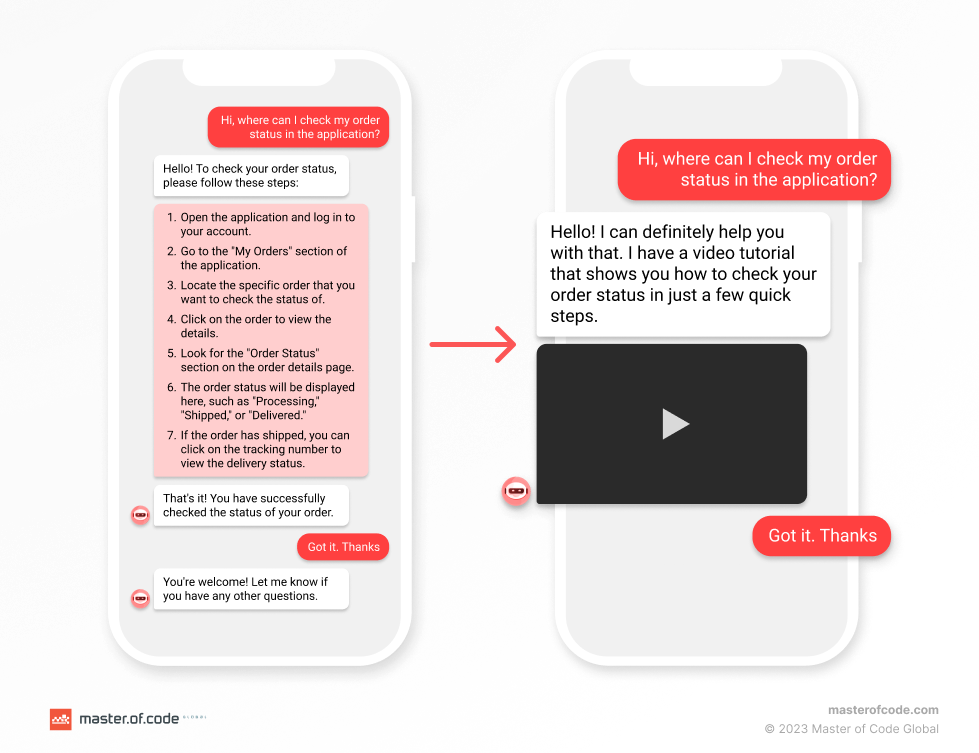
  • Platform Integration Makes Things Possible with Conversational AI Chatbots

    Successful Conversational AI (CAI) solutions give users the ability to engage with businesses and brands when and how they want to. The control for engagement is with the user — no more waiting in long phone queues or having to visit a branch office to get things done. All of the information is at the user’s fingertips or voice call — or can be, so long as the information needed to provide value is available to the user.

    What does a non-integrated solution look like?

    When we consider a Conversational AI chatbot solution without integration, it is not as engaging. In many cases, there are locked linear conversation flows that have limited functionality. They usually answer FAQs, provide some general support for contact information and answer some of the repetitive questions that cause noise to live agents (such as hours of operation), but your users simply don’t get the best value out of the Conversational AI experience.

    Why? Because it’s pretty generic.

    There is no level of personalization. There is no making the bot about being able to help and assist with the detailed challenges the user is experiencing.

    For some organizations, this is enough. But businesses that want to focus on customer engagement and success, more is needed. And to do more, enhancing the experience to not just provide information to the user but also to assist them with performing actions and providing customized, detailed information is key. And the only way to do that is to integrate with other systems.

    Download a Conversational flow chart diagram with the scenario of building dialogues for your chatbot

    What Does Integration Mean with Conversational AI Solution?

    When we consider a Conversational AI chatbot solution, we already have some level of integration built in. We have the code for the actual bot and we have the Natural Language Understanding (NLU) service which drives the understanding of the user requests. The bot needs to talk to the selected NLU and that requires communication between the two services.

    At its simplest, that is what integration is: communication between two disconnected services allowing them to speak with one another. It can be a one-way or two-way communication, it all depends on the contract and the needs of the solution and the experience.

    With monolithic technology solutions, everything is located in one large piece of software and generally within a single database. When this occurs, integration may not be needed because the system has access to everything it should need directly within its own borders. But monolithic web development has its challenges — it’s more complex to maintain and deploy components in isolation — in many cases (not all), it’s an all-or-nothing delivery and maintenance approach.

    Today, as cloud computing and global scalability continues to propagate, software is built with a service-oriented approach, with each service being focused on doing just one thing or a small set of related activities. This type of disconnected design allows for reusable and more scalable services, allowing smaller pieces to be updated, maintained, and deployed more rapidly.

    And with this disconnected service architecture, some type of communication is needed to allow these disjoint systems to engage and speak with one another. They can be sibling services within an organization that are maintained independent of one another to perform certain unique actions, perhaps maintained by different teams. They can be external systems that a Conversational AI chatbot solution needs to extract or send data into to achieve an objective. It doesn’t matter — the point is that a path and method of communication is necessary to achieve its objective.

    How to Choose Conversational AI Platform. Get the checklist

    How to integrate a Conversational AI solution?

    The easiest way to connect to services is via an Application Programming Interface, or API. This API effectively defines what is possible to do with the system on the other side — is it read only, is it full access to write data, etc. It is the gatekeeper of how a tool can interact with other tools and outlines the contract in which a solution is opening up a window in which other services can engage and perform some level of action with it.

    What happens behind those doors can be completely black-boxed. The service requesting to engage doesn’t need to know what’s going on back there, and it’s probably best that they don’t. As software continues to evolve, rapid functional and architectural updates occur that allow for growth and scalability without impacting external resources. For example, a migration from one database to another may occur inside that black box. Is this relevant to the system that’s making the call? No, all the caller wants to know is when they make the request that they get the information they are expecting back.

    In many cases, the API exists as a separate layer between the two systems. It creates abstractions as to how it interacts within that black box, so that systems and any proprietary information or business logic stays isolated. There’s no sense in showing all of the secrets of a solution, but the API interface allows systems to engage without knowing those details. I’ve already described what is exposed in the API as a contract and that is essentially true. By identifying what is being made available through an API, a system is committing to provide access to data through those interfaces. This allows for a contract to be in place so that a caller has an expectation of services available and expectations are managed.

    API integration for Conversational AI solution

    For many services, you need to know who is connecting. Authentication is generally the first step in any contract when requests are made. For generic information, authentication may not be required but a key of some sort is provided so that an understanding of who is using the data and the volume of requests can be managed and monitored. But if you need private information, such as customer information, then an additional level of authentication is needed. This ensures that the information returned is acceptable based on the credentials of the caller. From a security perspective, this is highly important since contracts are generally binding agreements and an organization wants to ensure that its data is kept secure and is accessible only to authorized individuals.

    What Types of Data can Conversational AI Consume?

    Anything. No, seriously, anything. You will want to ensure that it’s in a format that makes sense for the conversational flow and that it is engaging to the user, so a proper amount of conversation design is needed to choose the right pieces of data, but really any data can be utilized.

    With a Conversational AI chatbot solution, there are some key items that can be incorporated to create value-based experiences for your users:

    • CRM integration allows for a personalized experience for users. If you’re looking up or updating user information such as address and phone number, or you want to identify previous orders of a user, the CRM will have access to that information.

    Personalize your chatbot with best Use Cases chatbot implementation

    • Inventory services for when you want to identify how much of a product is in stock and which stores have them in stock.
    • Offer information for commercial activities, providing information such as cost, contract period, terms and conditions, and availability.

    The ability to pull all of this information into a single system provides a more personalized experience for the end user. If they can get offers that are relevant to them based on previous buying habits, which is available in their CRM, and can see which location has them in stock, the value of that conversation increases significantly than just saying “contact your local retailer for availability”.

    The Value of Omnichannel Customer Experience

    A Conversational AI system is only as strong as its reach. And how people are engaging continues to evolve. When Conversational AI first came to prominence, it was through a web widget. Now, an omnichannel customer experience for organizations is important as you want to reach your users where they are and where they want to and can engage. Most of these channels are independent of one another and require the ability for the bot to communicate through them, and that requires an integration of another sort: channel integration.

    Difference between Multichannel and Omnichannel Customer Experience

    Read Also: Multimodal Conversational AI tutorial

    For each channel, you need to understand the capabilities so that you can expose and engage in just the right fashion. With many channels, you can incorporate multimedia and engagement buttons to drive the conversation and make it easier for the user, while at the same time not restricting them to just those options. But in other channels, such as SMS, those engagement options are not available and as a result your conversational approach needs to change.

    This is just one simple example, but it can be used to illustrate how complex these integrations can be. An SMS integration may be as simple as a destination phone number and a message body, but an Apple Business message may include a slideshow of sales options and commerce opportunities built in. The level of integration needed, and the design needed to support a value-added engaging experience, are significantly different for both. And how you integrate with Apple Business will also be different than Instagram which will also be different than Snap, and as each continues to evolve their service offerings you will see the engagement opportunities continue to change.

    Omnichannel Strategy Implementation Results

    Conclusion

    Any Conversational AI chatbot solution has one objective: to allow a user to do something effectively and efficiently through a conversational interface.

    Integrations make this possible. Extracting data from multiple sources and bringing them into a structured format for use by the Conversational AI brings immense value to the end user, allowing them to create and utilize a highly personalized experience. Knowing the channels that are being integrated with continues to enhance that personalization, by offering the experiential elements that make the most sense to users.

    Determining which data is required and identifying the appropriate data source should occur at the beginning of the design activity for a use case. Understanding early on the APIs needed to extract data from — or if a custom integration needs to be developed if there is no existing availability to the data source — allows you to design and craft the most valuable experience for the users.

    At the end of the day, the key is to give value to your end users. Make their lives easier and provide a structured and efficient way to do it at their convenience — when and where they want it.

    Ready to build an efficient personalized customer experience within conversational AI solution?

    Let’s chat!


    Platform Integration Makes Things Possible with Conversational AI Chatbots was originally published in Chatbots Life on Medium, where people are continuing the conversation by highlighting and responding to this story.