Author: Franz Malten Buemann
-
AI Voice Assistants: 9 Key Predictions For The Future Of Technology

With nearly 1 in 4 U.S. adults already having a smart speaker in their home, voice assistants and conversational AI are quickly increasing in popularity in most major markets and becoming a normal part of people’s lives around the world.
Systems like Alexa and Google Home have created a new field of research in cognitive science that examines the effects of conversational devices interacting with users. The widespread availability and increasing adoption rates have also contributed to consumer behavior trends and purchasing patterns — from voice assistants becoming ubiquitous to people spending more on home improvement projects and the growing use of mobile devices as digital assistants.
In this article, we’ll take a deeper look at this field and explore 9 of the most important predictions for voice assistants and Conversational AI.
Explaining the Shift Towards Conversational AI and Voice Assistants
The consumer shift to voice, driven by evolving user demands, is causing change across the customer service space. Voice user interfaces, or VUIs, offer highly effective means of communicating and interacting with consumers. As users become increasingly comfortable with digital interactions in real-time, brands can use conversational interfaces for faster response times and increased customer satisfaction.
Due to these reasons, voice assistance is growing at a tremendous rate and it’s highly likely that nearly every app will be using AI-based voice technology in some capacity in the next five years. The emergence of voice assistants will also be helped by the fact that voice applications are becoming significantly more intuitive, responsive, and simpler to use in the future.
Top 9 Predictions for AI-powered Voice Assistants and Conversational AI
Personalized Experiences
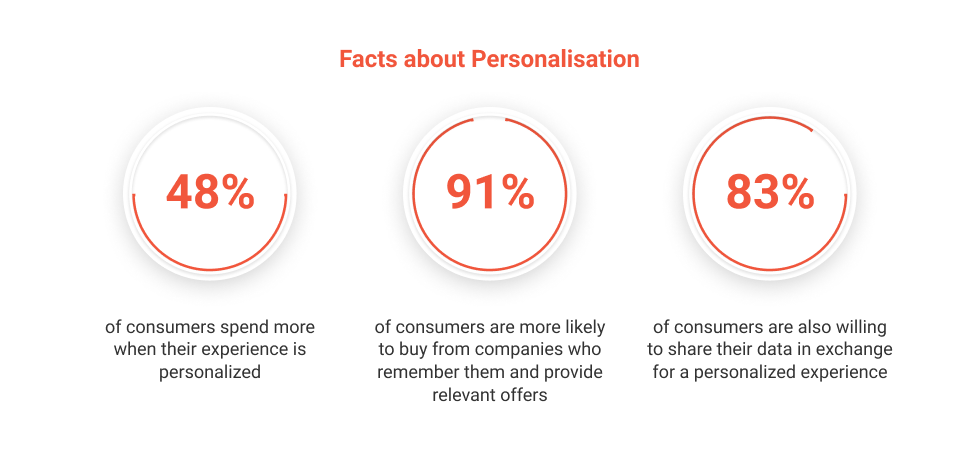
Personalization is more than names at the top of emails, it’s staying in touch with customer tastes and preferences and actively including them in the conversation. Personalization is essential for building meaningful relationships that last. Businesses can use machine learning (ML), in particular, the subset of ML known as Natural Language Processing (NLP) along with Sentiment Analysis to identify the true meaning of customer requests and queries. By identifying the Intents in those requests, brands can generate accurate responses to customers instantaneously.
Conversational AI and Customer-Centric Personalization For example, Pillo health helps users stay on top of their medication — measuring when it should be taken, keeping it stored, and dispensing it at the right time. When a user adds a new medication to their Pillo account, the robot politely reminds them to take it regularly before the date they need to administer it.
Voice Push Notifications
Voice notifications are a valuable tool to engage users within the application. Notifications can be helpful in reminders, promotions, and information. 55% to 60% of all mobile users opt into push notifications which means that businesses have a stronger chance of reaching their audience with relevant and timely messages.
Voice assistants are also designed to connect to third-party apps for voice push notifications, for instance, both Google and Alexa have this functionality, allowing them to notify users about everything from calendar appointment reminders to music streaming services.
Trending Bot Articles:
2. Automated vs Live Chats: What will the Future of Customer Service Look Like?
4. Chatbot Vs. Intelligent Virtual Assistant — What’s the difference & Why Care?
Search Behavior Will Shift
As adoption rates among online shoppers continue to rise and voice search continues to be at the top of the eCommerce sales funnel, eCommerce sites must ensure that they have the tools necessary to capture information and engage customers. By engaging customers, brands can develop long-lasting relationships with customers.
According to Juniper Research, consumers will spend $19 billion on voice-enabled products by 2022. If voice search models are successful enough, this will introduce a new advertising gate for brands that want to keep their messages prominent.
Inbuilt Security Features for Users
The latest trend in the voice assistant market is built-in security features, aiming to help users feel safer when using voice assistants.
The Impact of Voice Assistants On Consumer Behavior Once again, mega-corporations like Amazon and Google are taking charge here, having released updates that put security measures in place like speaker verification and ID confirmation.
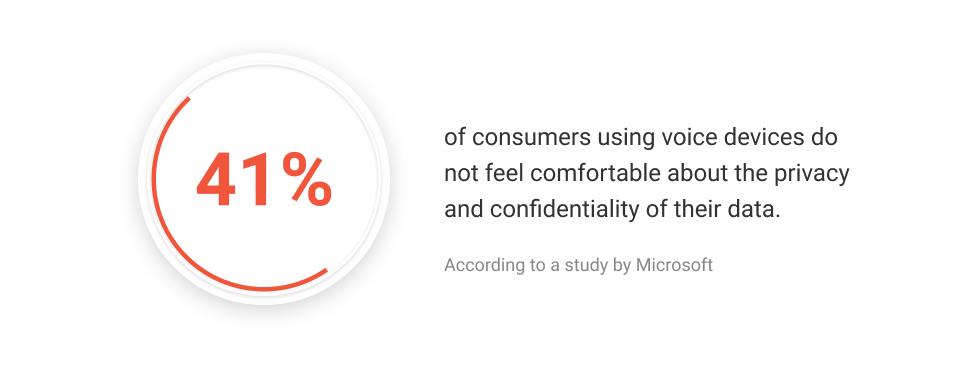
To further resolve users’ privacy concerns, Amazon has published several more comprehensive documents about the Echo’s recording capabilities and how it preserves users’ data.
If you’re concerned about your data being recorded by your Echo (or lack thereof), Amazon added several significant new features to help ensure that personal information is never stored on the device.
Voice Assistance in Mobile Apps
Apps with integrated voice assistants have improved usability and make app navigation easier. With voice-activated apps, users can control nearly all of an app’s functionality through voice commands. In many ways, this is similar to text-based chatbots or GUI-based conversational agents that allow users to navigate enter websites through a single element in the website. But, voice-based navigation is even faster and easier. This is a game-changer for end-users who are less tech-savvy and want to use apps while spending less time and energy.
Inbound Calls and Smart IVR with a Natural Language Understanding (NLU) Feature
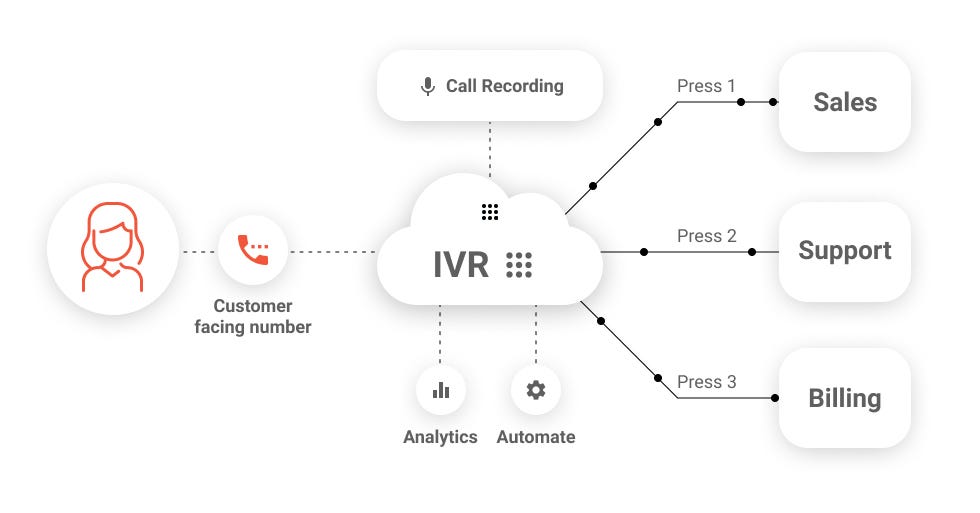
An advanced Interactive Voice Response (IVR) and a call tracking system can significantly improve sales and customer satisfaction. Businesses can use an intelligent virtual agent powered by an NLP engine to answer customers’ questions in real-time or create outbound calls with the click of a button. A smart call tracking system integrated into a business’ IVR lets them monitor and record every phone call from prospects or customers, creating robust data that can be used to generate outbound sales campaigns.
Increased visibility into your leads and contacts will give you a brand-new approach to sales, allowing you to optimize efforts immediately — giving your business a competitive advantage and improving overall performance.
Natural Language Processing (NLU) for Conversational IVR Conversational AI in Video Game Narratives
When mentioning Conversational AI’s use in gaming, we can’t ignore the importance of text-to-speech as well as voice recognition in creating a more immersive gaming experience. This is not an easy feat, especially when considering the vast possibilities of different types of voices, including synthetic voices and generative neural networks.
That said, generative neural networks are machine learning tools that are making this possible. Developers can create dynamic verbal dialogue for video games with far less manual labor.
As neural networks and artificial intelligence engines become more advanced, game designers can create NPCs with current voice-acting tools and use them to create a more immersive storyline. The next innovations in AI engines will allow bots to develop a custom personality based on player action, producing more realistic conversations. The NPC responds according to how the player has acted throughout the game. Considering that video games have become the biggest sector in the entertainment industry, it’s promising to see voice technology being a core part of its innovations.
Voice Cloning
Voice cloning is a process that uses machine learning along with neural networks to generate realistic human speech Neural network-based text-to-speech platforms mimic how the brain functions to process language and exhibit outstanding efficiency at learning patterns in data.
Deep learning comes into play when it’s time to generate human-like speech and is particularly effective at capturing nuances such as speed and intonation.
Through the power of artificial intelligence, deep neural networks, and cloud-based GPUs, new startups can create a computerized voice that modifies your own and make it indistinguishable from the voice of a natural person. Voice cloning will certainly be one of the biggest drivers in the entertainment industry, very similar to early CGI. The realistic nature of voice cloning is already creating a buzz in Hollywood. To a lesser extent, voice cloning may see consumer uses, especially in privacy-focused online communities.
The Rise of Enterprise Voice and Chatbots
Brands like Starbucks, Spotify, and eBay have built intelligent customer service into their online presence. One of the most innovative chatbots is the Bank of America’s Announcement bot by the name of Erica. Erica uses artificial intelligence, algorithms, predictive messaging, and many other advanced techniques to help customers make payments, check balances, and new products.
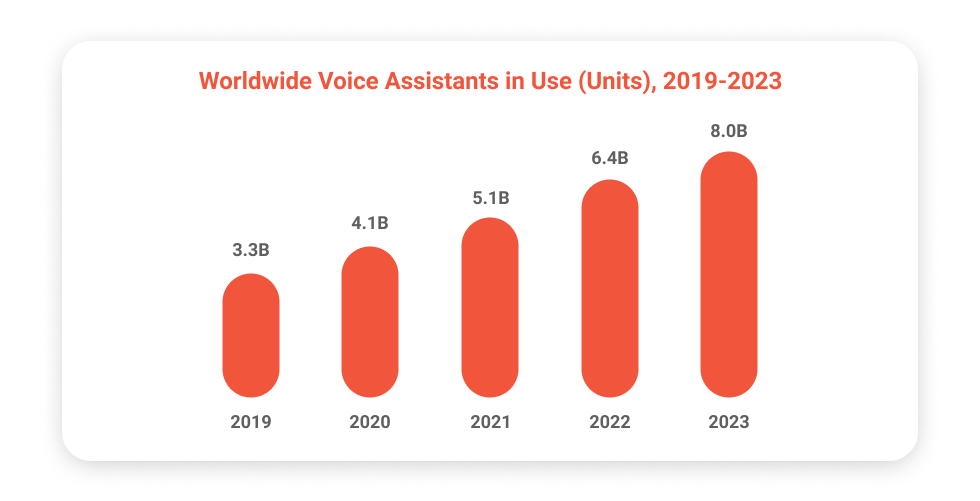
Worldwide Voice Assistants in Use (Units), 2019–2023 On the other hand, Amazon voice assistant continues to extend its lead over the competition by announcing its Alexa Skills and Alexa Capabilities. Amongst other new features, Amazon has given developers the tools to build their own Alexa skills (apps) — a unique feature that’s not available on any other device.
Some ideas for using Alexa skills include: improving the user experience, providing information, and improving productivity. For instance, a customer can experience a new product through Alexa’s customer-centric approach — with questions like “Alexa, how is this product made?”
Challenges
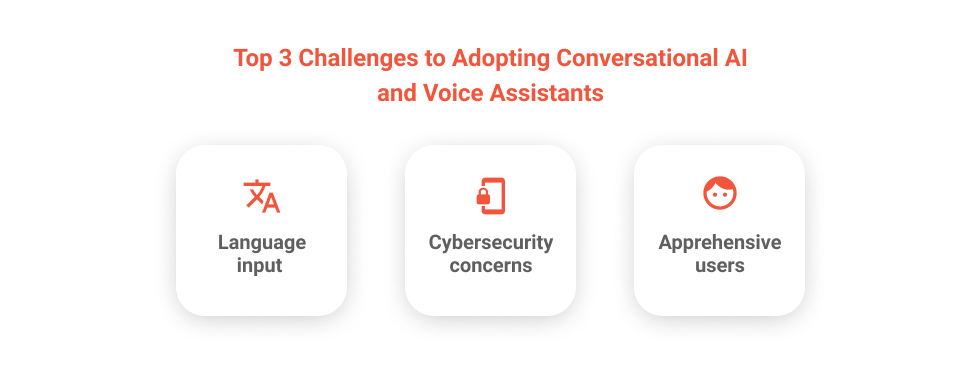
Conversational AI and voice assistants have improved at communicating with humans across a range of situations. However, voice recognition and natural language understanding aren’t perfect and there is still room to improve. For now, experts are innovating to combat a few key challenges, including:
- Language Input
Although voice recognition has advanced in leaps and bounds, AI still needs to continue improving — especially at recognizing minorities, as voice assistants today are disproportionately better at recognizing white male voices. Rather than a technological flaw, this is an indication of the lack of sample data that AI models can be trained against.
Additionally, inputs that are not appropriately processed can lead to frustration and a loss of customer trust across the board. To ensure a better experience, it is essential to develop AI that recognizes different dialects, accents, background noises, slang, and even nicknames.
2. Cybersecurity Concerns
The key to success with any conversational AI app is building trust and confidence among end-users. End-users can have high-security protocols, and despite recent advancements in privacy and security, privacy concerns are still present.
3. Apprehensive Users
One of the early expectations from voice assistants was that it would be the younger millennials and Gen Z accepting voice assistants the most. However, the older generations (ages 55 and above) seem to like the idea of voice assistants more than the younger generation. According to a survey by Think with Google, the adoption rates for voice-activated speakers are surging among baby boomers. Google found that 51% of Baby Boomers use voice assistants as an informative companion and not just as a tool to play music or make a quick shopping list.Furthermore, as employees begin using voice-based automation in their workplace, they far likely to adopt the same technologies in their homes and personal lives. Therefore, It’s important to understand that customer hesitation doesn’t reflect poorly on your brand. Instead, it is an indication of the voice technology gap that is getting smaller every year.
Challenges of Voice Assistant Technology The Future Conversational AI and Voice Assistants
The future of conversational AI, and particularly voice assistants is very bright. About 60 percent of smartphone users have tried voice search at least once in the 12 months; while they might not engage with it every day, they are beginning to see the convenience and accessibility it offers. By 2024, the global voice-based smart speaker market could be worth $30 billion, which is another indication of the vast market of voice assistants. But with every untapped opportunity comes a ticking clock, to capitalize on it before it loses its competitive advantage. With these 9 top predictions for voice assistants, we’ve tried to help businesses like yours find the right opportunity in this promising new world of voice assistants.
Get in Touch with Our Conversation Design Experts for a Consultation Today!
However, if you’re unsure of how to proceed with developing and deploying voice assistants of your own, consulting with an expert like Master of Code Global is the best way to go.
Don’t forget to give us your 👏 !

AI Voice Assistants: 9 Key Predictions For The Future Of Technology was originally published in Chatbots Life on Medium, where people are continuing the conversation by highlighting and responding to this story.
-
Debiasing Speech Recognition Systems for Kids
Welcome to Lesson 4 in our “Lessons from Our Voice Engine” series, featuring high-level insights from our Engineering and Speech Tech teams on how our voice engine works. This lesson is from Dr. Amelia Kelly, VP of Speech Technology.
What is debiasing?
Artificial intelligence systems will reflect the conscious and unconscious biases of their creators and create poor — and often prejudicial — user experiences for underrepresented users. Machine learning algorithms are unique in that they carry out decisions based on what they’ve seen within a supplied dataset, rather than being explicitly programmed using a predetermined set of rules. Building a system based largely on data from one demographic will result in accurate performance of the speech recognition system for that sub-group, but inaccurate performance for all others.
Debiasing is the conscious and intentional process of counteracting inherent biases that are found in databases and artificial intelligence systems.
Intentional processes, such as utilizing a varied, diverse, and proportionately representative dataset of voices to train machine learning algorithms, can reduce or remove the presence of unintended bias in voice technologies.
Trending Bot Articles:
2. Automated vs Live Chats: What will the Future of Customer Service Look Like?
4. Chatbot Vs. Intelligent Virtual Assistant — What’s the difference & Why Care?
Why is debiasing important for our voice engine and AI systems in general?
A biased system can amplify and propagate deep-seated prejudices held by the designers of that system, be they explicit or unintended. The effects of such biases in the context of educational technology, assessment platforms and learning tools for kids can be disastrous.
For example, if a biased system fails to understand a child’s accent or dialect, it can consistently tell that child he or she is a poor reader when, in fact, they are reading correctly. An unbiased system, on the other hand, can offer fair and uncompromised information to facilitate edtech platforms and services. AI companies need to make a concerted effort to debias their technology.
Catch up on our previous “Lessons from Our Voice Engine”:
Don’t forget to give us your 👏 !
Debiasing Speech Recognition Systems for Kids was originally published in Chatbots Life on Medium, where people are continuing the conversation by highlighting and responding to this story.
-
Implementing chatbot helps in monitoring consumer data gaining insights
What is Chatbot and how it Works? With the evolution of digitalization, people are now well-connected with each other through various modes of communication on different devices like computers/laptops, smartphones, and other electronic equipment. Companies are also taking advantage of such digital platforms and developing more robotic customer service centers to help users and solve their queries as per their needs and feasibility with a quick response time.
Artificial intelligence (AI) and Machine Learning (ML) based business applications are now widely accepted at all types of AI-enabled devices and machines like smart devices, drones to self-service kiosks and self-driving vehicles, etc. With the time being, people are becoming more habitual at the same time comfortable with AI and its benefits especially when it comes to the customer service experience.
AI based Virtual Assistant services and Chatbots are taking place of human customer service to assist users anytime as per their ease. Chatbots are specially designed to automatically chat with clients to answer their queries or receive feedback towards a particular product or service. The main motive of developing Chatbots is to minimize human interference and right here under this blog, we would discuss how AI-based ChatBots enabling businesses to perform better.
Natural Language Understanding Bots
One of the most interesting parts of Artificial intelligence and Machine learning as a service service-enabled chatbot is that such customer-oriented applications can understand natural languages like speech or texts used by humans for normal conversation. Natural language processing (NLP) equipped chatbots can provide an interaction just like humans do to make B2C engagement managed without human interference. NLP-based ChatBots lead to a conversational workflow with around-the-clock customer support service.
Trending Bot Articles:
2. Automated vs Live Chats: What will the Future of Customer Service Look Like?
4. Chatbot Vs. Intelligent Virtual Assistant — What’s the difference & Why Care?
Business Intelligence with Chatbots
Interacting with customers directly is now changing its dynamics. Nowadays, making direct contact with a customer becomes crucial, as they need quick answers to their queries. And if you do not interact with your customers timely your business or website might be criticized or will have negative ratings. Chatbots can provide real-time communication to understand the problems of the customers and respond to them instantly with the right answers. With this attitude and applicability, such an application is gaining traction and offers businesses a great opportunity to improve their relations with their customers.
Scheduling the Important Tasks
Hiring many employees for customer service is costlier than implementing a Chatbot that can attend to multiple types of customers at a time with the same efficiency. As Chatbots are fully automated they can allow administrations to switch many consumers simultaneously. By integrating Chatbots in the place of human agents you will not only able to save employee overheads but will also avoid the mistakes and technical errors done by the human agents. It is also useful in scheduling meetings and assigns similar tasks with good results. The right mix of Chatbot training data set is used to develop such applications so that they can learn while interacting with customers and respond accordingly.
Conclusion
Chatbots can provide a convenient platform for users to ask their queries and get the most suitable answers. No doubt it has become a powerful tool for businesses to keep them engaged and improve their customer relationships. Moreover, it can perform repetitive tasks without fatigue like humans and it can perform each task efficiently in less time than is possible only when you choose the right bot builder AI platform.
Every technology has pros and cons, as it is an AI-based system, hence such models need a huge amount of machine learning chatbot data that can cost you in terms of GPU cost increase making chatbot more expensive. However, with the help of suitable technology and the right resources, you can produce highly interactive and cost-effective Chatbots to get quality results helping you improve your overall business performance. originally Click
Don’t forget to give us your 👏 !
Implementing chatbot helps in monitoring consumer data gaining insights was originally published in Chatbots Life on Medium, where people are continuing the conversation by highlighting and responding to this story.
-
Serendipity: Reverse Discovery of Conversational AI

This post is part of a series of articles. It comes as a reflection of my digital journey with passion for application, automation, and the benefits they can bring. As I stay tuned to discovering (or rediscovering) how customer channels are evolving to impact our customer’s experience — either simplifying their interaction or making a bad service experience. These articles have been written with the aim of re-experiencing some of the key accomplishments from the past, that gives newfound meanings today.

When did it happen?
In 2008, I was working for one of the largest telecom service providers in India (present day Vodafone Idea). I was driving a large and complex business transformation program in customer experience area. During the ideation workshops, me and my colleagues were applying all our learnings and experiences to good use. The program was introducing a state-of-the-art customer relationship management (CRM) platform which was integrating all known and popular customer engagements channels.
After contact center, Short Messaging Service (SMS) has emerged as one of the most popular channels during the feature phone era (like WhatsApp in the smart phone era). In my earlier role, I had experienced the pain one had to go through to read and analyse customers’ free text messages that used to come on a common number (short sender code: 12345). These customer messages were of varying spectrum: some genuine requests or complaints, and rest either vague, incomprehensible, comical, or even a touché inappropriate. And this was my opportunity to bring a change to this practice or ways of working.

MANUAL PROCESS OF HANDLING CUSTOMER MESSAGES Note: Above graphical excerpt has been taken from the original concept note
What did I do?
I applied my empathetic perspective and ideated with the team to propose a structured approach (keyword based) and intuitive automation to manage customer’s query, request, or complaints (Q/R/C) using the SMS channel. The offering was named MySMS, and was the first conversational automation solution that was introduced in the market and was quick to gain popularity. It solved multiple pain points: auto-filtering of invalid messages, automatic assignment of customer Q/R/C to the relevant backend team, reduction in overall turnaround time. It also resulted in call deflection from the contact centers (a more costly channel). As the business owner for this application, I defined the roadmap to include new enhancements and make the dialogue (or asynchronous messaging) more intuitive: auto-responding with keywords matching customer’s text or providing help options so that customers are not required to remember the keywords. Also, automating the end-to-end request fulfillment process, making the experience more seamless with zero manual interventions.
Trending Bot Articles:
2. Automated vs Live Chats: What will the Future of Customer Service Look Like?
4. Chatbot Vs. Intelligent Virtual Assistant — What’s the difference & Why Care?
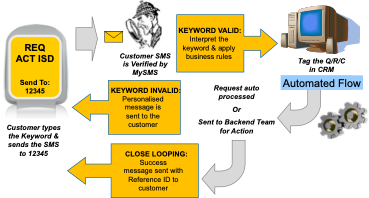
AUTOMATED PROCESS OF HANDLING CUSTOMER MESSAGES Note: Above graphical excerpt has been taken from the original concept note
What impact did it make?
The firm was receiving approx. 40,000 SMS daily (across all regions). Only 30% of these messages were valid and the activity used to consume a vast amount of human effort (wastage). MySMS automated this end-to-end journey and above all improved everyday work life of 23 employees — who could focus on more qualitative work.
MySMS is a good use case of present day, chatbot or Conversational Artificial Intelligence (AI). This new age term represents messaging and speech-enabled applications that offer human-like interactions between computers and humans.
The key drivers instrumental in making MySMS initiative a huge success was:
§ In the middle of difficulty lies opportunity (Albert Einstein): Remember the things that made life difficult; so that you can make it right or better one day.
§ Stay hungry, stay foolish (Steve Jobs): Stay curious and never be shy to try new things
§ Human factor: Leverage your experience
§ Simplification: Make use of Technology
As an endnote, I wish to summarise with the thought: disruption or innovation can happen anywhere or anytime, by chance or by design. It happens when we apply clear conscience and empathy to solve a problem. It’s still magic even if you know how it’s done.
Don’t forget to give us your 👏 !
Serendipity: Reverse Discovery of Conversational AI was originally published in Chatbots Life on Medium, where people are continuing the conversation by highlighting and responding to this story.
-
Top 10 Chatbot Tools for SaaS in 2021
People nowadays do not have enough time to wait too long for you or your representative to resolve their issues related to your business. There are millions of brands out there that can attract your customers if you cannot connect with them.
By considering such concerns, businesses in different sectors, including lifestyles, healthcare, and eCommerce, use AI’s innovative technology, which we call Chatbots.
How do Chatbots help in business?
Like its name, Chatbots are the bots that work as representatives in your absence to deal with your clients or potential customers. Chatbots are capable of having human-like conversations from initial to final discussion with the prospect.
Chatbots were only used on websites in the early days, but now it is also available for social media channels and online messaging platforms. So, even if you are not available to talk over these platforms, your Chatbot can bring you a sale.
A powerful AI Chatbot can automate numerous tasks that include customer service, sales and marketing, operational tasks, etc.
How to Choose the Best Chatbots for your SaaS Business
There are many types of Chatbots available, but choosing the perfect one may be a tricky task for some people. Some SaaS Application Development Companies do it for you while developing the application. While selecting the Chatbots, make sure to identify your target audience.
With that, know the requirements and objectives that you want to accomplish using these AI-powered chatbots. Few factors that should be considered on selecting chatbots are response time, function and functionality, etc.
Top Ten Chatbots Tools for SaaS in 2021
Here in this blog, we are listing down the top ten Chatbots tools that will boom in 2021. These Chatbots have their features and advantages over others. You can go with one that suits your SaaS business requirements.
Chatbot — Chatbot Saas Tools
It is a tool that helps you to create amazing Chatbots using drag and drop builder. It also allows applying pre-existing templates along with customization. Using this tool, you can design your Chatbot for a well-organized conversation with the customers.
Features
- Customize the look of the Chatbot according to the design of your website.
- Using Webhooks and APIs, you can connect it to other apps that means it allows complete automation.
- Provides clickable images, elements, and gifs.
- The Chatbot never gets distracted out of the conversation and maintains a natural dialogue with AI context management.
Trending Bot Articles:
2. Automated vs Live Chats: What will the Future of Customer Service Look Like?
4. Chatbot Vs. Intelligent Virtual Assistant — What’s the difference & Why Care?
Zendesk Chat
It is a live chat software that provides real-time chat support on the web, mobile, and messages for businesses. Zendesk Chat helps in regaining lost customers and increasing the conversion rate quickly. With that, It automatically creates tickets from chat interaction and turns down the customer wait times through skills-based routing.
Features
- In Zendesk Chat, customers can rate you, which helps in getting feedback for further improvement.
- By using APIs, you can integrate AI-powered bots.
- Files are sharable in Zendesk Chat. It solves customer’s problems fastly.
- You can collect information about your customer before starting the chat.
- Targeted messages on the basis of your customer’s behaviour.
Chatfuel
Chatfuel is a Chat tool that makes bot building very easy for all. It is the best platform for building Facebook bots. It is preferred and used by all kinds of businesses, but the list of its clients also includes big brands of the world like Adidas, LEGO, etc.
Features
- It continues to provide to the customer on behalf of you and never misses any chat.
- You can transfer the conversation to an actual human if the online bot can’t answer the customers’ questions.
- No coding knowledge is required to build Chatbot. You can do it using its drag and drop features.
- If you aren’t able to develop your Chatbot, then their agency can do it for you.
Tawk.to
It is a free chat app that allows you to analyze and chat with the visitors on your website or even from a free customizable page. Tawk.to is quite popular, and numerous businesses use it for providing real-time support to their customers.
Features
- Free and easy way to communicate with your prospects and customers.
- It gives the feature of real-time monitoring of the visitors on the website.
- You will get automated triggers and customizable widgets.
- Tawk.to allow you more than 100 integrations and a built-in ticketing system.
- It only takes a few minutes to set up on the website.
Botsify
Botsify is one of the most intelligent AI Chatbots platforms, which build chatbots that can support video, audio, AR, VR, and text on all the messaging platforms. It helps in creating robust and intelligent chatbots for websites and other social media messaging platforms like Messenger and Slack.
Features
- You don’t have to spend time and hard work coding to build chatbots using Botsify.
- In case the Chatbot is not able to answer the customer’s query, you can seamlessly transfer the conversation to an actual human.
- You can enable automation for multiple channels without extra effort.
- It also has a drag and drop builder, which is powered by AI and machine learning.
- Botsify offers multiple plugins to integrate with Shopify, Google Sheets, etc.
IntelliTicks
IntelliTicks is a popular AI-powered chatbot platform that is known for increasing sales. It engages with every visitor of your website in a more personalized way with relevant messages and dialogues. Businesses using IntelliTicks get double increases in leads.
Features
- Talk with your visitors with a proactive and personalized engagement.
- Allows integration with other CRM software.
- It provides a detailed report on conversion and leads.
- It can identify and categorize leads into hot, warm, and cold leads in live traffic.
- IntelliTicks analyzes questions and answers repeated questions using AI.
- Understanding lead insight is easy in IntelliTicks.
ManyChat
ManyChat is a tool through which you can build a chatbot in a few minutes without coding skills. It helps in marketing and sales through Facebook messenger. It is a fact that ManyChat supports more than a lac bots present on Facebook Messenger. It is a leader in the messenger chatbots marketing industry.
Features
- It has an easy drag and drop interface for Chatbots building.
- Integration with Shopify that enhances sales ratio.
- You can leverage the social media conversation for more lead generation and conversions.
- It can connect to other marketing tools easily.
- You can generate leads in automation using DMs on Facebook and Instagram.
Intercom
Intercom provides custom chatbots for sales, marketing, and support to customers in your business. It also offers live chat options along with integration options for eCommerce and social media platforms.
Features
- You can connect it with your CRM and social media platform.
- Build chatbots without the knowledge of coding.
- Advance targeting through proactive conversation.
Landbot.io
Landbot.io is a tool that helps in building AI-powered bots that interact with the users in an advanced way. It provides a drag and drop builder for the hassle-free creation of chatbots.
Features
- Allows integration with other tools
- Easy to use and chatbot building for different platforms.
- You can personalize the chatbots along with brand elements.
LivePerson
It is a platform through which you can build optimized chatbots. LivePerson is very convenient as well as full of features through which you can leverage advanced analytics in real-time.
Features
- Liveperson provides flexibility in communication.
- It includes the features of canned responses and hyperlinks.
- You can create pre-written statements to send in chats.
Wrapping Up
These are the top chatbots builders that will boom in 2021. You can choose any of them from the above-mentioned tools. Furthermore, the Chatbot industry is growing rapidly, and businesses focus on more advanced AI-powered chatbots to improve user experiences.
But with that, make sure to give the option of chatting with a customer service representative to your customers if your Chatbot cannot resolve the customer queries.
Don’t forget to give us your 👏 !
Top 10 Chatbot Tools for SaaS in 2021 was originally published in Chatbots Life on Medium, where people are continuing the conversation by highlighting and responding to this story.
-
Top 5 Examples of Conversational User Interfaces
Conversational User Interface (CUI) is an artificial interface with which you can communicate to either ask questions, place orders or get information.
Top-notch CUI’s offer a more human-like conversation. This helps in bridging the gap between physical and online conversations.
Many companies have started understanding the importance of conversational AI by incorporating them into their marketing strategies. Statistics show that automated conversational marketing companies witnessed a 10% increase in revenue within 6–9 months.
Even from a customer’s point of view, 86% of online buyers preferred quick and immediate customer support, which chatbots for small businesses provide.
There are two main types of CUI’s. First is the chatbots where the interaction and communication take place in the form of text. The second one is voice assistants like Google Assistant, with which you can talk to provide input.
Game-Changing Conversational User Interface Examples
Here are 5 of the top CUI’s and chatbots for business that cover all bases and provide a smooth and happy experience to all users.
1. Skyscanner — Travel Search Website
Skyscanner is an online travel agency that launched in 2003. It allows its users to compare and find cheap flights and hotels and also hire cars.
Skyscanner is the world’s biggest independent flight search engine. In 2016, it raised $192 million to grow its engine and services. In the same year, when conversational AI and chatbots started receiving more recognition, Skyscanner joined the league by introducing their Facebook Messenger bot.
The purpose of this chatbot is to help customers search for flights to any destination through a simple conversation.
A Brief Walkthrough
Skyscanner’s Facebook Messenger bot begins well by providing the necessary information on its home page. By displaying information like “The world’s travel search engine” and “Typically replies instantly,” it tells you what it is capable of doing.
When you continue, the bot welcomes you by your name, thus providing a personalized experience. You can then find flight deals, explore new destinations, or get tips on the best time and route for traveling.
After selecting the origin city, destination city, and travel dates, the chatbot shows a list of flight options from various airlines along with their rates. It is also capable of sending alerts if there is any change in the pricing.
Once you compare and choose a flight, the chatbot redirects you to the website to complete the payment.
Few Brilliant Features
- Anywhere
The “Anywhere” feature is one of Skyscanner’s best features. If you are unsure of your destination, simply typing “anywhere” in the text box will display a list of travel suggestions from the origin city.
- Offers Constant Confirmation
Throughout the process of searching and selecting a flight, Skyscanner’s chatbot constantly confirms the cities and dates that you have chosen. It also allows you to change the details with ease.
Adapting to New Trends
Skyscanner is one great example of a company that follows and adapts to new trends. With many people using the Telegram messaging service, Skyscanner introduced a Telegram bot to target a wider audience to search for flights and hotels easily.
The bot can even understand colloquial terms like “next weekend” or “next Monday” and display the correct options.
Skyscanner has also added a live chatbot on the Skype platform.
In 2016, Skyscanner also partnered with Amazon’s Alexa allowing users to search for flights through a voice conversation. By asking simple questions “Where are you flying from?” and “Where are you flying to?” Alexa can get the travel details from you and talk you through the relevant flight details.
Results
The easy-to-use conversational user interface of Skyscanner is effective in providing relevant details to all customers. In just a few years since the chatbot’s introduction, Skyscanner managed to pass one million traveller interactions with chatbots across all platforms by 2019.
All the minute details show the thought put into designing the chatbot, making it a huge success.
Trending Bot Articles:
2. Automated vs Live Chats: What will the Future of Customer Service Look Like?
4. Chatbot Vs. Intelligent Virtual Assistant — What’s the difference & Why Care?
2. Duolingo — Language Learning Platform
Duolingo is a language learning platform that provides its services for free to all users on its website and mobile app. Officially released in 2012, Duolingo now offers courses in 38 languages, including fictional languages like Klingon.
Over the past few years, Duolingo has started to leverage the power of artificial intelligence to alter the courses and make them more convenient for the user.
With the help of a conversational user interface, Duolingo has revolutionized the language learning sector.
Duolingo is an example of a great company that analyzes and understands their problems and brings out solutions to overcome them.
Duolingo understood that the most significant problem they would face would be helping users effectively learn a language. Conversing is what helps learners practice and retain the language. Simply reading words and phrases on a screen would not help in the same way.
The Solution
- Chatbots
To overcome this obstacle, Duolingo implemented the use of AI-based chatbots. They created and assigned a few characters to the bots, allowing you to have a real conversation in your learning language.
If you get stuck and don’t know how to reply during the conversation, you can also use the “help me reply” option to get assistance from the bots.
- Conversational Lessons
Duolingo recently took conversational learning to the next level by introducing conversational lessons. This new feature offers practice with words and phrases used in real-life scenarios and will enable you to put those words together to form meaningful sentences.
Duolingo allows you to listen and repeat commonly used sentences. It also corrects you when you speak or type the wrong word and explains its correct usage. This way, you can learn a language with Duolingo through textual and voice conversations.
As you learn more words, the difficulty levels increase, giving you thorough learning of the entire language.
Outcome
Duolingo’s chatbots and conversational lessons give the user the experience of having a conversation in reality. Duolingo is known for its conversational AI and conversational marketing strategies.
Since its inception, they have added over 500 million registered users, out of which 42 million are active every month.
The coronavirus lockdown between March 11 — April 30 increased Duolingo’s users by 30 million people. These statistics show the magnitude of Duolingo and its CUI’s success.
3. Domino’s — Pizza Restaurant Chain
Domino’s is one of the most successful pizza restaurant joints across the globe. Today, Domino’s operates 17,800 stores in more than 90 countries selling an average of 3 million pizzas every day.
Over the years, Domino’s has introduced different ways through which customers can order food. One such way is online ordering.
From 2017 to 2020 alone, Domino’s made 27 million Facebook impressions. This figure alone shows the success of online ordering. But Domino’s did not stop there. They introduced CUI into their business, allowing customers to order food through a bot on Facebook Messenger.
Here are some highlights of Domino’s chatbot for business.
Meet Dom
Domino’s named their chatbot “Dom,” giving it a character. This makes the user feel that they are conversing with a person on the other end rather than a computer. Dom makes digital ordering more conversational and simple.
Pre-set Options
Dom has pre-set default options programmed into its interface. So, when you want to place an order with Dom, options like “Pizza,” “Pasta,” “Sandwiches,” etc., show up on the screen. All you have to do is select an option and continue to the next step. This eliminates the need to type in your order, thus saving time.
Dom is also aware of current deals and allows you to apply a deal or coupon to your order.
Constant Summarizing
The entire process of ordering a pizza occurs in multiple steps. It includes choosing the size of the pizza, crust, and toppings. Dom makes sure that it constantly summarizes your order while simultaneously adding new information to it at every step.
Dom also simplifies the process of making changes to the order. Even if you are in the last step (say you are choosing toppings) and feel like changing the pizza crust, Dom will make that change for you while retaining other information (like pizza size) in your order.
Accepting its Shortcomings
When Dom is unable to understand the customer’s input, it apologizes and lets the customer know about it. This gesture is appreciated rather than displaying information that is not related to the customer’s request.
Domino’s Voice Ordering
Dom’s skills also include its ability to place orders through voice commands from users, making pizza ordering easier.
Domino’s also offering its services on voice-based CUI’s like Amazon Alexa, launched in 2017, and Google Assistant, launched in 2019. Through these mediums, you can place your most recent order or track your ongoing order by asking the voice bot to do so.
Domino’s Anyware
Apart from ordering through chatbots and voice-based CUI’s, the Domino’s Anyware initiative allows all users to literally order from anywhere. This includes ordering from your car, smart TV, smartwatch, and through tweets, SMS, and zero-click app.
Interface
To put it in a nutshell, Domino’s conversational AI chatbot makes online pizza ordering simple for all customers. The linear flow in Dom’s CUI makes it easy to order food when compared to other alternatives.
4. Lark — Digital Healthcare Platform
Lark is a digital healthcare company that offers services in various sectors. It keeps track of your daily activities like food habits and sleeping patterns and aims at improving your fitness and health. It helps people in reducing weight and also focuses on reducing stress and anxiety among people.
Lark’s chatbot is an app that dedicates itself to all these activities. Users can interact with their bot through text, voice, and button options.
Varied Responses
One aspect that sets a fundamental difference between ordinary bots and top chatbots like Lark is its varied responses to the same topic. Even if you type in the same sentence repeatedly, Lark will respond with a different answer. This small attribute enormously improves its human-like conversational style.
Lark’s responses are also friendly and caring. This is crucial, especially for conversations about mental health and stress. These responses help in motivating the users.
A Knowledgeable Bot
While conversing with a healthcare bot, knowledge about everything must be its top priority. Lark is one such bot that knows stuff related to its field as it was created with the help of experts and professionals in the healthcare sector.
For instance, when you tell Lark what you ate for lunch, it can recognize it and place it under a particular category (like veggies or meat). It can then make recommendations (like switching to other categories) so that you consume all kinds of nutrients to maintain a balanced diet.
In a way, Lark acts as your fitness coach and nutritionist.
Proven Research
- It increased the consumption of healthy meals by 31%.
- An in-app survey showed a 100% response rate.
- High-risk diabetes patients using conversational AI lost a magnitude of weight compared to the loss achieved with lifestyle change programs.
- The health coach also encouraged positive behavioral changes.
Achievements
Over the years, Lark and its conversational user interface have received a few achievements.
- Named “Best of 2016” by Google
- Business Insider named them one of the “10 Most Innovative Apps in the World” in 2016
- Selected as a finalist in the “Fierce Innovation Awards — Healthcare Edition 2020.”
5. Erica — Bank of America’s CUI
In 2018, Bank of America launched their own chatbot “Erica” to help their customers in their transactions on the mobile app.
Created using AI, predictive analytics, and cognitive messaging, Erica can help customers in numerous ways like,
- Making payments
- Checking account balance
- Tracking daily expenditure
- Locating past transactions
- Checking FICO score
- Receiving notifications on pending bills
Highlights of Erica’s Conversational User Interface
- Necessary Information on the Home Page
The home page of the app displays a greeting message that welcomes the user. Through the prompt at the bottom of the page, you can type or voice out your task or query. Erica also displays a message, “See what Erica can do,” which shows all its functions when clicked upon.
- Versatility
Erica can efficiently understand voice, text, as well as tap inputs from the users. Erica indeed shows its versatility when it comes to understanding the customers’ varied questions. Currently, Erica can understand almost 500,000 different variations of the questions that customers ask.
Erica’s time-to-resolution averages around three minutes only via voice within the app. The voice-first attitude of Erica has redefined banking, taking it to a whole new level.
- Provides Meaningful Insights
Erica provides meaningful insights that help customers in making better decisions. These insights can also help in saving money. Erica can do this by suggesting stuff like putting the cash rewards from your credit cards to better usage.
- Simplified Feedback System
Instead of asking detailed questions or sending out long forms, Erica asks for feedback subtly. Once the tasks are completed, a smiley and a sad emoji appear. You can easily give feedback by tapping on any one of them.
Analysis of Erica’s Success
Around 500,000 new users make use of Erica’s services every month. At the end of 2019, Bank of America stated that Erica alone had witnessed over 10 million users and was about to complete 100 million client requests and transactions.
These statistics show that Bank of America hit the bulls-eye with its conversational AI.
Why is Conversational User Interface Important?
Using Artificial Intelligence (AI) and Natural Language Processing (NLP), CUI’s can understand what the user wants and provide solutions to their requests.
Some of the best CUI’s provide the following benefits to the customer and the owner.
- Provide a personalized and unique experience to all the users
- Offer 24×7 support to all customers and clients, eliminating the need for man-power for the same job
- Can efficiently speak to thousands of customers at the same time
- Convenient to use as they are user-friendly
- Available across various platforms and channels
- Easy to set up for business owners as it requires little to no knowledge in coding
- Real-time analytics help business owners and marketers improve their marketing strategies.
Going through these game-changing conversational user interfaces and chatbots for business, it is clear that using them in conversational marketing strategies increases a company’s sales and leads to more happy customers.
Most of these chatbots also prove that thinking about all the small and minute details and incorporating them in the CUI’s can take the company a long way forward.
Don’t forget to give us your 👏 !
Top 5 Examples of Conversational User Interfaces was originally published in Chatbots Life on Medium, where people are continuing the conversation by highlighting and responding to this story.
-
How can you use WhatsApp for customer service? [Tips + best practices]

Globally, there are about 3 million companies that use WhatsApp business to reach and engage their customers. 84% of SMBs believe that WhatsApp is a very effective way for them to communicate with their customers.
Wondering why so many companies are going all out to serve their customers over WhatsApp? Want to know how you could scale up WhatsApp customer support?
We’re answering all your questions in this article.
Why should you use WhatsApp for customer service?
WhatsApp has 2 billion active users in 180 countries. It’s almost certain that your customers are using WhatsApp on a regular basis. To make it even better, 70% of WhatsApp users check the app daily.
And guess what, providing customer support over WhatsApp reduces customer effort by eliminating the need for them to always visit your website, write an email, or even get on a phone call in order to reach you.
In fact, it makes things even easier by making it unnecessary for them to even write a message at all. They can even have voice interactions with you over WhatsApp.
You can even use WhatsApp chatbots to send customer service updates and notifications automatically. And you know that there’s a high chance that your customers would reach these messages (the average open rate for WhatsApp messages is 98%), unlike with email customer support where it can sometimes feel like a game of chance — will they open this time, or will they ignore your email?
How can your company be found on WhatsApp?
For a customer to be able to reach you on WhatsApp, they’d need to have your phone number, they can’t just use the search feature on WhatsApp to find your business if they haven’t interacted with you on WhatsApp before or don’t have your WhatsApp Business Phone Number.
But there are ways to improve discoverability.
You could display your phone number on your website, but rather than making them save your number and then open WhatsApp, you could make things easier for them.
For starters, you deploy a widget on your website that allows them to directly send you WhatsApp messages.
Bonus tip:Here’s how you could add a WhatsApp button to your website.
You could even display a WhatsApp QR code for your business on your physical and digital properties that your customers scan to find and message your business on WhatsApp. You could even include a customized message that is pre-populated when the chat opens up, thus making the interaction easier for your customers.
How can you use WhatsApp for customer service?
1. Answer customer questions
This is the most obvious thing you can do to provide customer support over WhatsApp. Your customers spend a lot of time using WhatsApp, now if they do end up having questions regarding your offerings, it’s only right that they should be able to reach you over the app that they’re already using regularly, instead of having to open (or worse, download) another app.
2. Share notifications
With the WhatsApp business API, you get to send notifications regarding payments, account updates, shipping information, etc., even to customers who haven’t interacted with your business on WhatsApp before.
3. Sending purchase confirmations
WhatsApp can even be used to send purchase confirmations and order details to your customers, thus keeping things transparent. In addition to this, a WhatsApp chatbot can even be used to share personalized product recommendations, drive sales, and collect payments from your customers.
4. Pushing out reminders
You could even send payment, booking, and appointment reminders over WhatsApp.
5. Rescheduling bookings
WhatsApp can be used to schedule and reschedule appointments, reservations, and other bookings. The process becomes even easier for you when you integrate your WhatsApp support solution with your customer service and marketing software like spreadsheets and calendars.
6. Modifying subscription plans
You can even help your customers change their subscription over your WhatsApp chatbot, simplifying upselling and cross-selling.
Trending Bot Articles:
2. Automated vs Live Chats: What will the Future of Customer Service Look Like?
4. Chatbot Vs. Intelligent Virtual Assistant — What’s the difference & Why Care?
How can you handle a large number of support requests on WhatsApp?
Earlier, the only way to provide support on WhatsApp was for a single customer service agent to handle conversations, either using WhatsApp on your phone or using WhatsApp Web.
Scaling your customer support up and handling a large number of customer support requests was just not possible. There was only so much a single agent could do.
But in August 2018, WhatsApp made it possible for companies to get access to its APIs. Now, with the WhatsApp Business API, you have the ability to deploy a chatbot that can automate these customer service requests and deliver instant answers to your customers.
Built on the Engati platform, your WhatsApp chatbot uses artificial intelligence and natural language processing (NLP) to understand your customers’ questions, the actual intent behind them, and provide them with the most appropriate answer in an instant.
You can scale your WhatsApp customer support even further by using live chat along with your chatbot, allowing you to use as many agents as you need to handle your customer requests, instead of forcing you to have just one agent handling all your support requests.
When your use Engati Live Chat, your customers service representatives will also have access to the context from past conversations with those customers, as well as from conversations with those customers across other channels, so they’ll be able to give your customers answers that are tailored for them and won’t have to ask your customers to repeat themselves at all.
How can you send notifications and updates on WhatsApp?
Generally, WhatsApp only allows you to send messages to customers who have interacted with your business within the past 24 hours. Those messages are known as session messages.
You won’t be able to send notifications and updates to your customers solely using session messages. A large number of these notifications would have to go to customers who have not interacted with you on WhatsApp within the last 24 hours. That’s where message templates come in.
You can use WhatsApp message templates if you have the WhatsApp Business API. These templates are message formats that are pre-approved by WhatsApp. You can use them to send notifications, account and payment updates, delivery status information, and other customer service messages even to customers and users who have never interacted with your business at all.
You can create your own message templates which can contain text as well as rich media. Another major benefit of using these message templates is that you could have interactive buttons in them that could either have quick replies (thus eliminating the need for your customers to bother typing messages out themselves) or CTAs that lead to your website or encourage customers to call your team up.
WhatsApp customer service best practices
1. Use chatbots and live chat
Your AI-powered WhatsApp chatbot can handle about 80% of customer conversations on its own. That means you really only need to send 20% of your customer queries to your live agents.
And the good news is that you can keep updating your chatbot and train it to answer these new, unexpected questions. So your customer service representatives can concentrate on handling complex issues in greater detail, instead of simply trying to hurry them along.
To make it even better, your agents can take over the conversation from your WhatsApp chatbot at any point.
This powerful combination of chatbots and live chat helps you get more done at a faster pace, reducing your resolution time, and improving your customer experience by providing your customers with instant answers to all their questions.
2. Integrate with your other customer service software
Streamline your support operations by integrating your WhatsApp chatbot + live chat solution with your CRM, Ticketing system, and other software like Google Sheets and Google Calendar.
3. Enable voice interactions
Voice is the future. It allows people to multitask, getting more done with less attention, without requiring as much focus. Virtual assistants like Siri and Alexa are already demonstrating this trend.
Your WhatsApp chatbot can make life easier for your customers, by answering customer support questions through voice interactions. All you need to do to enable voice input is check a checkbox and then upload a JSON voice file. It’s that easy.
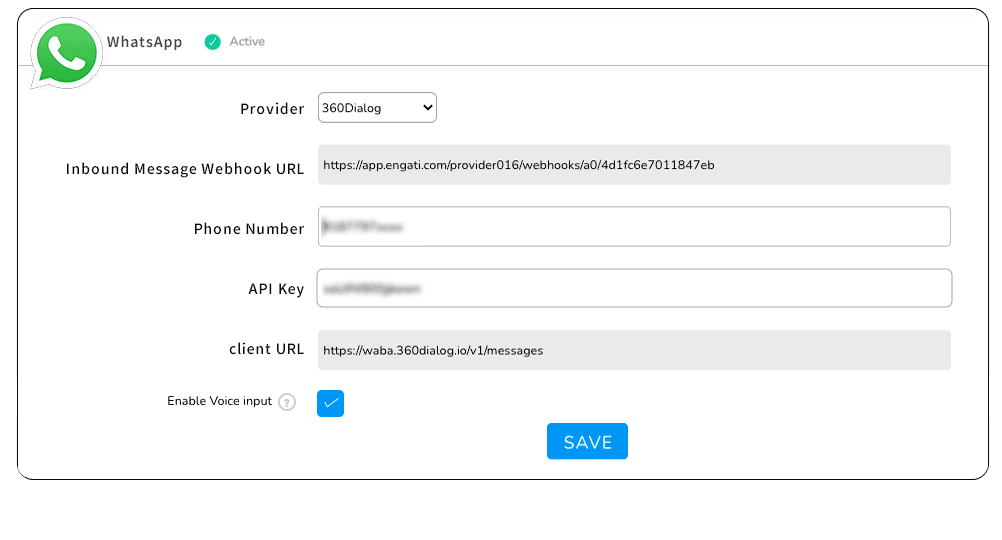
Enable voice input on WhatsApp chatbots
4. Go business casual
WhatsApp as a channel tends to be a less formal environment than emails. It’s a chance to display your brand’s personality. Now, that doesn’t mean you go completely casual, you need a balance.
So, be a little less formal, but make sure you still come across as professional and helpful.
And make sure your chatbot reflects your brand personality as well. The key is to let your customers know that they’re talking to a bot while making them feel like they’re talking to a human.
Your WhatsApp chatbot should also be able to make small talk. Not all your customers will get to the point immediately. To allow your Engati WhatsApp chatbot to do that, all you need to do is open up the Settings section in the Train tab and enable small talk.
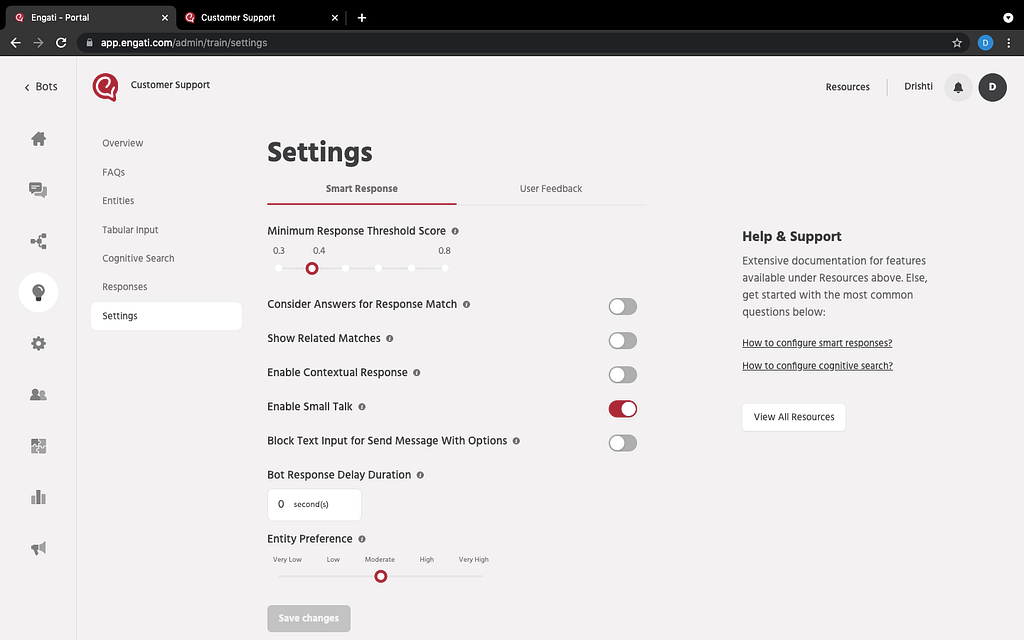
Enable small talk on your chatbot
5. Speak your customers’ language
You want your customers to accept you as one of them. If you don’t speak their language, you’ll come off as an outsider.
You want them to trust you and feel comfortable talking to you. That’s why you need your WhatsApp chatbot as well as your live chat agents to have the ability to engage your customers and interact with them in their language.
6. Use rich media
You don’t want your interactions to be limited to text messages. Make your conversations more interactive by using images, video, and more.
You could even share documents with and receive documents from your customers over WhatsApp rather than forcing your customers to switch to an email conversation.
7. Reduce effort, use buttons
By their very nature, WhatsApp chatbots are intended to reduce customer effort. It’s all about letting them reach you over the app they’re already using instead of having to hop across apps and platforms.
Simplify the interaction even further by sending interactive buttons with your chatbot messages so that they don’t need to bother typing text messages out.
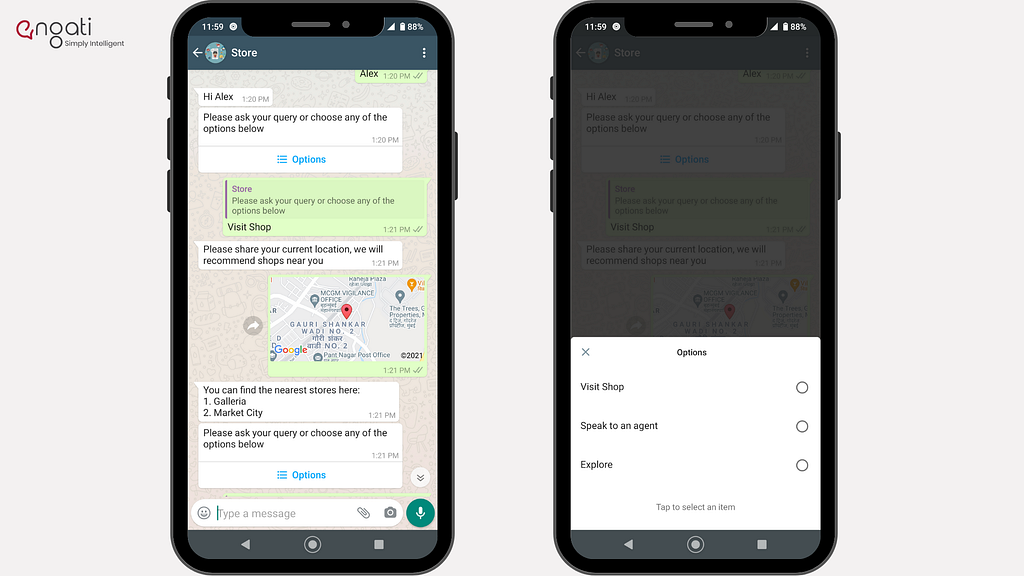
Use interactive buttons on your WhatsApp chatbot
8. Let your customers know that you’re on WhatsApp
Your customers are not going to find out in a dream, you need to let them know that they can reach you and get their queries answered and issues resolved over WhatsApp.
Mention it in your website, use a widget on your website to lead your customers to your WhatsApp bot, mention your WhatsApp number in your email signatures, you could even go ahead and put up QR codes on your physical and digital properties to make it easier for your costumes to reach you.
9. Update your WhatsApp Business Profile with the necessary information
Fill out your profile with all the necessary details that your customers would be looking for. A small description of your business, your business hours, a link to your website, your address, and the category your business falls under.
Congratulations! You are now ready to support your customers in their preferred language, over their favorite chat application — WhatsApp!
This article about the “How can you use WhatsApp for customer service? [Tips + best practices]” was originally published in Engati blogs.
Don’t forget to give us your 👏 !
How can you use WhatsApp for customer service? [Tips + best practices] was originally published in Chatbots Life on Medium, where people are continuing the conversation by highlighting and responding to this story.
-
How to Prepare Your Organization for Marketing Automation
Marketing automation strategy has changed the way businesses function, deliver and grow. Automating marketing activities is not only empowering employees by streamlining their workflow and saving time but pacing up marketing processes to enhance customer satisfaction and retention.
Marketing automation dates back to 1992. But, it started taking shape in the middle of the 2000s. The impact of marketing automation can be best understood via these insightful facts by Invespro:
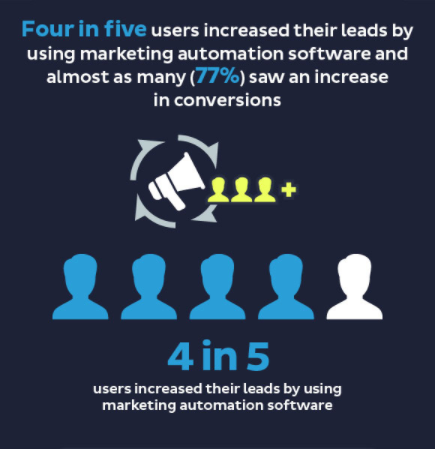
- Marketing automation software helped nearly 80% of marketers increase their leads.
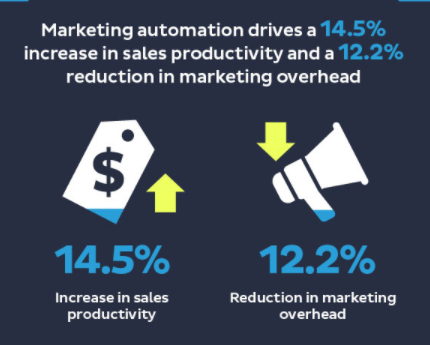
- Sales productivity rose by 14.5% after marketing automation was introduced in the company with a 12.2% reduction in marketing overload.
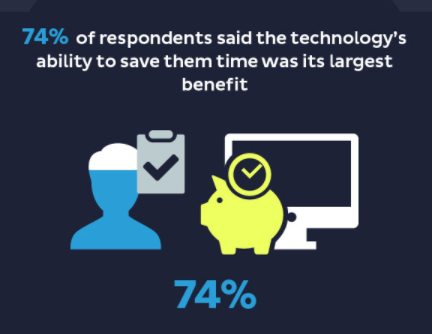
- Time-saving was the biggest benefit of automation, as stated by 74% of respondents.
If you also wish to utilize a marketing automation strategy and shift the business dynamics, you need to do some groundwork. You’ll need to rethink what you are aiming at and what assets you currently hold.
In this article, we will cover the following topics:
- What is marketing automation?
- What is marketing automation software?
- How can automation fit into a marketing strategy?
- 10 Steps to prepare your organization for marketing automation success
- Top 5 marketing automation tools
Just follow along and discover how you can introduce marketing automation in your existing business strategy.
Let’s get started.
Marketing Automation Definition
Marketing automation is the process of automating repetitive tasks using various marketing automation platforms. Using technology, you can personalize marketing messages, reach out to more customers, and nurture sales lead in the fastest and most efficient manner possible.
What Is Marketing Automation Software?
A marketing automation software is a platform that helps marketers manage marketing campaigns across several channels. These advanced platforms are designed to accelerate and scale a company’s marketing efforts while personalizing every customer interaction.
Here are 10 best-selling marketing automation software features that help to manage end-to-end internal processes and streamline business activities across sales, marketing, IT, and operations departments:
- Email designing and scheduling
- Lead generation and nurturing
- Customer relationship management
- Real-time customer support
- Target audience segmentation
- Social media automation
- Internet marketing
- Workflow Automation
- Content Management
- Reporting and Analytics
How Can Automation Fit Into a Marketing Strategy?
Do you know that 90% of the employees are stressed by repetitive and manual tasks? According to a study by SnapLogic, repetitive tasks turn marketers into mindless zombies, which significantly stalls business productivity, growth, and revenue. The sad part is that these tasks can be easily automated.
Incorporating automation in your marketing strategy helps reduce problem resolution time, makes the teams more creative and efficient so that they can get more done in less time.
If you search online, you will find a number of marketing automation tools, which can seem very attractive and promising. It can be very tempting to pick up tools for email marketing, social media marketing, etc.
Do know that just by having a marketing automation tool, one cannot nurture prospects and convert them into delighted customers.
You have to know how marketing automation works while understanding the components and nuances of marketing automation first.
The best marketing automation strategy has customers at the core. Marketing automation is best implemented in the context of a flywheel and not a funnel, where you don’t solely focus on moving the lead from marketing to sales and customer service, but follow the same path repeatedly.
Trending Bot Articles:
2. Automated vs Live Chats: What will the Future of Customer Service Look Like?
4. Chatbot Vs. Intelligent Virtual Assistant — What’s the difference & Why Care?
How to Prepare Your Organization for Marketing Automation
- Have Clear Goals
Are you thinking of creating a marketing automation plan? Great. But, here are a few questions that you must answer first:
- Why do you want to automate marketing processes?
- What results do you want to achieve?
- What are your long-term business goals?
Automated marketing campaigns are excellent for businesses. But sadly, it is not meant for every business.
Without clarity, you might only be following a herd, without knowing whether you should be a part of it or not.
2. Involve Key Stakeholders
There are several decision-makers or stakeholders in any organization who make sure a project is implemented correctly.
The stakeholders can include business analysts, executives, people from sales & marketing teams, and IT departments.
Schedule a meeting with your stakeholders or get them in the loop through email to get inputs on the automation campaign and redefine business goals if needed.
3. Decide KPI’s for Your Goals
Key performance indicators (KPIs)- You might find them fancy and daunting. But they are as important as having marketing automation technology in the first place.
Do you know why?
KPIs help you know if your marketing automation efforts are paying or not. It gets you valuable feedback on how you can improve your business.
Your KPIs for the automation campaign should include metrics like funnel conversion, customer satisfaction, revenue, profitability, and other strategic business goals.
4. Build a Marketing Automation Team
At first, hiring full-time employees for marketing automation can seem expensive, or assigning a couple of team members from within the department can appear daunting.
No matter how you do it, it would be helpful if you have marketing automation experts who can act as a bridge between the sales team and the target audience. They can follow a sound marketing strategy and use the automation tools to ace the game with foolproof internal coordination and smart tactics.
The various roles can include:
- Project managers
- Content writers/developers
- Web designers
- Email/ lead nurturing specialists
- Analytics specialists
To build a sustainable marketing automation team, consider certain variables, like your company size, goals, budget, and resources.
5. Identify What Can Be Automated
Every business has a set of routine, recurring marketing tasks that need to be taken off from the to-do lists daily.
Such time-consuming tasks can include activities like:
- Tracking the progress of marketing campaigns and assigning tasks to team members.
- Writing social media posts in batches and disbursing them on a daily, weekly, or monthly basis.
- Planning meetings, file sharing, and communication with the team members about project status updates.
- Sending emails to the customers on birthdays or anniversaries or responding to their queries
Automation is the only way your team can save time and achieve more in a day. Create a list of your individual needs, and look for marketing automation tools accordingly.
6. Have Engaging Content
When you are trying to capture customers’ attention, you need content that connects with the users at various lead generation and nurturing stages.
If you already have content, do a content audit and get the answer to certain questions like:
- How is your existing content performing?
- Which pages are working better than others?
- Is your content taking you closer to your goals?
- What is missing in your content?
With such an insight, you can fill the gaps where the content is not touching a specific aspect of the user experience. You can go ahead and repurpose all your existing content into a graphical format with a tool like Visme or Picmaker. Finally, you can use the power of automation to repurpose the content for whitepapers, guides, email marketing, or SlideShare.
7. Identify Your Target Audience
Understand that marketing automation aims at reaching out to the right audience at the right time with the right message.
Before putting out content and automating marketing, work on creating customer personas.
This way, you can personalize the content for different target audiences, map it to their different decision-making stages till purchase, or create new content altogether (if needed).
The more they are engaged, the easier they’ll take action, and share the experience with others to encourage them to buy.
8. Create a Smart Content Calendar
A content calendar is the best way your content, sales, and marketing teams can stay organized and on top of their games.
For an automation software application to work best, have a content library ready all the time. Choose your social media channels to establish content flow.
Find out what needs to be tracked. Get your team to review the content and give feedback to improve the social media posts further.
9. Choose Automation Tools
The beauty of having marketing campaign automation software is that only a few people can achieve results that may take hundreds of people to accomplish manually.
Analyze your sales funnel and see which part can be improved with automation, depending on your goals and content assessment.
To begin with, jot down a list of tools you find good. Next, visit their website to learn about the features and pricing. Go through the best review sites like Capterra to better learn about the products through positive and negative user reviews.
10. Analyze Automation Deployment Success
Time saved followed by money saved is probably the best metrics to analyze automation deployment success.
Many testing methods include automated tests for mundane tasks ranked from low risk to high risk or low priority to high priority.
Many experts have suggested that automation is successful if it can save anywhere from 2 hours in a day or 4 days in a month.
Another metric is to track the number of marketing risks and see automation mitigates how many of them.
Top 5 Marketing Automation Tools You Must Consider
Offered by Oracle, Eloqua is a software as a service (SaaS) platform designed for marketing automation, and sales lead generation.
With this tool, marketers can monitor customer’s buying cycles and build targeted campaigns through multiple channels like email, web, social media, etc.
ProProfs Help Desk is a feature-rich tool that helps the marketing teams access all the product-related queries through a shared inbox. They can discuss leads internally using internal comments and respond to customers faster using canned responses.
With this tool, the agents can collaborate and be in sync with other teams to gather the best results for their marketing activities.
Marketo is a well-established marketing automation software that offers impressive capabilities to automate marketing programs, develop personalized communications, build strong customer relationships, and measure marketing ROI for business success.
The behavior tracking feature helps marketers engage the right customers at the right time.
Constant Contact is a popular tool for email marketing planning and automation to meet business goals.
Through this platform, segment contacts, send targeted emails to new leads, nurture leads with personalized emails, and get new contacts through sign-up forms and social media ads.
Any automation list will be incomplete without a social media automation tool. Buffer is a market-leading tool that lets you schedule and publishes posts across your social media accounts.
Its robust analytics helps you measure content performance and develop successful marketing and social media strategies.
Automate Marketing Efforts & Grow Your Business
When you make automation work for your company and nurture customers with constant support and relevant content, you build long-term relationships and increase revenue generation opportunities.
But, before choosing any automation tool, make sure you know your business goals and identify areas that can be significantly improved by automation. Review the tools for their features, prices, and any hidden costs.
Ready to gain complete control over your marketing?
Don’t forget to give us your 👏 !
How to Prepare Your Organization for Marketing Automation was originally published in Chatbots Life on Medium, where people are continuing the conversation by highlighting and responding to this story.