|
submitted by /u/prashanthgandhidoss [link] [comments] |
Category: Chat
-
5 Lucrative benefits of having chatbots in your business
-
A.I. with Attitude: Building a chatbot with personality
By Jeff Betts, Head of Product

Conversational AI experiences have made great strides in recent years to support a growing number of use cases with an often unnoticed efficacy. From ordering a pizza to more serious matters like securing COVID-19 vaccine appointments and locating where people can register to vote, chat experiences have helped connect users to an incredible amount of resources. Despite this growth, one thing many conversational AI experiences have lacked is a unique voice.
Not a literal voice, but rather a personality and tone that communicates to us as an extension of a brand always available to help solve a problem or accomplish a goal. There are many reasons a brand might opt to include a personalized voice in a chat experience like leveraging a consumer connection with a team through a mascot, highlighting a marquee product, or even as straightforward as softening or brightening the tone of an important message so it’s more relatable to audiences that are used to communicating on social media apps.
Personification: Extending your brand
GameOn Technology has helped evolve the chat app industry by having our products match the tone of real-world brands, such as our recent work with Mike Tyson, the Atlanta Hawks, and Arsenal FC. Yes — these conversational applications give fans the information they’re looking for like Iron Mike’s favorite knockout and video of Trae Young’s latest 3-pointer from the Hawks’ center court logo — but they also provide a personality-driven chat experience that keeps users coming back for more.
In working with Mike Tyson on his custom experience, the GameOn team helped translate Mike’s story and voice to messaging channels with unique quotes, images, custom artwork, and Deep Thoughts from Mike. Upon launching, we soon observed frequently asked questions such as “when is your next fight?” or “what was your favorite knockout?” The Tyson team was able to use GameOn’s Q&A feature to pair select questions to answers that came from Iron Mike himself.
The Atlanta Hawks are a great example of utilizing a mascot to personify an experience. The Hawks made an incredible 2021 NBA Playoff run which has helped fuel a growth of over 250% in new users month over month for their new application! Fans are asking everything from “what’s the current score?” to “where can I buy the red playoff shirts?” and “how many kids does Harry the Mascot have?” Harry’s personality, and immense Atlanta Hawks knowledge from his 35 years with the team, helps power the bot and keeps fans engaged.
Trending Bot Articles:
2. Automated vs Live Chats: What will the Future of Customer Service Look Like?
4. Chatbot Vs. Intelligent Virtual Assistant — What’s the difference & Why Care?
Data Driven Results
Many industries that would reap the benefits of a personality driven experience include customer service, brands with well-known mascots, celebrities, sports organizations, video games, sales organizations, and even retail brands. In the case of Arsenal, GameOn worked directly with the team to base their application on football legend Robert Pires. This resulted in an authentic 1:1 relationship between fans and the sports team, making the experience a huge success. Gunners fans are delighted with, and appreciate, the Easter eggs and remarks from “Robot Pires” sprinkled throughout the experience such as his slide into victory when a user asks about a match Arsenal won! The Arsenal FC conversational application saw an increase of engagement on match days by over 3 times and 90% of fans become weekly-active users (WAUs) averaging over 1M messages per week within the first 6 months.
This is only the beginning for GameOn’s ChatOS platform. We will continue to push the industry forward by creating conversational applications that better deliver the answers consumers seek from brands they follow. The closer we are able to secure that 1:1 connection, the more rewarding the experience will be for everyone.
Don’t forget to give us your 👏 !

A.I. with Attitude: Building a chatbot with personality was originally published in Chatbots Life on Medium, where people are continuing the conversation by highlighting and responding to this story.
-
The Top 5 Industry Use Cases for Conversational AI
Artificial Intelligence (AI) is one of the most pervasive technologies in use today. With the human language being the medium to how we communicate, it is no surprise that Conversational AI (CAI) is becoming the most prominent frontier of this technology. Many businesses are enlisting the help of this technology to stay competitive.
According to Markets and Markets, the expected global Conversational AI market size is set to grow from USD 4.8 billion in 2020 to USD 13.9 billion by 2025, at a Compound Annual Growth Rate (CAGR) of 21.9%.
Therefore, companies, industry leaders, and employees need to understand precisely what Conversational AI is, why it’s essential, and the many use cases of this AI application disrupting Healthcare, IoT Devices, Retail, HR, and Finance and Banking Industry.
What is Conversational AI?
Conversational AI is a subset of AI that focuses on imitating conversations with humans to deliver a human-like conversational experience. The goal of these types of AI is to replicate the human experience as closely as possible. Through Machine Learning technologies like Natural Language Processing (NLP) and Natural Language Understanding (NLU) — Conversational AI aims to process language data (what you say) and understand it (what you mean).
Other technologies like speech recognition, sentiment analysis, and dialogue management are also used to provide Conversational AI with the ability to respond accordingly. To do so successfully, Conversational AI needs input data that humans curate to learn from how we communicate and understand one another naturally.
Conversational AI is seen as a successor to chatbots, one of AI’s first applications. While chatbots strictly follow a script, Conversational AI allows for a more contextualized conversation. The application of Conversational AI is far more complicated and nuanced than chatbots simply because of its ability to understand language on a deeper level.
Trending Bot Articles:
2. Automated vs Live Chats: What will the Future of Customer Service Look Like?
4. Chatbot Vs. Intelligent Virtual Assistant — What’s the difference & Why Care?
Why is Conversational AI important?
As the adage goes — it’s not a matter of if, but when.
And with Chatbots, it’s not hard to see why. ACCORDING TO JUNIPER RESEARCH, Conversational AI solutions can scale, provide 24/7 service and asynchronous conversations, and are forecasted to have operational cost savings in industries like banking of $7.3 billion globally by 2023.
However, it is not enough to have a chatbot on your site in 2021. Businesses need to have intelligent chatbots with natural language processing and understanding for the best customer support experience. In fact, with the emergence of Conversational AI, more and more people expect chatbots to understand them and assist them beyond what they can find on a FAQ. Conversational AI can deliver a customer experience equal to or better than a live chat when done correctly.
In addition, One cannot overlook the importance of the handshake between a bot and a website. A bot cannot replace or compete with a website: the best chatbot designs are ones where the site and bot work in tandem. The trend for Conversational AI bots is now increasingly beyond solutions for just reducing operation costs of call centers, but instead adding to the customer experience and providing better engagements.
Armed with the machine learning technologies, it is not surprising that Conversational AI applications are behind many chatbots and devices that exist in the market today, proving to be a core component to social success.
What are the 5 Industry Use cases for Conversational AI?
The Conversational AI industry is currently undergoing explosive growth as it becomes increasingly applicable for more use cases. Here are the top five sectors and their use case of CAI technologies to improve user experience and interactions and provide excellent customer support.
1. Healthcare usage cases for Conversational AI
The healthcare industry is undergoing a paradigm shift as it becomes increasingly apparent that Conversational AI can help cut costs and streamline the patient experience. Patient care has not been immune to this new age of technology, with chatbot ai solution now playing an essential role in cutting down on unnecessary time from human medical assistants to helping patients understand their treatment plans through natural dialogue — albeit digitally enhanced.
Use cases for Conversational AI for the healthcare:
- Diagnosis: Conversational AI can help diagnose conditions online by asking the patient a series of questions and learning based on their responses to provide insight into any potential health issues they may be experiencing.
- Medical scheduling: Conversational AI can streamline a patient’s medical appointment by providing them with general information about their next visit before they even arrive at the hospital. It can also handle the patient’s paperwork and help them schedule appointments.
- CBT: Cognitive Behavioral Therapy is an effective way to treat mental health problems like anxiety. Conversational AI can provide a completely immersive CBT experience with the help of NLP and NLU.
- Therapy: Conversational AI can help fill the gaps in care that mental health patients receive from human clinicians. Conversational AI can provide a 24/hour service, which means it can be provided for as long as necessary without needing breaks or days off. Additionally, bots have no judgment and won’t stigmatize patients when engaging in a conversation- something significant for mental health.
- Mental Health: Bots like Replika, which are conversational chit-chat bots, can help with emotional counseling, providing a safe and private space for people to share their feelings. Conversational AI can also aid in therapy sessions themselves- such as assisting a therapist by taking notes or summarizing the session.
- Medical assistant: Conversational AI can be a virtual assistant to support patients and their carers, helping them understand health-related topics. This tactic often helps reduce the stress levels associated with healthcare services by freeing up human medical assistants for more high-level work that is best left in their hands.
- Data Collection: Conversational AI is also being used by pharmaceutical companies as a method for gathering user feedback on their products via surveys or focus groups — all without the need for an interviewer. This saves both time and money spent on hiring human data collectors while still collecting valuable information from consumers that can be analyzed using Conversational AI’s Natural Language Processing capabilities.
2. Internet of things (IoT) devices
Perhaps becoming the more useful helper in the household in this day and age are Conversational AI-enabled devices that use automatic speech recognition to engage with users. These include voice assistants such as Amazon’s Echo and Google Home and mobile, smartwatch, and desktop assistants like Apple Siri and Cortana. Conversational AI can bridge the gap between humans and non-human interfaces by understanding natural speech patterns and allowing context without a rigid conversation structure.
Many of these devices use unsupervised machine learning — meaning Conversational AI’s abilities are self-learned through trial and error in response to user input.
Some of the use cases for this industry include:
- It can control home appliances through google or Alexa.
- We are getting any devices to “dial” phone numbers and send messages on the user’s behalf.
- Ordering food or grocery items through Conversational AI-enabled devices and apps like Amazon’s Alexa while simultaneously learning what the user likes to suggest better products that they may be interested in.
- It is remotely actioning tasks such as turning on the lights or air conditioner.
3. Retail use cases for Conversational AI
Conversational AI in the retail space is an emerging trend: lead generation, lead qualification, lead nurturing to 24/7 concierge services, faster order fulfillment, and amplifying marketing messages.
Through smarts like API integrations, other use cases for retailers with conversationally enabled applications include:
- Product Recommendations: Conversational AI is leveraged by retailers as a customer service chatbot to provide product recommendations based on user interactions and search queries.
- Customer Data Insights: Conversations with customers are recorded digitally, eliminating the need for humans to manually input every word spoken during an interaction or call center conversation. A simple data analysis into the type of search queries asked can provide businesses with further insights into their products and services.
- Scalability and Multi-Channel Integrations: Conversational AI can scale conversations across different channels simultaneously (i.e., email to web assistance to Facebook) without human intervention. This provides increased opportunity for conversions and sales while at the same time reducing costs associated with traditional methods of communication that require human involvement, such as phone calls.
- Better User Experience and Engagement: Conversational AI can be used in retail settings not just as one-off ‘conversations’ but as ongoing conversations. Maintaining context and holding data from previous conversations will translate to better customer experience, engagement, and conversion rates.
- Inventory tracking: Conversational AI provides the ability to track inventory and offer availability to customers.
Through all these use cases, Conversational AI provides the foundation to excel in online retailing in 2021 — not only by providing the information that customers need immediately and 24/7 but gives businesses the data from their customers to provide better and more optimized products and services.
4. Human Resources
Companies are also leveraging conversational AI for HR purposes — from recruitment to documentation directory. Companies can find that their resources can be allocated more efficiently, boosting productivity, maintaining staff satisfaction, and saving time and money.
The most common use cases for an HR bot are:
- Recruitment: Conversational AI can be used to sift through CVs and job applications, eliminating a need for HR staff to go through every application manually. The ability to analyze data such as keywords found on the CV compared to other applicants’ search terms means that these AI can provide companies with a more accurate list of possible candidates than any HR could.
- Onboarding: Conversational AI can be used to automate onboarding and orientation processes, including advising new employees with any necessary information they need about their work before they start work- such as where bathrooms are located. AI chatbots also have a user interface that is more intuitive than any HR staff member will ever have and can remember every conversation with an employee.
- Documentation: AI can automate documentation processes, which means that HR staff will not constantly update their records. Conversational AI’s memory function also ensures all employees’ documents are up to date in real-time.
- General staff advisory: Acting as a concierge service or a help desk, the use of Conversational AI extends to answering any questions, filling out leave applications for employees, and automated shift date and reminders.
5. Finance and Banking
According to a recent study by Juniper Research, the success rate of bot interactions in the banking sector will reach 90% in 2022. This means that the most robust way for financial institutions to stay competitive is by embracing digitalized customer experience strategies such as Conversational AI.
Conversational AI is currently making waves in the world of finance and banking, with use cases including:
- Banking virtual assistant bots can check user balances or process a transaction across any bank accounts.
- It prevents fraud with automatic speech recognition, detecting any keywords or phrases that could signify fraudulent activity on the user’s account. Conversational AI also can detect any anomalies from normal behavior, which could be indicative of fraud.
- Finance bots can process any transactions to provide you with an accurate picture of your finances. Conversational AI will help access and analyze data, such as trends in spending habits or bank accounts, to recommend how best to spend money.
The Bottom Line
Conversational AI promises a lot of potential in 2021. There are many industries with excellent use cases for Conversational AI: Healthcare, Public Sector, HR, IoT devices, Retail and Banking, and Finance — each one promising to change how that industry operates. Conversationally enabled applications have the potential to take customer service from good to great — chatbots can assist companies in saving up to 30% customer support costs and answering up to 80% of routine questions.
Let’s take a look at how far AI has come. Enjoy the video below — it might change the way you think.
What It’s Like To be a Computer: An Interview with GPT-3
Now back to the topic. While it may seem that Conversational AI is an easy to implement, all-encompassing force to be reckoned with, it is worth noting that a chatbot is only as good as its solution and conversation design and the platform that facilitates it.
Ultimately, Conversational AI chatbots still need to be human-curated simply because humans understand how humans communicate best. While Conversational AI can never truly replace human-to-human conversations and interactions, it’s certainly getting close.
Originally posted at RuhaniRabin.com. Click here to subscribe now
Don’t forget to give us your 👏 !
The Top 5 Industry Use Cases for Conversational AI was originally published in Chatbots Life on Medium, where people are continuing the conversation by highlighting and responding to this story.
-
Why Conversational is an Essential Component of a Successful Chatbot in Higher Education

image by https://unsplash.com/@jeshoots What is “conversational”? By the Merriam-Webster dictionary, conversation is defined as an “oral exchange of sentiments, observations, opinions, or ideas”. Because of the exchange, one-on-one conversations are often considered the most effective way for humans to engage with one another.
However, human-driven conversations don’t scale. From our conversations with universities, we learn that it is not unusual for an admissions office to have only four to five staff members, who might need to handle over 30,000 to 40,0000 incoming student inquiries, not to mention that many such inquiries are repetitive on the similar topic , e.g., program requirements, financial aid options, and application process. Additionally, universities wish to learn more about prospective students who made such inquiries, such as their interest and expectations, which will enable university staff to better follow up with the students (e.g., inviting them to apply for a program or scheduling an interview). So what capabilities must a chatbot have in order to help universities automate such engagements but without losing a human touch?
What is a Conversational Chatbot
To scale out human-driven conversations while containing cost, more and more universities now are enlisting the help of chatbots. Now you might be puzzled: how could a chatbot be not conversational? From the literal sense, it makes absolutely no sense if a chatbot is not conversational. In reality, however most chatbots out there unfortunately cannot converse with their users, hence are not conversational.
How can chatbots be made conversational? To possess human conversation skills, conversational chatbots must be powered by cognitive intelligence — an advanced, human-like Artificial Intelligence (AI). Such a chatbot, also known as a cognitive AI assistant or a cognitive AI chatbot, should demonstrate three key conversation capabilities.
Trending Bot Articles:
2. Automated vs Live Chats: What will the Future of Customer Service Look Like?
4. Chatbot Vs. Intelligent Virtual Assistant — What’s the difference & Why Care?
A Conversational Chatbot Supports Two-Way Communication
We’ve all had the experience with a chatbot where we are clicking buttons and being forced to follow a path that leads nowhere. Frustrated, we give up and try to ask a question directly in the chat window. The chatbot, however confused, responds that it does not understand our input. This is a typical one-way exchange, where a chatbot tries to dictate the whole conversation by following a rigid, pre-defined chat flow, which often leaves users frustrated and unhelped.
In another scenario, a chatbot might open up a conversation with a phrase like “How may I help you?” What happens next is also quite familiar: after texting a question, we receive a chatbot response “Sorry I’m not sure I understand, would you mind rephrasing your question?” Left clueless, we don’t know how to rephrase the question and are also afraid no matter how we rephrase the question, the chatbot still could not understand. So we give up. This is another typical one-way exchange, where a chabot tries to let users drive the conversation without providing any guidance, which often results in failed conversations because of today’s technology limitations.
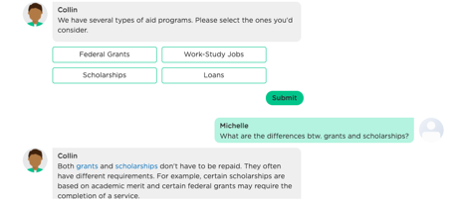
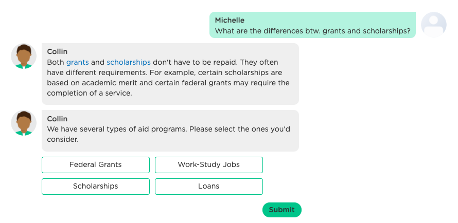
In contrast, conversational chatbots support two-way exchanges, delivering more human-like conversational experiences. Specifically, conversational chatbots can take initiatives and guide a conversation while actively listening to users and allowing users to take initiatives during the conversation. The example below shows a two-way conversation between a chatbot and a student who is inquiring about financial aid options.

A Conversational Chatbot Understands and Maintains Conversation Context
Continuing our above example, a typical chatbot might not recognize and respond to the user’s question, even if it did, it would get lost by the user interruption or take us back to the beginning of the conversation. Either way would derail the conversation and fail to complete the intended task (in this case, recommending financial aid programs).
Just like humans in a conversation, conversational chatbots are able to understand the focus of attention and remember the conversation context. As shown below, while a user diverts from the initial flow of the conversation, the chatbot answers the question, and then naturally resumes the flow where it was left off. This conversation capability enables a chatbot to complete assigned tasks while helping users whenever possible.
A Conversational Chatbot Can Read People and Personalize Each Engagement
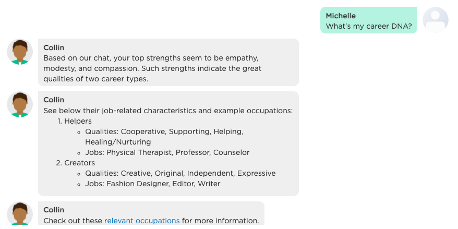
In addition to language abilities, great human conversationalists have high social-emotional intelligence, which enables them to deeply understand and empathize with their conversation partners and foster effective and pleasant conversations.
Unlike a typical chatbot that often offers one-size-fits-all responses and knows little about its users, a conversational chatbot can actively listen to its users, infer the users’ unspoken needs and wants from a conversation, and personalize each conversation. Not only does this capability allow a conversational chatbot to behave more human-like, but also enables it to better help its users based on the users’ needs and wants. The conversation example below shows that such a chatbot provides personalized career information to students based on the students’ passions, interests, and personality.
Why Adopt a Conversational Chatbot Now?
The demand for personalized, conversational interactions is a growing expectation by today’s university students. Multiple university studies show that students are willing to and wish to interact with a chatbot and can also benefit from such interactions. Higher education needs to cut through the clutter and create a better connection with their audience, e.g., current and potential students and alumni. Additionally, university studies indicate that technologies already exist to support rapid, no-coding setup and adoption of cognitive AI assistants, which not only deliver a higher engagement rate, but also continually improve from users’ interactions.
In other words, conversational chatbot solutions are no longer a luxury item for only certain universities. Without requiring additional technical resources, EVERY university now can easily adopt cognitive AI technology and their human-like conversational capabilities to improve student/alumni engagements, reduce administrative burdens, and elevate workplace morale, as the university hopes to achieve.
Don’t forget to give us your 👏 !
Why Conversational is an Essential Component of a Successful Chatbot in Higher Education was originally published in Chatbots Life on Medium, where people are continuing the conversation by highlighting and responding to this story.
-
Why are ChatBots a requisite for businesses
ChatBots/VoiceBots may seem like a recent phenomenon but the Artificial Intelligence-backed technology isn’t as new as one may think. In the 1960s, MIT Professor Joseph Weizenbaum invented Eliza, the first-ever ChatBot.
Even though Eliza was a tongue-in-cheek simulation of a therapist with no framework to assess or contextualize responses, her invention paved the way for ChatBots which used Natural Language Processing and Machine Learning to converse. Come the 2000s, come, Siri, Google Virtual-Assistants, and the likes. There are literally new devices like Google Home, Amazon’s Echo, which is built to converse.
From those times to now, ChatBots have become sophisticated automated tools that do more than converse with your customers & prospects. They sit at the intersection of customer support & sales taking on roles that weren’t meant for them. If you have been thinking about if your company needs a ChatBot, you have come to the right place.
Here’s why Businesses of today, can’t ignore the following multifarious benefits that ChatBots/VoiceBots bring to the table-
- Be available at all times, all day: This enough has been a driving factor for businesses to deploy a ChatBot/VoiceBot. Customers have enough products/services providers to choose from, hence businesses don’t want to miss a single lead that comes their way. A ChatBot by handling queries at an odd hour could do more than a human agent making outbound calls to leads. In the same gripe, tougher has been customer retention. ChatBots deliver superior customer service. They help businesses deliver pleasant experiences. Eventually leading to customer loyalty and hence, even more sales.
- Save Costs: Businesses want a better bang for their buck, and ChatBot/VoiceBot offers just that. The automated conversation tool is capable of handling many queries at the same time. ChatBots/VoiceBots can handle general queries and seamlessly transfer queries that require personalized attention to human agents. This lets businesses save contact center overheads and optimize business processes.
- Provide an Omnichannel Experience: Customers switch from one application to another in a matter of seconds However, what they don’t enjoy is an experience that’s not seamless. If a customer speaks to a ChatBot/VoiceBot on the website about starting a service, in his next conversation with the business he wants no disconnect from the earlier conversation. ChatBots ensure an omnichannel experience across platforms like WhatsApp, Website, etc.
- Do more than just Converse: A ChatBot’s primary job might be to solve customer queries, grievances and provide support at any given time of the day, or night. However, one must remember that these AI-Powered Conversational Bots through managing intents and contextualizing what the customer is saying, on the other hand, gains customer intelligence that’s unmatched when compared to human contact centers. ChatBots/VoiceBots offer detailed reports that empower business leaders to understand their customers, the loopholes in their processes, and also better decision making.
- Talk to Customers in any language: In a vast country like India, there are more than xx languages spoken. As businesses that go much beyond the region they operate in, businesses can’t afford not understanding the language of their customers and leads. ChatBots essentially solve this problem by conversing in just about every language that it has been programmed to. ChatBot/VoiceBot Providers take care of this aspect and businesses don’t have to worry about losing customers because of language barriers.
The most innovative of businesses have realized the potential of conversational bots in India, and if it’s to be believed- which it should be, ChatBots are a part of a differentiating CX Strategy for Customer Success Leaders. The Chatbot market was valued at USD 17.17 billion in 2020 and is projected to reach USD 102.29 billion by 2026, registering a CAGR of 34.75% over the forecast period, 2021 – 2026.
Due to faster grievance resolution and its ability to foster customer engagement, lead generation, and eventually higher revenue, businesses are adopting the technology at a fast rate. Whether you’re a healthcare honcho or an EdTech Entrepreneur, ChatBot/VoiceBot can better many processes in your organization.
The debacle shift of human/consumer behavior due to the pandemic in 2020, accelerated its adoption even further. With businesses suddenly realizing, a ChatBot/VoiceBot can be the pioneering factor across their customer success, sales, marketing, and financial strategies. And 2021 looks even more exciting for this technology.
submitted by /u/Mikeb_234
[link] [comments] -
Best chatbot-maker platform for my school project?
For my graduation project I need to create a funny chatbot to ask the user questions and react to answers. All the chatbot platforms I can find are very marketing-based, but I need one for a more artsy comedic direction. I’m not a pro in coding, but I can handle the basics.
Does anyone know a good platform? (Preferably one which allows photo / media files)
Thanks!!!!
submitted by /u/douweflop
[link] [comments] -
Need for conversational platforms for IT support
Conversational platforms are revolutionizing enterprise work environment by enhancing day to day internal communication across business functions as well as external customers. Organizations are leveraging AI for customer support to reduce expenses and improve business efficiency, with plans to expand the scope of AI applications to other areas such as IT Service Management (ITSM) and IT support. By enabling real-time interactions, conversational platforms are also transforming technical support strategies by using chatbots and virtual assistants as IT support agents.
Globally, more than 50% of businesses are expected to deploy a chatbot solution by 2025
Conversational platforms benefit IT support agents by performing several transactional tasks
IT support, especially for software, consumer electronics, and gadgets is prone to large number of questions and complaints. For handling these queries 24/7 and reducing the burden on human agents, conversational platforms i.e. virtual assistants and chatbots are deployed to act as IT support agents. These virtual assistants are designed to address even complicated customer queries and complaints in addition to frequently asked support questions.
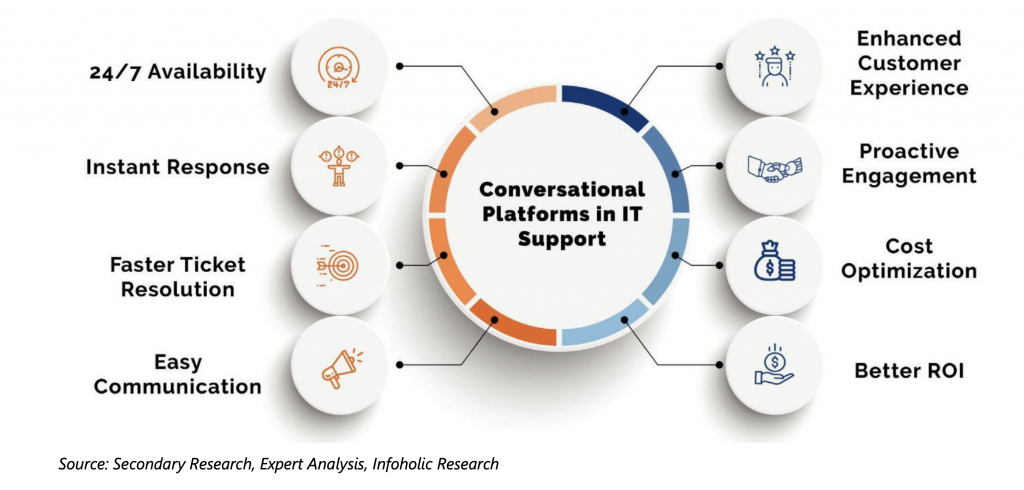
Customer frustration over traditional communication channels are also driving the need for conversational platforms for IT support. Lengthy waiting times and slower resolution even for simple queries are few factors leading towards customer frustration. Conversational platforms are built to handle service requests and routine incidents providing customers with consistent realtime solutions, enabling better customer engagement through personalized experience and faster turnaround time.
Every single technical or IT issue requires the user to raise a ticket by filling forms and then wait for the response from the support team. In an increasingly tech-savvy environment, enterprises cannot expect IT users to fill up the lengthy ticket forms and wait too long for the response. Conversational platforms offer 24/7 availability, which quickens the ticket resolution by sending the issue to the right agent. This also improves the overall resolution rate and rapidly restores business continuity.
Conversational platforms are becoming a key component of IT support
Conversational platforms are designed to proactively resolve all sorts of customer issues any time of the day, anticipating the needs of customers, thereby enhancing customer interaction. By providing real-time IT support even to the impatient customers, conversational platforms can aid in reducing customer attrition rates and enhancing satisfaction rates.
With enterprises increasingly shifting toward IT self-service, chatbots, and intelligent virtual assistants are also becoming strategically important to guide users to respective solutions with end-user expectations for faster and more convenient IT support.
Trending Bot Articles:
2. Automated vs Live Chats: What will the Future of Customer Service Look Like?
4. Chatbot Vs. Intelligent Virtual Assistant — What’s the difference & Why Care?
Customers, nowadays, prefer using IT self-service support compared to other support channels including emails and phone. Conversational platforms can quickly guide customers to the knowledge base, improving performance and resolving queries more effectively.
Conversational IT self-service offers a more seamless experience to customers by reducing the perceived effort, anticipating demand and learning from past interactions. Other than end-users, Conversational platforms also learn from their interactions with IT support agents and management.
Use cases for Conversational platforms in IT support
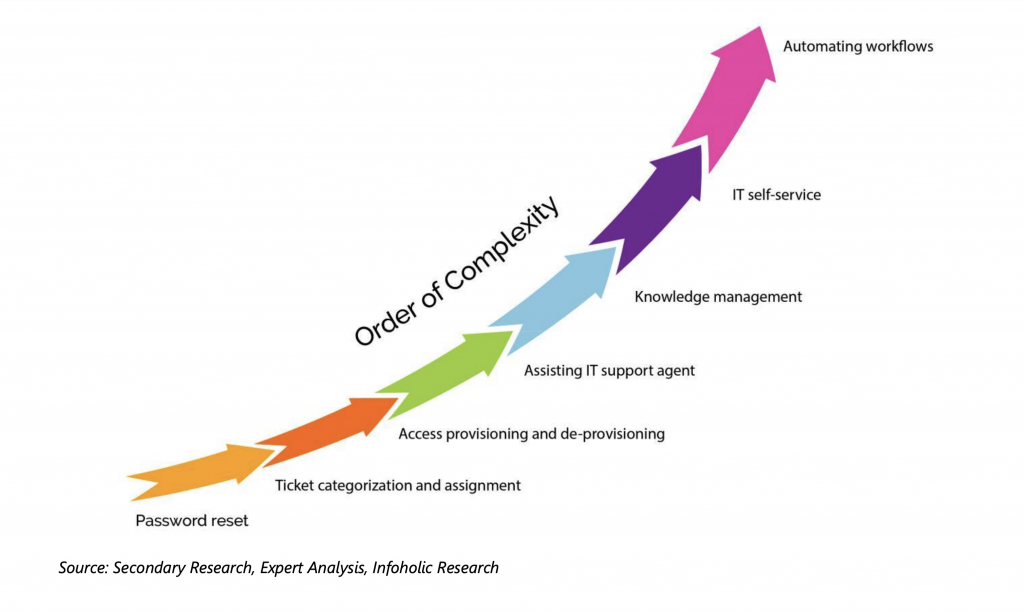
With additional learnings from internal IT support agents, conversational platforms can help in the areas of knowledge management, sentimental analysis, predictive maintenance, asset management, proactive change management, and demand planning. From a management perspective, conversational platforms are useful for workload optimization, strategic decision making, and predicting contract violations.
Benefits of conversational platforms in IT support
Chatbots are the future of IT support
Advancements in technologies including AI, ML, NLP, and others are making everyday jobs more efficient, simple, and easy. Chatbots can quickly and effectively handle routine employee issues, boosting the overall IT productivity and efficiency. By addressing IT support issues at unmatched speed, chatbots allow human support staff to focus on other critical business issues. AI-enabled chatbots are engineered to handle the high volume of IT issues and instantly respond to an array of customer inquiries. ML and AI are enabling chatbots in IT support to continuously evolve by learning from past encounters to help organizations in scaling up their customer service. One of the main applications of chatbots is to segregate and sort unimportant tickets created during IT support issues from being sent to IT human agents, thereby ensuring consistency in terms of response time and staff efficiency.
Customer feedback is one of the most important parameters for an organization to find faults and issues in their products or services. Chatbots for IT support are bringing together real-time customer feedback enabling companies to eliminate the communication gap between the repair staff and the ticket registration department. By reviewing the transcripts of customer interactions with the chatbots, meaningful insights of the users’ preferences and problems can be better understood, leading to higher quality of products and services. For instance, if a group of customers report the same issue that “connecting Bluetooth devices from their television creates a problem,” it points to specific technical issues within a line of products. Such customer feedback is often considered an important asset for businesses to offer reliable support to customers and exceed their expectations.
IT support provided by chatbot
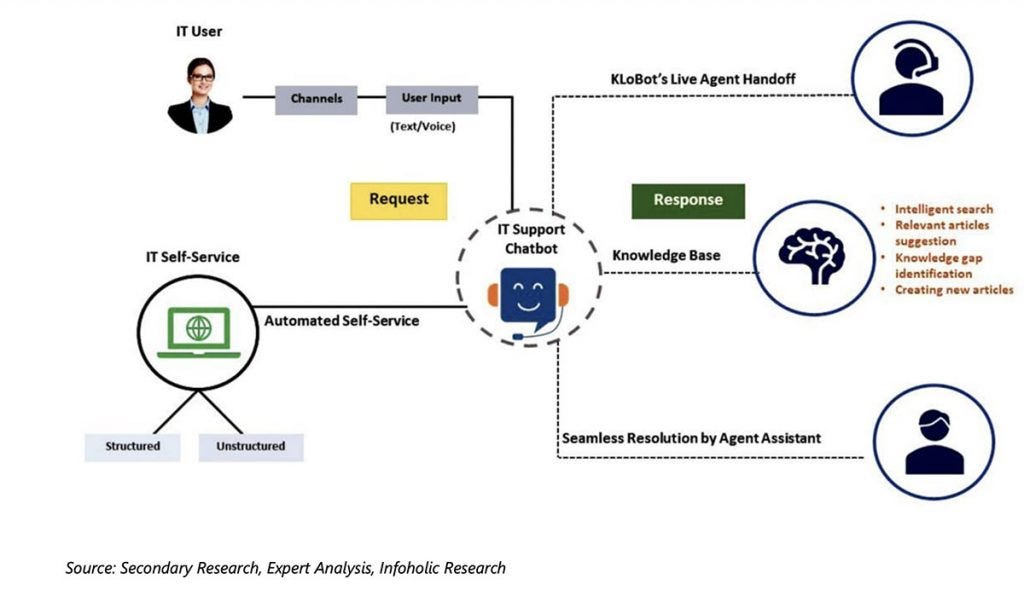
Collaboration with the live support agent
KLoBot offers a no-code chatbot builder platform, developed with AI-based conversational UI, to streamline business processes, automate routine tasks, and simplify internal & external business communications. These chatbots are helping businesses to offer 24/7 support to their customers using text, email, mobile app, website, or phone. IT support teams are not typically equipped to develop software applications, requiring software vendors to provide them with solutions.
KLoBot’s no-code platform is rightly positioned to such use-cases to securely create and deploy bots using Drag+Drop Bot Builder UI.
Typically, IT users opting for self-service support prefer to solve issues on their own, rather than contacting IT support agents. However, IT organizations are facing challenges in effectively managing the execution and utilization of IT self-service. KLoBot understands such challenges of IT support teams, helping them develop AI-enabled chatbots, which assist end-users in knowledge repository search, FAQs, QnA, and much more. The platform also eliminates the need of buying expensive hosting resources, hardware, or software, enables IT organizations to create their own skill-based chatbot with capabilities of NLP as well as ML, within few hours. Leveraging the KLoBot’s Live Agent Handoff skill, chatbots can smoothly transfer complicated requests or issues to the live IT support agent. This seamless handoff between the chatbot and human agent enables enterprises to offer superior end-user experiences as well as a deep understanding of related IT issues of customers.
For executing the IT support operations effectively, chatbots should identify and analyze complex situations based on their expertise and pass the queries to live IT support agent. The live IT support agent by focusing more on the high touch interactions builds the customer’s trust and ensures the ticket resolution.
Don’t forget to give us your 👏 !
Need for conversational platforms for IT support was originally published in Chatbots Life on Medium, where people are continuing the conversation by highlighting and responding to this story.
-
How to Integrate Dialogflow Chatbot to Python Frameworks
Chatbots are software tools created to interact with humans through chat. The first chatbots were able to create simple conversations based on a complex system of rules. Using Python and Dialogflow frameworks, you would be able to build intelligent chatbots.
In this post, we will learn how to add a Dialogflow chatbot to Python frameworks such as Flask or Django.
Pre-requisites:
You will need a Dialogflow account, a Kommunicate account for deploying the chatbot. Also, you will need Python and Flask frameworks installed on your system. To need more info about the Flask framework, please refer to this link.
We will be using Flask in this tutorial. If you are looking to add Dialogflow chatbot to the Django framework, you can see this tutorial.
Steps to Add Dialogflow Chatbot to Python Frameworks
Create an agent
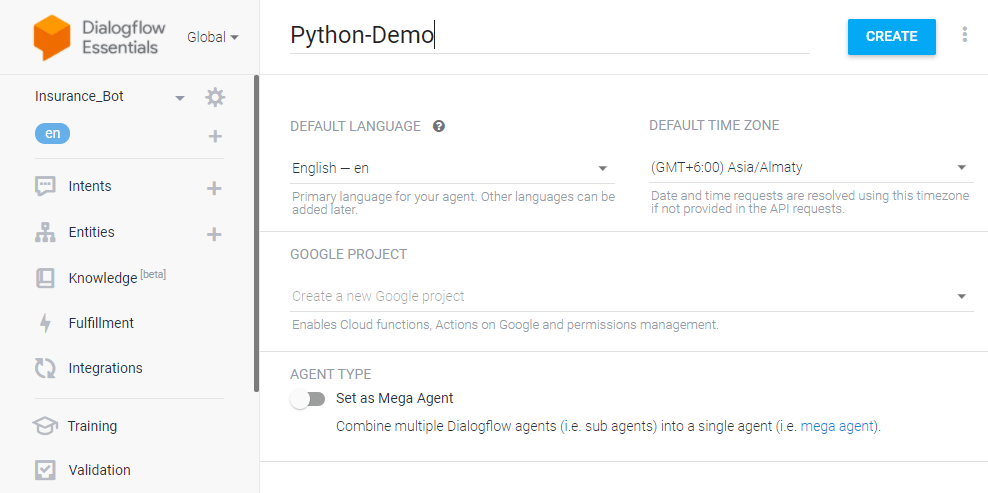
Login to the Dialogflow console. An agent is just a chatbot. You can train the agent with training phrases and corresponding responses to handle expected conversation scenarios with your end-users.
Click the dropdown near the Agent settings, then click Create new agent, provide an agent name (For example — Python-Demo), then click CREATE.
Create an intent
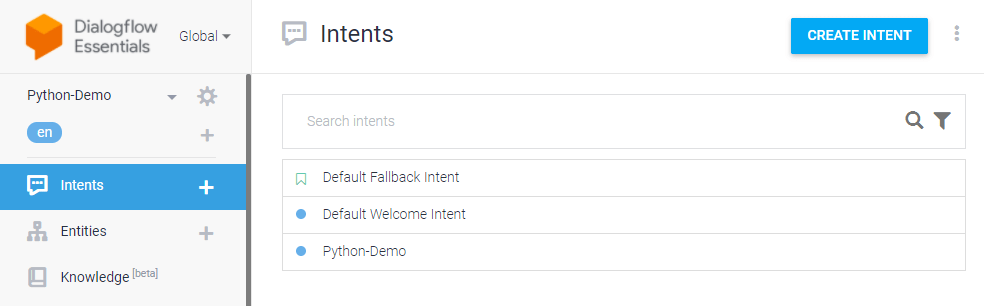
An intent categorizes end-users intention for one conversation turn. For each agent, you can define many intents. When an end-user writes or says something, referred to as an end-user expression, Dialogflow matches the end-user expression to the best intent in your agent.
Click the CREATE INTENT button and provide an intent name (for example, python-demo) and save.
Trending Bot Articles:
2. Automated vs Live Chats: What will the Future of Customer Service Look Like?
4. Chatbot Vs. Intelligent Virtual Assistant — What’s the difference & Why Care?
Add training phrases
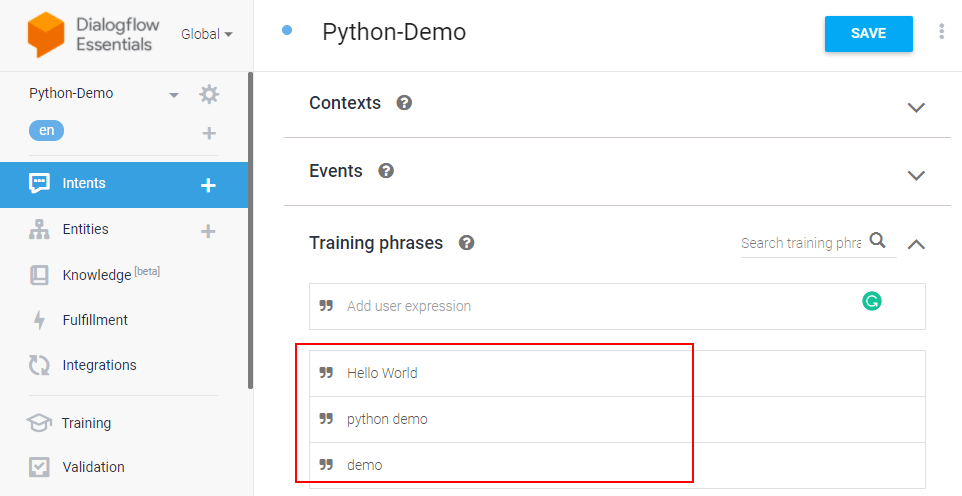
These are example phrases for what end-users might say. When an end-user expression resembles one of these phrases, Dialogflow matches the intent.
Click the intent created (python-demo) and add the user phrases in the Training phrases section.
🚀 Here’s a video for you on creating a Dialogflow chatbot and learning more about agents, intents, and entities:
Enable fulfillment
After adding an intent, you don’t need to add agent responses in the Responses section. Since we are using Flask for the same, you need to enable webhook for this intent. The webhook will help us transfer data and responses between Dialogflow and Flask. Dialogflow provides webhook services via Dialogflow Fulfillment.
Fulfillment is a code deployed through a web service to provide data to a user. You can enable webhook calls for all those intent that required some backend processing, database query, or third-party API integration.
Under the Fulfillment section, click Enable webhook for this intent and save the intent.
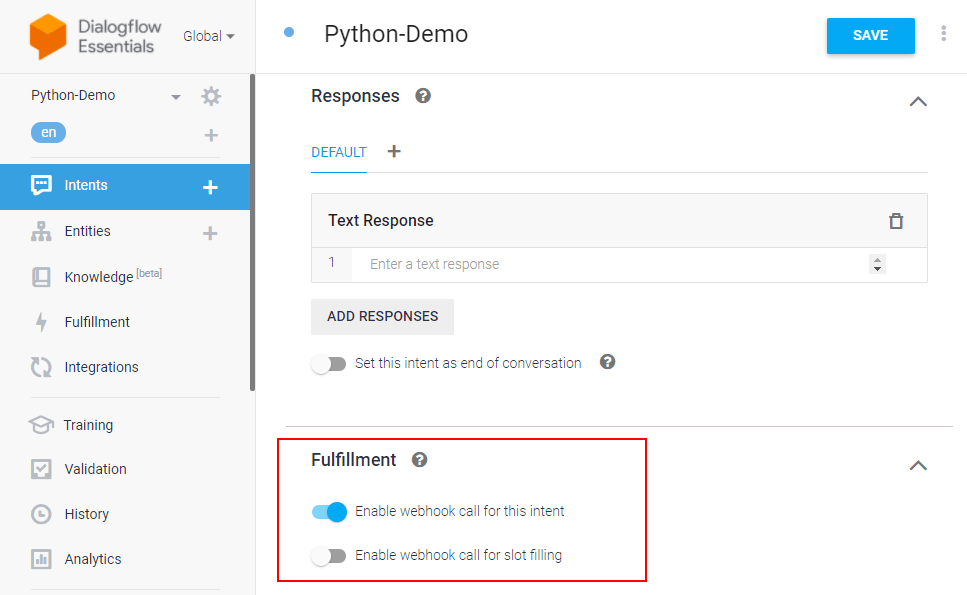
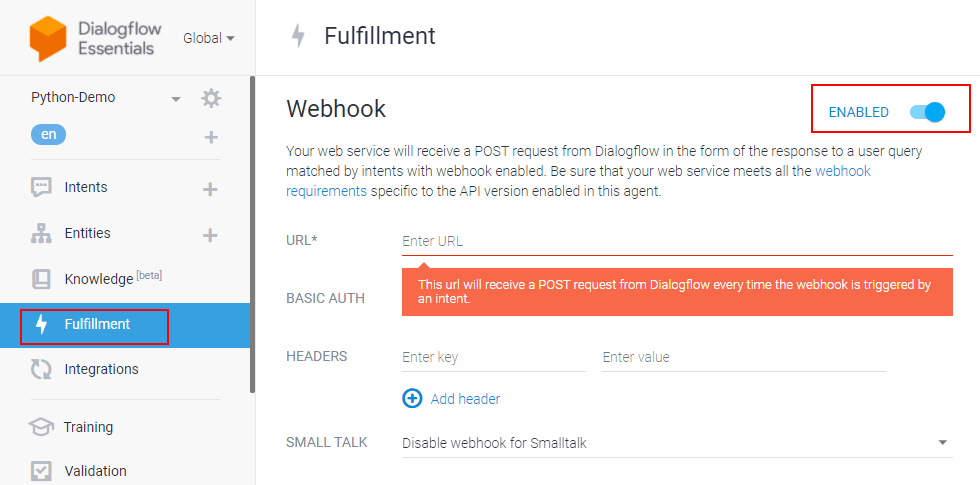
Dialogflow fulfillment has two options — Webhook and Inline Editor. The inline editor is also a webhook but hosted by Google cloud functions. We are going to use the webhook.
Go to the “Fulfillment” section & enable Webhook.
Using Python with Flask & enable webhook server
The webhook requires a URL, and it should be an HTTPS protocol. The webhook URL will receive a POST request from Dialogflow every time an intent triggers the webhook.
We are using Python programming language and Flask framework to create the webhook.
Create a file (for example — app.py). Import all the necessary libraries (ex: os, JSON, send_from_directory, request) needed for Python. Please check if you have Flask on your system. If not, install it using pip, and here’s the documentation for the same.
import flask
import json
import os
from flask import send_from_directory, request
To handle all the agent webhook requests, we need to define and add a route/webhook method with a POST request. A POST request will be sent to this URL /webhook. It executes all the methods inside the method.
Also, a fulfillment text is added to return that when it triggers the training phrase from Dialogflow.
If you need to add more conditions & responses, you can define them inside the webhook method.
# Flask app should start in global layout
app = flask.Flask(__name__)
@app.route('/favicon.ico')
def favicon():
return send_from_directory(os.path.join(app.root_path, 'static'),
'favicon.ico', mimetype='image/favicon.png')@app.route('/')
@app.route('/home')
def home():
return "Hello World"@app.route('/webhook', methods=['POST'])
def webhook():
req = request.get_json(force=True)
print(req)return {
'fulfillmentText': 'Hello from the bot world'
}if __name__ == "__main__":
app.secret_key = 'ItIsASecret'
app.debug = True
app.run()After setting up the Python process, let’s use Ngrok to create a public URL for the webhook and listen to port 3000 (in this example). For Dialogflow fulfillment, you will need an HTTPS secured server since the local server (localhost) will not work. You can also use a server and point a domain with HTTPS to that server.
You will get a URL like https://f3e3a29d7ae9.ngrok.io/webhook where the webhook is the POST route for Dialogflow we mentioned in the Python file.
Copy the URL you created (In this example — https://f3e3a29d7ae9.ngrok.io/webhook) and paste it into the Dialogflow fulfillment URL field.
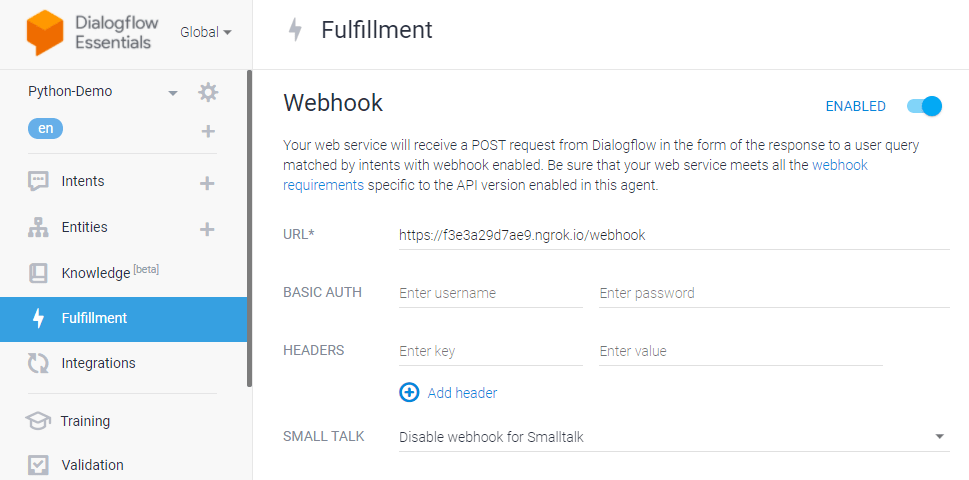
Once the Dialogflow setup is done, you can easily add it to your website or apps using Kommunicate & test the Python chatbot working.
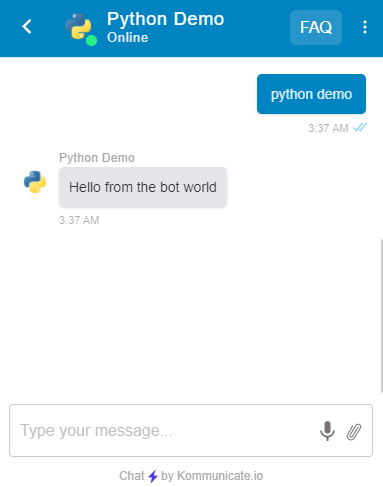
Wrapping Up
How easy was that? In a few simple steps, you can add a Dialogflow chatbot to your Python frameworks. Do try this out and let us know in the comments. We would love to try your chatbot out.
This article was originally published here.
Don’t forget to give us your 👏 !
How to Integrate Dialogflow Chatbot to Python Frameworks was originally published in Chatbots Life on Medium, where people are continuing the conversation by highlighting and responding to this story.
-
How to Create a WordPress Chatbot Without Any Coding
What is WordPress?
WordPress is a free open source content generation and management system used by companies and businesses (with its WooCommerce tool), and it can also serve as an e-commerce platform.
More and more companies only work through the internet, transferring their location from a physical space to a virtual one.One of the great benefits of WordPress with a plugin architecture. It allows users to extend the features and functionality of a website or blog with cutting-edge technologies.
Quick summary:
- What is a chatbot
- How to create a WordPress chatbot
- Steps to activate your chatbot to handle all your conversations
- How to add a chatbot widget to your WordPress website
1. What is a chatbot?
The chatbot uses natural language processing, which translates human language into data deciphered with recurring text and patterns and shapes them into automated answers and responses.
Just like when you chat with a real person, users can talk to a chatbot via voice recognition, or type in the chat interface.
Bonus: What is Chatbot how do they work
2. How to create a chatbot for your WordPress website?
- Sign up for Kompose, a GUI bot builder based on natural language conversations for Human-Computer interaction. You don’t need any coding skills to master Kompose. It has a simple, intuitive, and easy-to-use interface. Sign up here.
- Go to the Bot integrations section and use the “Create a Bot” option to create one.

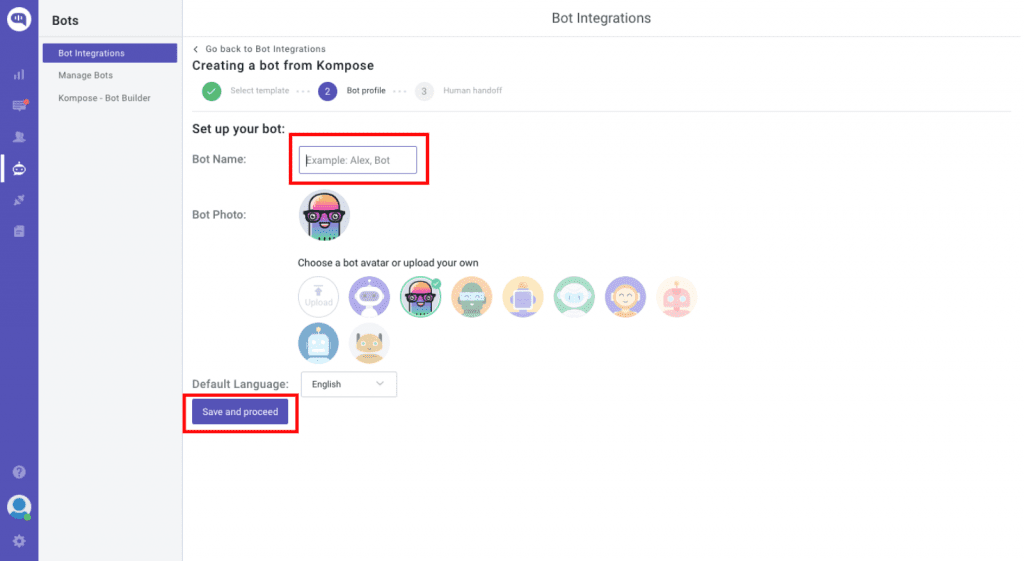
- Name your bot, set its language (as Kompose supports most used languages), and click save.
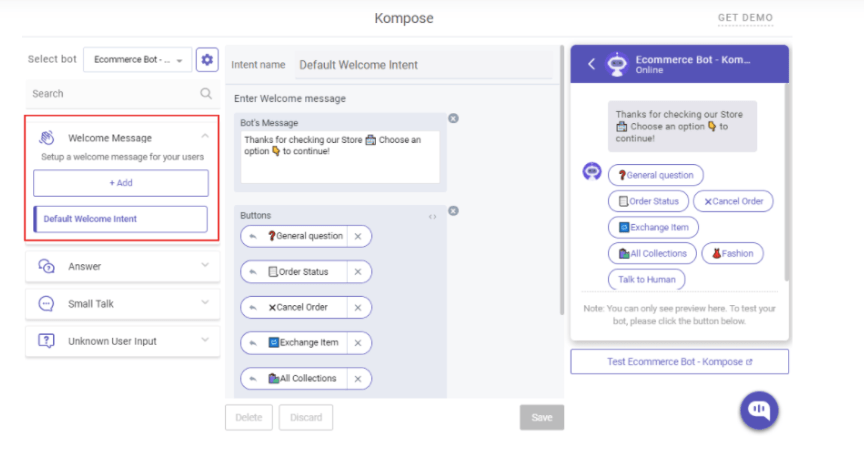
- Create your first welcome message and embed Texts, Buttons, Images, or other rich media types.
- Create answers for the bot. Define the intent that is possible and mention the phrases that you expect will trigger the communication. With time your bot will learn.
- If you don’t want to create your Chatbot from scratch, you can also use one of the available chatbot templates.
Trending Bot Articles:
2. Automated vs Live Chats: What will the Future of Customer Service Look Like?
4. Chatbot Vs. Intelligent Virtual Assistant — What’s the difference & Why Care?
3. How to set your chatbot to handle all your customer conversations
Once you create a chatbot, you can set it as a default bot in the conversation routing rules section as shown below.
- Click on ⚙️Settings >> Conversation rules >> Routing rules for bots >> Then click on bot like below and select your bot.
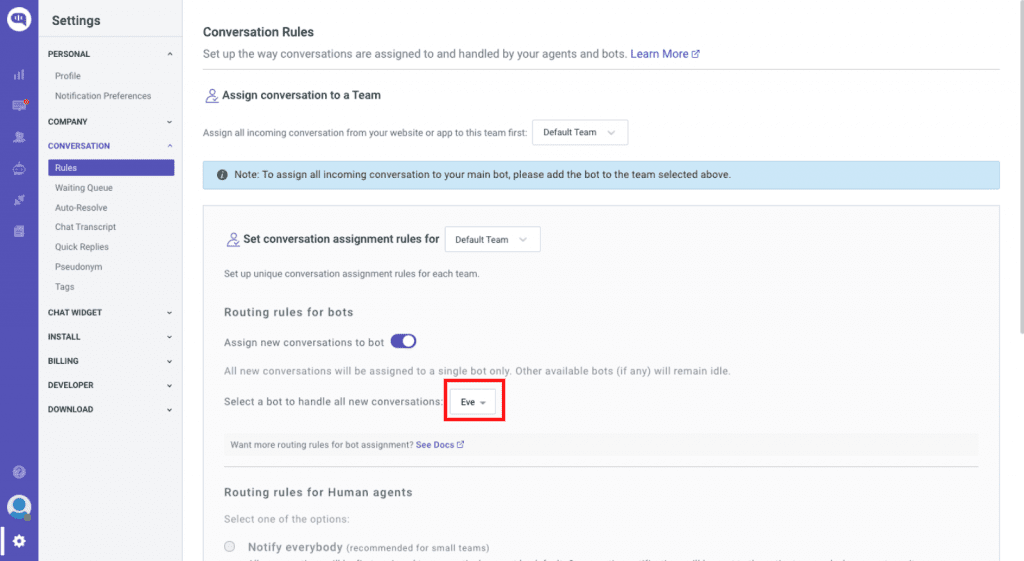
Now, your bot will reply to all of your conversations.
4. How to add a chatbot widget to your WordPress website
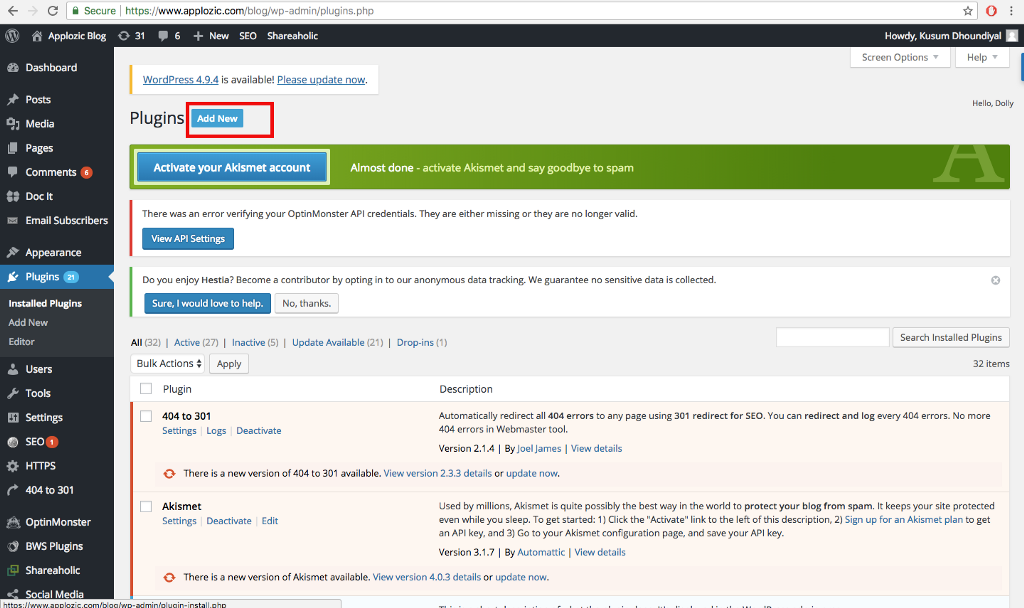
Step 1: Log in to your WordPress dashboard & Navigate to plugins
From the left navigation panel, click on Plugins. After that, click on Add New
Step 2: Add Kommunicate Plugin
Navigate to the search bar and search for ‘Kommunicate’. Click on the Install now button and activate it.
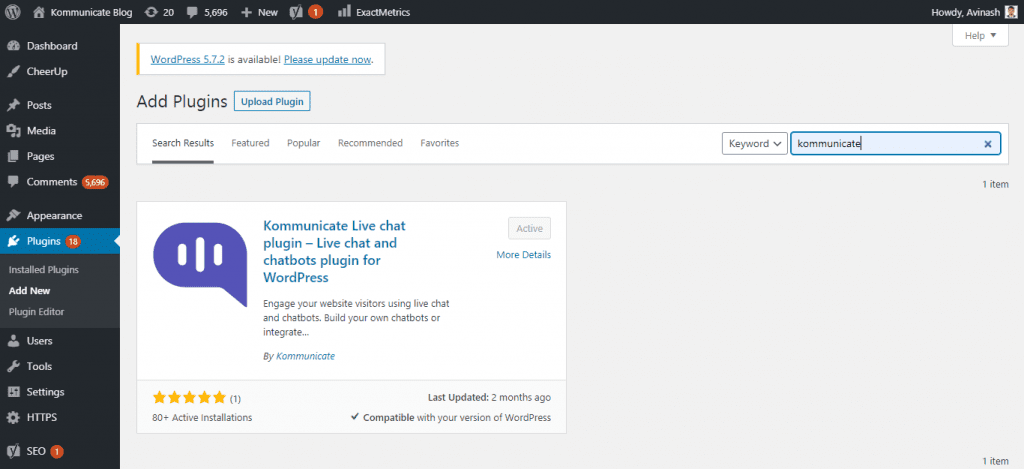
Step 3: Add your Kommunciate App ID
Go to your Kommunicate dashboard > Settings > Install > Copy your App ID
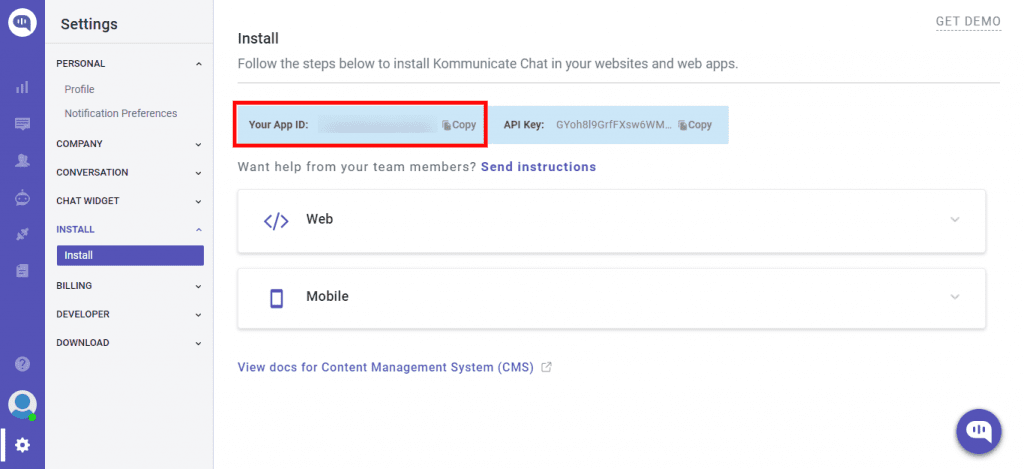
Then, Go to Kommunicate settings in your WordPress dashboard > Paste your Kommunicate App ID and click on save changes
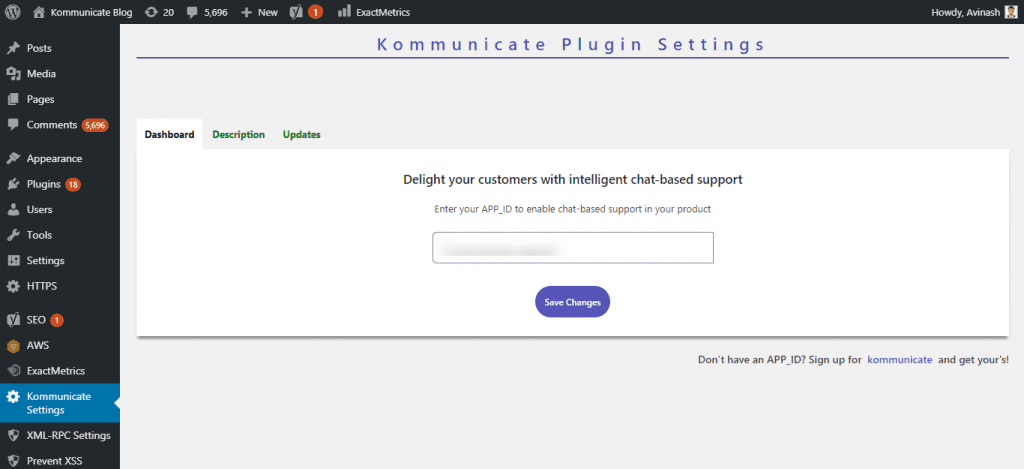
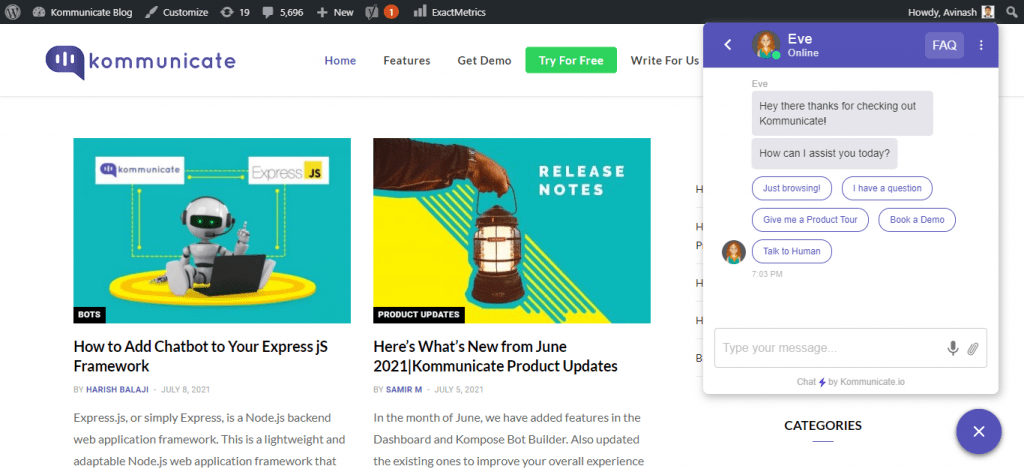
Refresh your page and now your chatbot widget should be live on your WordPress website.
Wrapping Up
Creating and installing your WordPress chatbot is as simple as it gets and requires no coding skills or technical expertise. Use the live chat and bots to connect quickly with visitors to your website and with customers.
This article was originally published here.
Don’t forget to give us your 👏 !
How to Create a WordPress Chatbot Without Any Coding was originally published in Chatbots Life on Medium, where people are continuing the conversation by highlighting and responding to this story.