Enhancing Customer Support on WhatsApp: Building a WhatsApp Chatbot with Human Handover using Dialogflow
In today’s digital age, WhatsApp has become a preferred communication channel for businesses and customers. WhatsApp Business API once limited to a select few, is now within reach of a broader range of businesses, offering new opportunities for providing exceptional customer support and addressing user queries.
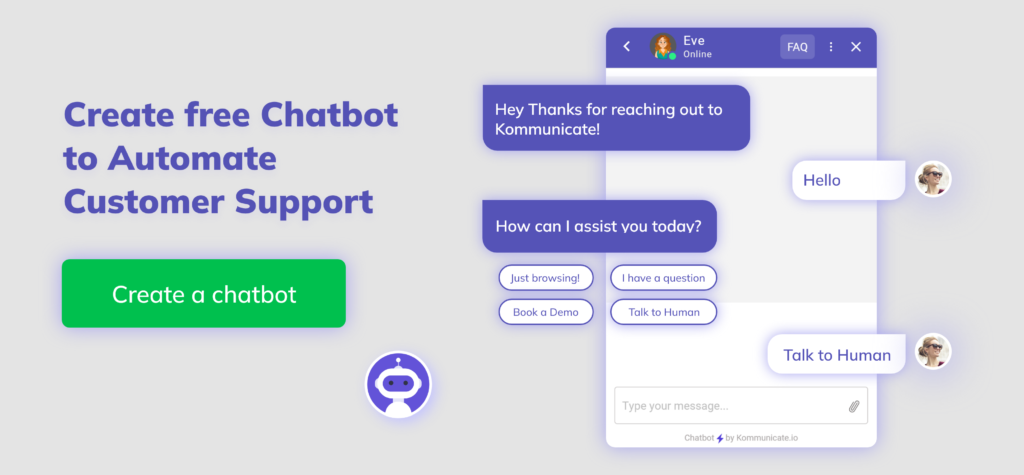
One innovative way to leverage the power of WhatsApp API is by integrating it with Dialogflow, a robust natural language processing platform. This integration enables businesses to create a WhatsApp chatbot that can efficiently handle a wide array of customer queries. It is a valuable tool for e-commerce and small-scale businesses seeking to enhance their customer support capabilities.
Real-World Example
To better illustrate the potential of this integration, let’s explore a real-world scenario:
Imagine you run an e-commerce store that sells a variety of electronic gadgets, and you’ve integrated the WhatsApp Business API with Dialogflow to create a sophisticated chatbot.
A customer named Sarah contacted you on WhatsApp business account, inquiring about the availability of the latest smartphone model. The chatbot, powered by Dialogflow, understands her query and provides information about the smartphone’s availability, specifications, and price. It even offers to assist with placing an order.
However, Sarah has specific questions about the smartphone’s camera capabilities and whether it’s compatible with her existing accessories. These queries fall into a more complex category and necessitate a more personalized touch. This is where the power of human intervention comes into play.
Recognizing the complexity of Sarah’s questions, the chatbot seamlessly transfers the conversation to a live human customer support agent, who is also accessible through WhatsApp. The support agent picks up the conversation right where the chatbot left off, addressing Sarah’s concerns in a friendly and knowledgeable manner.
Key Benefits
- The integration of WhatsApp Business API with Dialogflow not only enables businesses to provide automated responses but also ensures a smooth transition to human agents when needed.
- This dynamic interaction enhances the customer experience, instilling confidence in your brand’s commitment to providing excellent service.
- By combining the capabilities of a chatbot with the expertise of human agents, you can meet the diverse needs of your customers efficiently and effectively. This level of responsiveness and personalization sets businesses apart in the competitive landscape of modern customer service.
As we explore the integration of WhatsApp Business API and Dialogflow, we’ll delve deeper into the technical aspects of creating a chatbot with human handover, providing practical insights and steps to empower your business with this powerful tool.
Prerequisite Tutorials
Before you begin this tutorial, it’s essential to review the following prerequisite tutorials:
- Explore a WhatsApp Business API: Click for Tutorial
- Learn How to Integrate Dialogflow API: Click for Tutorial
These tutorials provide the foundational knowledge required for successfully implementing the integration discussed in this tutorial.
Technical Implementation
Ensure you have followed the WhatsApp bot tutorial and Dialogflow API integration tutorial. We retrieve user messages from the WhatsApp bot and transmit them to the Dialogflow API. This process involves several key steps.
Step 1: Let’s start by replacing the code with the one specified in Step 17 of the WhatsApp bot tutorial. This code will help you set up the integration seamlessly:
from flask import Flask, request
import requests
import os
import json
from google.cloud import dialogflow
from google.protobuf.json_format import MessageToDict
import datetime
app = Flask(__name__)

os.environ["GOOGLE_APPLICATION_CREDENTIALS"]="<Service_account_key_File_path>"

# Credential Details
MOBILE_NUMBER = '<User_phonenumber>'
ADMIN_NUMBER = '<Admin_number>'
PROJECT_ID="<Project_id>"
language_code="<en-US>"

# Connect with Dialogflow Api and and send response to user
def detect_intent_texts(project_id, session_id, texts, language_code):

    session_client = dialogflow.SessionsClient()
    session = session_client.session_path(project_id, session_id)
    print("Session path: {}n".format(session))
    text_input = dialogflow.TextInput(text=texts,   language_code=language_code)
    query_input = dialogflow.QueryInput(text=text_input)
    response = session_client.detect_intent(
       request={"session": session, "query_input": query_input} )

    print("=" * 20)
    final_response = MessageToDict(response._pb)
    print(final_response)
    print("=" * 20)
    final_text =       final_response['queryResult']['fulfillmentMessages'][0]['text']['text'][0]
    intent = final_response['queryResult']['intent']
    action = final_response['queryResult']['action']
    return final_text,action,intent

# connect with the admin and admin direct messages to user
def send_msg_admin(msg):
    headers = {
       'Authorization': f'Bearer {ACCESS_TOKEN}',
   }
    json_data = {
        'messaging_product': 'whatsapp',
        'to': ADMIN_NUMBER ,
        'type': 'text',
        "text": {
            "body": msg
        }
    }
    response=requests.post(f'https://graph.facebook.com/v17.0/{PHONE_NUMBER_ID}/messages', headers=headers, json=json_data)
    return response.text

# store all details in json file
def writedata(human_phone,user_phone,human_interface):
    current_time = datetime.datetime.now()
    dict_data = {'human_phone': [human_phone], 'user_phone': [user_phone],       'human_interface':[human_interface], 'last_updated': [str(current_time)]}
    with open('data.json','w') as json_data:
      json.dump(dict_data,json_data)

#  bot connect with the user send msg
def send_msg(msg,phonenumber):
    headers = {
       'Authorization': f'Bearer {ACCESS_TOKEN}',
   }
    json_data = {
        'messaging_product': 'whatsapp',
        'to': phonenumber,
        'type': 'text',
        "text": {
            "body": msg
        }
    }
    response=requests.post(f'https://graph.facebook.com/v17.0/{PHONE_NUMBER_ID}/messages', headers=headers, json=json_data)
    return response.text

# Admin  can Send images
def send_image(id,phonenumber):
    headers = {
        'Authorization': f'Bearer {ACCESS_TOKEN}',
    }
    json_data = {
        'messaging_product': 'whatsapp',
        'to': phonenumber,           # example 91<your number>
        'type': 'image',  # Set the message type to 'image'
        "image": {
           "id":id
        }
    }
    response = requests.post(
        f'https://graph.facebook.com/v17.0/{PHONE_NUMBER_ID}/messages', headers=headers, json=json_data)
    print(response.text)


@app.route('/receive_msg', methods=['POST','GET'])
def webhook():
    res = request.get_json()
    print(res)

    try:
        ADMIN_NUMBER = "<Admin Number>"
        if res['entry'][0]['changes'][0]['value']['messages'][0]['id']:
            language_code="en"
            session_id = res['entry'][0]['changes'][0]['value']['messages'][0]['from']

            if res['entry'][0]['changes'][0]['value']['messages'][0]['from'] == ADMIN_NUMBER:
                with open('data.json','r') as json_data:
                     filtered_rows = json.load(json_data)
                     user_phone = filtered_rows['user_phone'][0]
                try:
                        msg = res['entry'][0]['changes'][0]['value']['messages'][0]['text']['body']
                        send_msg(msg,MOBILE_NUMBER)
                        print(msg)
                        if str(msg).lower() == "bye":
                           human_interface = "False"
                                 writedata(ADMIN_NUMBER,MOBILE_NUMBER,human_interface)
                           msg = "Thank you for connecting with us. We appreciate your time and value your input. If you have any further questions or need assistance in the future, please don't hesitate to reach out. Have a wonderful day ahead!"

                except:
                      img_id=res['entry'][0]['changes'][0]['value']['messages'][0]['image']['id']
                      send_image(img_id,MOBILE_NUMBER)
            else:
                human_phone = ADMIN_NUMBER
                user_phone = session_id

                msg = res['entry'][0]['changes'][0]['value']['messages'][0]['text']['body']
                if not os.path.exists('data.json'):
                    human_interface = 'False'
                    writedata(human_phone,user_phone,human_interface)

                with open('data.json','r') as json_data:
                    filtered_rows = json.load(json_data)

                if filtered_rows['human_interface'][0] == 'False':
                    session_id_1 = f"session_id{session_id}"
                    response, action,intent = detect_intent_texts(PROJECT_ID, session_id_1, msg, language_code)

                    if action== "human_transfer" or "input.unknown":
                        message = f"Request To connect With you and the user number is {session_id}"
                        send_msg_admin(message)
                        print("Send to Admin msg")
                        human_interface = "True"
                        writedata(human_phone,user_phone,human_interface)
                    else:
                        human_interface = "False"
                        writedata(human_phone,user_phone,human_interface)
                        send_msg(response,session_id)

                else:
                    send_msg_admin(msg)

    except:
        pass
    return '200 OK HTTPS.'

if __name__ == '__main__':
    app.run()
Step 2: Ensure that you have created the PROJECT_ID as specified in the Dialogflow API Integration Tutorial, which you will need to replace in the provided code.
Step 3: To get GOOGLE_APPLICATION_CREDENTIALS, follow the instructions at this link: https://cloud.google.com/iam/docs/keys-create-delete to generate a JSON service account key. Save the JSON file in the same directory as your Python script.
Step 4: Input values for MOBILE_NUMBER and ADMIN_NUMBER, and ensure that they are different. You can also replace “language_code” as per your requirements, but it should be set to “en” by default.
Now, let’s understand the key functions and their roles in the WhatsApp bot script:
- detect_intent_texts
This function demonstrates how Dialogflow sends a request and receives a response via WhatsApp. It sends a specific action to trigger a response, and then it forwards that response back to the user. - send_msg_admin
In this function, When a user wants to connect with a human, this function sends a message to the admin number. The admin directly responds to the user’s request. - writedata
In this function, we store information about the admin number, user number, user’s last update time, and a human interface. Initially, we set the human interface as “false”. - send_msg
In this function, we establish a connection between the bot and the user, and subsequently, we send a response back to the user. - send_image
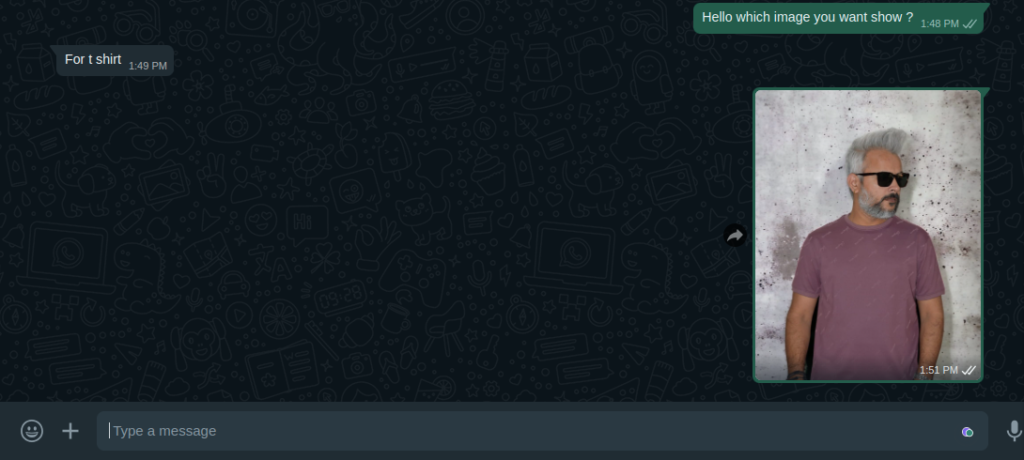
In this function, when a user inquires about sending images, the admin quickly responds to the user and simplifies the process of sharing images.
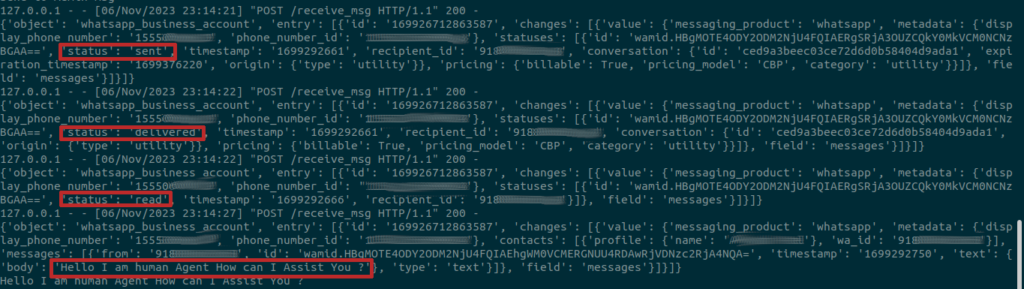
When we send messages on WhatsApp we get a response from the dialog flow bot.

In the Flask server terminal, we receive feedback on the sent, read, and delivered messages, allowing us to monitor the status and progress of our message transmissions.
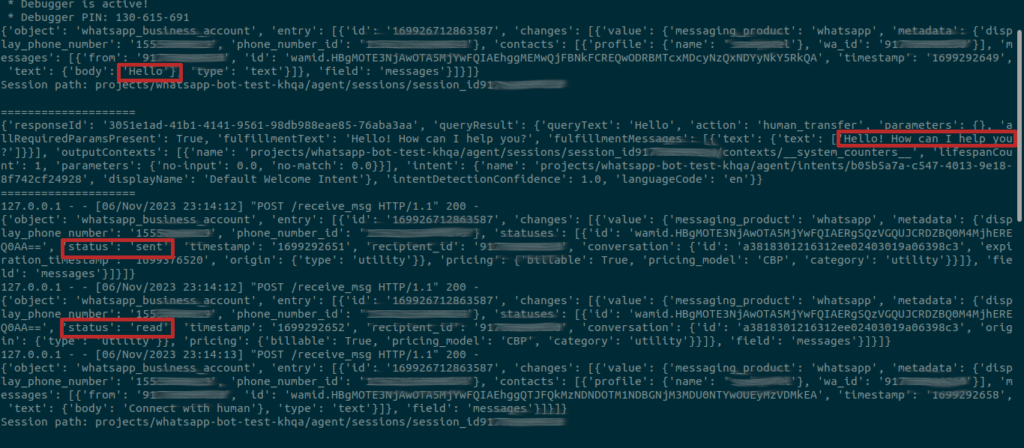
When a user initiates contact with a human agent or bot that doesn’t understand the user query, the Dialogflow action is activated and forwarded to the admin. The admin directly responds to the user’s queries. the Flask app server provides us with responses and updates throughout this communication process.
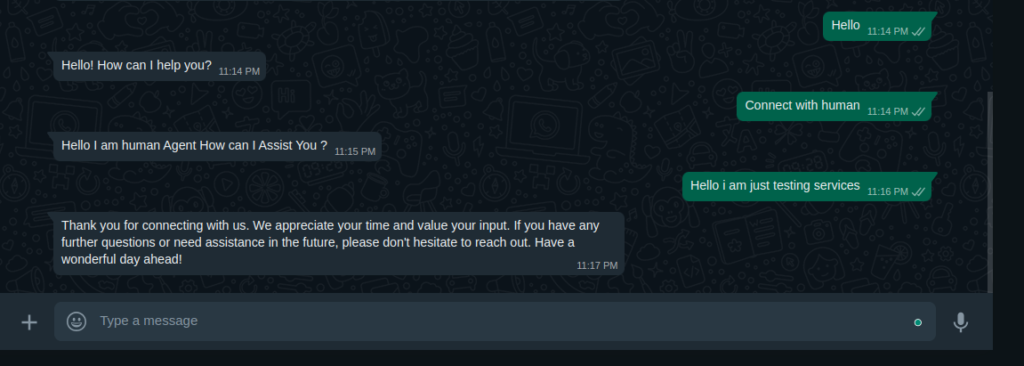
Here is the Flask app server’s response to initiate a connection with the human agent:

Here is the conversation of the admin directly connecting with the user and responding to the user’s queries.
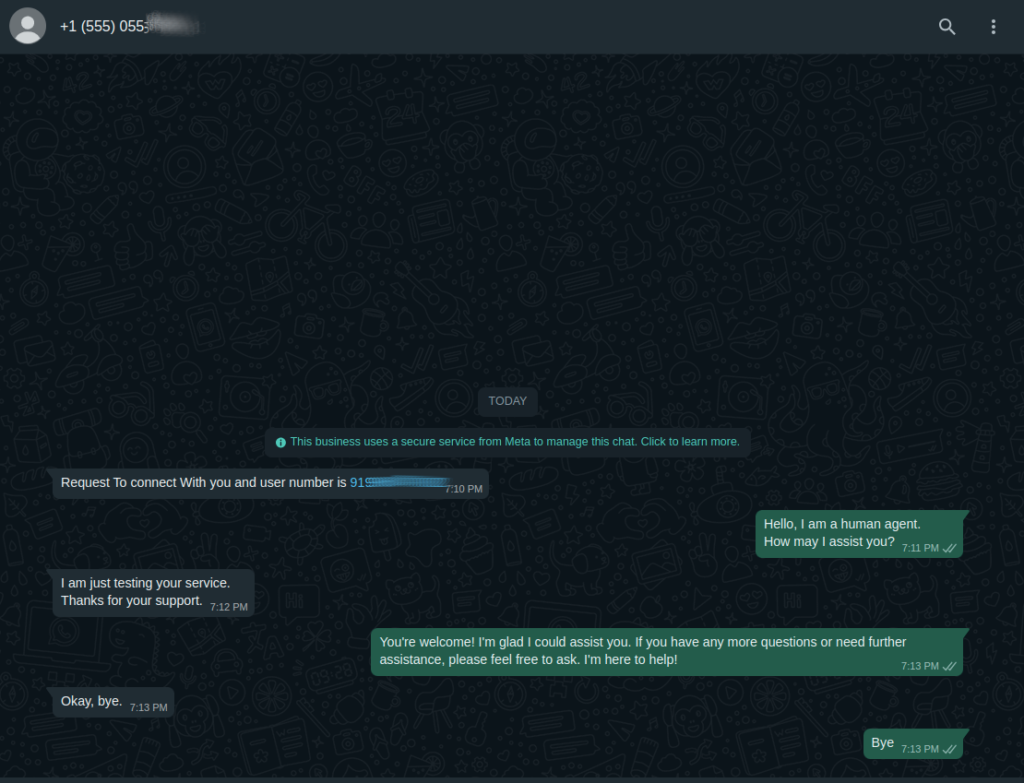
We also receive responses in the Flask app terminal from the admin during the conversation between the admin and the user. These responses include status updates on sent, read, and delivered messages.
Here is the conversation between the user and the admin when the user asks about the image-related queries.
Admin Send the image to the user:
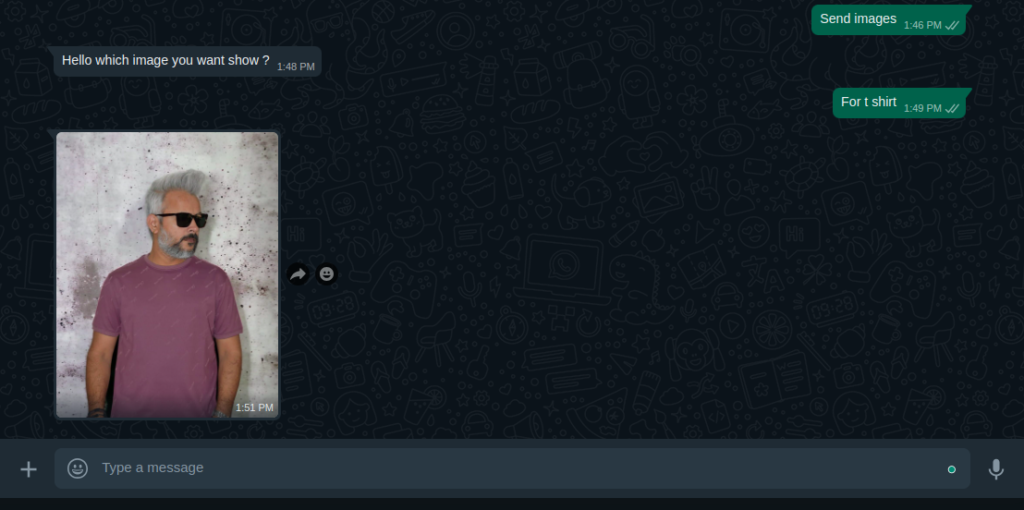
We can end the conversation with a closing message, like “bye”, or any custom message you’ve chosen to use for concluding the conversation with the admin.
We have the capability to configure a wide range of responses supported by WhatsApp. For more details, please visit: WhatsApp Business API Automation with Flask
We hope that you’ve effectively created a WhatsApp Chatbot using Dialogflow and having fun using it.
Originally published at Enhancing Customer Support On WhatsApp: Building A WhatsApp Chatbot With Human Handover Using Dialogflow on November 9, 2023.
Enhancing Customer Support on WhatsApp: Building a WhatsApp Chatbot with Human Handover using… was originally published in Chatbots Life on Medium, where people are continuing the conversation by highlighting and responding to this story.