You’ve heard about the wonders of voice technology. Maybe you want to build a voice experience for fun or to make a profit. Whatever the reason, you’ll eventually come to the point where you’ll need to learn the basics of creating Alexa skills and then publish them.
Well, first let’s explain two important details that need to be clear for such a process:
What are Alexa Skills?
Can I build Alexa skills without coding?
What are Alexa Skills?
Skills are like apps for Alexa, similar to those you have on your smartphone. They make it possible for users to do anything they would do with a keyboard or touchscreen on another device but with voice commands instead.
Anyone can take the road of creating Alexa Skills now. You don’t even have to know how to code. With Alexa Skill Blueprints, there are dozens of templates just waiting for customization based on your specific needs. This option is great for individuals who want to publish their own Alexa skill or put it in the Alexa Skill store for other people to use.
For brands and businesses with more specific needs, the best option would be to hire an agency to design and build your voice experience. These agencies will have the knowledge and know-how to create Alexa skills that fit your needs.
The FAQ’s when creating Alexa Skills
1.How do Alexa skills work? Creating Alexa skills comes in two parts: an interaction model and application logic. The interaction models use voice user interface to process customer speech. Artificial intelligence is the leading technology used, using the Automatic Speech Recognition (ASR) and Natural Language Understanding (NLU) components. Alexa is a cloud-based AI. When the AI gets a request from a user, it sends it to your skill application logic. You can host your logic on a cloud service offered by Amazon, your own server, or another provider.
2. How do I start building Alexa Skills? You’ll need a developer account and an AWS account to host your back end. Though it’s not necessary to host your skill infrastructure on AWS, it will make things much easier for you to get the hang of things. You can always switch it later if you need! With Ipervox however, it is much simpler. All you will need is the developer account, which you can do by following these steps.
3. What type of Alexa Skill can I create? If you have an existing product, you can create an Alexa skill to maintain contact with your customers or expand your reach to this new and existing market. Examples of products that lend themselves well to voice include apps, games, flash briefings, and music. Podcasts, videos, smart home control, and more can be offered through an Alexa skill. For more inspiration you can always check these case studies from Alexa.
4. How to monetize my Alexa Skill? Amazon Alexa skills can be monetized through in-skill purchasing, meaning customers can pay for premium experiences on a subscription basis or one time purchase. You can also offer services that are quickly consumable or depletable, like exchanging in game currency or premium content for small payments. If you already have a web service that accepts payments, then you can use account linking to make your voice apps work for you.
5. How to make my Alexa Skill public? Once your skill is built and ready for certification, submit it to the Alexa Skills Store. If your skill passes certification, it will be published and available for any user to enable. For more details, you can check out this blog post from Amazon Alexa. Here you can learn how to pass certification the first time. You can also check this video tutorial for more information.
6. What if I want to use programming languages? With Alexa, you can make a skill in any programming language like or have knowledge. The Alexa Skills Kit includes SDKs for Node.js, Python, and Java, so you can focus on what you want to do on your skill instead of spending time worrying about coding. As for Ipervox, even if we offer and suggest a no-code/low code Alexa skill development method. However, you will still have the available option to do it traditionally: using programming languages.
Building an Alexa Skill in the simplest way possible
Using Ipervox, both individuals and businesses can easily make their products and services accessible on the most popular voice assistants, such as Amazon Alexa or Google Assistant. It’s quick, easy, and helps your business grow.
With us, you can create an Alexa Skill and use it for monetization, user engagement, growth & awareness, voice marketing, voice shopping, customer support, and much more. It all depends on what you and your business need. Also, you will have all of our support regarding the voice design of your Alexa Skill, the go-to-market strategy, and promoting it effectively.
Welcome to the Every Thing You Need to Know About Chatbot Blog. This is my first Natural Language Processing Blog on Medium Site. I hope all of you like this blog; ok I don’t wanna waste your time. Let’s get ready to jump into this Journey.
I’m damn sure you’ve at least heard about Chatbot, also you’ve familiar with the term Google Assistant and Alexa, Am I, right guys. These are very famous chatbots in the entire world, we are using these Chabot’s applications in our day-to-day life.
You know one thing Chatbots are used by 1.4 billion people today. Companies are launching their best AI chatbots to carry on 1:1 conversations with customers and employees. AI-powered chatbots can also automate various tasks, including sales and marketing, customer service, and administrative and operational tasks. Ok, let’s go and get the deeper knowledge into that.
Table of Contents:
· Motivation
· What is Chatbot
· Types of Chatbots
· How does Chatbot works
· Application of Chatbots
· Why Chatbots are Important?
· Create your first Chatbot
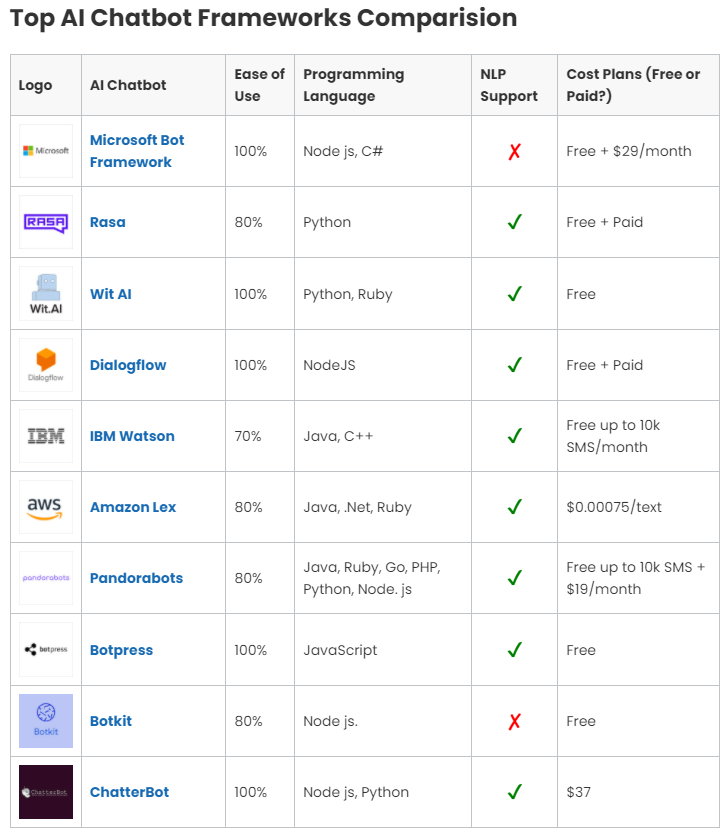
· Framework for Creating Chatbots
· Popular Chatbots in the world
· Fun facts about chatbots
· Conclusion
Motivation
Everyone knows Chatbots is a branch of NLP and Artificial Intelligence, Basically, I’m a guy who is very passionate about Data Science and AI. In Chatbot creation it’s kind of getting knowledge of how AI interacts with humans and the real world, Apart from that nowadays Chatbots are used in many industries. Reasons for the sudden renewed interest in chatbots include massive advances in artificial intelligence (AI) and a major usage shift from online social networks to mobile-messaging applications such as Facebook Messenger, Telegram, Slack, Kik, and Viber. The first of these reasons hold promise that intelligent chatbots may well be within reach. The second concerns service providers’ need to reach users in the context of mobile messaging.
What is Chatbot
In simple terms, A chatbot is an artificial intelligence (AI) program that can simulate a conversation (or a chat) with a user in natural language through messaging applications, websites, mobile applications, or by phone.
An example. You want to buy some shoes from your local retail store, you have to access their website, find what you are looking for, and buy it. But what if that store had a bot? It would only be necessary to write a message to the brand through Facebook and tell them what we want. And if you had doubts about size measurements you could get answers to your problem in a moment.
Types of Chatbots
There are mainly three types of chatbots,
1. Rule-Based Chatbots
2. AI-Based Chatbots
3. Intellectually-Independent chatbots
There are 3 types of Chatbots
1. Rule-based chatbots
A rule-based bot can only comprehend a limited range of choices that it has been programmed with. Predefined rules define the course of the bot’s conversation. Rule-based chatbots are easier to build as they use a simple true-false algorithm to understand user queries and provide relevant answers.
2. AI-based chatbots
This bot is equipped with an artificial brain, also known as artificial intelligence. It is trained using machine-learning algorithms and can understand open-ended queries. Not only does it comprehend orders, but it also understands the language. As the bot learns from the interactions it has with users, it continues to improve. The AI chatbot identifies the language, context, and intent, which then reacts accordingly.
3. Intellectually-Independent chatbots
These are Machine Learning (ML) bots, which allow bots to learn from the user’s inputs and requests. As they learn from the data provided, they’ll recognize recurring patterns and common user behaviors to decide what to do with little to no human interference. They understand specific keywords and phrases from either past experiences, or whatever is programmed in them.
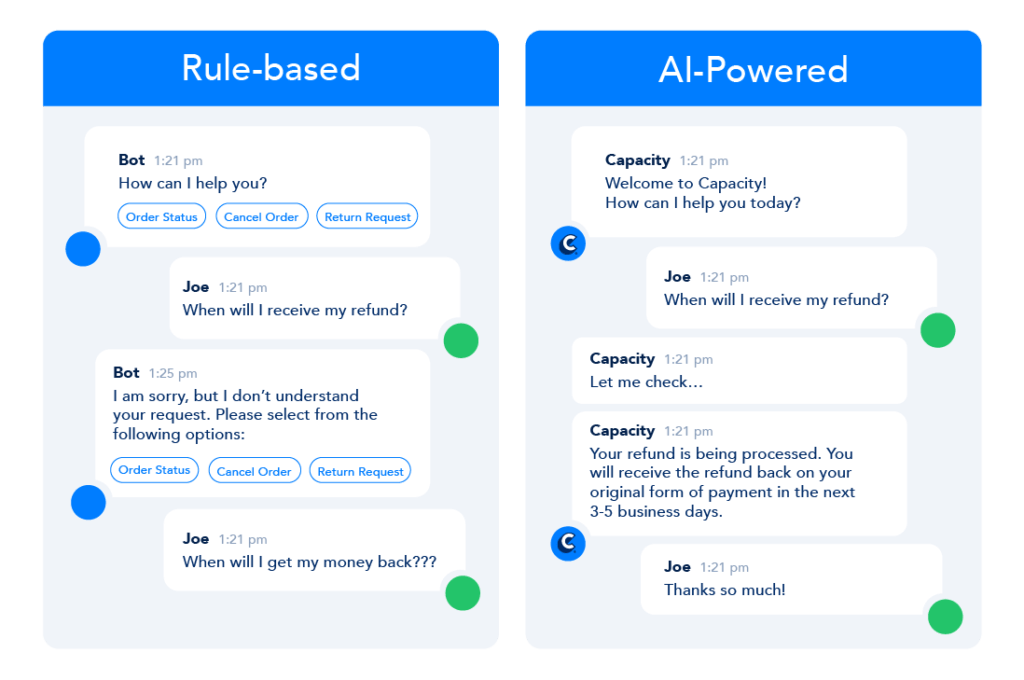
Rules-based chatbot software executes pre-determined actions based on “playbooks” you set up on the back end of the user interface. Much like a virtual assistant, rules-based chatbot technology can act based on clicks actions, such as “Yes” vs. “No”, or by recognizing a particular keyword or group of keywords. For example, you could set up a rules-based chatbot to respond if someone selects “Red” or “Green” but also if they respond with “I want red shoes” and your target keyword is “red shoes”.
Below is an example of how a rules-based chatbot could behave based on the pre-determined actions that you design ahead of time.
Rule-Based VS AI-Powered
How Do AI Chatbots Work?
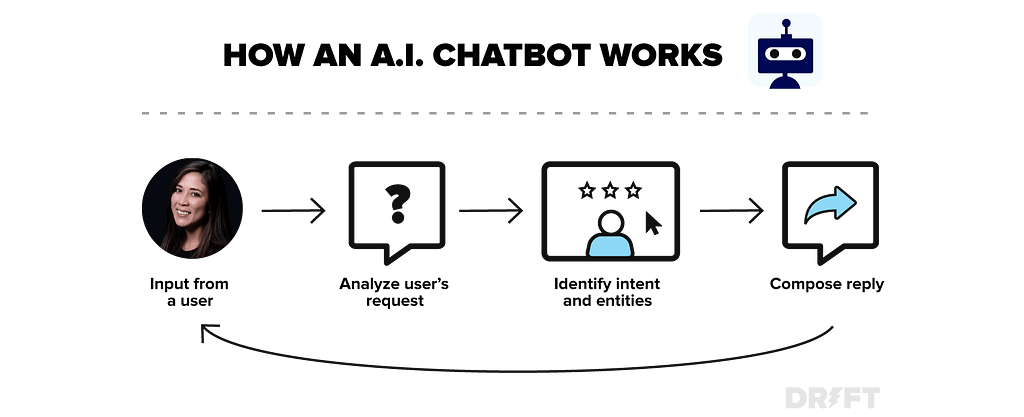
A.I. chatbots use artificial intelligence & natural language processing technology to understand sentences structure, then process that information & progressively get better at answering the question at hand.
Instead of relying on a pre-determined outcome designed by a human, AI chatbots first understand what your question is:
Then once they understand your intent, they deliver an answer that they think is the right answer based on existing data. Over time, and by observing correct & incorrect answers, the machine gets better at understanding what the ‘right’ answer is (think Apple’s Siri, Google Assistant, Amazon’s Alexa). This is why AI chatbots, although powerful, aren’t right for everyone because they require a training period, and generally require more effort to get started. However, once they understand your business well, they can be incredibly powerful.
Application of Chatbots
Chatbots are used by various applications and various domains, now we’ll see what are the most important and applications of chatbots.
Applications of Chatbots
1. Content delivery
Media Publishers have realized that chatbots are a powerful way to engage with their audiences and monitor engagement to gain valuable insights into reader interests.
2. Order Food
Various fast food giants like KFC and Pizza Hut have invested in Chatbots that enable customers to place their orders through conversations. Taco Bell went a step further to improve the conversational experience by giving their Chatbot named TacoBot some personality
3. Book Flights
Airlines are also applying chatbots to their business operations, for instance, Icelandair’s chatbot gives their customers the ability to search for and book flights in a text-based conversational manner.
4. Companionship
Russian technology company Endurance developed its companion chatbot for Senior People and Patients with Alzheimer’s Disease. The primary function of the chatbot is to be a virtual companion — To speak with senior people on general topics like the weather, nature, hobbies, movies, music, news, etc. The chatbot asks questions, reacts to the answers, can speak on various topics, and share interesting news and facts from Google
Chatbots in Healthcare
5. Health Care
Chatbots have also made their way into health care by easing the burden on medical professionals by facilitating faster medical diagnosis, answering health-related questions, booking appointments, and lots more. A Chatbot like Super Izzy can track menstrual cycles, dates, and fertile windows. The bot also asks menstruation-related questions and learns to give information about menstrual health and sexual issues.
6. Transportation
Uber in partnership with Facebook has enabled users to sign up for Uber and request a ride, without having to leave Messenger or download the Uber app. Ride status updates and ride receipts are delivered to a private conversation between the customers and Uber on Messenger, making it easy to track Uber rides and payment history.
7. E-commerce
The e-commerce industry is also improving the shopping experience with Chatbots. Customers can now search and shop more conveniently with the help of chatbots. eBay has invested in Chatbot technology with their ShopBot, a virtual shopping assistant that helps customers find the items they want at the desired price range.
Why are chatbots important?
Let’s Know
Chatbot applications streamline the interactions between people and services, improving customer experience. At the same time, they offer companies new opportunities to improve the process of customer engagement and operational efficiency by reducing the typical cost of customer service.
To be successful, a chatbot solution should be able to perform tasks effectively. Human support plays a key role here: regardless of the type of approach and platform, human intervention is crucial to configure, train and optimize the chatbot system.
Create your first Chatbot
I know you’re so excited to create your first Chatbot. Actually, there are a few steps to create Chatbot.
Step 1: Identify the type of chatbot you are building.
Step 2: Select a channel.
Step 3: Choose the technology stack.
Step 4: Design the conversation.
Step 5: Train the bot.
Step 6: Test the chatbot.
Step 7: Deploy and maintain the bot.
We’ll see in this topic in another detailed blog how to implement these steps or how to create a Chatbot from scratch. I will make that blog as soon as possible. For now, I will give some webpage links to you guys are getting an overview idea about chatbot creation either from scratch or using any framework.
Framework for Creating Chatbots
Why Frameworks?
It helps in developing contextual chatbots with minimal training data i.e., you have to train your bot by building stories that are nothing but expected conversation flow. 3. It also supports synonyms and hyponyms means you don’t need to train your bot for every possible synonym which helps in saving development time.
Awww! Frameworks are consuming less timing to create Chatbots
AI chatbot development frameworks are here to save the day! The recent explosion in the AI chatbot development industry has been phenomenal with constant new releases and updates, there are many AI chatbot development frameworks that are combating each other for the top spot.
Popular Chatbots in the world
Here are 11 of the world’s most popular chatbots today achieving growth marketing strategy gains in sales, publishing, education, and service industries:
In order to make popular chatbots, people need to use them and businesses need to derive ROI value from them. That’s simply by definition. To have a popular chatbot, it needs to be fun, interactive, and profitable.
Whether you’re looking for inspiring chatbots for e-commerce or retail, chatbots for generating B2B leads, or are trying to gain traction for your products and services in an innovative way, look no further
Fun facts about chatbots
ELIZA is the first-ever chatbot.It was developed by MIT professor Joseph Weizenbaum in the 1960s. ELIZA could “interact” with people like a psychotherapist would.
The 2 most popular ways to start a conversation with a chatbot are “Hi” and “Hello,” according to Dashbot.io, a bot analytics provider.
According to a LivePerson survey of 5.000 consumers in 6 countries, Chatbots Will Be Indistinguishable From Humans by 2029 People in China Seriously Love Chatbotsglobally, 38% of consumers think positively of chatbots, and only 11% view chatbots negatively. The rest 51% are neutral about chatbots.
According to the DigitasLBi report, 73% of Americans wouldn’t use a There Are More than 30,000 Facebook Chatbotscompany’s chatbot after having a bad experience.
For now, male and female-inflected bots are the most visible. However, the gender balance is still changing. Some of the most popular chatbots like Siri, Alexa, and Cortana identify themselves as genderless. Alexa calls itself “female in character.” Siri claims it’s “genderless.”
1.4 Billion People Use Messaging Apps.
There Are More than 30,000 Facebook Chatbots.
Chatbots Will Be Indistinguishable From Humans by 2029.
People in China Seriously Love Chatbots.
Don’t Blur Lines Between Bots & Humans.
Fun & Facts about Chatbots
Conclusion
From my perspective, chatbots or smart assistants with artificial intelligence are dramatically changing businesses. Chatbots can reach out to a large audience on messaging apps and be more effective than humans. They may develop into a capable information-gathering tool in the near future. Chatbots are a new, emerging space. So I expect to update this list on a regular basis as new chatbot stats come in. But for now, I’d like to hear what you have to say.
Do you agree with the fact that chatbots can help with various things and helps with online sales and more?
Or maybe I missed an interesting stat that belongs on this list.
Let me know by leaving a comment! On These Platform
In India, Every Year Over 100 Million Smartphones Are Being Sold. Smartphones Are Playing A Critical Role In Providing Access To Technology and Internet Across India, There Is Demand For Cheaper Smartphones and Large MNCS Which Produces Smartphones Know That India Is A Hot Market and Those Companies Are Investing Billions Of Dollars To Capture The Market Of India. The Indian Smartphone Market Has Become One Of The Most Competitive Smartphone Market Across The World, and This Competitiveness Has Benefited The Consumer’s The Most.
Intense Competition Has Led To More and More Choices To The Consumer, There Are Now 10 Companies With Each Offering 5–6 Smartphone Series In Just One Price Range. We, The Consumers Have An Endless Number Of Choices and It’s Very Helpful To Us.
While This Intense Competition At Each Price Range Has Given Us An Endless Number Of Choices, It Has Left Confused, Very Confused. With So Many Choices In Each Specific Price Range, Which Phone Should We Buy? What Kind Of Phone Do I Buy? How Important Is The Processor? What Is HDR and Why Do I Need That? Which Phone Is Perfect For Me? How Is This Phone Better Than The Other? Which Phone Company Gives Good If Not The Best Customer Service?.
This Competition Has Led Us To Be Very Confused About The Purchasing Decision Of Smartphones and Even When We Purchase The Smartphone, Due To FOMO Or Someone Else Buying A Better Phone, We Buy Another Phone In 6–8 Months, These Days Smartphones Have Become Social Value As Well, Which Made The Purchase Decision Even Worse. This Has Resulted With Millions Of Users Wasting So Much Money and Time and Has Become A Burden In Their Life. A Solution Is Required and It’s Required Now, Especially During A Pandemic Where Everyone Has Gone Online and We Need A Solution and We Need It Now.
TechBot.ai Is A CaaS (ChatBot As A Service) Company Which Has Created The Solution. TechBot.ai Has Launched A Product Called TechBot Which Is An AI Personal Chatbot Assistant Which Will Try To Understand You As A Consumer and Recommend A Smartphone At The Price You Want. The Recommendation System Will Recommend A Phone Which You Can Use For 3–4 Years. TechBot Will Have The Ability To Review Any Smartphone You Want To Buy, Eg: You Are Thinking Of Buying iPhone 12, You Can Ask ANC(Name Of TechBot) To Review iPhone 12, It’ll Give You The Review Of iPhone 12.
TechBot.ai Will Not Take Any Money From Smartphone, Retail Or E-Commerce Companies To Recommend A Phone. We, Will, Make Our Money Via Ads and Nothing The Else. TechBot.ai Will Guarantee That We Will Recommend A Phone With Honesty and Integrity and We Will Make Sure That You Will Have A Great Experience.
TechBot.ai Will Provide The Access To TechBot In Social Media Platforms, You’ll Be Able To Access TechBot In Facebook Messenger, Instagram, Slack, Telegram and Whatsapp. We Will Focus On Providing Access Of TechBot To As Many Users As We Can. TechBot Will Be Available In September and I Hope You’ll Have A Great Experience.
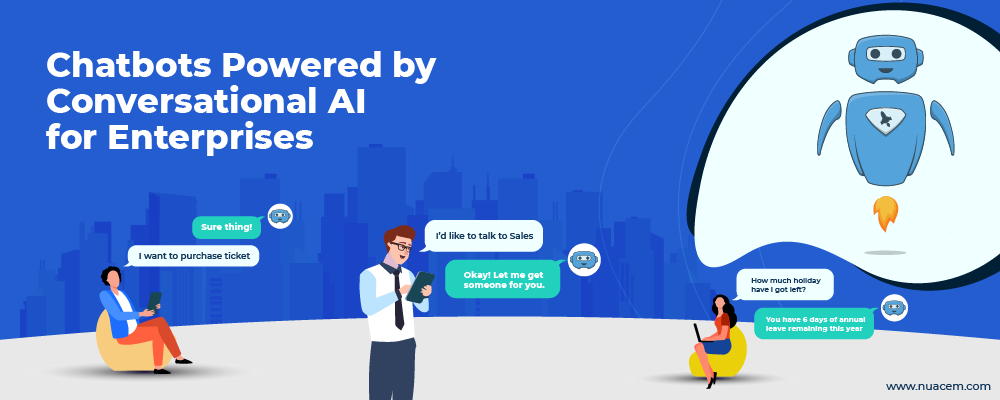
Chatbot space is diverse and there is a huge list of chatbots that are being used in various areas. Recently, Enterprise chatbots are picking up popularity and are the newest AI chatbot that is receiving wide attention.
Till now, you might have heard about AI chatbots for customer service that responds to users’ queries and routes requests to agents.
Think the same but replace the customers with employees of an organization and you basically would get an enterprise chatbot.
There are a lot of advantages for enterprise chatbots, but there are many challenges too. In this Guide, let us discuss all the important aspects of Conversational AI Chatbots for an enterprise.
We start with a brief discussion of what chatbots are and how they work, then understand clearly what enterprise chatbots are. We understand their use cases with an enterprise and see how advantageous it is to use enterprise chatbots.
Then, we will look into some challenges of using it, and finally understand how easily you can equip yourself with an enterprise chatbot. Also, we will see what you need to see on a chatbot platform.
What Chatbots are and how do Chatbots work?
When you see chatbot definition, it looks something like this: Chatbots are software that can understand human language. Lets people interact with businesses on their digital assets like websites, apps or social media channels in their natural language through various communication channels.
Chatbots use three natural language techniques: Natural Language Processing, Natural Language Understanding, and Natural Language Generation. The intents of these technologies are evident in their names.
An intelligent chatbot correctly identifies context and intent of an user and based on things it already learned from user’s big data, they fill in additional information and clues for solving particular problem.
Also, chatbots are now able to understand and interact in many languages and can be localized easily.
Enterprises need AI chatbot technology for many reasons. Just as a customer needs information quickly and easily, employees of an enterprise too would have certain needs for their queries or performing certain tasks.
An enterprise chatbot can take questions posed by employees and after recognition of the user’s (i.e, employees) intent, it can take appropriate action.
This shows that there is a significant degree of similarity between use cases of customers and those of employees for chatbots. Let us see some of use cases of Enterprise chatbot applications:
Chatbot Use Cases for Enterprise Chatbots
General Requests and inquiries
Employees would have a wide range of queries like they might want to check their allowances, reimbursements, and policies. Instead of referring through many documents themselves or asking others, employees could quickly reach out to chatbot.
Helpdesk
Conversational AI solutions can be extremely helpful in suggesting basic solutions for any problem and if not yet solved, raise a ticket request and send it automatically.
Intranet search Chatbots
There would be many files on the intranet and if a particular employee needs to find a specific file, instead of going through all the files and searching manually, they can just ask the chatbot.
Chatbot then uses intelligent natural language techniques to fetch data from the intranet and present them to employees.
Business Intelligence
Chatbots can have access to data reports and your employees could ask for any data regarding the organization and within their bounds, they could get all information in multiple formats.
These are only some general use cases. On the basis of your organization, there would be a lot more use cases for an enterprise chatbot.
Benefits of implementing Enterprise Chatbots
Just as use cases overlap, benefits also overlap between general customer chatbots and enterprise chatbots. Let us see some of important benefits of implementing enterprise chatbots:
Easily answer FAQs
Chatbots can understand questions easily and can give fast and more accurate answers to them than a search engine.
Decrease time taken for solving problems
Chatbots work pretty fast and they can finish requests of employees within seconds. If required, they can also rope in experts within an organization for solving problems.
Works all time
A conversational AI solution can work consistently throughout all times a year and as such your employees won’t experience any downtime and even a slight delay in getting their concerns addressed.
Increased Employee Productivity and Satisfaction
With all their Concern queries satisfied and work quickly done, employees would be more productive and ultimately this will improve their satisfaction.
Challenges with Chatbots
One of the main problems with implementing chatbot is to design it. What must it do? There must be a well-thought answer for these problems which probably involve multiple chatbots for multiple use cases.
As chatbots would have access to critical business information both in data and policies, its security is also a serious concern.
Another important challenge for having an NLP chatbot is its cost. Though many solutions are available relatively cheap, certain sophisticated solutions could take up a lot and be more costly than it actually saves.
How can you get a Chatbot?
It is certainly true that the underlying technology of chatbots is incredibly complex and hard to build from scratch. The challenges which we mentioned make it even harder.
There are a lot of open-source chatbot frameworks that make chatbot development easier. However, developing enterprise chatbots that address all use cases and concerns is still not an easy task.
Fortunately, there are a lot of organizations that provide customized chatbot solutions that are tailored to specific use cases and also can be built within minutes! If the kind of chatbots offered by the chatbot platform can align with your needs and budget, you can quickly go for them.
Final Words
Harnessing the power of natural language processing and natural language understanding technologies, plus armed with big data analytics, they can solve numerous problems and perform a lot of tasks.
Just as they have been helping end customers throughout the years, they can help employees in an enterprise if they are correctly designed and implemented. If you have not yet considered including chatbots, then this is high time to use them!
Businesses now realize the need for a customer-centric approach to transforming their customer experience (CX). According to the Zendesk Customer Experience Trends Report 2021, 75 percent of company leaders agreed that the global pandemic accelerated the acquisition of new technologies to get customer-centricity right.
But, there are challenges too.
Some of the businesses don’t have the systems and technology to segment and profile customers.
Some lack the processes and operational capabilities.
Some of them don’t have all of the components in place to claim they are customer-centric.
Few don’t know what their customers expect and how they want to interact with the business — not the products, features, or revenue model.
However, in the digital-first world, social messaging is the dominating communication channel consumers are using to interact with brands. Forward-looking businesses are tapping this trend to their advantage using industry-ready AI chatbots to manage customer-centric interactions and forge customer relationships online.
Superior Customer Experience is a Necessity
While adopting the latest AI technologies to improve customer relationships, it becomes imperative for industry leaders to keep an eye on the latest customer engagement trends. Here are a few reasons that explain why a top-notch customer experience is the need of the hour:
To enable a Superior Omnichannel Experience
AI-powered chatbots are capable of preserving information across several digital touchpoints and even when it transfers the conversation to a live agent, customers don’t have to explain their issues repetitively. Such availability of information across the channels helps businesses provide a consistent omnichannel experience to their customers. This experience helps businesses save time for customers and amplifies the customer engagement graph.
To improve Brand Loyalty & Differentiation
Another success metric for businesses is to consistently improve their brand value in this digital competitive arena. Brand loyalty involves an intrinsic commitment of a consumer to a brand based on the distinctive values it offers. Hence, it becomes an obvious reason for CXOs to leverage a Conversational AI technology that enables instant, relevant responses helping brands provide improved experiences and differentiation.
To expand new Customer Base
The biggest success for brands is to acquire new customers and expand their customer base over time. Providing instant prompts with offers, product recommendations, and guiding customers through their conversational journeys enables businesses to broaden their reachability and increase conversions.
Intelligent AI chatbots are fast becoming key enablers to customer support and conversational commerce teams and are instrumental to improving the end-customer experience landscape.
Why are AI Chatbots not a “One-Size-Fit-All” Approach?
AI Chatbots are not a “one-size-fits-all” solution. No two brands have the same business needs, so no two chatbots can be the same. An all-in-one solution that goes right for all the business functions sounds like a myth. Hence, the approach has to be changed as per the business use cases while building and training an AI chatbot.
When catering to customer support and conversational commerce use-case, the “One-size Fit-all” approach is not able to solve all customer queries. The responses will sound generic to customers and increase dissatisfaction. Hence, the right approach is to replace this with the best and most common industry use-cases to improve efficiency and conversions.
Here are a few problems that remain unsolved with the one-size-fit-all approach:
Every industry has its distinct use-cases. Today, every industry has its unique business use cases depending on the marketplace and audience they are targeting. Hence, a versatile approach that provides solutions to industry-specific use cases should be the topmost priority for businesses when adopting customer experience automation technology.
Non-personalized responses don’t work anymore. A generic AI Chatbot will not be capable of providing contextual responses across omnichannel digital touchpoints. In the current landscape, this won’t work anymore. The need of the hour is a domain-intelligent AI Chatbot that can end-to-end resolve customer queries, providing a seamless experience to the customer.
Customer satisfaction matters. Unhappy Customers are an outcome of poor customer service. A generic AI chatbot will not be able to deliver top-quality support and service as they are not supported or trained to handle domain-specific commonly recurring queries, resulting in increasing customer dissatisfaction.
NLP: The Technology Behind Intelligent Conversations
While it is established that a domain-specific, AI virtual assistant is core to enabling superior customer experience, it’s important to understand the technology behind it.
To understand the pain points, intent, and expectations of a customer in a conversation between a bot and a customer, NLP is the behind-the-scenes technology that makes the magic happen.
Natural Language Processing (NLP) is a subsection of Artificial Intelligence that enables chatbots to understand human languages. NLP analyzes the customer query, language, tone, intent, etc., and then uses algorithms to deliver the correct response. In other words, it interprets human language so efficiently that it can automatically perform end-to-end interaction with accuracy.
Key Capabilities that NLP provides:
NLP allows chatbots to understand voice input as well as text.
With NLP technology, the chatbot doesn’t need the exact correct syntax to understand customer’s expectations.
Based on its programming mechanism, it can auto-detect languages, context, sentiment, and intent.
Chatbots can either process their response through their NLP engine or by analyzing customer’s browser preferences.
Intelligent AI chatbots are now critical to strengthening a brand’s CX strategies. As cognitive AI-powered technologies continue to develop, business leaders must ensure they adopt chatbots technologies that are agile to meet the requirements of their businesses.
Key Capabilities a powerful AI Chabot Should Have
An AI-powered full-stack Conversational AI platform enables brands to comprehensively solve business problems end-to-end, and at scale. While looking to adopt a conversational AI solution, some of the key characteristics which CX leaders should look for are as follows:
Powerful NLU & ML Intelligence: The turning point in the evolution of chatbots was the advent of two key AI technologies — Natural Language Understanding (NLU) and Machine Learning (ML). The architecture of Natural Language Understanding (NLU) is built on a combination of modules such as Language detection, ASR classification, Context Manager, that work in tandem with deep learning-based encoders to accurately understand natural language and handle user queries with higher precision. Businesses should go with a Conversational AI solution that has a high precision, powerful NLU capability.
Ability to Create Domain Intelligent Conversations: Industry-specific AI chatbots embedded with domain-specific intelligence, data dictionaries & taxonomies are trained on thousands of user utterances to deliver human-like conversational experiences at scale. The in-built Named Entity Recognition (NER) engine helps chatbots to understand user intent and context better. As customer conversations are unique to a business, the Conversational AI solution must be agile and help create domain intelligent conversations.
Quick to Launch: AI chatbots built using smart NLU and advanced domain intelligence capabilities Smart Skills deliver desired output with minimal effort and training. This platform consists of a comprehensive library of 100+ ready-to-use, domain-specific intelligent use cases for your business. Technology is getting easier to deploy and domain-intelligent chatbots can now be launched in a matter of minutes. Businesses should go for a Conversational AI solution that is faster to value and give quick ROI.
Comprehensive integration to build a Full Stack solution: An AI solution that can be easily integrated into your existing CRMs, help desk software, etc helps create a full-stack solution with only one source of truth. The best scenario, in this case, is that the integration of these AI solutions should not require deep-coding dependencies or complex technical processes. Businesses should adopt an easy-to-integrate Conversational AI solution that has a comprehensive integration ecosystem.
CX Trends to Look out for in 2021
While the above-mentioned capabilities of Conversational AI sound interesting and intriguing, it is only the tip of the iceberg. Technology has just entered the digital space and is expected to evolve further with time. Talking about the same, here are the top four customer experience trends businesses might come across in 2021 and beyond.
The build-to-buy switch: Considering the increasing popularity, organizations find it optimal in terms of cost to purchase already-built tools and then customize them, instead of building one from scratch.
Emphasize on what and how of the customers: 2021 conversational AI tools are more efficient now. They are designed to understand human language quicker, faster and give human-like responses.
Deploy models (process-oriented) that are more than a messaging bot: Since organizations are on the lookout for automating a large part of their customer interaction funnel, emphasis is laid on the creation of tools that are one step ahead of the basic designs and can automate end-to-end queries and processes which are repetitive.
Consolidation of customer support, marketing, and sales departments: To offer an omnichannel experience, the next wave of conversational bots is bringing together the different departments in an organization to achieve a common goal of customer experience.
Final Words
CX transformation is a catch-all phrase that means something different for every business. There should be different strategic approaches when it comes to deploying AI-powered technologies. However, it is established that a simple AI chatbot will not deliver the kinds of experiences that a Conversational AI solution can enable.
In case you’re interested to explore more, here’s an eBook we’ve put together that shares the experiences of a diverse set of CxOs as a part of their journey to identify feasible, realistic solutions to solve the challenge of repairing a broken customer experience and scaling high-volume customer queries with AI Automation. Get your copy here.
Join us in our journey to transform Customer Experience with the power of Conversational AI.
Interested to explore more or want to try out a chatbot of your own?
DialogFlow is a development platform created by Google that can help us to create Chatbots. It’s based on NLP (Natural Language Processing) which offers our chatbots the possibility to be very powerful.
What is the ChatBot ?
A chatBot is an intelligent program that can interact with people like a human and serves them in the specific domain where it has been created. The chatbot analyzes the intention of the client and researches the response that will be more adapted.
Now you know what DialogFlow and chatbot are, let’s see how we can create a chatbot using Dialogflow.
Note: You should have a google account and login in to the Dialogflow platform before following these steps.
In this article, we will create a chatbot that can serve clients who will want to do a reservation for a bedroom in a Hotel.
Step 1. Create an Agent
An Agent is an intelligent program inside the chatbot, it’s that program that interacts with the clients or users.
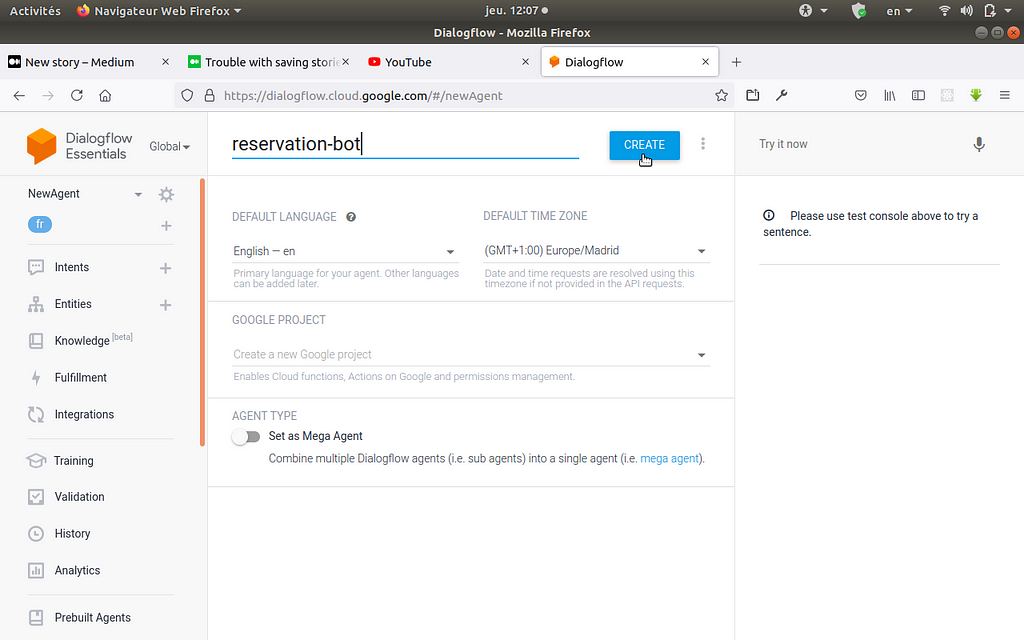
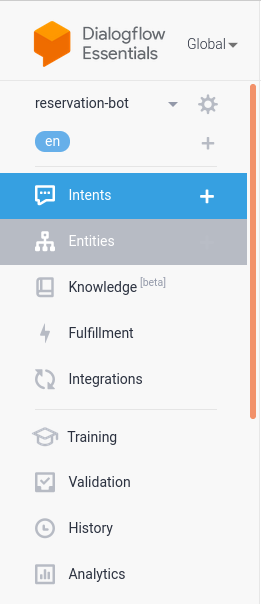
To create an Agent, go to the left section of your screen and click on the first button below the Dialogflow logo and go down to the create new agent button.
After that, the new screen will be loaded, and you will be ask to specify the name of the Agent, the language that it should be speak and the time zone. For me, I type reservation-bot for the name and the rest, i leave the default values. After that, you must click on the CREATE button and DialogFlow will create an agent for your chatbot.
Step 2. Create intents
Intents is use by the chatbot to understand what the clients or users want. It’s inside the intents that we should provide to the chatbot the examples of phrases that the clients may ask and some responses that the chatbot should use to answer to the clients. Let’s show how we can do it.
Note: When we create a new agent, it comes with two defaults intents named Default Fallback Intent and Default Welcome Intent
For create a new Intent, click on the Create Intent button
After that, you must give the name of your intent. Then go to the Training Phrases section and click on add training phrases. This section concerns the way where you should give the example of the phrase which represents the different questions that clients may ask to the chatbot. we recommend giving many examples to make your chatbot very powerful.
For this example, you could take the same phrases as me.
We have added some phrases that clients may ask to our chatbot, for your own chatbot, feel free to add another phrase to improve the power of your chatbot
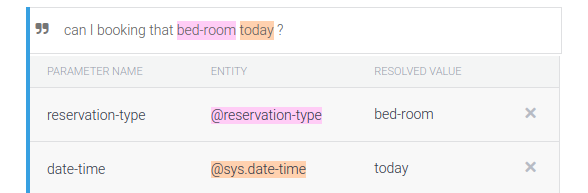
In this image, we can see that two expressions are overlined. In fact, DialogFlow has identified these expressions as an entity. DialogFlow recognizes three types of entities such as systems entities, developer entities, and session entities. this night and today are recognized as systems entities, it refers to the date or period of time, this type of entity is already set in Dialogflow. Later we will create our own entities which will recognize by DialogFlow as Developer entities. For more information, check out this documentation
Now, let’s define some Responses that the agent may use to answer to clients. Go down to the Response section and click on the Add response button, and add some responses statements.
You can see that inside these responses examples there are some expressions that start with the $ symbol, these expressions are considered as variables that will contain the values that clients will mention in their questions, and that DialogFlow will have recognized as a certain entity. On the image above, we have three variables such as $time-period, $date-time, and $reservation-type. $time-period and $date-time are systems entities variables and $reservation-type is a Developer entity variable, which means $reservation-type should be created by the developer, before that DialogFLow may recognize it. After added some responses that the agent should use, click on the Save button, we will come back hereafter.
Step 3. Creation of entities
In reality, entities are keywords that help the Agent to recognize what the client wants. To create it, just follow me.
Click on the Entities button
creation of entities
After click on the Create Entity button
creation of entity
After, specify the name of the entity (you should give reservation-type as name of your entity, because you have use it as variable when you gave some responses to the agent). Then, add an entity bed-room and some synonyms like below.
make sure to check the case Define synonyms before, and then click on Save button.
The role of synonyms is that, when clients should talk about bed-room, bed or room, all of this should refer to the bed-room.
Do the same with the entity reservation-action and save it.
creation of reservation-action entity
Now, we have two entities ready to be used.
Step 4. add our entities inside training phrases expressions
back to the reservation intent interface and go to the training phrases section.
When you are there, select an expression, and inside this expression select the word bed-room like this
Then, research for @reservation-type
And click on this, and the color of bed-room will change.
Do the same thing to all the bed-room inside all expressions.
For the words booking, reservation, and reserve, do the same things but instead of research @reservation-type you will research @reservation-action.
adding developper entities inside our training phrase expressions
Step 5. Definition of parameters and actions
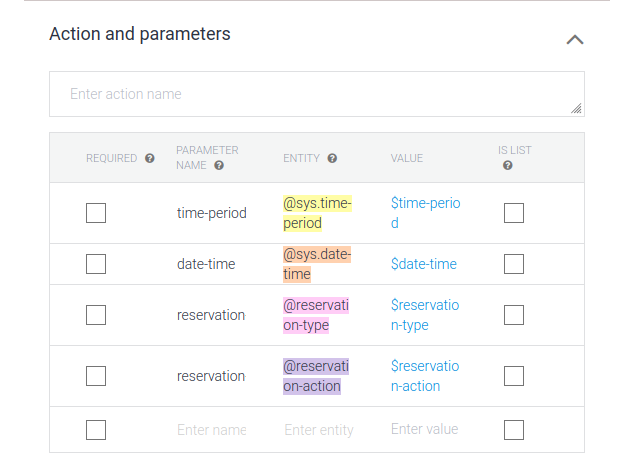
It’s not required, but in some cases, it will be very important to obligate the user to give to the chatbot, some information.
Go down to the Actions and parameters section, always inside the reservation intent interface. you should have this image below.
action and parameters
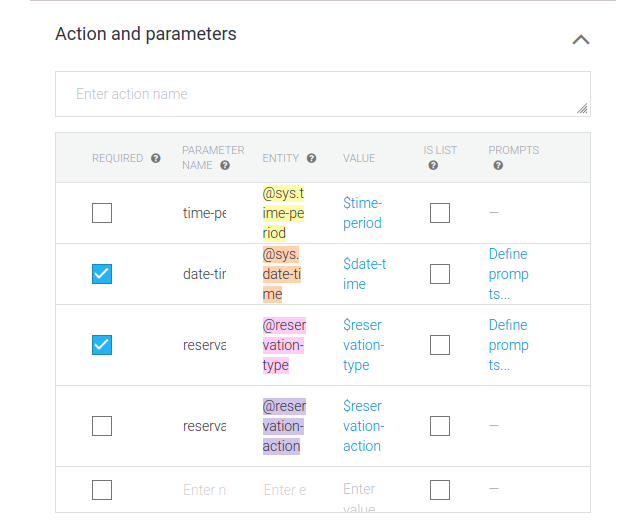
For our chatbot, we want that clients provide the reservation type and the date of the reservation. Make sure to check it.
actions and parameters
After that, we should specify the prompt text that the Agent should display to the client when they haven’t specified the required parameters. You need to click on the Define prompts… space on the right place of this section, after defining prompt text, close the box dialog.
for the date-time parameter
define prompt text for date time parameter
for the reservation type parameter
After this, save the intent.
Now you can test your chatbot.
test section
You can test your chatbot here.
Step 6. Integration on the web platform
integration
Click on the integrations button
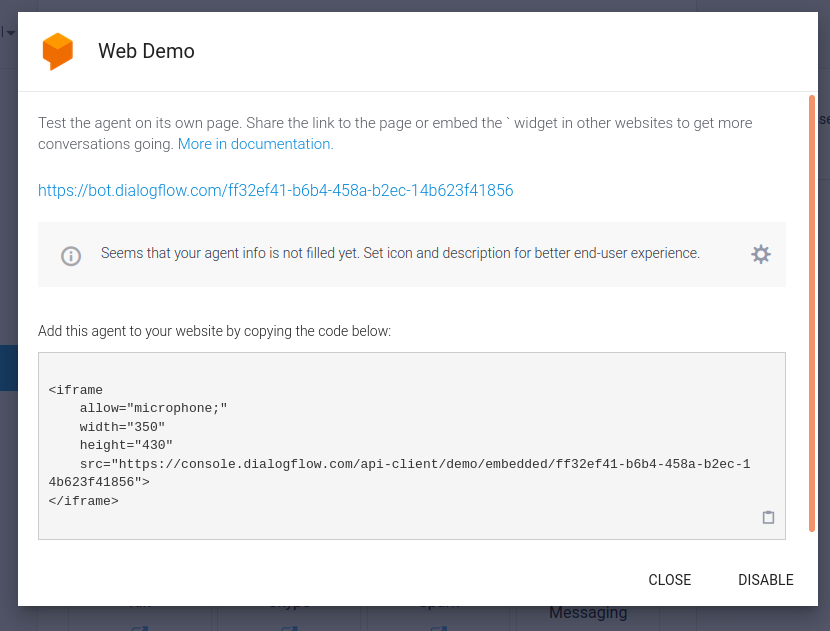
You can integrate your chatbot inside of many platforms, like Facebook messenger, WhatsApp, telegram, and so on.
For this article, we are going to choose the Web Demo






![[Chatbot Builder Case Study] Boost Webinar Audience](https://external-preview.redd.it/wQeS8JLZtgRjHMXgZAQ7NUQF87v45ZwenRzKVuj4JRQ.jpg?width=640&crop=smart&auto=webp&s=99151d7a6bf0d044e943cb4f0be662c8a59a5a8b "[Chatbot Builder Case Study] Boost Webinar Audience")