Author: Franz Malten Buemann

  • We Asked Students On Voice Assistants — Results Might Surprise You

    We Asked Students On Voice Assistants — Results Might Surprise You

    University Voice Assistants Are Becoming More Widespread

    We’re just beginning to understand the potential of voice technologies. Voice is the ultimate interface. It’s part of what we are as humans and it’s how we communicate. There’s almost no learning curve like it is with typing. It helps machines adapt to people rather than the other way around. And yet, we are still very far from fully grasping the potential of voice technologies.

    Unfortunately, most of us still live in Voice 1.0. We’re mostly just commanding our devices to carry out simple tasks, like setting alarms. This is just the beginning of what’s possible. For the education industry, there are many reasons to use voice technology. Students gain easy access to university information. They can use voice technology to gain real-world expertise. It seems imperative for universities to start using university assistants.
    The Benefits Of Having Voice Assistants For Universities

    Having a voice assistant for university students includes a lot of benefits when it comes to efficiency. People tend to speak faster than they type. Thus, having a voice assistant would free up time when doing repetitive tasks as setting timers or reminding students. They are a huge investment when it comes to digital equity.

    Instead of providing devices for the whole class of students, universities can place one device per auditor. Furthermore, voice assistants for universities enhance communal learning. All students are hearing the same information at the same time while maintaining eye contact.

    Yet, how much do universities know about their students’ needs?

    Ipervox conducted a study with data from 1360 skills with bad reviews. According to it, the most common problems users have with skills include broken functionality (35.56%) and bad user experiences (14.16%). There are other stats derived from this analysis, like: skills have outdated information (2.8%), skills are useless (6.5%) they were not performing as per their description (3%), etc.
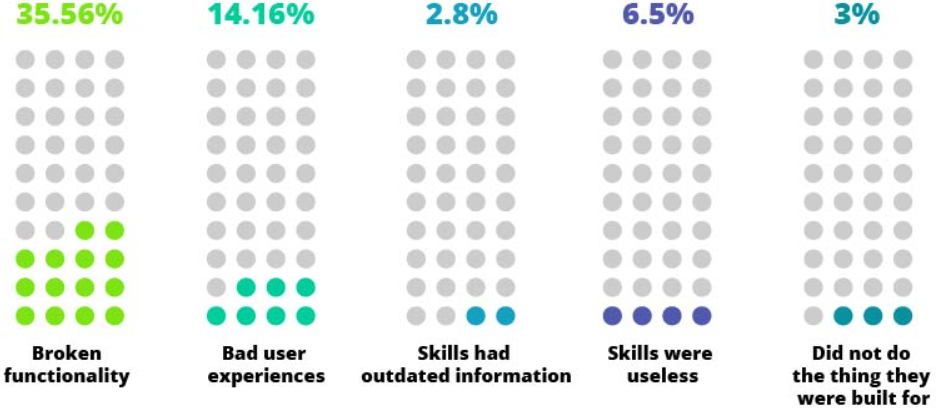
    Common problems users have with voice skills
    Common problems users have with voice skills

    Do these results apply in voice assistant for universities? Ipervox conducted a survey over a two-week period among almost 50 respondents to understand the usage of voice assistants in universities. The average respondent was 23 years old and the gender distribution was 72.1% male and 27.9% female.

    The questions within the case study aid universities in planning Alexa for business and to focus on business-related aspects. Building a plan will give a clear idea of what is necessary for building the voice application. The results of the case study will help universities understand what it takes to have a successful voice assistant.

    Trending Bot Articles:

    1. How Chatbots and Email Marketing Integration Can Help Your Business

    2. Why Chatbots could be the next big thing for SMEs

    3. My Journey into Conversation Design

    4. Practical NLP for language learning

    The Case Study About Voice Assistant For Universities

    Ipervox conducted around 50 surveys with university students in order to understand their current usage of already built voice assistants and what could be improved for the future. The results showed that the usage of actual voice assistants was low, almost 87% of the students did not use their university assistant.
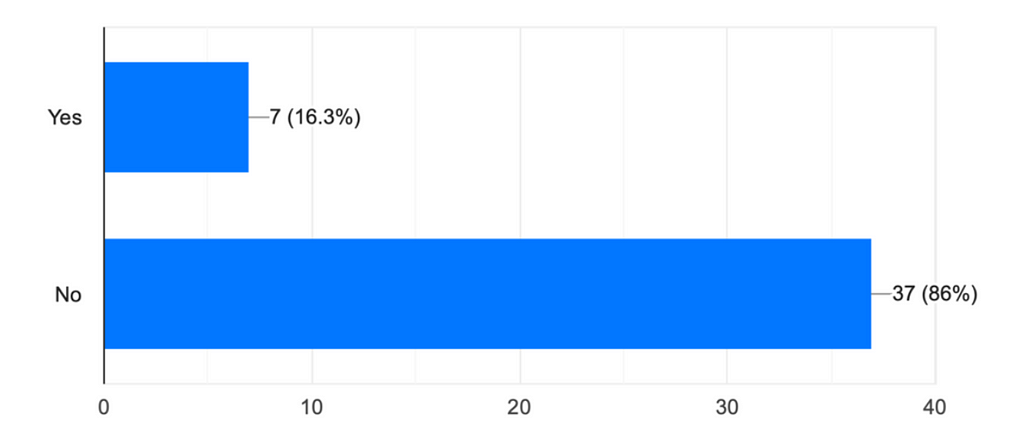
    Usage of university voice assistants
    Usage of university voice assistants

    Why Do You Need To Evaluate Your Current Condition?

    In overall, the university taken into study was not consistent in their website content and app information. As a result, the voice application could confuse students. We found out that before developing a voice app, each university must update all the info on their website and applications. On the other hand, all faculty members should disseminate the information in the same way. As such, it should be easier for students to find through categorization of information by using voice assistants.

    3 main areas to improve

    Students use voice assistants as a time and energy saver. It noticeably reduces the time and energy people spend crouched over books, staring at displays, waiting in lines at administrative offices, and anticipating their professors’ arrival to get work done and answers. But if asked, what would they suggest to improve? According to the study, students want to improve the way they get information regarding:

    The added options were booking areas, helping students with internships, helping students with the information regarding the canteen menu.
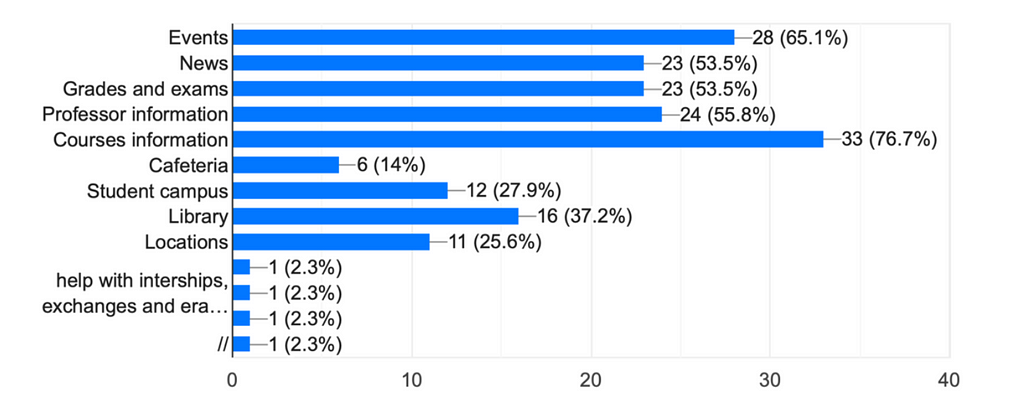
    Areas in which voice assistants need improvement
    Areas in which voice assistants need improvement

    Is student routine important?

    When asked about where they would use the voice, students told us they’d like to use it mostly at home, and then on campus. This led us to identify our user persona for these users, so that we could build a skill that is adjusted to both places, but to me more home oriented. Regarding the best suitable time to use it, students mostly preferred to use it in the morning before starting their day. The second best suggestion would be in the afternoon to recap what they need to do for the upcoming day.
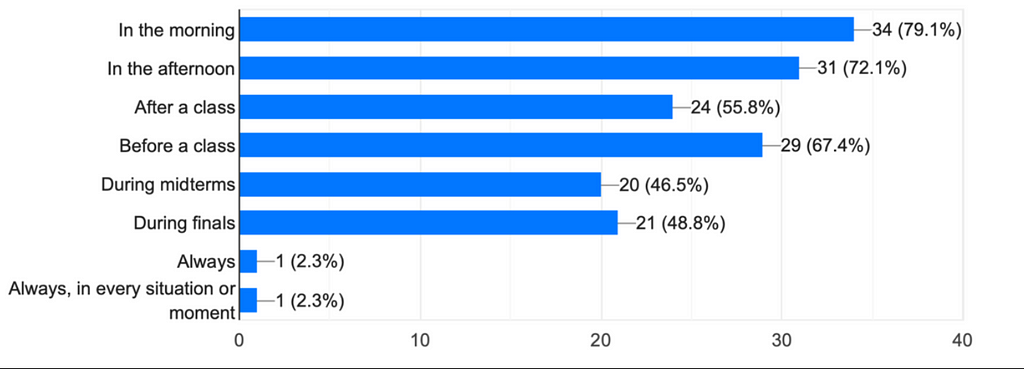
    The usage of voice assistants
    The usage of voice assistants

    The Suggested Voice Design According To Ipervox (VUS)

    The voice design should be based on student needs when it comes to the education industry. What Ipervox found out through this case study is that most of the students expect the following from their university voice assistant:
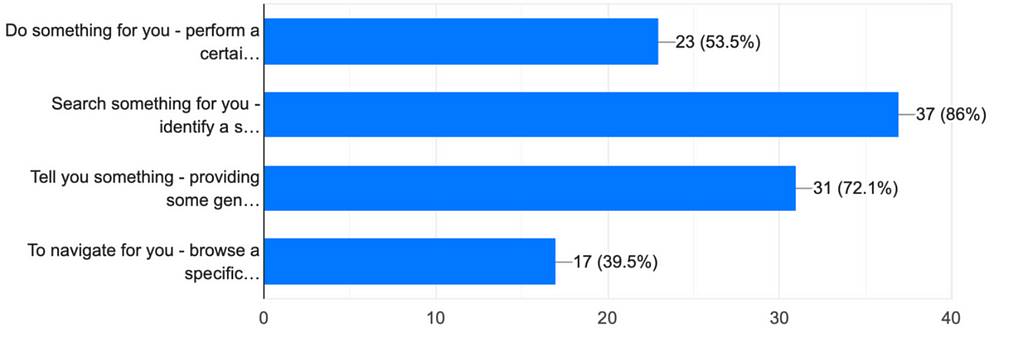
    Students’ needs for voice assistants
    Students’ needs for voice assistants
    • Do something (53.5%)

    The list of preferred tasks include notification for the next submission, information about an event, and adding something to the calendar. Additional requirements were related to possible job vacancies, exam marks or record a classroom.
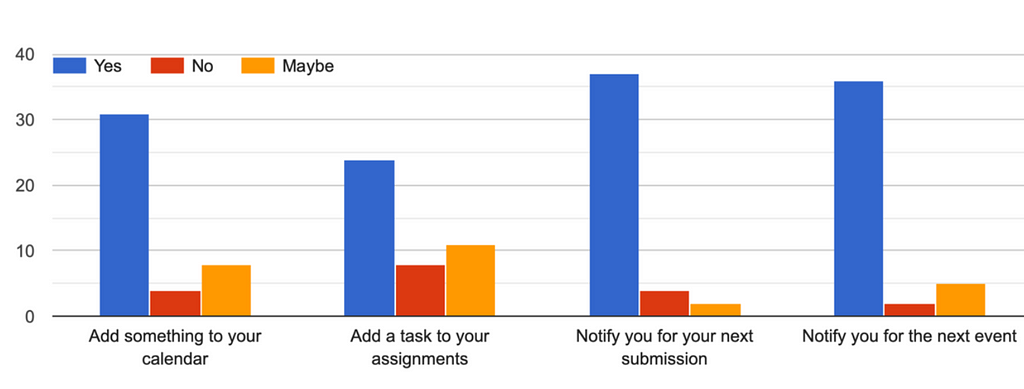
    Voice assistants for doing options
    Voice assistants for doing options
    • Search something (86%)

    Searching for something is the second on utility percentage based on voice utility spectrum. What should universities keep in mind about that? The most preferred searches were about grades and submissions.
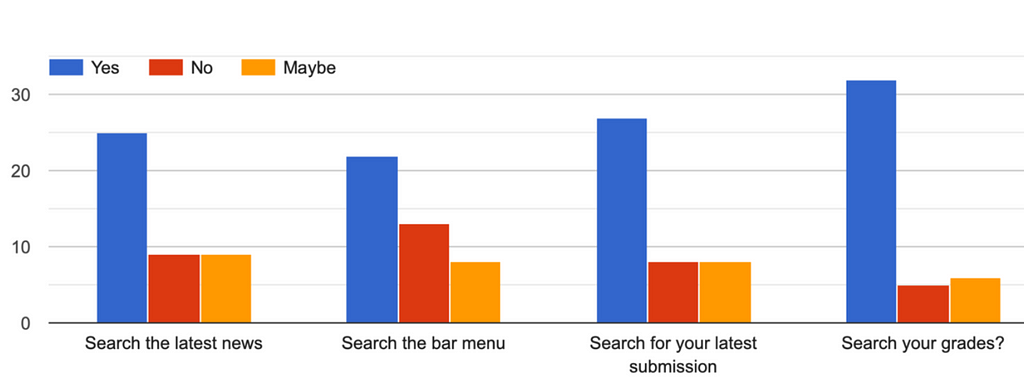
    Voice assistants for searching options
    Voice assistants for searching options
    • Tell something (72.1%)

    When it comes to telling something, students preferred that their voice assistant could give information about next semester courses or extracurricular activities. Other suggestions included professor common questions, next lesson, discount percentage from affiliated clubs etc.
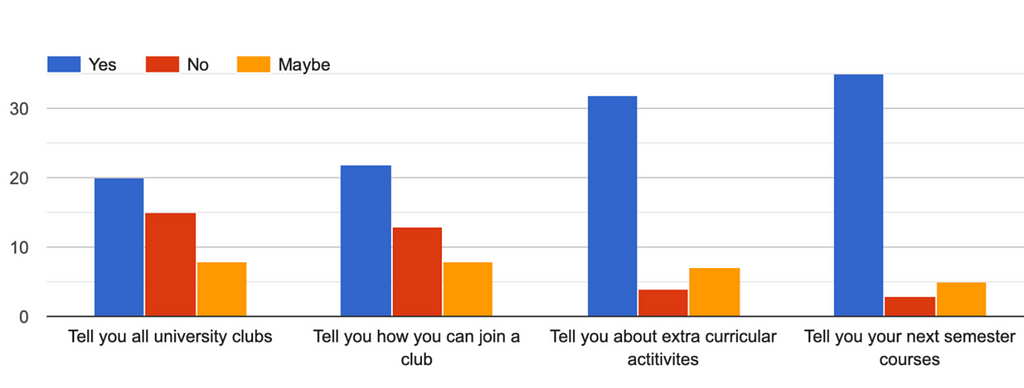
    Voice assistants for telling options
    • Navigate something (39.5%)

    Most students use their voice assistants for all the navigation options given to them in the survey. Why is this helpful? Universities might need to reconsider the strategy of making a voice app in order to make it more appealing to students.
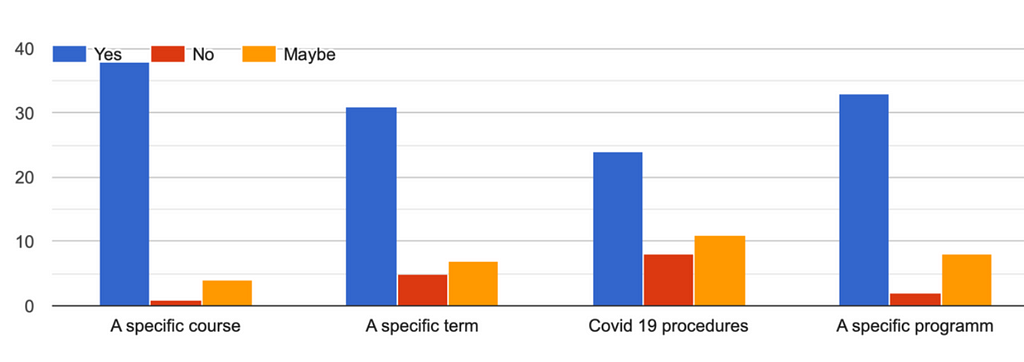
    Voice assistants for navigation options

    Is voice technology replacing the old methods? According to the results gathered from the case study, students would like that their voice assistants help them while checking:

    • Lessons / Timetables
    • Room availability / classrooms
    • Events
    • Exam dates and location
    • Booking a place or booking an interview
    • Canteen menu
    • Shuttle services

    What is repetitive should be optimized into efficiency and what is done with the old technological ways, should be replaced with voice technologies.

    Real-Life Examples Of Voice Assistants In Universities.

    Different ways are used to implement the usage of voice applications. One of the common ways to do it is through Amazon Echo devices. They come preloaded with Amazon Alexa, Amazon’s virtual assistant, to access all the information. All that is left to do is create the voice application that enables the students to request and receive that information. This is made possible by Alexa for Business, a tool that allows every business, academic institution, or individual to create an Alexa Skill fit for their use case.

    Saint Louis University

    Saint Louis University is one of the universities to have implemented such voice technologies to benefit students. To make it happen, SLU bought 2,300 Echo Dots directly from Amazon for their students’ dorm rooms. The devices are already with an Alexa voice app or Skill enabled (“SLU”). This Skill allows students to reach all the information needed concerning what’s going on on-campus. Their Alexa Skill can answer approximately 150 questions related to the campus. They intend to add more questions and answers based on students’ requests.

    Other Universities

    What about other universities? For their engineering students, Arizona State University distributed 1,600 Amazon Echo Dots in one of the residences. They have also customized their voice assistant to assist students with Down Syndrome through their studies.

    The University of Oklahoma, while hosting a hackathon contest, encouraged students to develop Alexa Skills that would be useful to their university students. It granted 600 Echo devices to its residential students.

    Also, Northeastern University, in collaboration with a developing company, developed an Alexa Skill named “ Husky Helper “. This Skill was made available not only for the students with Amazon Echo devices but for any student with a smartphone.

    Why To Enter This Future With Ipervox?

    As can be noted above, all these universities have used Amazon Alexa while implementing a voice assistant for their students’ benefit. However, creating an effective and all-inclusive voice application for a University can be difficult and requires a lot of preparation and data. This is where Ipervox can help you. Ipervox is an online platform dedicated to the creation of Alexa Skills in the best way possible. Ipervox allows businesses to create their voice app from the designing process to implementation and then maintenance. Suppose you are a University that wants to implement this new technology to assist on a student’s journey. In that case, you can create an Alexa Skill with Ipervox by taking into consideration every detail.

    All you need to do is to contact us, and we will take care of the rest.

    Don’t forget to give us your 👏 !


    We Asked Students On Voice Assistants — Results Might Surprise You was originally published in Chatbots Life on Medium, where people are continuing the conversation by highlighting and responding to this story.

  • NLP the next step forward in bridging the gap between users and businesses.

    Have you interacted with a chatbot that engaged you in an unnatural conversation, leaving you with a frustrated experience?

    That is now a thing of the past with NLP ‘Natural Language Processing’.

    What is NLP?

    To put it simply NLP is a branch of AI that improves human- machine communication. It helps computers read and understand natural human language. It relates thoughts, language, and patterns of behaviour learned through experience to specific outcomes.

    Why NLP?

    · Facilitating organizational knowledge

    NLP primarily focuses on learning and learning is the first step to acquiring knowledge.

    The NLP is a no failure, but only feedback approach. This means that if something did not go as planned, one has simply learned the results and then changed his or her behaviours accordingly in order to reach the desired outcome.

    It is this self-learning ability that actually increases effectiveness over time for an organization. Accordingly, NLP allows continuous learning to occur in organizational members as they can use information and feedback to improve what they are doing.

    Trending Bot Articles:

    1. How Chatbots and Email Marketing Integration Can Help Your Business

    2. Why Chatbots could be the next big thing for SMEs

    3. My Journey into Conversation Design

    4. Practical NLP for language learning

    · Increase user engagement by developing a personality using ‘Brain’

    A Workbot gets intelligent when it becomes aware of user needs and is able to handle any scenario of conversation with ease.

    Developing a ‘personality’ for a Workbot is a number one factor for increasing user engagement if designed correctly using NLP. A personality gives users and customers an experience that is similar to a real person thus creating a memorable chat experience.

    Don’t forget to give us your 👏 !


    NLP the next step forward in bridging the gap between users and businesses. was originally published in Chatbots Life on Medium, where people are continuing the conversation by highlighting and responding to this story.

  • How to Build Feminist Chatbot Designs

    How to Build Feminist Chatbot Designs

    In a previous article, we discussed the importance of designing chatbots with care. To recap: Careless chatbot designs reinforce negative gender bias and stereotypes. This causes problems in both the digital and physical world, which is why it’s essential to design chatbots with gender equality in mind.

  • Bot Agencies Turned to SaaS Companies

    It’s great to start as an agency and offer chatbot building services. But if you want to scale your business, it might be time to switch from a professional service model to something like SaaS or Marketplace.

    Here are some companies that have made the jump from agencies:

    Here’s a quick list of some companies that made it. They all started as agencies but after some time figured out how to build a product company.

    Trending Bot Articles:

    1. How Chatbots and Email Marketing Integration Can Help Your Business

    2. Why Chatbots could be the next big thing for SMEs

    3. My Journey into Conversation Design

    4. Practical NLP for language learning

    • BotsCrew — (https://botscrew.com), started as an agency and then built a chatbot building framework.
    • Botmakers — (https://botmakers.net) used to sell chatbot project leads but switched to chatbot templates marketplace.
    • Airchat (https://airchat.us), a website bot building platforms focused on recruiting bots. Built by the Botmakers team too.
    • A Denmark based BotSupply.
    • Blip by Take (Brazil and LATAM market)
    • London-based company We Build Bots (http://wbb.ai).
    • Leena.ai started as an agency too but then join y combinator and built a HR chatbot platform.

    Who did I miss? Please mention in comments or email me at alex@tarta.ai.

    Don’t forget to give us your 👏 !


    Bot Agencies Turned to SaaS Companies was originally published in Chatbots Life on Medium, where people are continuing the conversation by highlighting and responding to this story.

  • Building a Weather Bot with Bot Framework Composer

    Building a Weather Bot using Bot Framework Composer- Part 1

    What is a Bot Framework Composer?

    Bot Framework Composer is an open-source visual authoring canvas for developers and multidisciplinary teams to build bots. Composer integrates language understanding services such as LUIS and QnA Maker and allows sophisticated composition of bot replies using Language Generation. Composer is available as a desktop application as well as a web-based component.

    See the documentation here — https://docs.microsoft.com/en-us/composer/

    Let’s start building a basic weather bot using the Bot Framework Composer.

    Prerequisites:

    1. Install Bot Framework Composer
    2. Install Bot Framework Emulator

    Now, let’s start creating our Bot

    Creating the Bot

    The first step in creating a bot with the Composer is to create a new bot project. This will create a new folder on your local computer.

    1. Launch the composer

    Trending Bot Articles:

    1. How Chatbots and Email Marketing Integration Can Help Your Business

    2. Why Chatbots could be the next big thing for SMEs

    3. My Journey into Conversation Design

    4. Practical NLP for language learning

    On the Home page, select the New icon.

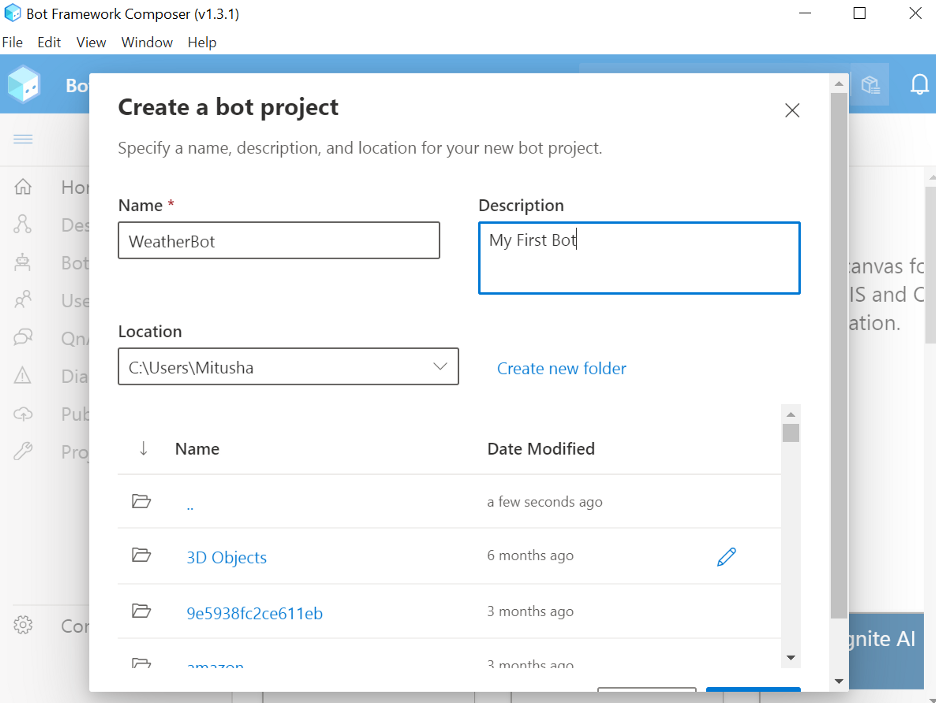
    In the displayed Create a bot project form, enter the following information:

    1. Name. Enter the name WeatherBot. Notice that spaces and special characters are not allowed in the bot’s name.
    2. Description. Enter A friendly bot who can talk about the weather.
    3. Location. Select the location on your computer where to save the project.
    4. Click OK.
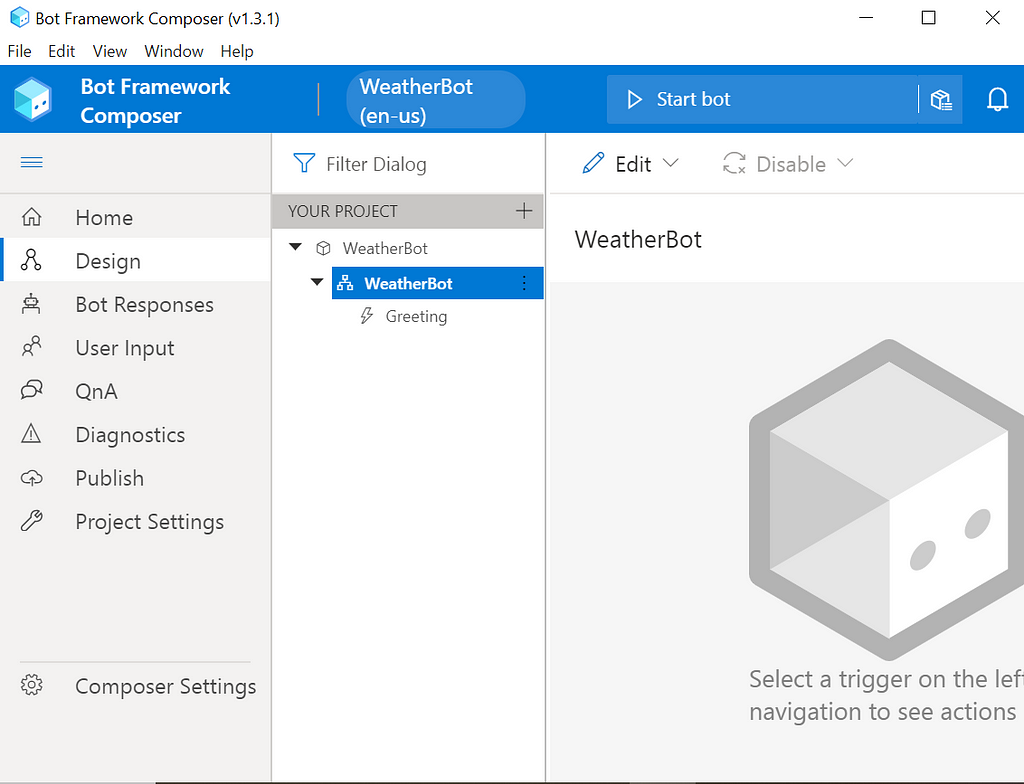
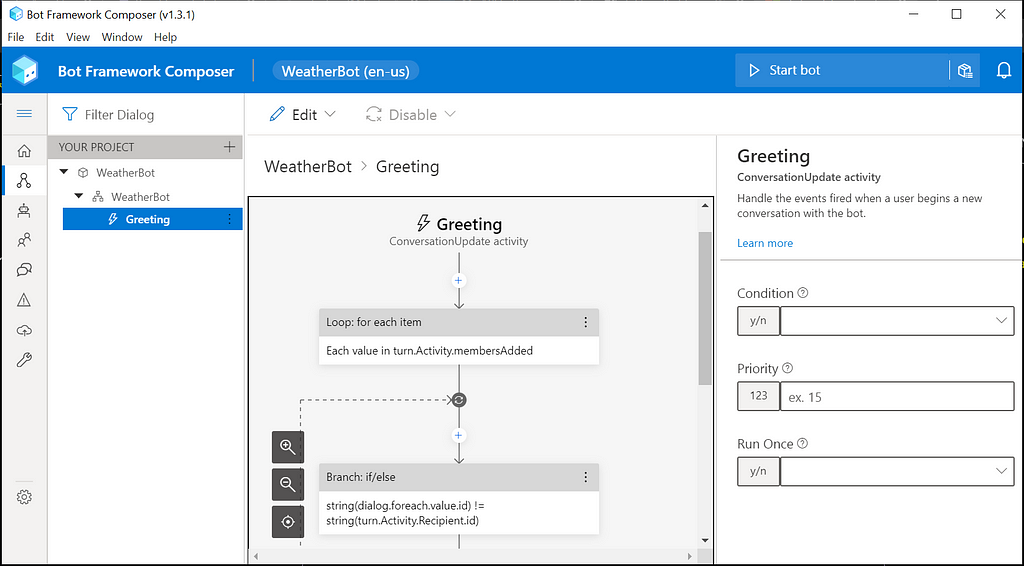
    5. Select the Greeting trigger in the Navigation pane on the left. In the Authoring canvas, the related conversation flow is displayed.

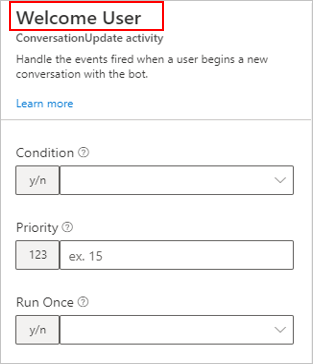
    6. To help keep bots organized, you can rename any trigger to something that better describes what it does.

    As an example, in the Properties panel on the right, rename the trigger from Greetings to Welcome User.

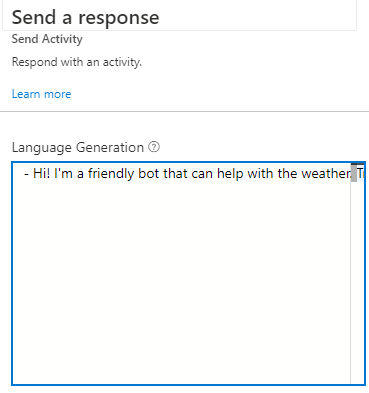
    7. Now, it’s time to make the bot do something. Let’s instruct it to send a simple greeting to the user. In the Authoring canvas, select the existing Send a response action. Its properties will appear on the right in the Properties panel. This action has only one property: the text of the message to send.

    8. Type a welcome message into this field such as:

    Hi! I’m a friendly bot that can help with the weather. Try saying WEATHER or FORECAST.

    It is always a good idea to have your bot introduce itself and explain its main features.

    You can start adding functionality to your bot by adding Actions to the Welcome User trigger. You can do this by selecting the plus (+) icon in the Authoring canvas, at the desired location in the flow.

    9. From the displayed list of actions, select the appropriate action.

    Start your bot and test it

    Now that your new bot has its first simple feature, you can launch it in the emulator and verify that it works.

    1. Select Start bot in the upper right-hand corner of the screen. This tells Composer to launch the bot’s runtime, which is powered by the Bot Framework SDK.

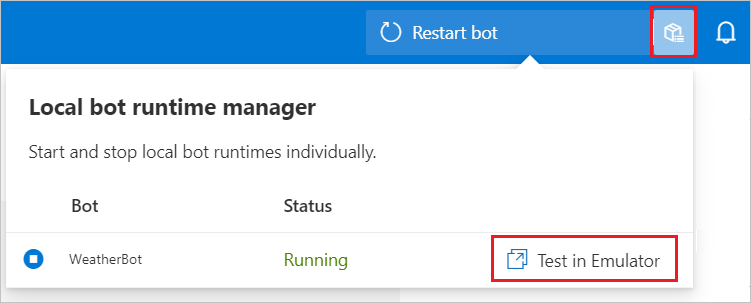
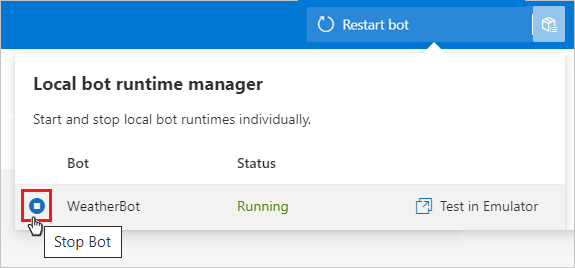
    2. Once the bot’s runtime has started, the Local bot runtime manager will open. You can also select the icon to the right of the text Restart bot, as highlighted in the following image, to open and close the Local bot runtime manager.

    3. Select Test in Emulator in the Local bot runtime manager. This will open your bot in the Emulator.

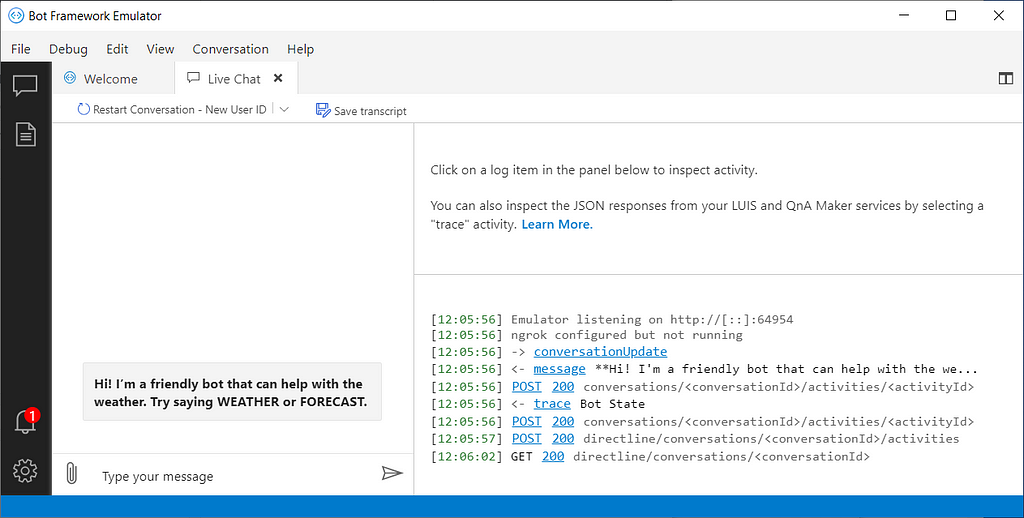
    Soon the Emulator will appear, and the bot should immediately greet you with the message you just configured:

    4. When you are done, you can stop the bot by selecting the Stop Bot button in the Local bot runtime manager.

    Finally, we have successfully created a bot using Bot Framework Composer!

    Reference — Microsoft Tutorial

    Don’t forget to give us your 👏 !


    Building a Weather Bot with Bot Framework Composer was originally published in Chatbots Life on Medium, where people are continuing the conversation by highlighting and responding to this story.

  • 3 Ways Conversational AI Assistants are changing employee communications

    With many employees now finding themselves working from home most of the time, traditional methods of communication are becoming less effective. This in combination with multiple and complex systems and the plethora of emails HR and Support teams are receiving daily, is making it increasingly difficult for employees to find the information they need to support their role.

    The way employees are communicating with their organizations is therefore changing and Conversational AI Assistants are helping to facilitate this change.

    Changing Communication Channels

    Over the last year platforms such as Slack and Microsoft Teams have been increasingly relied upon by employees and managers alike to communicate regardless of their location. The tool’s ability to provide instant connection and responses, as well as integrations with shared workspaces and video calls makes them the ideal communication channel for many employees.

    Additionally, the instant nature of applications such as Facebook Workplace echoes the development of many popular social media platforms, making them immediately translatable for younger employees within the workplace.

    A recent survey conducted by Humley exploring employee communications trends in 2021, found that 33% of employees from the Gen Z bracket preferred collaboration and instant-messaging tools over more traditional channels such as email. It is certainly, clear that the reliance on these collaboration platforms will continue to grow and perhaps even surpass emails and calls as we move towards a more hybrid model of working.

    Conversational Assistants could help organisations manage the rise in demand and adoption of these communication platforms through deploying directly to them. Conversational Assistants enable businesses to provide instant responses to queries and requests such as ‘How much annual leave do I have left?’ or ‘What is the company policy on COVID-19?’, interacting with employees in the same way as an HR and Finance administrator might.

    By deploying Conversational Assistant to channels such as Slack, businesses can enable functional teams (HR, Finance, etc.) to transition away from emails and calls and communicate with employees in the channels they actually use, increasing not only workforce productivity but also engagement and satisfaction.

    On-Demand Information

    We live in an on-demand culture and our personal lives and are used to having information at our fingertips — from being able to get 24/7 customer support to instant web browser resources, yet in a workplace, this is often not the case.

    To find vital information employees are required to navigate complex systems and documents or send multiple emails which can be subject to delays in responses, resulting in frustration. Humley’s survey also found that 42% of employees surveyed struggled to find the information they need and a further 31% experience delays in email responses leading to lack of clarity, productivity, and ultimately low morale.

    Conversational AI Assistants enable employees to communicate and find information whenever they need it, with no reliance on email responses or call-backs. For example, platforms such as Humley’s deliver meaningful responses in an average of 2 seconds. This means not only instant user satisfaction but also that functional teams such as HR can deliver an average 30% time saving to their day through reducing the number of email requests needing to be processed.

    Trending Bot Articles:

    1. How Chatbots and Email Marketing Integration Can Help Your Business

    2. Why Chatbots could be the next big thing for SMEs

    3. My Journey into Conversation Design

    4. Practical NLP for language learning

    Additionally, Conversational Assistants such as Humley’s, also come with pre-built integrations to internal business systems (HRIS, Payroll, Finance, CRM, Sales), which means that not only can employees and managers securely access information contained within them but can also perform tasks such as updating customer records or booking holiday. Again, saving employees significant time, improving productivity, and reducing the pressure on functional teams — freeing them up to focus on more rewarding and business-critical tasks.

    More Open Conversations About Wellbeing

    A recent Humley Survey exploring the impact of COVID-19 on employee wellbeing found that 69% had been moderately to severely impacted by the change to remote working. With the change to more permanent remote working and reliance on digital channels of communication, it can be difficult for organisations to gauge the wellbeing of employees. This is particularly true as often we do not know that we are not OK and as result will not communicate this.

    Conversational AI Assistants could be deployed by HR Teams to provide additional support for employee’s well-being by enabling them to seek advice without the need to speak to a person. This is crucial because of the stigma surrounding mental health, meaning that many people are still reluctant to discuss their wellbeing for fear of shame or judgment. Conversational Assistants, therefore, not only allow employees to remain anonymous, but also provide the right information and advice whenever they need it.

    Additionally, the utilisation of Natural Language Processing (NLP) within Conversational Assistants means that they can understand and identify employee sentiment within conversations and be used to flag concerns, prompting human intervention.

    For example, this could be as simple as repeated negativity identified in employee responses, which triggers a notification sent to the appropriate team leader with a recommendation to check-in. Or more complex analysis of interactions and conversation trends which help HR Teams to identify potential mental health and stress-related issues before they arise. Leading to more meaningful interactions about employee wellbeing and improving motivation and morale as a result.

    The tremendous challenges of the last year and the evolution of digital channels have meant that how employees communicate with an organization has changed. Conversational AI Assistants are part of this shift in the landscape and could enable businesses to facilitate more effective and productive employee communications, improving engagement and experiences as well as ensuring long-term success.

    To find out more about how Conversational AI Assistants could transform your employee communications, get in touch today. info@humley.com

    Don’t forget to give us your 👏 !


    3 Ways Conversational AI Assistants are changing employee communications was originally published in Chatbots Life on Medium, where people are continuing the conversation by highlighting and responding to this story.

  • Exclusive VIP Promo for Conversational AI Conference

    SAVE $170 and Get Tickets for only $49!

    Chatbot Conference Online 2021

    Hi, hope you are healthy and well.

    We wanted to thank you for being a long time subscriber and for helping make Chatbots Life one of the most popular blogs on Chatbots and Conversational AI online.

    The event features speakers from Google, Salesforce, IBM Watson, CoCoHub, Rasa, etc. It’s the perfect opportunity to discover how enterprises are using Conversational AI and to network with top industry experts.

    Also, we wanted to inspire you to create more great Conversational AI systems!

    So we created a special promo just for you and are offering you a Discounted Pass to the Chatbot Conference for only $49! This is $170 off our current price and this offer is limited to the first 25 people who register.

    You can now attend the Chatbot Conference on May 25th for only $49.

    Hope to see you there!

    Stefan

    Cheers!


    Exclusive VIP Promo for Conversational AI Conference was originally published in Chatbots Life on Medium, where people are continuing the conversation by highlighting and responding to this story.