The moment we’ve all been waiting for has finally arrived!
Facebook recently announced the release of new automation features for Instagram.
Then that means one thing: you can continue to engage with your audiences on Instagram — 24 hours a day, 7 days a week — all year long!
If you’re interested in knowing the details, read on. And get ready because this new suite of features can impact brands, such as yours, in so many ways.
Now, let’s take a closer look at the 9 biggest automation features coming to Instagram real soon:
1) Visual Flow Builder
If you’re looking to build bot sequences, then you’re in luck! Instagram will be rolling out a visual flow builder of its own, so you can easily create chatbot sequences without having to code!
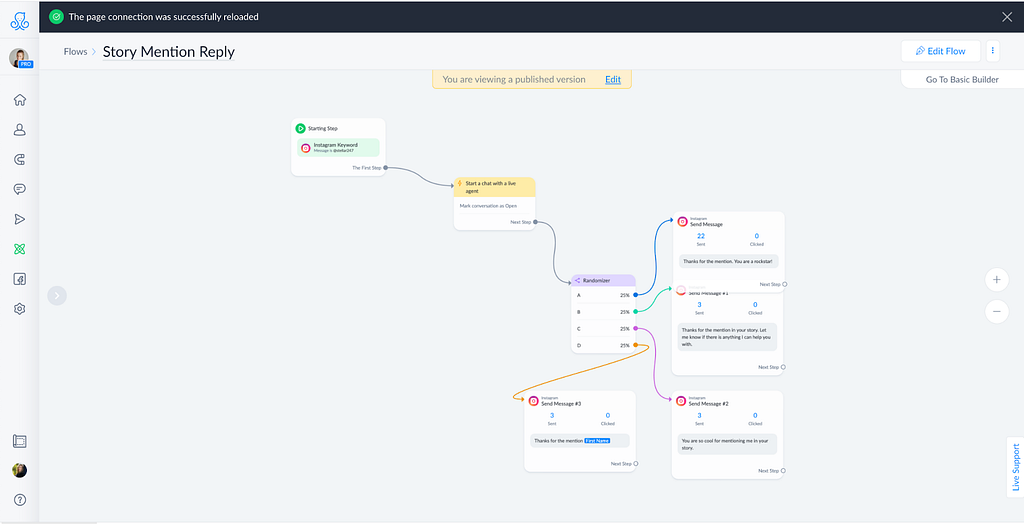
Visual flow builders are game-changers because they can help you cut down building process time. And that’s not all. They can also help you visualize automations in one place, so you don’t have to spend precious time shifting from one platform to another.
These automations are not yet available for every account. First you must have a business account.
Here is a timeline for Instagram Automations release dates:
June 2, 2021 All accounts with 10k-100k followers
July 1, 2021 All accounts with 1k-100k followers
August 1 — all accounts
These dates are tentative from Facebook so they can change.
But if you can’t wait that long, why not try ManyChat’s numerous chat marketing features (including its very own visual flow builder) while waiting for Instagram’s? Here’s a link you can use so you get a 30-day ManyChat trial for free.
Promo code for 30 days pro free: kellyonemonth
2) Quick Replies
Ever read a Choose Your Own Adventure story? It’s the kind of story that lets you decide and choose your own “destiny.”
Well, Instagram’s new Quick Reply feature aims to do just that.
Basically, you can create an automated bot on Instagram that allows you to offer different responses to your followers so they would engage with you. This gives your audience freedom of choice and more reasons to interact with you on Instagram.
What’s even more exciting is that the Quick Replies feature allows you to create predetermined responses or even personalized ones.
Can you imagine the chat marketing campaigns you’d be running with this feature alone?
3) User Inputs
This is probably the most exciting feature in the bunch, especially if you’re looking to build your email list. With this new feature, you can now collect email addresses through your bot.
But it’s not just email — user inputs allow you to capture a user’s data. This means that you can also save your prospects’ phone numbers and other contact information quickly and effortlessly through your chatbot.
So, if you’re selling products or services and have bots to help you collect leads, this feature is a must-have. Think of it as a tool that helps you maximize your marketing efforts through automation.
Trending Bot Articles:
2. Automated vs Live Chats: What will the Future of Customer Service Look Like?
4. Chatbot Vs. Intelligent Virtual Assistant — What’s the difference & Why Care?
4) Default Replies
Facebook has also improved the way that you can reply to Instagram messages. They have introduced Default Replies, which allows marketers to set a default message for when they cannot send one in time.
This is excellent news if you’re always too busy but still want to keep the engagement going on Instagram.
The best part? You can program it to send replies whenever you like — even when you’re sleeping! How cool is that?!
One thing to note, though; default replies are automatically enabled when you connect your Instagram account. So should you need to change them, just go to your Settings and look for Default Reply.
5) Keyword Triggers
A keyword trigger is a word or phrase that prompts your chatbot to execute a specific task. For example, you can program your bot to send a downloadable file to a user who sends you the words “FREE STUFF” through Instagram DM.
In fact, that’s what I did with my YouTube Creator’s Guide. You can snag it for free if you send me the keyword “YOUTUBE” on my stellar247 Instagram account.
The download will then be delivered to you in no time at all. My trusted IG automated assistant will automatically send it to you — just like magic.
But that’s just one of the many ways you can use Keyword Triggers to help you boost your online presence. The possibilities are endless with this feature alone!
6) Comment-to-Message Automation
Got a lot of comments but didn’t have the time to engage with them all?
If yes, you’ll absolutely love the Comment-to-Message Automation feature. This feature allows you to automate messages so you can send DMs to your post commenters instantly! And get this: you may also choose specific posts you can incorporate this feature with!
Interested in being among the first few users to implement this right away using ManyChat? Be sure to subscribe because I have a tutorial video for this exact, very cool feature coming out very soon.
7) Story Automation
Love Instagram Stories? Then you’re going to love this!
The Story Automation feature is similar to the comment-to-message automation feature, only that this one applies to Stories.
With this feature, you may program your bot to do various tasks, like delivering downloadable files or sending links to external resources through Instagram DM. You may even send fun GIFs!
To make this work, you need to assign certain keywords to specific tasks and leave the bot to do the rest.
So when somebody sends you a particular keyword through DM, your bot will then jump in and execute the task associated with that keyword. How cool is that?
Like all the other new automation features, this one can run 24/7 as well. Say goodbye to the tedious task of manually responding to every viewer’s request! Say hello to more engagement!
There are many more things you can do with this feature, so when it’s finally released, I highly recommend that you go ahead and give it a try!
8) Conversation Starters
Want your bot to talk to your customer using specific and pre-programmed statements that can compel your prospects to move in the right direction?
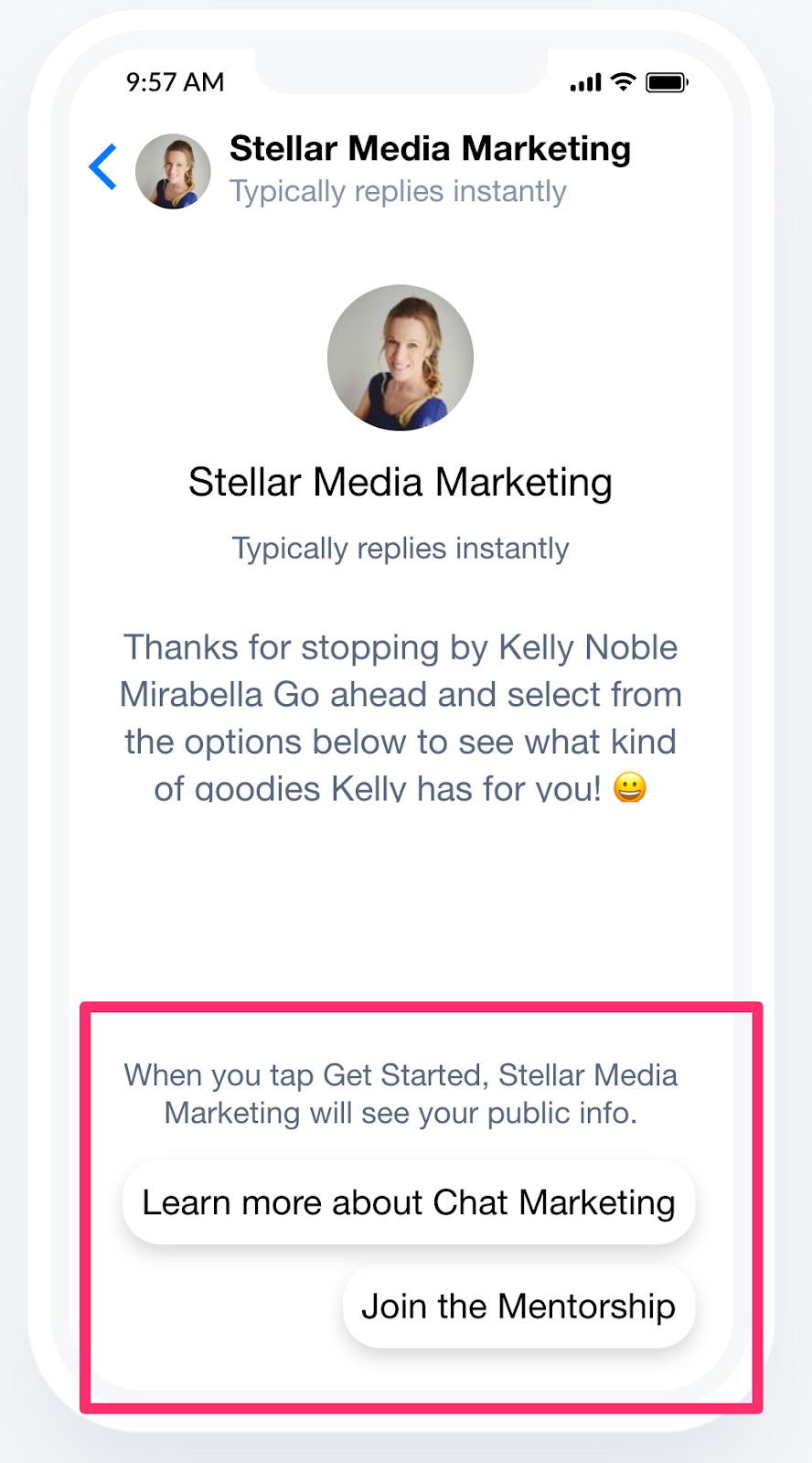
If yes, then don’t miss out on IG’s Conversation Starters.
Conversation starters can be set up to trigger at any given time and are particularly useful for brands and businesses. You can use these triggers to direct a customer towards a particular product or service.
There are a variety of conversation starters that you can use — depending on your niche and business goals. It could range from event invites to time-sensitive offers and more. But there’s a whole lot more you can do with it, so I’m encouraging you to try it out when you get the chance!
9) Story Mention Trigger
The last feature I’ll share with you today is the story mention replies. These are great for quickly responding to users who mention you in their stories and keep that engagement going.
But you can always add conditions, like preventing it from triggering if a person mentions you more than once in their stories.
Of course, you also have the option to turn it off — but it’s up to you and how you’re going to implement your chat marketing strategy.
Sounds cool! When can I access these new features?
Those with 10,000 followers to up to 100k followers can now use Instagram Automations via ManyChat.
However, Instagram accounts that didn’t make it to the cut, but with at least 1000 subscribers can access these new features sometime in July, possibly on July 1st. Accounts with less than a thousand subscribers will be able to access these new features, tentatively on August 1st.
So we’re expecting everyone to get Instagram Automations by the end of the summer.
The Bottom Line
The new update brings many of Facebook’s chat marketing capabilities to Instagram’s messenger service. What I find most exciting about this are the chat features and how one can easily leverage them for marketing.
This is a huge win for business owners and marketers alike. Creating chatbots helps us gain more control, especially when it comes to automated messages. Chatbots can also help us build more resilient and engaging brands by assigning bots that work all day and all night long.
Want to get on the front seat when it comes to Instagram chat automation?
Then don’t forget to subscribe to the Baby Got Bot Channel. Also in the next few weeks, I’ll be releasing several tutorials on this exact topic, so you can try these new features first hand!
Join us in the Baby Got Facebook group, where you’ll meet like-minded chat marketing enthusiasts, and experts who talk about chat marketing day in and day out!
Lastly, if you want to have my brain on speed dial, consider joining my Baby Got Mentorship Program. We also have members-only office hours, where I give more personalized attention to those who join.
So tell me, which Instagram Automation feature are you most excited about?
Let us know your thoughts by leaving a comment below.
Don’t forget to give us your 👏 !


Exciting News! New Automation Features are Coming to Instagram was originally published in Chatbots Life on Medium, where people are continuing the conversation by highlighting and responding to this story.



![How Calen.ai Won a Google Award for a Chatbot Built With Integromat [Link to article]](https://external-preview.redd.it/MtJhbVMjODuvbBUf1wmSNfcr2zqLLHIbzRn7NyYlEr0.jpg?width=640&crop=smart&auto=webp&s=b8e4a5277b5030cdc947b704246dc00f5d427491 "How Calen.ai Won a Google Award for a Chatbot Built With Integromat [Link to article]")